AI Visibility Data Paralysis: How to Get Unstuck
Your brand might be missing from important conversations, losing recommendations to competitors, associated with the wrong topics, or described using outdated information. AI assistants may even struggle to access your content in the first place. Each of these problems...
 Konoly
AI visibility isn’t one problem. It’s a collection of different problems that happen to look similar from a distance.
Your brand might be missing from important conversations, losing recommendations to competitors, associated with the wrong topics, or described using outdated information. AI assistants may even struggle to access your content in the first place.
Each of these problems needs a different fix. So instead of asking, “How do we improve our AI visibility?” start with a better question:
“What kind of visibility problem do we actually have?”
The best way to answer that is to look for patterns across AI responses: where your brand appears, where competitors win, what AI associates with you, whether those claims are accurate, and which sources shape the answers.
Once you know what’s actually going wrong, you can decide what’s worth fixing.
In this guide, I’ll walk through the workflow I use to diagnose AI visibility problems, using Ahrefs Brand Radar for visibility tracking and Letaido to build a custom dashboard. You can follow the same process with other AI visibility tools, too.
1. Set up tracking for your brand and competitors
Brand Radar gives you two sources of AI answers:
This guide's setup uses custom prompts. The index is where you can later mine new prompt ideas and find cited pages you didn't know about.
To start, create a new Brand Radar report and add your brand alongside the main competitors you want to compare against.
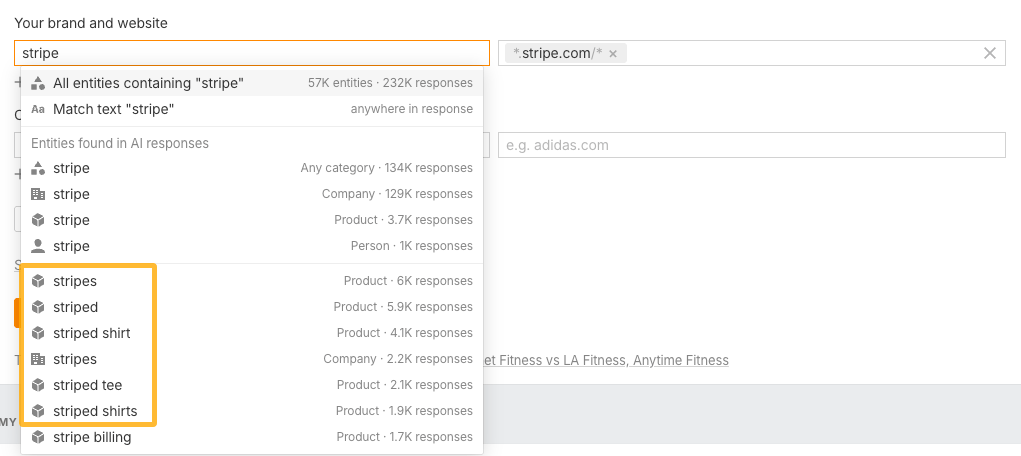
If a brand name is also a common word or has other meanings—like Square, Stripe, or Asana—use Brand Radar’s entity recognition instead of matching the name alone. Otherwise, you can end up with lots of false positives—a typical conundrum of any tracking app.
When you enter a name, Brand Radar shows the known entities associated with it. Don’t simply select every entity containing the brand name: some may belong to unrelated companies or products.
Spend a few minutes exploring the list and selecting the entities that belong to the brand. It takes a little setup, but it’s much easier than building complicated inclusion and exclusion filters that can accidentally cancel each other out.
Here’s an example:
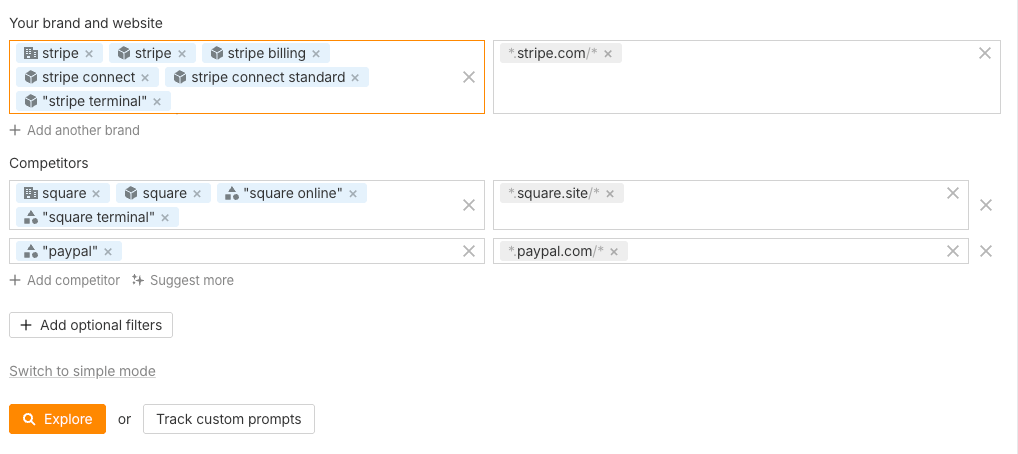
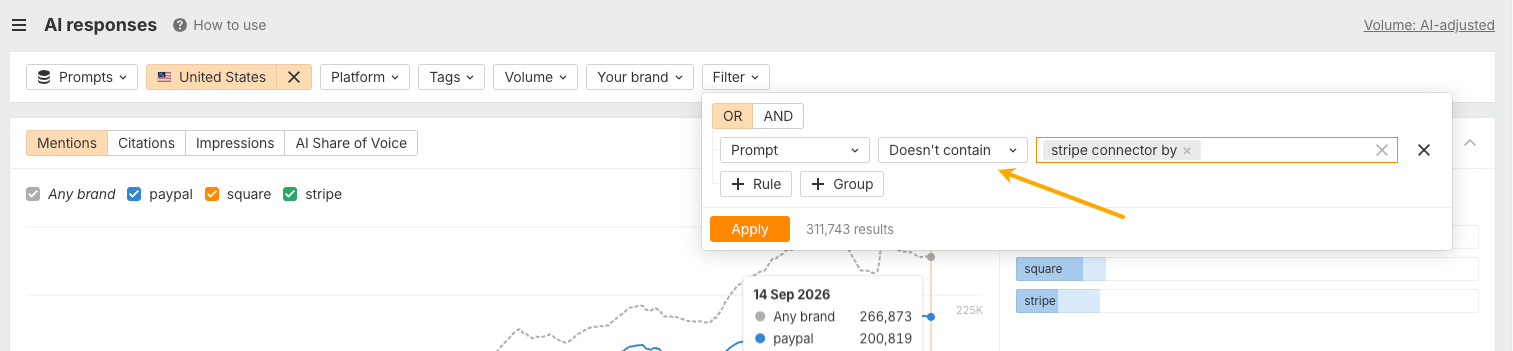
In this setup, Stripe is both a company and a product, and several Stripe products contain the brand name, so I added the relevant entities separately. Some terms are distinctive enough to use a broader match—for example, anything containing “Stripe Terminal.” Brand Radar shows these broader text matches in quotation marks. You still need to watch for unrelated products with similar names, such as “Stripe Connector by QuickBooks.”
PayPal, on the other hand, is distinctive enough that matching the name alone is relatively safe. If you later spot false positives, you can exclude them in Brand Radar.
Spend a little time getting this right before moving on. Otherwise, you risk building the rest of your analysis on noisy data.
Keep reports specific to a single brand. For example, Ahrefs as a company owns several brands, and each of them would require separate reports: Ahrefs, Evolve, Letaido, Yep.
Once your brands are set up, you need to decide what you actually want to learn from AI answers.
This is where it’s easy to go wrong.
You could dump hundreds of vaguely relevant prompts into a tracker and watch your overall visibility score move up and down. But that number won’t necessarily tell you what changed—or what you should do about it.
Instead, start with the business questions you want your tracking to answer.
For example:
Group prompts by the questions you want to answer
Don’t put every prompt into one big bucket.
Give every prompt a tag for the business question it answers. For example, 'ahrefs vs semrush' and 'ahrefs or moz' both get a Comparisons tag. Later, you can check your visibility for each tag separately.
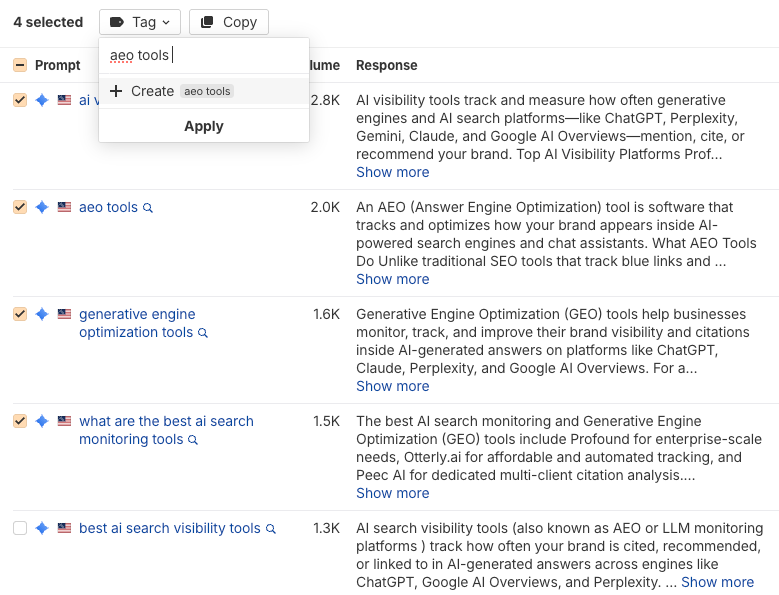
To illustrate, here’s Ahrefs visibility in mention rate, in main categories
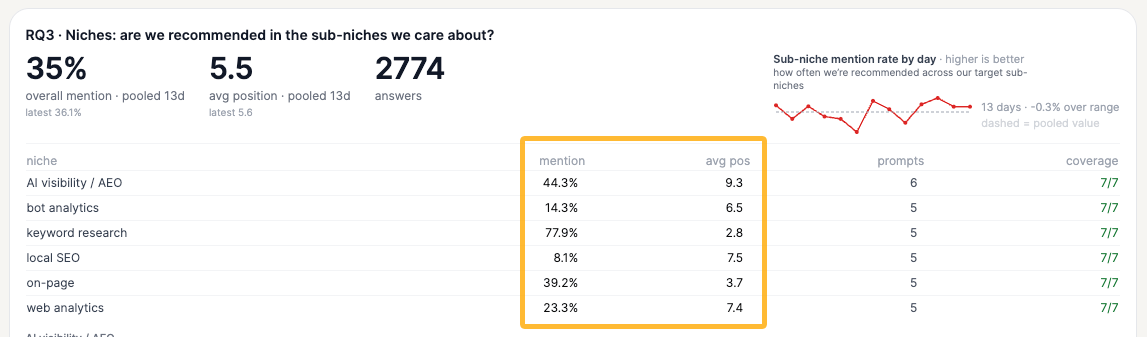
And here’s the visibility in specific niches:
Here’s what organizing prompts look like for Ahrefs.
The key is to keep these groups separate.
A brand can look strong overall while being almost invisible for an important use case. If you mix all your prompts together, those gaps can disappear in the average.
For example, you might already perform well with SEO tools but have almost no visibility for bot analytics or AI visibility. Tracking those categories separately gives you a much clearer picture of where you’re actually gaining—or losing—ground.
Instead of asking, “Is our overall AI visibility growing?”, you can ask, “Are we becoming more visible for the specific categories we care about?”
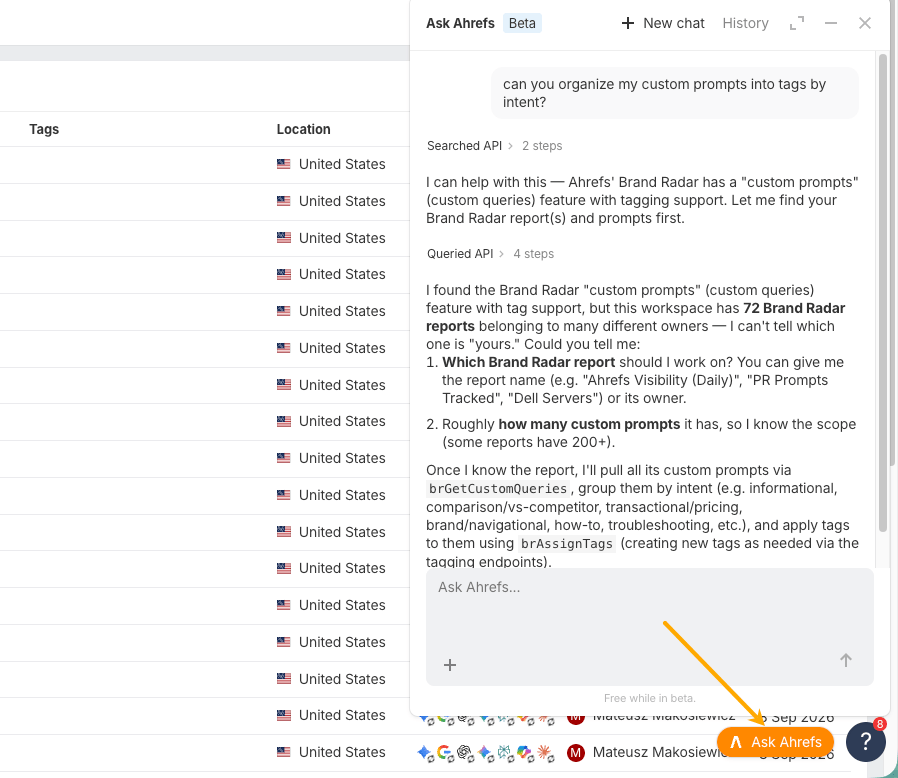
You can use Ask Ahrefs or Letaido for a bulk prompt import with tags.
Where to find prompts worth tracking
You don't have to come up with every prompt yourself. There are plenty of places to find ideas:
Article titles in your niche hint at the questions people have. Treat them as candidates, then check in the AI index or Keywords Explorer that people actually ask them. For instance, if you find an article called “How to Choose an AI Visibility Tool: A Beginner's Guide”, that tells you there is probably a broader question worth tracking: how to choose an AI visibility tool.
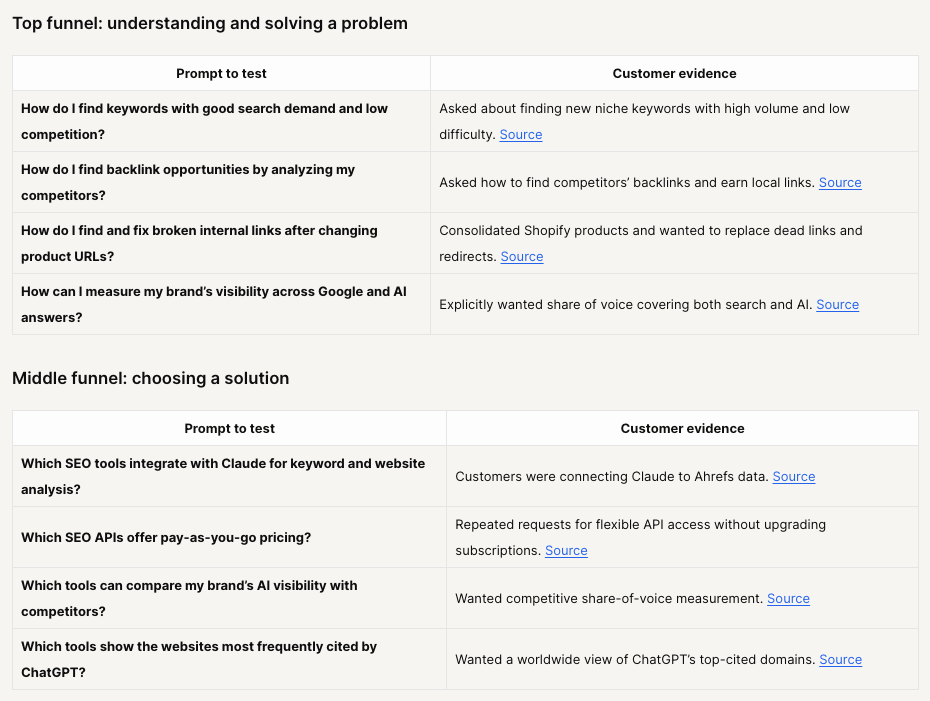
Customer conversations can be even better because they show you how people describe problems before they've translated them into marketing language.
If your customer support platform has an MCP or another way to query conversations with AI, use it to find recurring questions and wording. Here are some examples Letaido found for me via Intercom MCP.
Keep prompts short and focused
As a general rule, I prefer short prompts built around a clear topic rather than long, carefully constructed questions.
Think:
best ai visibility tools
Rather than:
What are the best AI visibility tools for a mid-sized SaaS company that wants to track its brand across ChatGPT and other AI assistants?
I usually aim for around six words or fewer—just enough to express a real customer need, problem, use case, or market niche.
You're not trying to recreate every possible conversation someone could have with an AI assistant. You're building a stable set of probes that lets you see how your brand's visibility changes.
Track frequently at first to establish a baseline
Once your prompt set is ready, resist the urge to look at the first batch of answers and start making changes right away.
AI answers aren’t perfectly consistent. Ask the same question twice, and you might get different brands, rankings, or sources. That means a single scan can make your visibility look much better—or much worse—than it usually is.
So first, you need a baseline.
Run your most important prompts daily for at least a week. You can track them weekly instead, but it will take longer to collect enough data to see what’s normal.
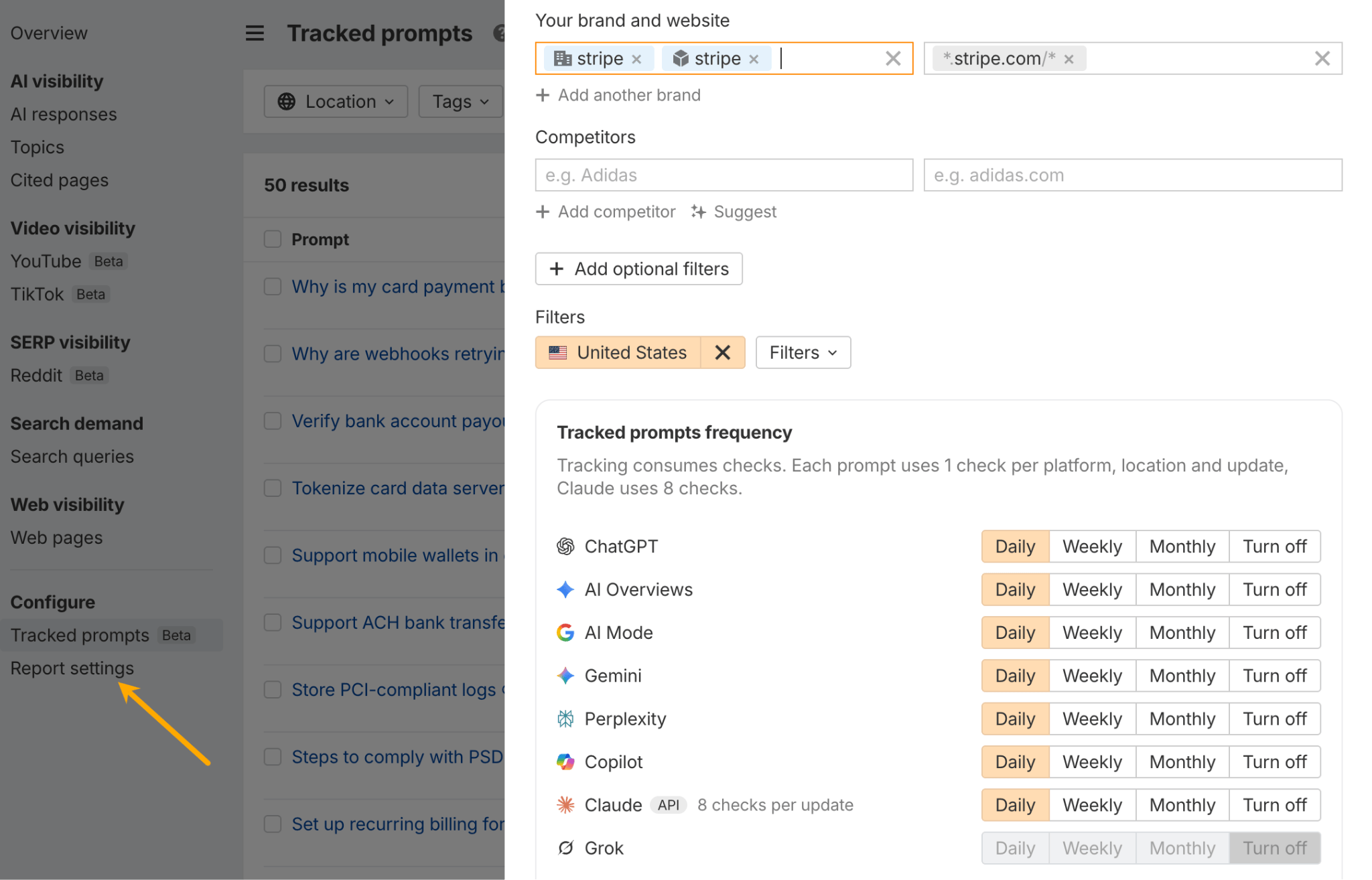
Once you have a good sense of the usual pattern, you can adjust how often you track each prompt:
Set up Web Analytics and Bot Analytics for additional context
These tools give you another layer of evidence beyond what AI assistants say.
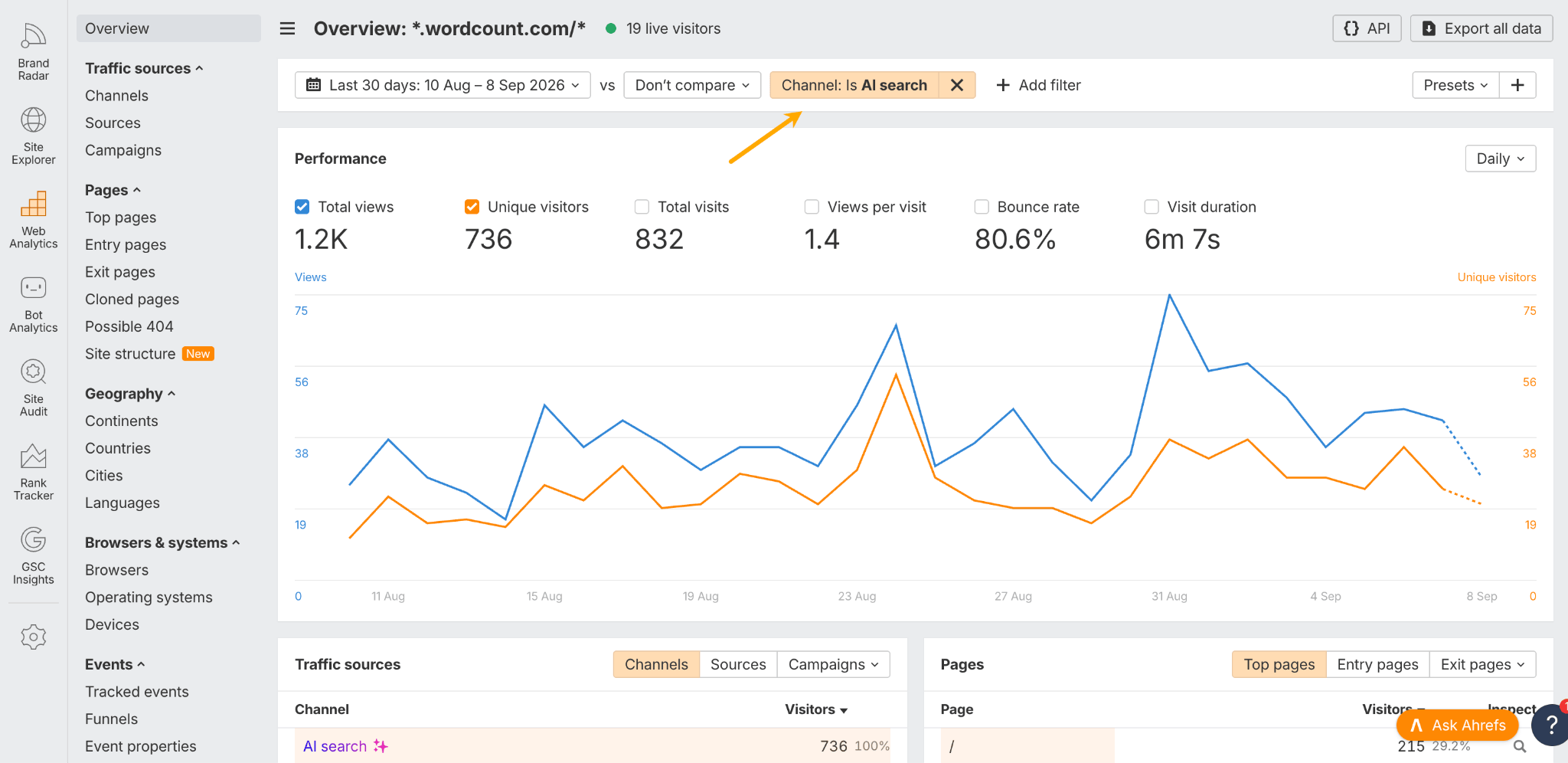
Bot Analytics shows when AI crawlers visit your site. Setup is similar, and it's free too.
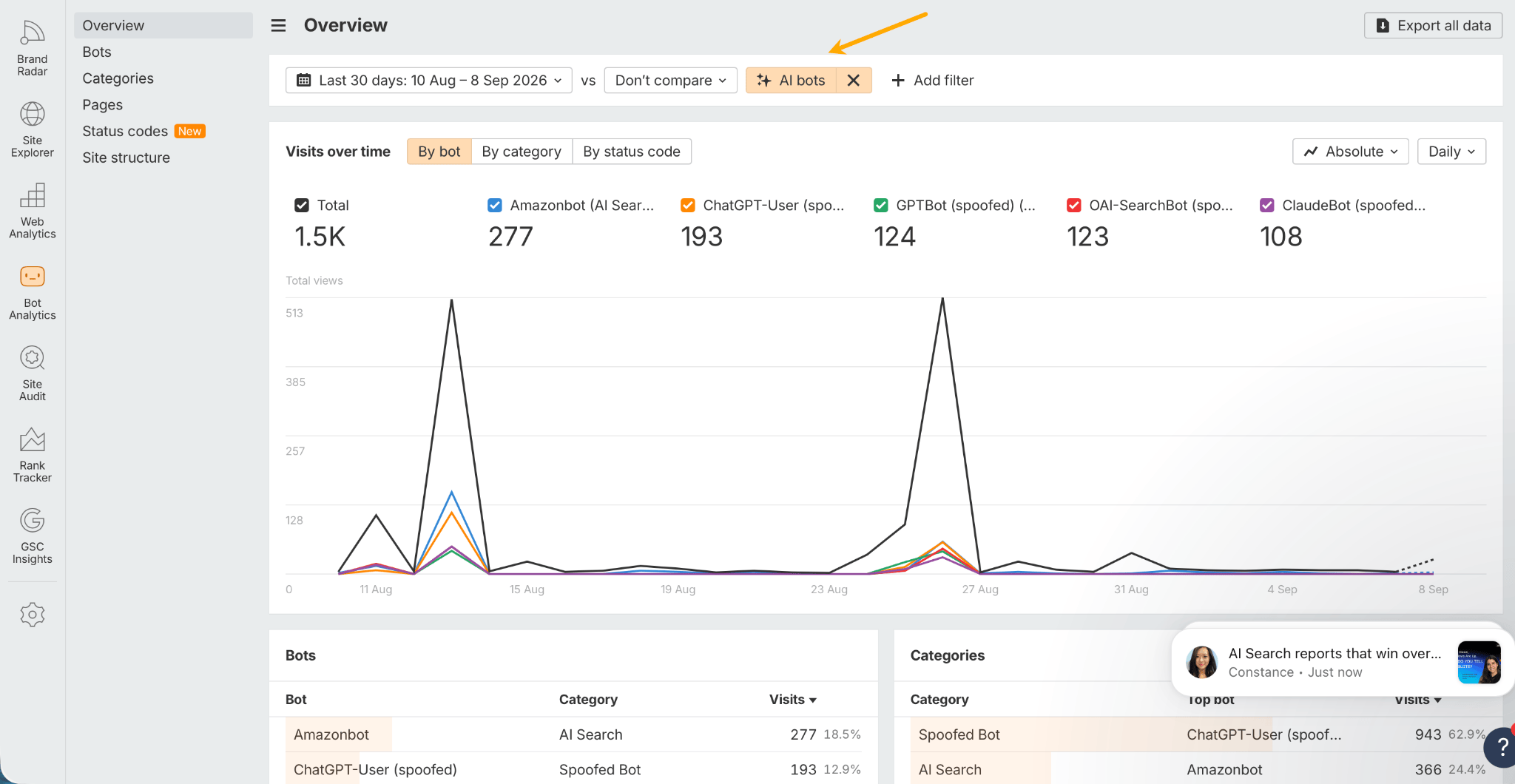
We’ll use that data later.
For now, the main goal is simply to collect enough information before you start drawing conclusions.
Once you have that baseline, you can move on to the big question: Which parts of your AI visibility need work?
3. Diagnose where your AI visibility is weak
This is where organizing prompts by tags pays off. There are two useful ways to look at your results: by individual tags and across all tags together.
Look at each prompt tag separately
Your brand can perform very differently depending on what people are asking.
For example, we have strong visibility for broad prompts like: “best SEO tools”, “top SEO software”, but weak visibility for a narrower category, such as best local SEO tools, “Google Business Profile tools”—this is exactly our case at Ahrefs.
If you look only at your overall visibility score, strong performance in one category can mask weaknesses elsewhere.
Tags help you spot those gaps. You can see:
Tagging prompts turns “our AI visibility is weak” into a specific problem you can act on and report in terms that anyone can understand.
For example:
Here’s that last scenario visible on a Brand Radar report thanks to tagging:
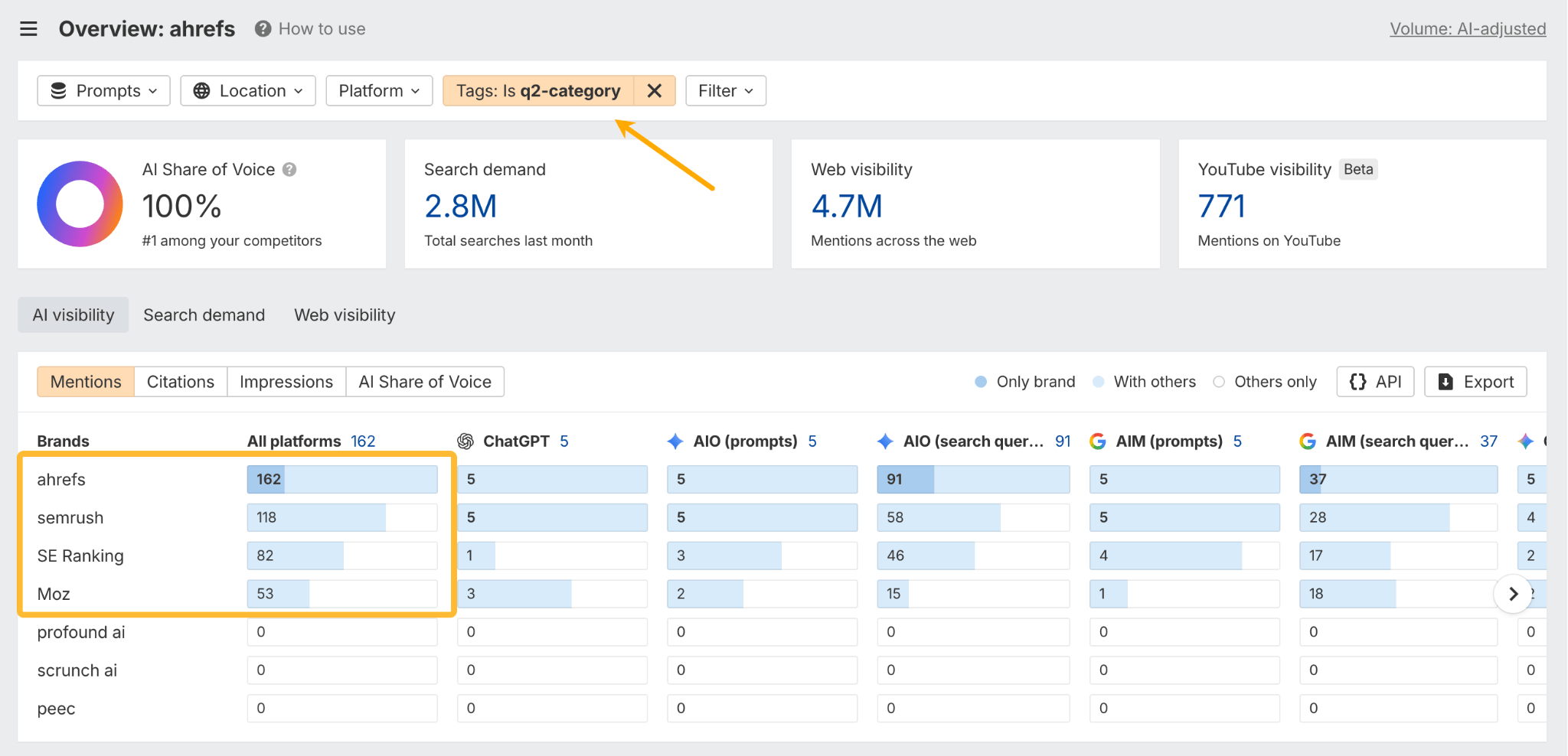
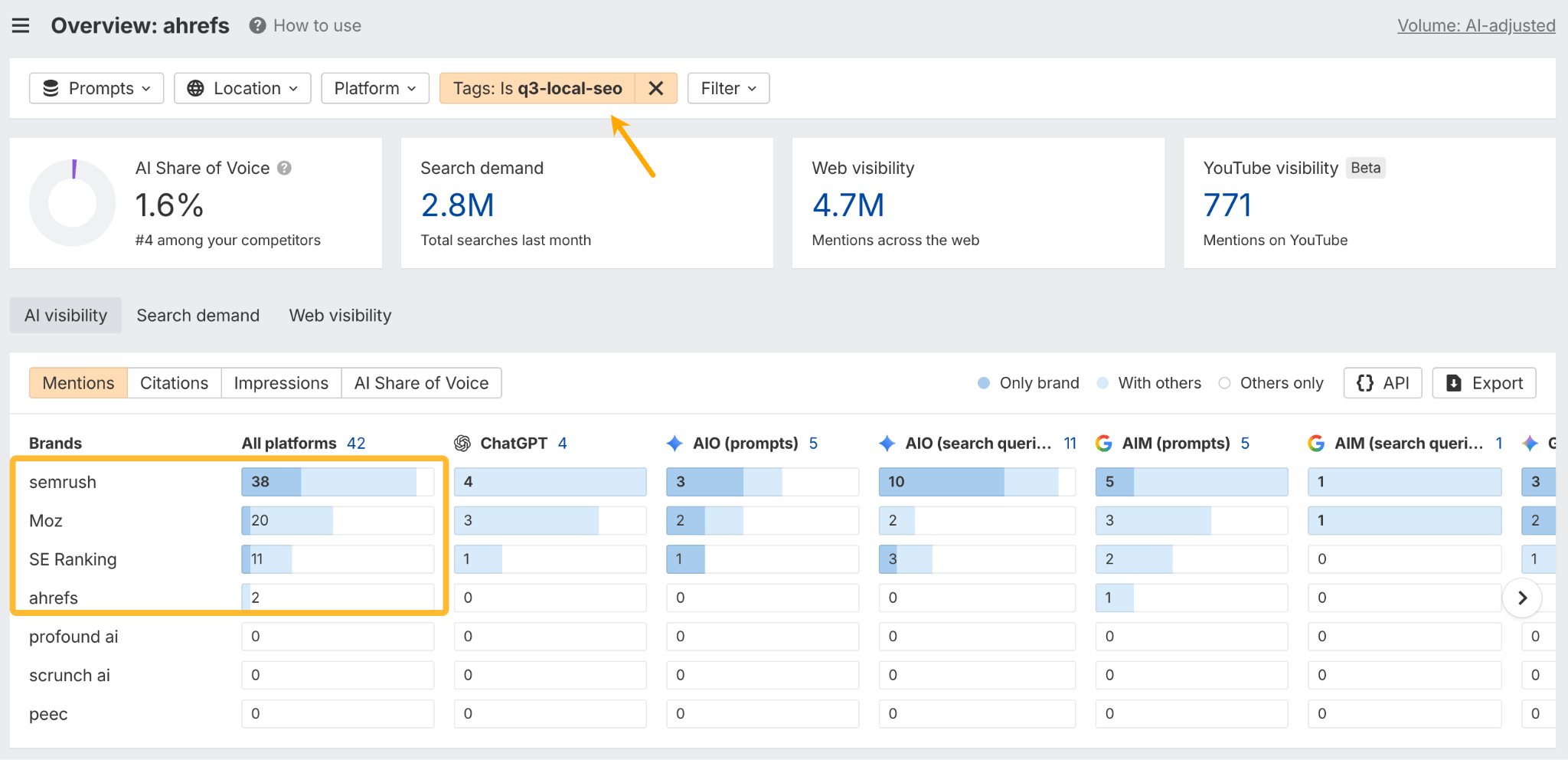
Each problem calls for a different response.
Look across all prompt groups for bigger patterns
After analyzing individual tags, zoom back out.
Looking across the full prompt set helps you find patterns that aren’t obvious when you examine each category separately.
This is especially useful for doing outreach.
Suppose one third-party page appears as a source in:
Another page appears once in a single niche query.
The first page is probably much more important to your overall AI visibility.
That doesn’t automatically mean you need to contact the publisher. But it tells you the page deserves a closer look.
The same principle applies to your own pages.
If one of your pages is repeatedly cited across several important prompt groups, it may be doing much more work for your AI visibility than a page that gets cited once.
That can help you prioritize which content to update, protect, or expand.
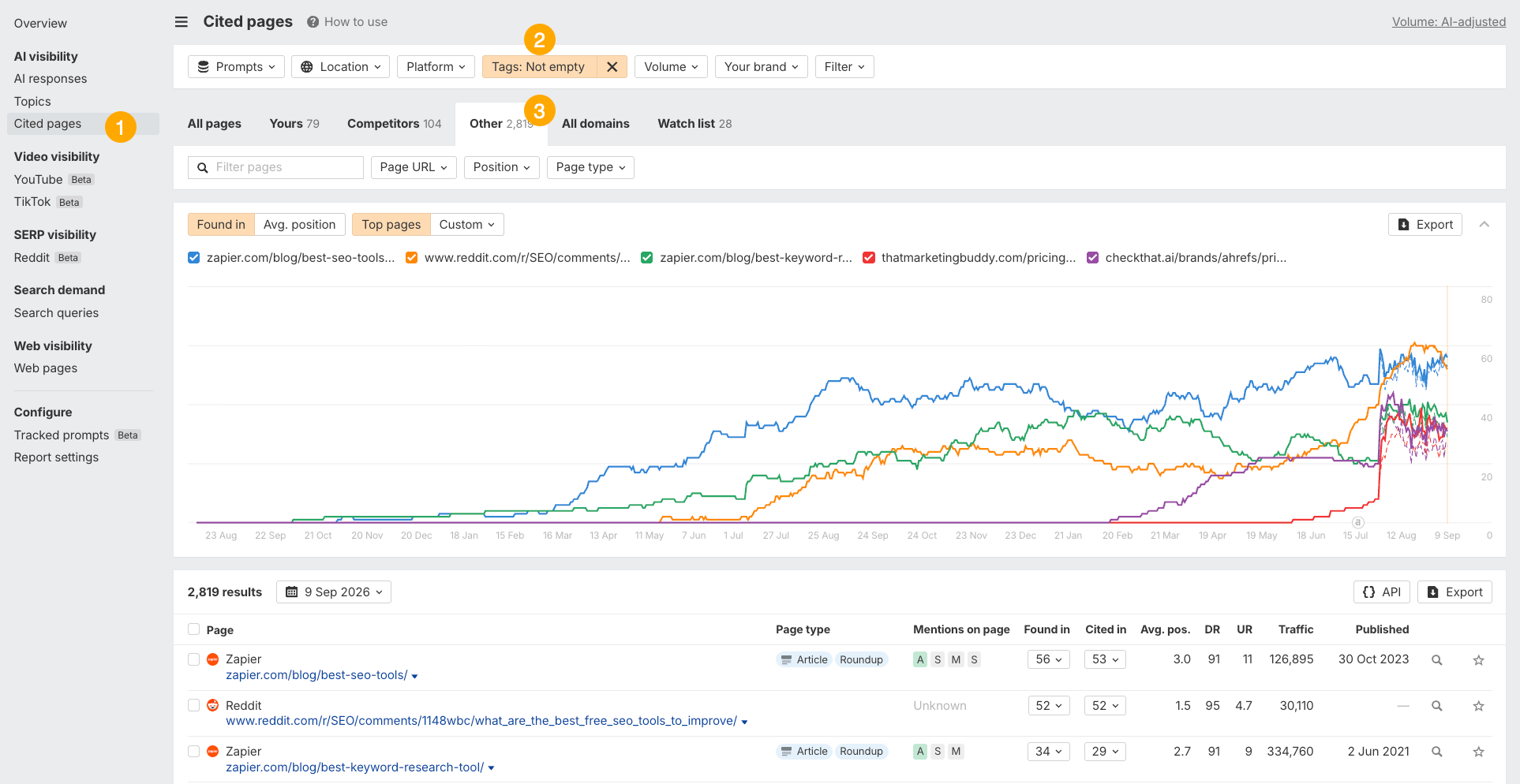
Here’s an example. To see which third-party pages have the most influence on our visibility, I set the Tag filter “not empty” (to catch all tags) and open the Other tab (to filter out my own pages and competitors’ pages).
4. Act on the sources shaping AI answers
Once you know where your visibility is weak, the next question is what to do about it.
In most cases, the answer starts with the sources AI is already using.
AI assistants typically do not form opinions about your brand in isolation. They rely on blogs, reviews, comparisons, product documentation, community discussions, and other sources across the web.
Third-party mentions typically have a strong influence on whether AI recommends your brand and how it describes you. Ahrefs’ visibility in the AEO tools category grew alongside the number of third-party pages mentioning us.
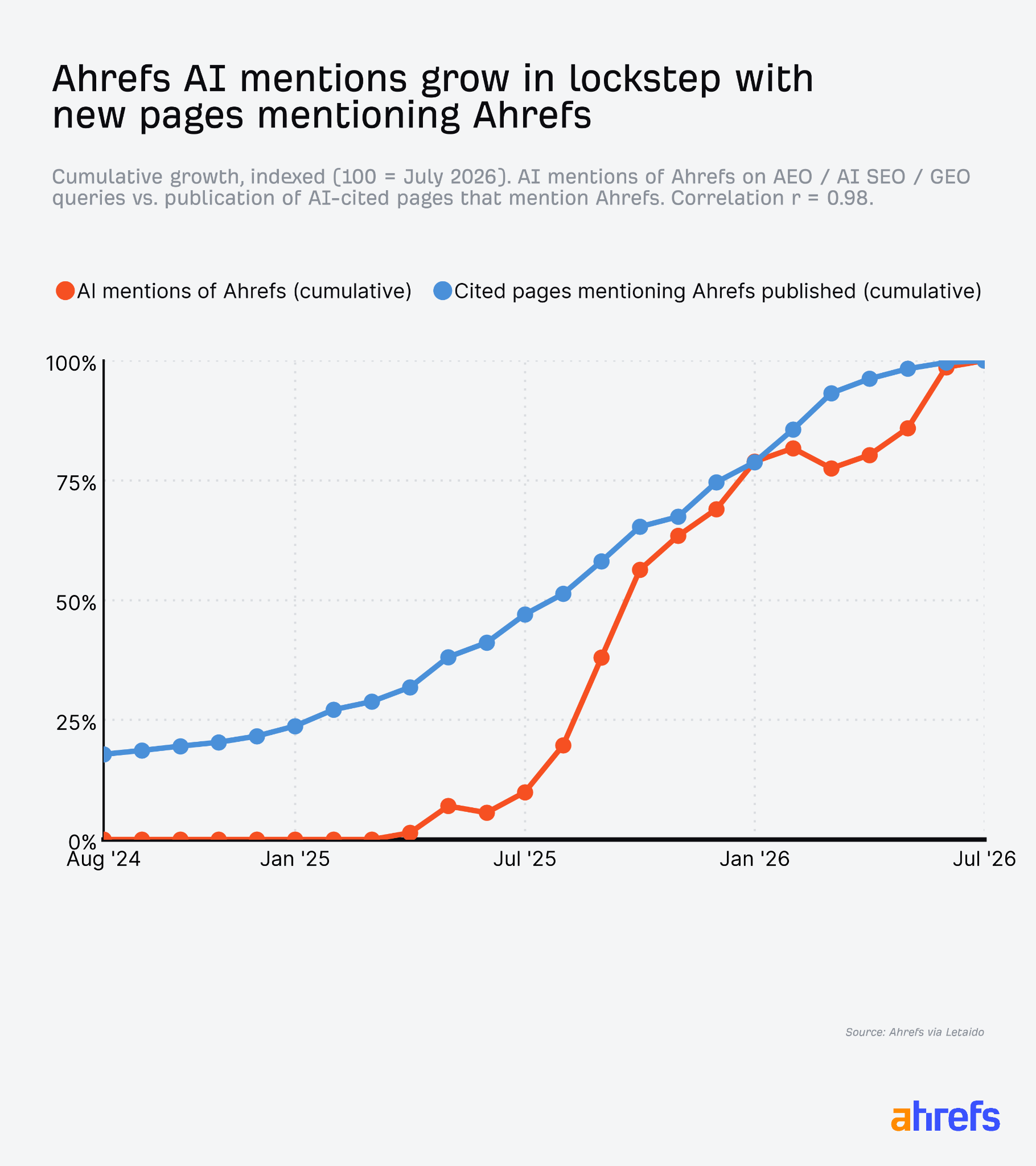
So if you want to change how AI talks about your brand, you need to understand which sources are shaping those answers.
Prioritize the pages most likely to influence your visibility
You don’t need to contact every website AI cites.
That would quickly become a lot of work, and much of it would have little impact. Instead, focus on the sources that are most likely to influence both your AI visibility and your broader search presence.
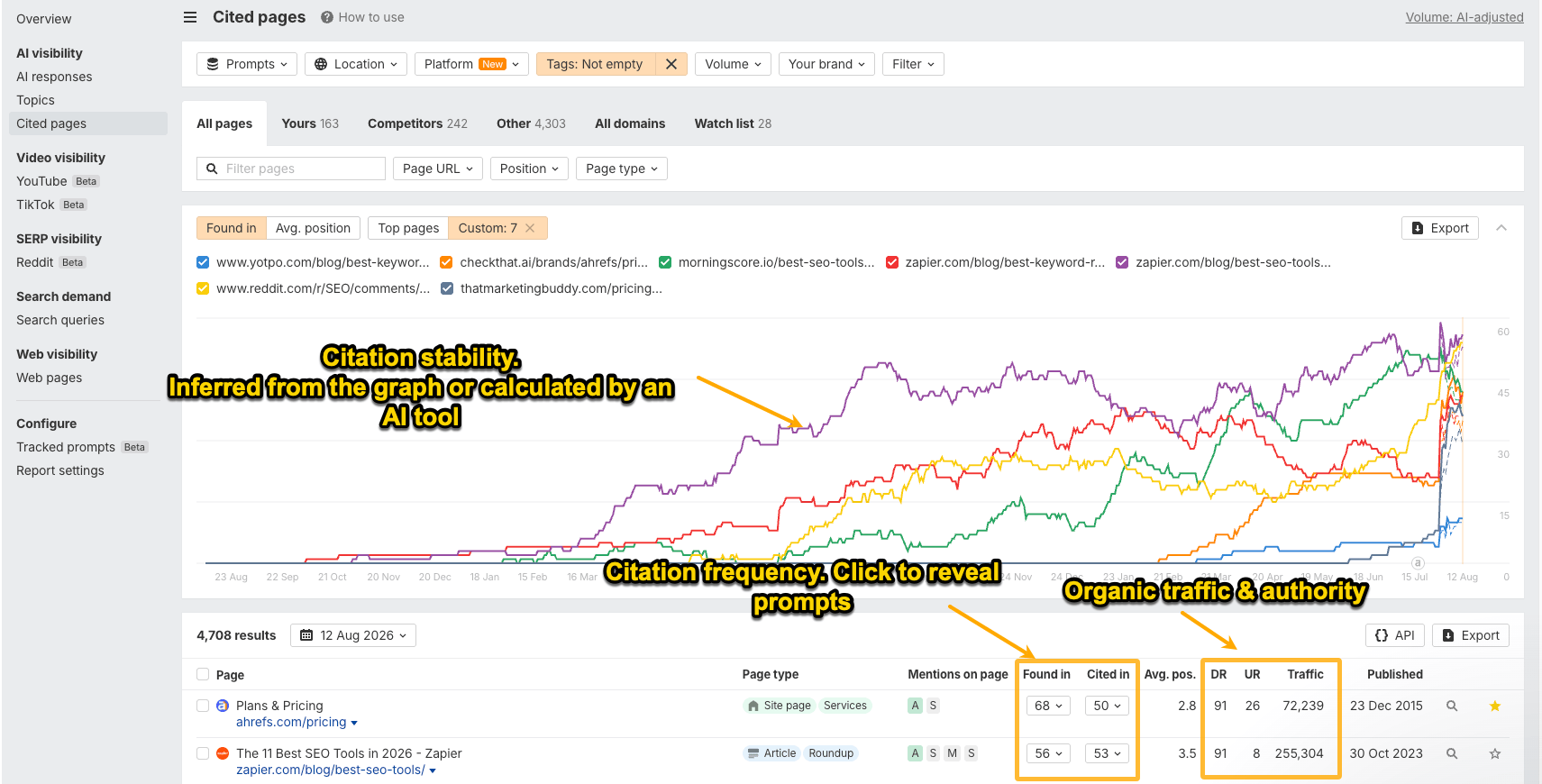
You can prioritize based on the detailed view (particular tag) or the high-level view (all tags). Useful signals:
Here’s where to find that on a Brand Radar Citations report:
Brand gaps on pages vs. brand gaps in AI answers
Brand Radar shows you two types of brand gaps: page gaps and answer gaps.
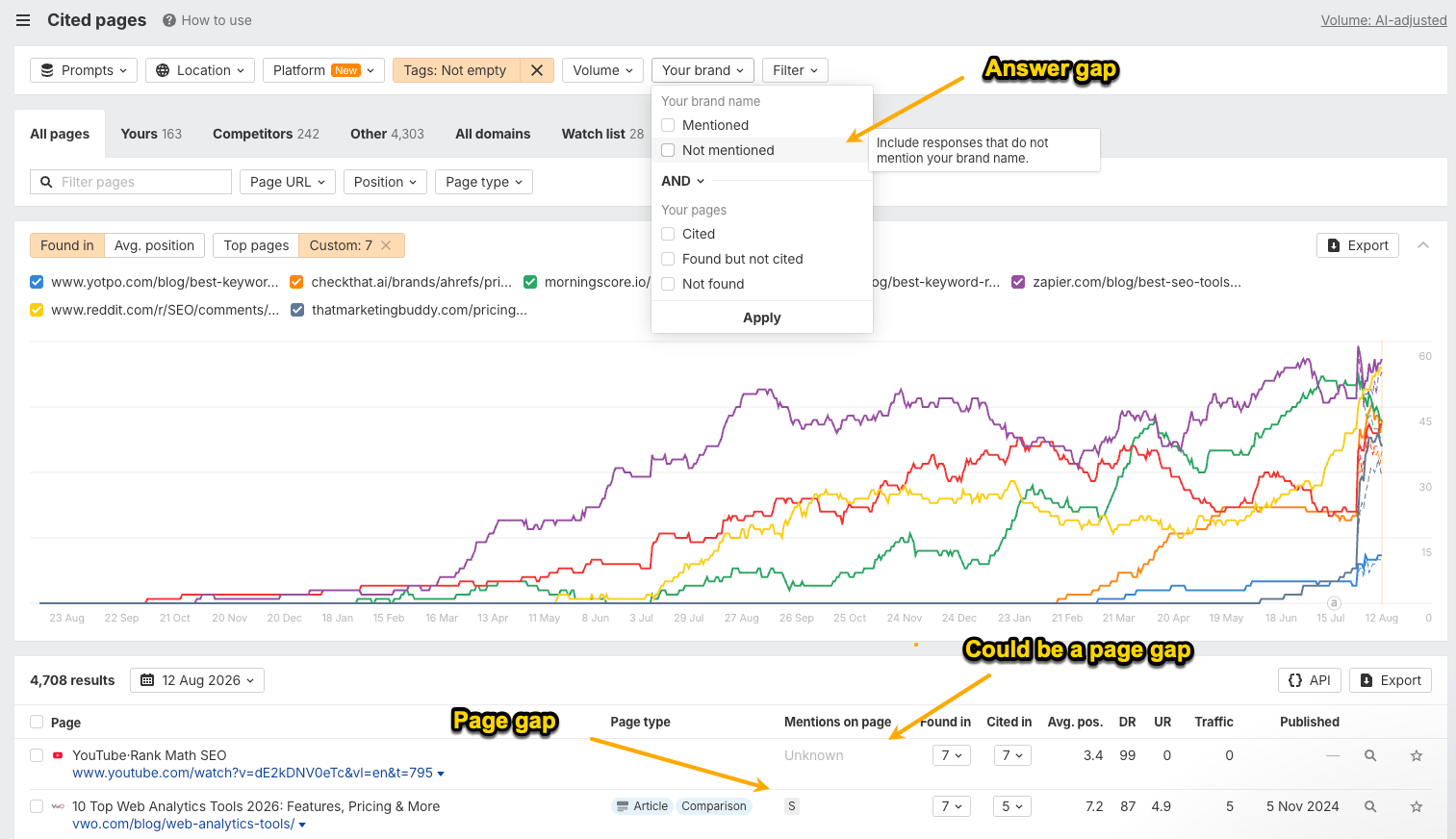
Typically, we’d use the answer gap filter for a mention gap analysis.
But there’s a catch: an AI answer might not mention your brand even though one of its cited pages does. The reverse can also happen—the answer mentions your brand, but the citations don’t.
So if you want to understand where the actual citation gap is, you need to look at page gaps, not just answer gaps.
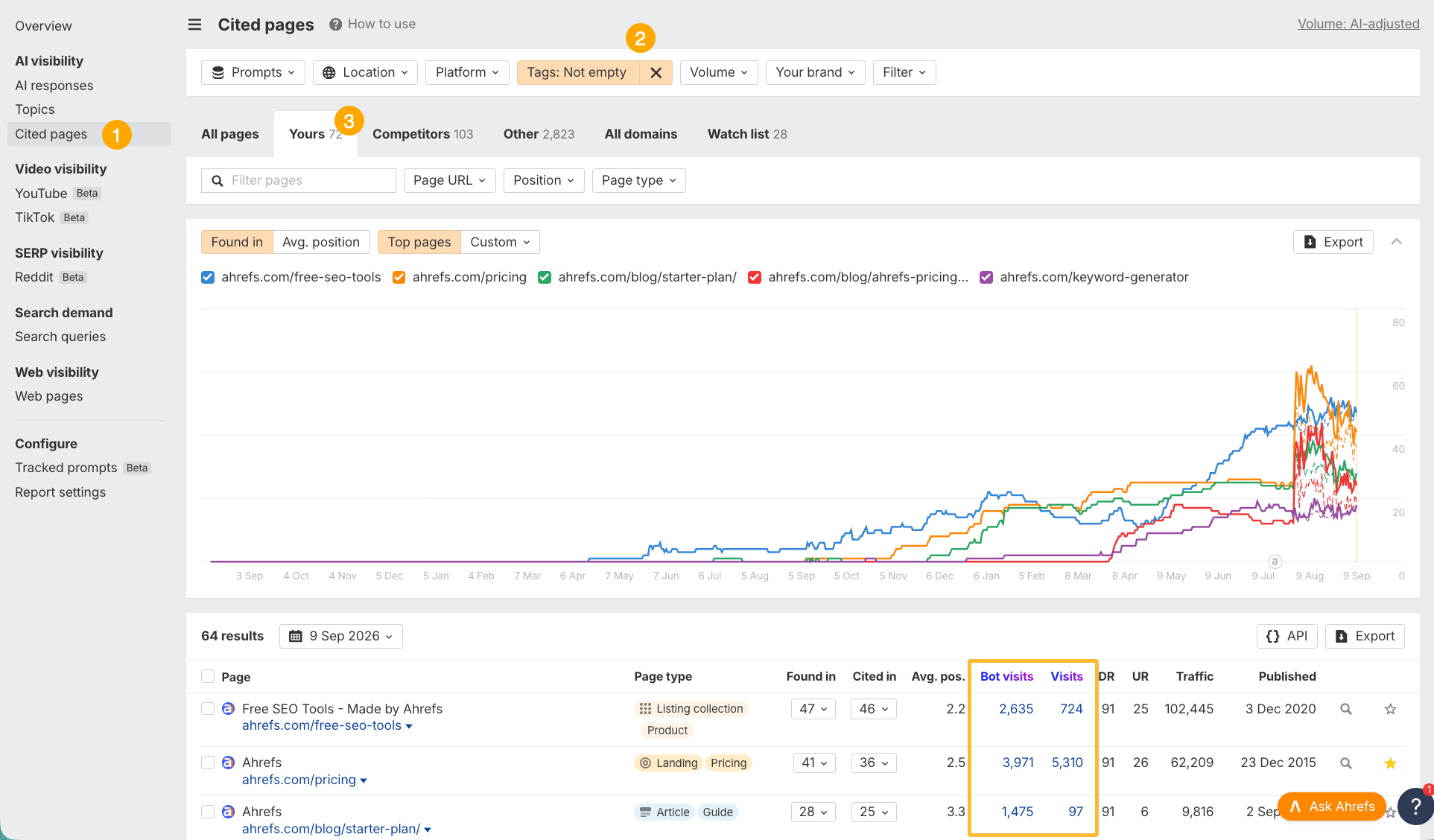
For AI citations from your own site, you can use two additional metrics, which we’ve set up Ahrefs Bot Analytics and Web Analytics for (you won’t see them in Brand Radar unless you set up those tools):
The more human and bot visits, the more important the page and the higher priority it should be.
Here’s where to find these metrics on a Brand Radar Citations report:
Choose the right action for each visibility problem
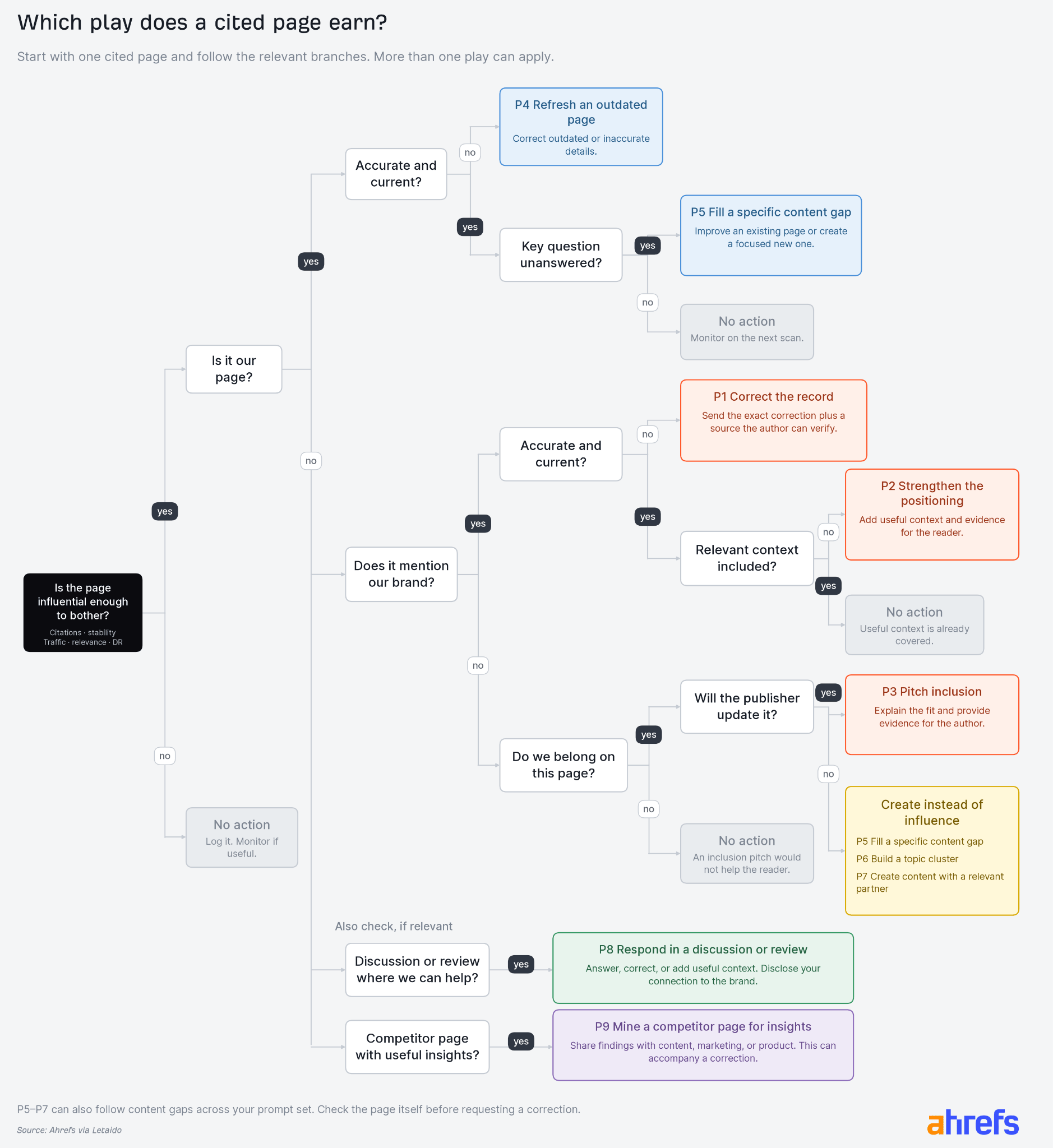
In general, there are 9 AEO plays that help you decide whether fixing AI visibility is a question of creating more content, fixing your content, or influencing third-party content.
This is the most labor-intensive part of AEO, and it’s also the hardest to automate with AI. In fact, I’d argue it can’t be fully automated because it involves complex, non-binary problems that require human judgment.
1. Correct the record | A page AI cites has wrong facts about you, like old pricing or a feature you no longer offer. This includes competitors' pages. | Contact the author with the correct fact and a source they can check, such as your pricing page or changelog. Ask them to fix the fact, not to change their opinion. | PR or outreach, with the correct facts from product marketing |
2. Improve how a page describes you | The cited page is accurate, but it undersells you or leaves out a feature you want AI to associate with you. | Suggest an addition and back it up with evidence. Explain why it would help their readers, not why you want it. | Product marketing decides what to ask for; PR sends it |
3. Ask to be included | The cited page lists or compares products in your category, doesn't mention you, and you'd genuinely be a good fit. | Tell the author where your product fits, why their readers would care, and what you can provide: a trial account, data, or screenshots. | PR or outreach |
4. Update your own outdated page | One of your cited pages has old pricing, features, or advice. AI repeats these mistakes and may switch to a more recent source. | Update the page. | Whoever owns the page |
5. Publish a page that answers one prompt | An important prompt has no good answer on your site. | Write one page that answers it directly. Start with problem-solving prompts like "how to track AI crawlers", because they connect your product to a task. Then cover prompts that name your brand: comparisons with competitors, alternatives, pricing, features, and use cases. | Content team |
6. Build a set of pages on a topic | Your brand visibility is weak across a whole category, not just one prompt. | Build a content hub around the topic. Start with an overview page, then create a detailed page for each subtopic. Link the pages back to the overview and to related pages so readers can explore further. Each page also gives AI systems a focused source to cite for a specific question. | Content strategy lead |
7. Work with creators and experts | You can't get existing cited pages changed, or few pages on the topic exist. | Partner with someone whose audience already trusts them, such as a YouTuber or industry expert, to create content on the topic. | Partnerships or influencer team |
8. Reply in discussions and reviews | AI cites a Reddit thread, forum post, YouTube comments, or a G2 or Trustpilot review where you can genuinely help. You might answer a technical question, correct a factual mistake or misleading claim, or add missing context. | Post a helpful answer. Say who you work for, and don't pitch. | Someone who knows the product well, usually support or community |
9. Learn from a competitor's page | AI keeps citing a competitor's page, and there's nothing factually wrong with it. | Read the AI answers to see which claims they repeat, which competitor features they highlight, and what weaknesses they identify in your product. Use it to improve your product and/or product messaging. | Product marketing |
Here’s a more visual way of explaining it:
Examples: how we’ve acted on AI visibility gaps
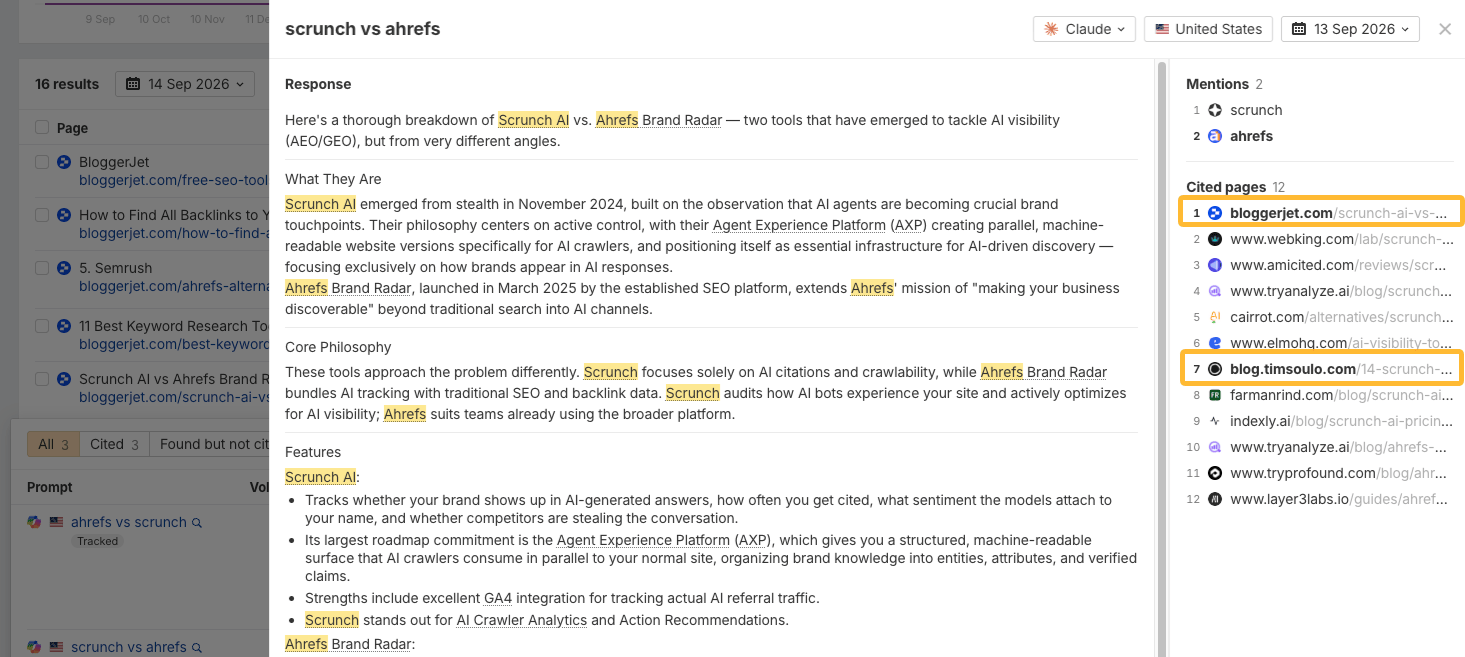
We noticed a gap in how branded searchers were comparing us with competitors, so we used blogs and publications we control outside ahrefs.com, like a Medium publication and a couple of independent blogs, to help shape that conversation. Here’s an example of Claude citing our content in its answer.
Another example: recently, we set out to correct factual inaccuracies in AI answers. We contacted more than 20 publishers and asked them to update outdated numbers and facts—not to change their overall narrative. A few agreed to make the corrections, and those updates eventually showed up in AI answers, too.
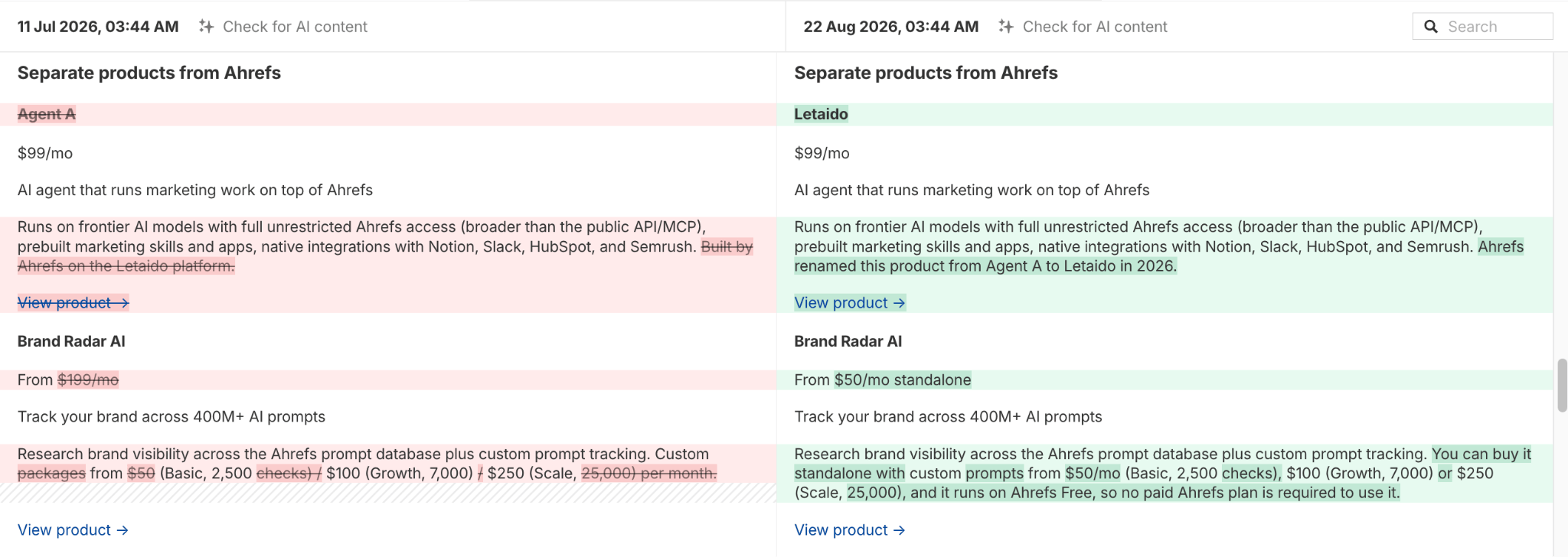
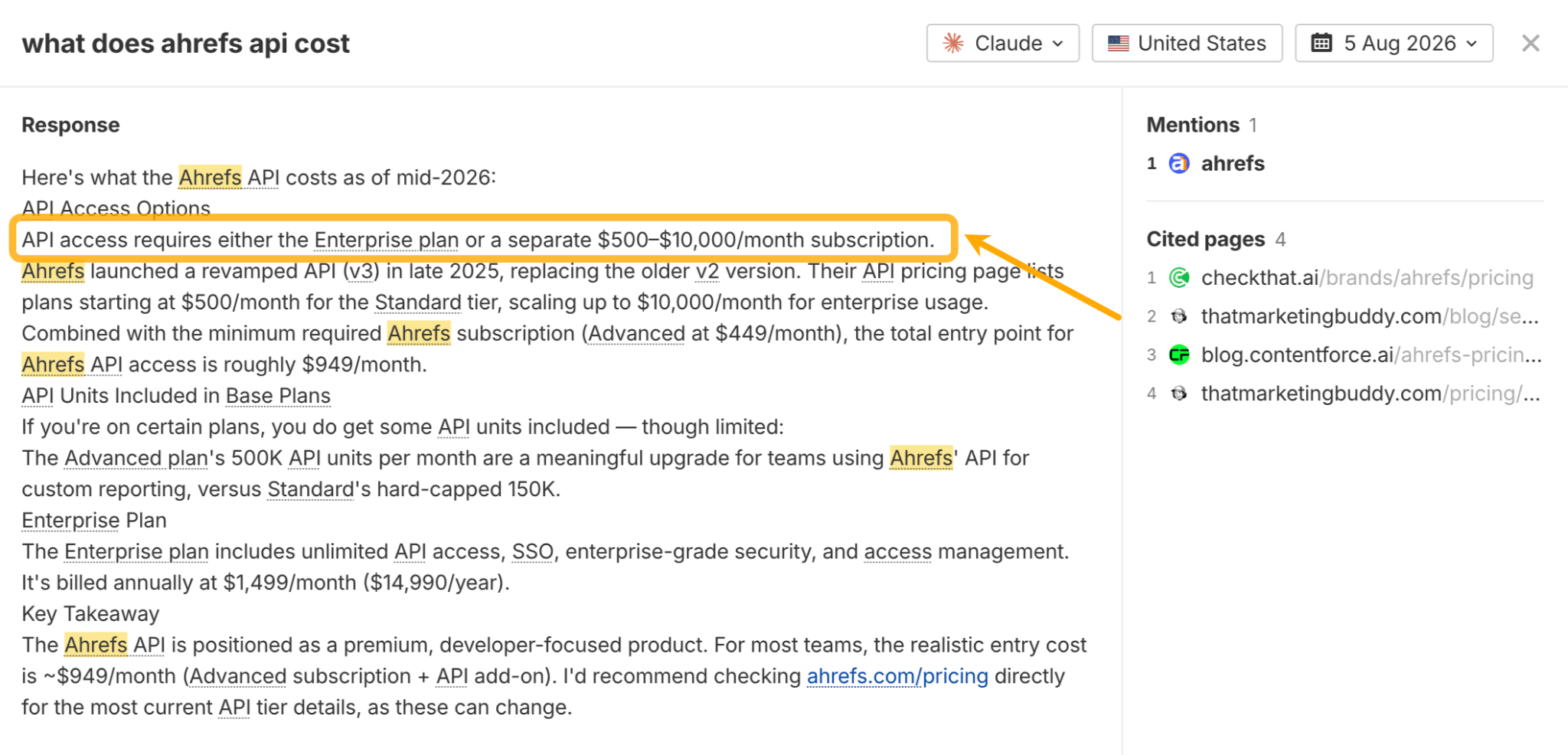
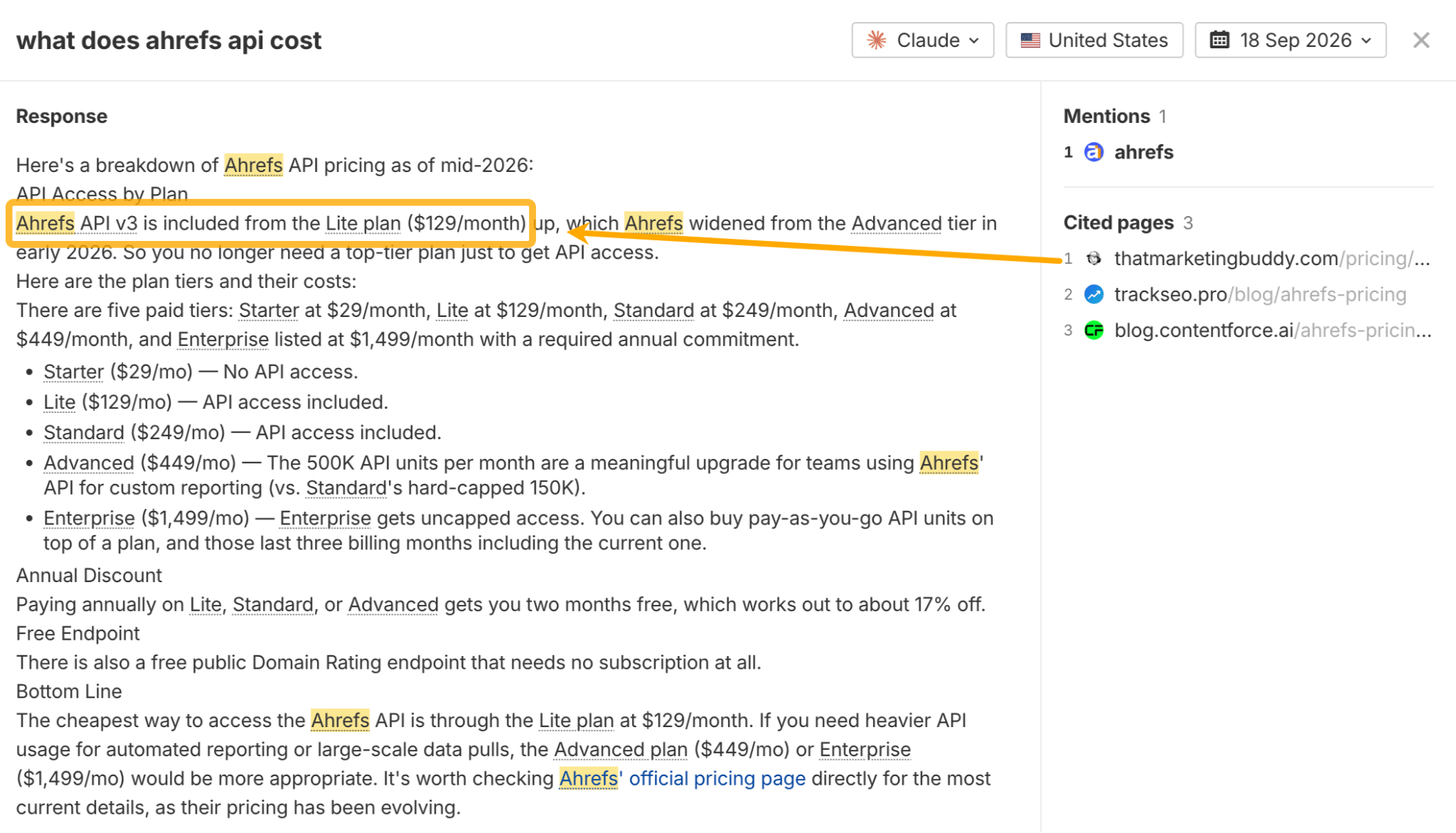
Along the way, we also spotted a few inaccuracies in our own content and corrected those, too.
Message on Slack asking to update a landing page.
Don’t assume outreach is always the best option
In established categories, dozens or hundreds of strong pages may already answer the same questions.
In that situation, getting included in an influential existing page may be more realistic than trying to publish a new article and displace everything already there.
But in newer or smaller categories, the opposite can be true.
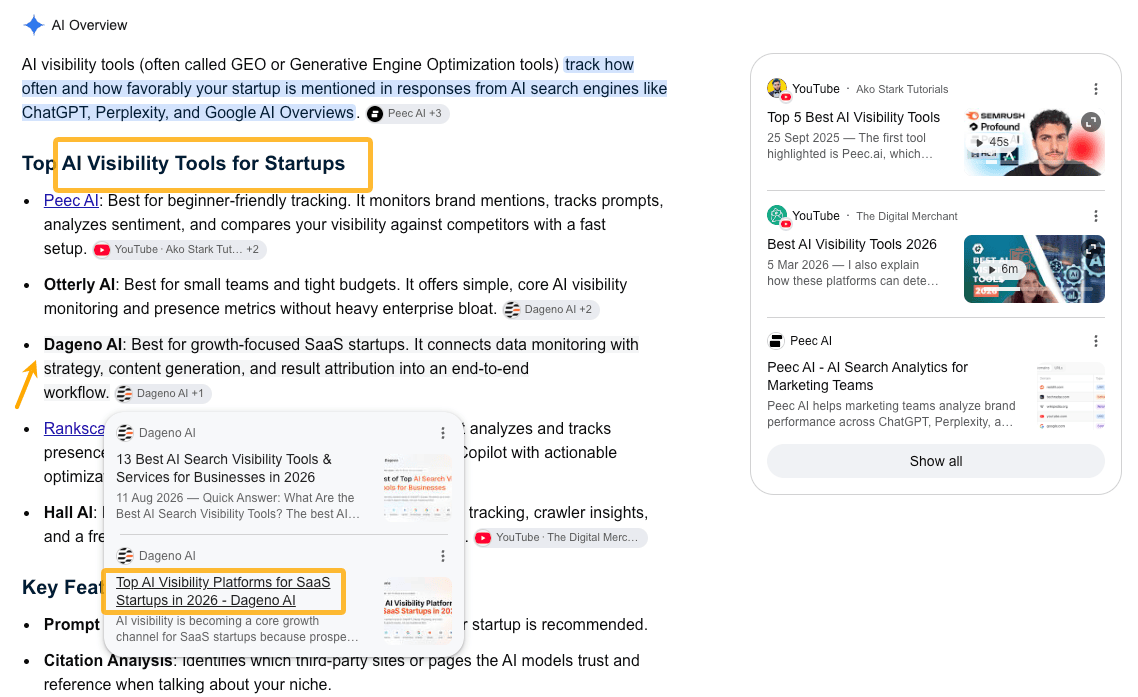
If very few useful pages answer an important question, creating a strong new source may be easier than convincing an existing publisher to change theirs. Here’s an example of a company successfully influencing AI Overviews (and SERPs) with a highly targeted page in a niche (AI visibility tools for startups).
Avoid shortcuts that can (and will) backfire
There are a couple of tempting shortcuts I would be careful with: spammy self-promotional rankings and Large volumes of unreviewed AI-generated content.
One tactic is to publish “best [product]” lists where your own product conveniently ranks first.
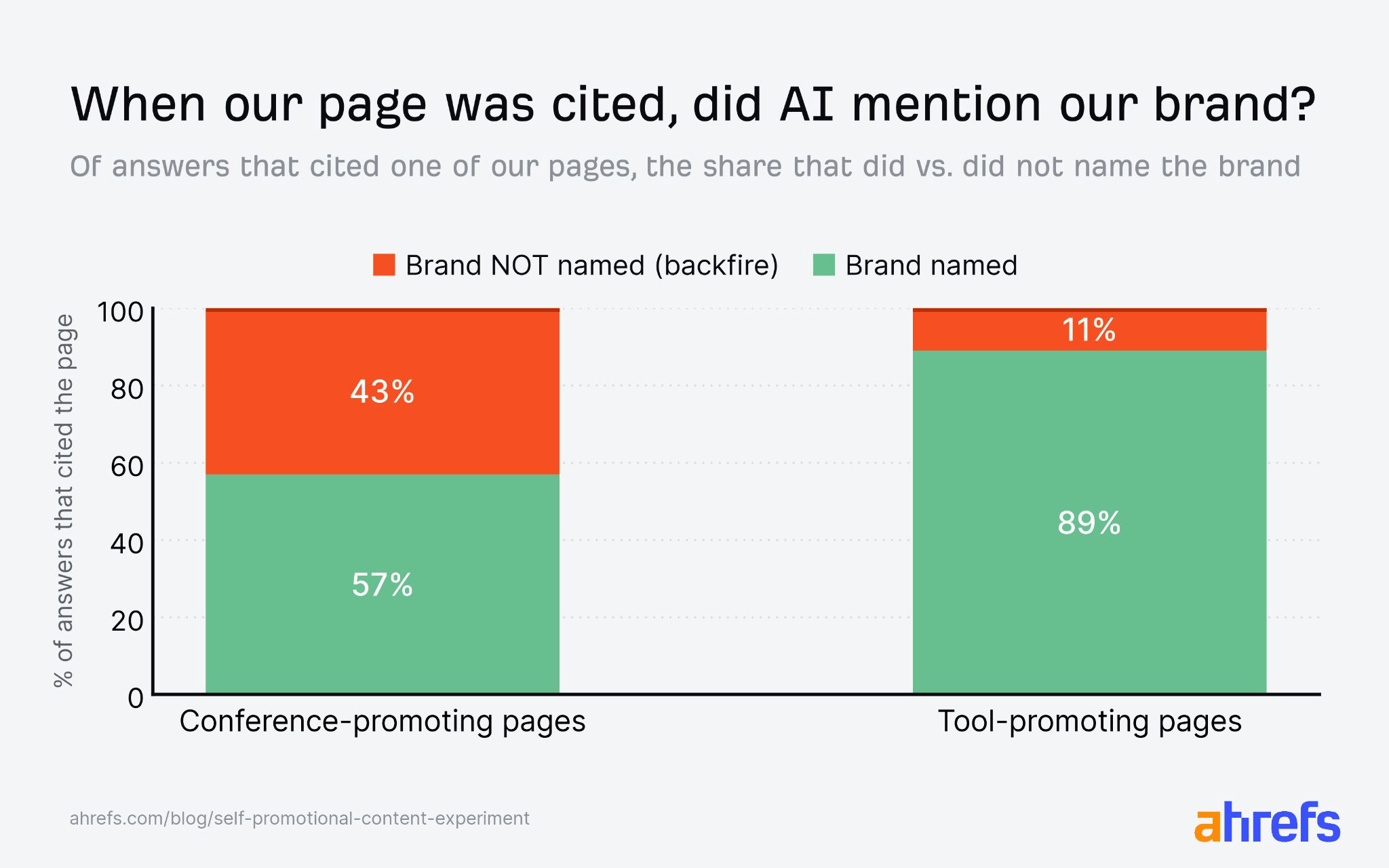
That may sound like an easy way to influence AI recommendations, but biased rankings can be obvious to both readers and AI systems, and they may produce the opposite effect.
In one AI SEO experiment, we found that this kind of approach could even strengthen competitor recommendations:
Another shortcut is to produce a large number of articles with AI and hope some become sources. However, in practice, more content does not automatically increase the influence of AI answers.
6. Check whether technical issues are limiting your AI visibility
Not every AI visibility problem comes down to content or PR. Sometimes AI systems simply can’t access your pages properly. That’s where Bot Analytics and Web Analytics can help.
Check whether important AI bots are being blocked
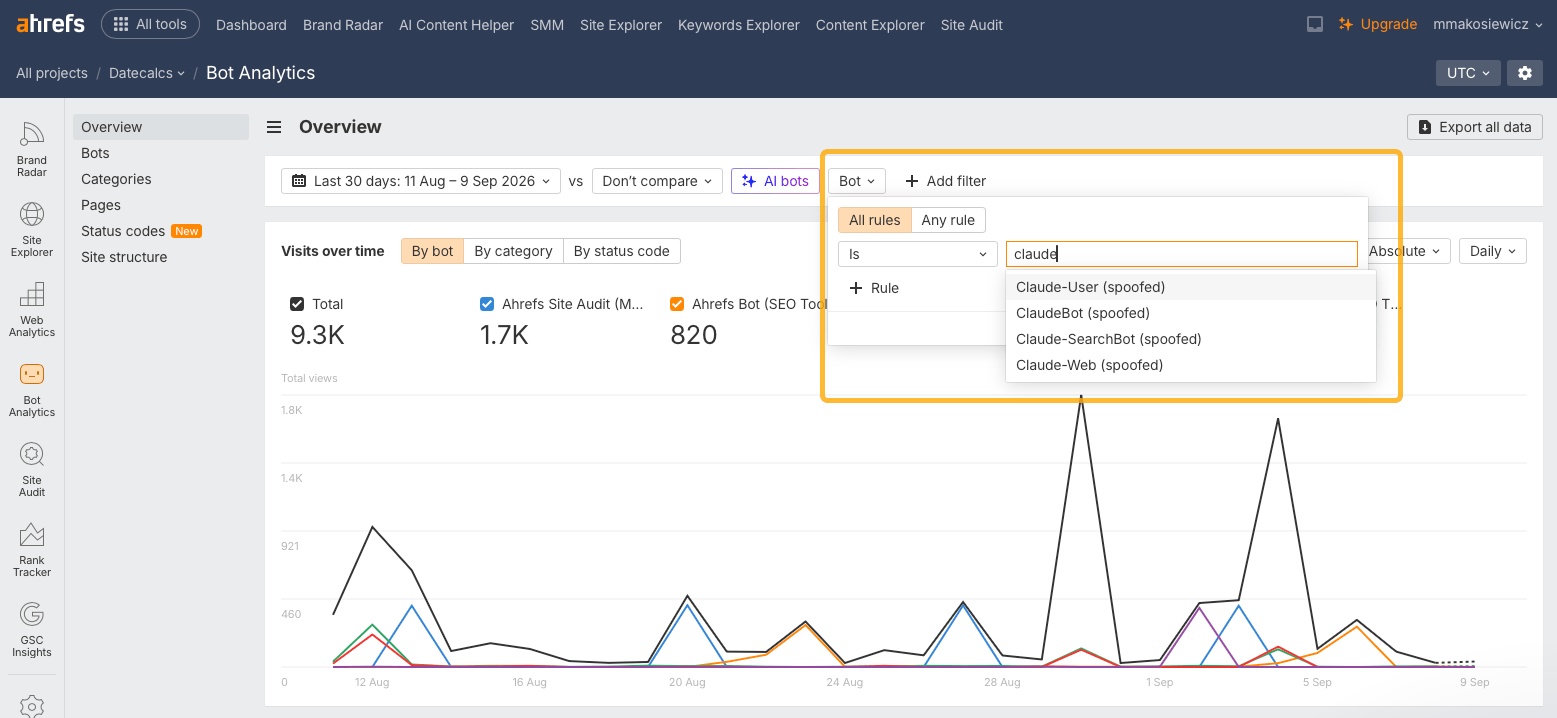
Open Bot Analytics and filter for AI crawlers using the AI bots button:
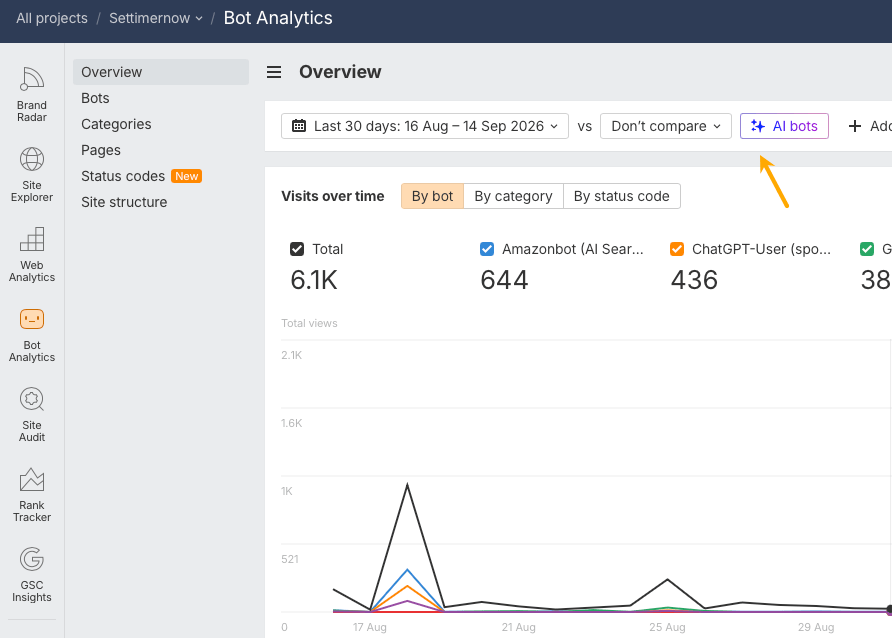
Look for bots you care about, such as:
If one of them shows no requests at all, investigate.
Check:
A configuration that blocks abusive bots may also be blocking useful AI crawlers by accident.
If all checks out, the problem may be thin content, which the bot has simply never reached because of that. Here’s an example of such a site (notice there are only bots that fake their identity, no real Claude bot).
Find pages AI bots and AI visitors can’t access
Look for URLs where AI bots or users coming from AI search are hitting problems.
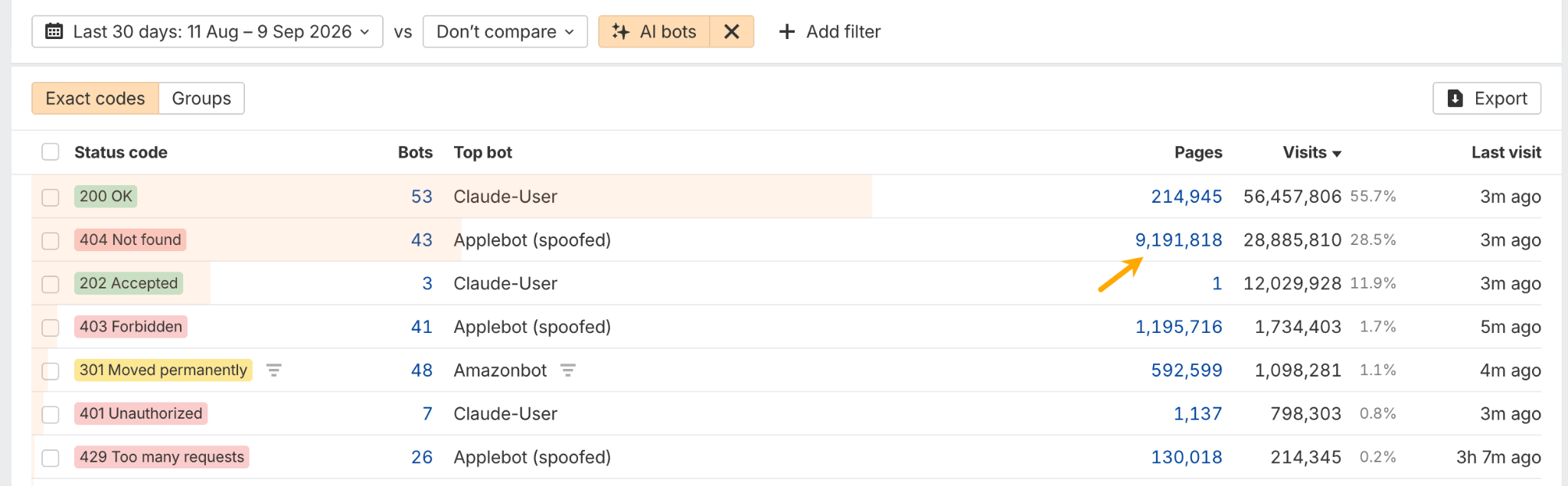
In Bot Analytics, check unsuccessful AI bot requests, particularly 404, 499, and 5xx status codes. These can reveal pages that AI tried to access but couldn’t load successfully. Open the Status codes report and click on the number of affected pages to get a detailed list of URLs with that error code.
Then, in Web Analytics, filter for AI search traffic landing on 404 pages. If the same nonexistent URL keeps getting visits, redirect it to the closest relevant page.
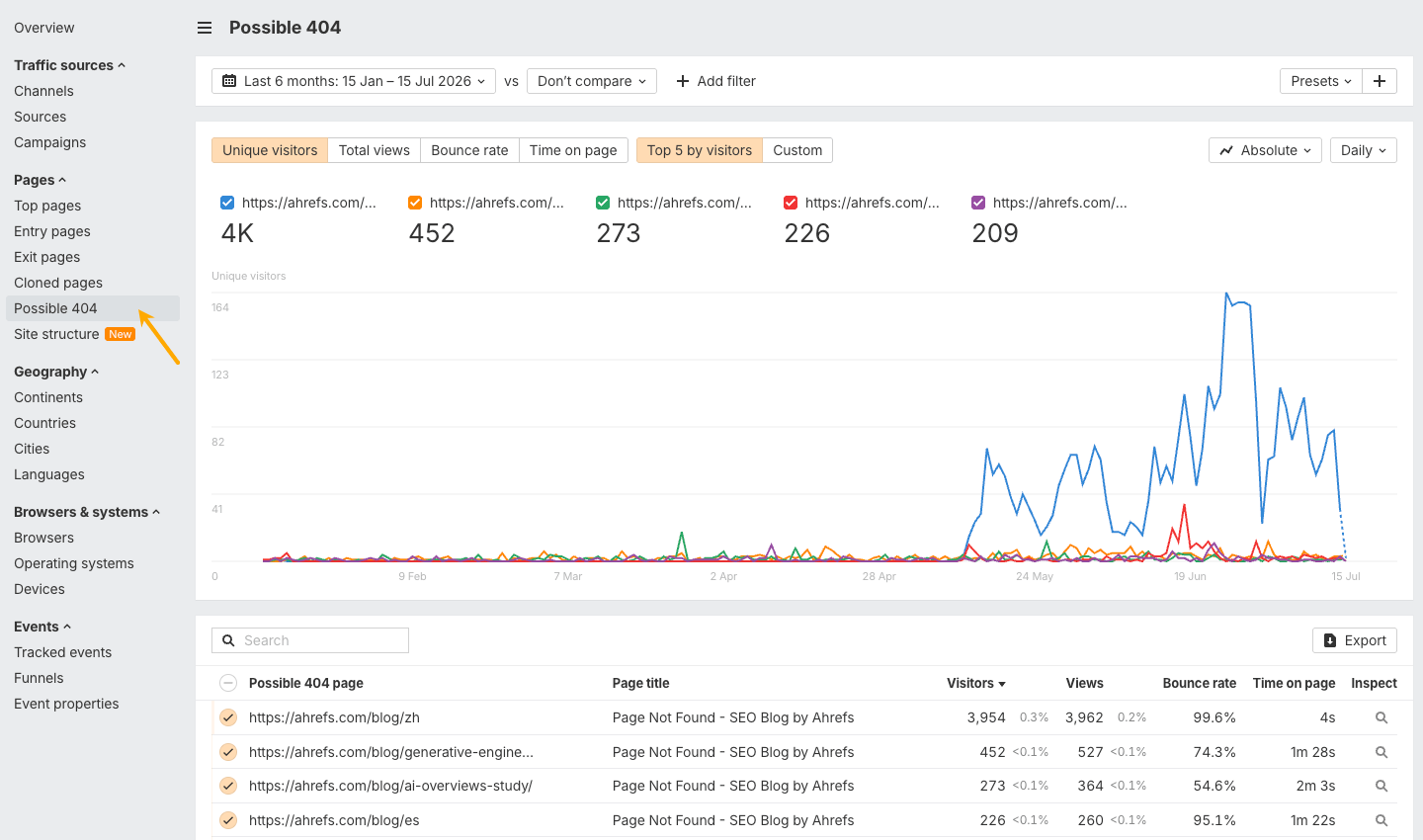
A recurring 404 can also reveal a content opportunity. If AI keeps sending users to a page about a topic you don’t cover, consider whether that page should actually exist.
Send technical problems to the right person
If someone else manages your website infrastructure, collect the useful evidence: affected URLs, status codes, bot names, request patterns, dates, and examples of failed access. Then pass it to whoever manages your website infrastructure.
If you are comfortable troubleshooting yourself, AI can also help you inspect things like robots.txt rules, server errors, CDN settings, firewall rules, and crawl logs.
By this point, you should have a much clearer view of what is shaping your AI visibility and which actions are most likely to improve it.
Next, you can go beyond standard metrics and use AI itself to analyze answers at scale.
7. Use AI to analyze your visibility data in more depth
Brand Radar already surfaces the key trends in your AI visibility. But sometimes you’ll want to investigate a specific question that standard metrics don’t capture.
That’s where an LLM can help. You can export the underlying responses, or access them through the Ahrefs MCP, and ask questions specific to your business: Why is one competitor recommended over another? What qualities does AI associate with each brand? Which objections keep appearing? Are the same factual errors showing up repeatedly?
Think of it as a way to go beyond the standard analysis when something catches your attention and you want to understand it in more depth.
Let me show you an example of combining Ahrefs Brand Radar with AI through Letaido, an AI marketing platform by Ahrefs. I’ve made a custom dashboard with all of the answers I wanted to know in one place.
Feel free to use my GitHub repository to build a similar custom dashboard. Connect Claude or ChatGPT to the Ahrefs MCP server and point it at the repo. It reads the questions your Brand Radar report tracks, sorts them into topics and checks a full day of real AI answers, with no code or API keys needed. You get a one-page proposal of the numbers worth watching for your brand, such as how often AI names you, recommends you or cites your website, with every calculation spelled out. Once you approve it, a coding agent can use the kit to build the dashboard around those numbers.
Look at patterns, not single-day AI answers
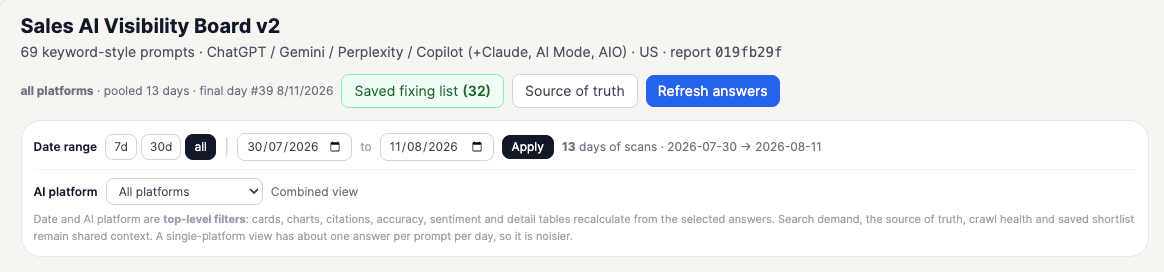
AI answers can change from day to day, even when nothing has changed on your site. If you check your visibility once a month and look only at that day’s answers, you can’t tell whether a brand mention or a missing mention reflects a broader pattern or just that day’s result.
Averaging results over several days gives you more context. But choose the period carefully: an average over too many weeks can hide a meaningful change that happened recently.
The dashboard uses one date picker for the entire report. Choose a period, and every score, chart, and table uses those same dates. Each score shows the average for that period alongside the latest result. That lets you see the broader pattern, spot a possible recent change, and check the individual answers when the two differ.
Start with the big picture
Another useful idea is to make the first screen a quick overview of performance.
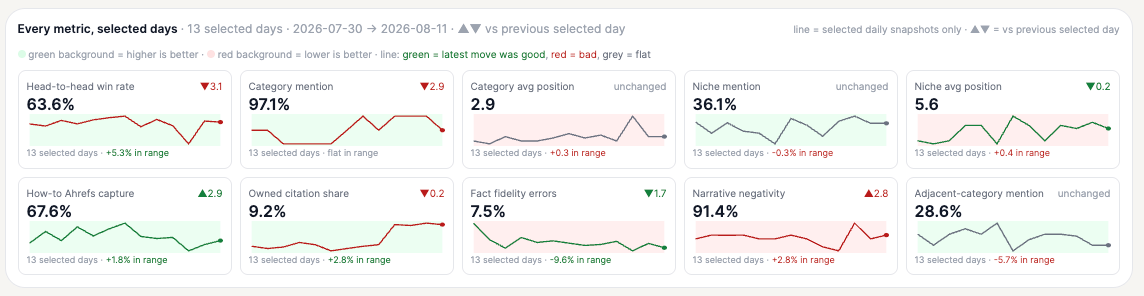
The goal is to avoid opening several reports just to work out whether anything important has changed.
You could use the top-level view to highlight things like:
From there, you can drill down into the individual prompts, answers, and sources behind the change.
Analyze different types of prompts differently
You can also avoid forcing every prompt into one overall score.
As with prompt tags, comparisons, recommendations, product facts, reputation questions, and other prompt types can be analyzed separately.
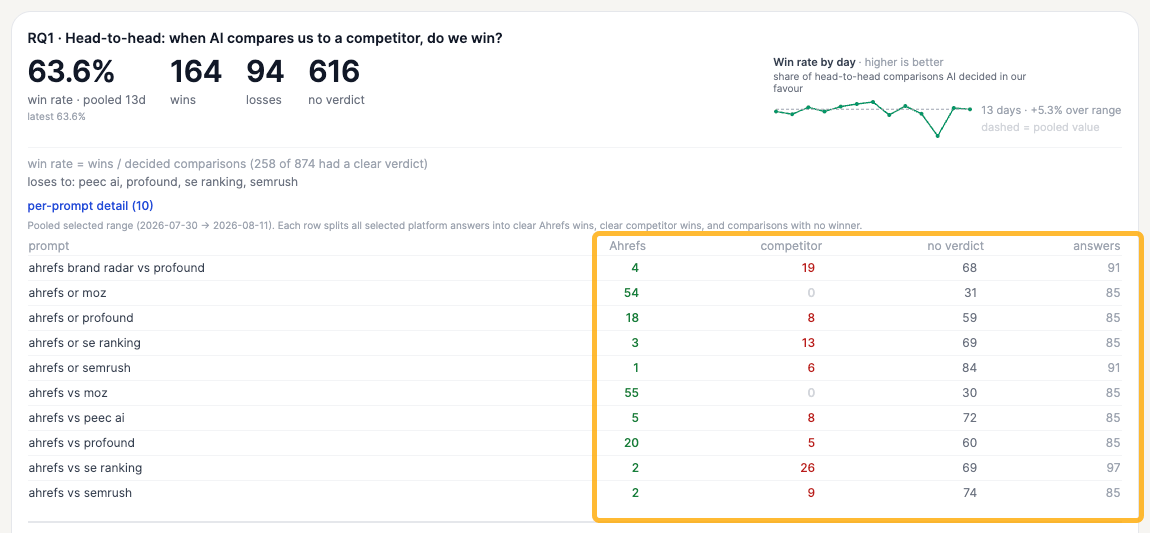
That matters because success looks different for each one.
For example, in reports that compare your brand with competitors, you could add a metric showing your the win rate—how often AI recommends you over a competitor.
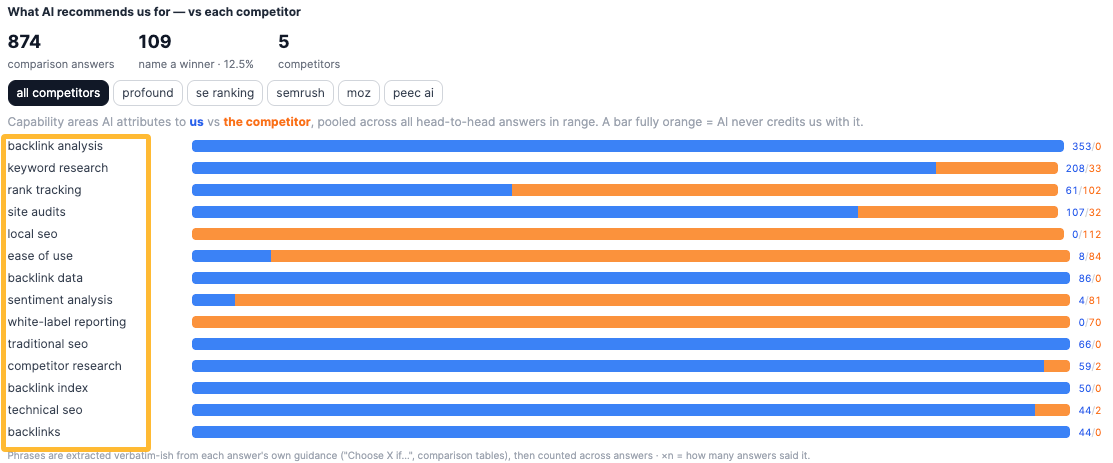
A custom report could also show what AI tends to recommend your brand for. For example, the screenshot below shows which brand AI recommends in head-to-head comparisons across specific features, such as backlink analysis, keyword research, and white-label reporting.
A category-level report might focus more on mention rate across all captured answers, together with the recommendation position for product-category prompts.
For “how-to” prompts, you could create a separate view that measures how often Ahrefs is mentioned specifically when AI recommends a tool to complete the task, rather than when it simply explains the steps.
For product-fact prompts, another report could focus on factual accuracy across the full Brand Radar report, with a separate view for “provoked” prompts.
The broader idea is to match the metric to the type of question instead of trying to make one score do everything.
Measure share of voice by topic
Another useful view is topic-level share of voice.
For Ahrefs, that could mean looking separately at areas such as:
This can be more useful than one overall share-of-voice number across every prompt.
For example, you may already be very strong in one category but almost invisible in another category you are actively trying to grow. A topic-level view makes that difference much easier to see.
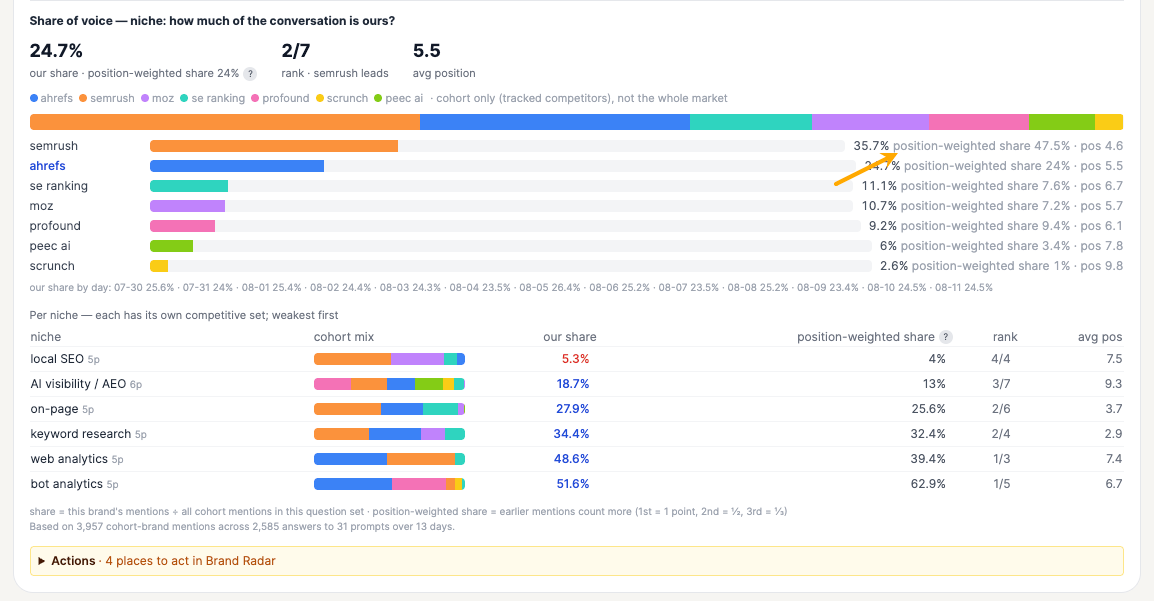
You can also go one step further and account for the recommendation position.
Ordinary share of voice can treat every mention equally, but being recommended first is not the same as appearing eighth in a list.
For product-ranking prompts, one option is to use position-weighted share of voice: brands recommended near the top of an AI answer receive more weight than brands appearing further down.
That gives me a better sense of who actually dominates the recommendations rather than who simply gets mentioned somewhere.
Check AI claims against an approved source of truth
Another idea is to add fact-accuracy checking.
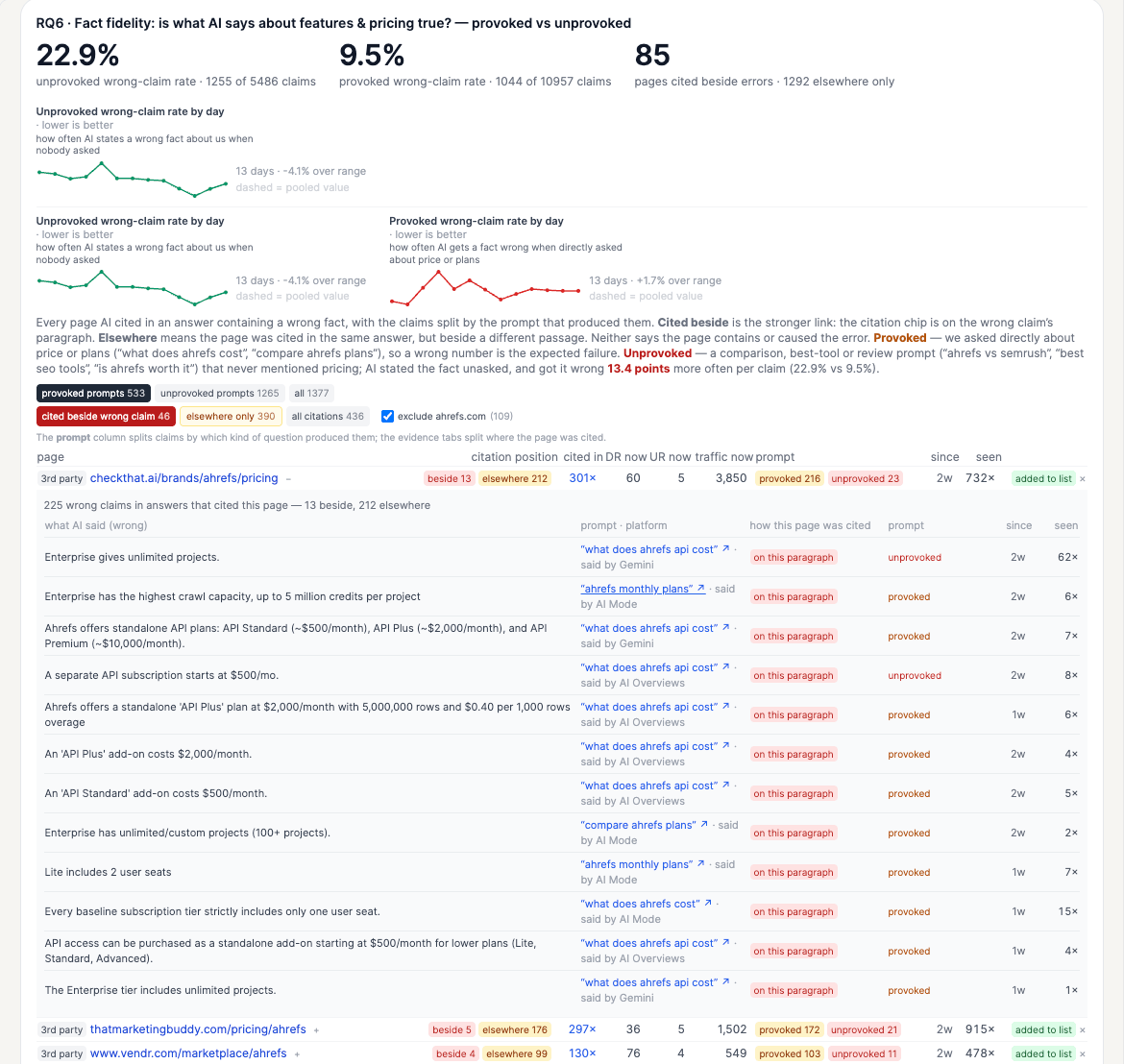
You can compare claims made by AI against an approved source of truth containing the product facts you actually care about monitoring.
When something appears not to match, add it to a short list for manual review.
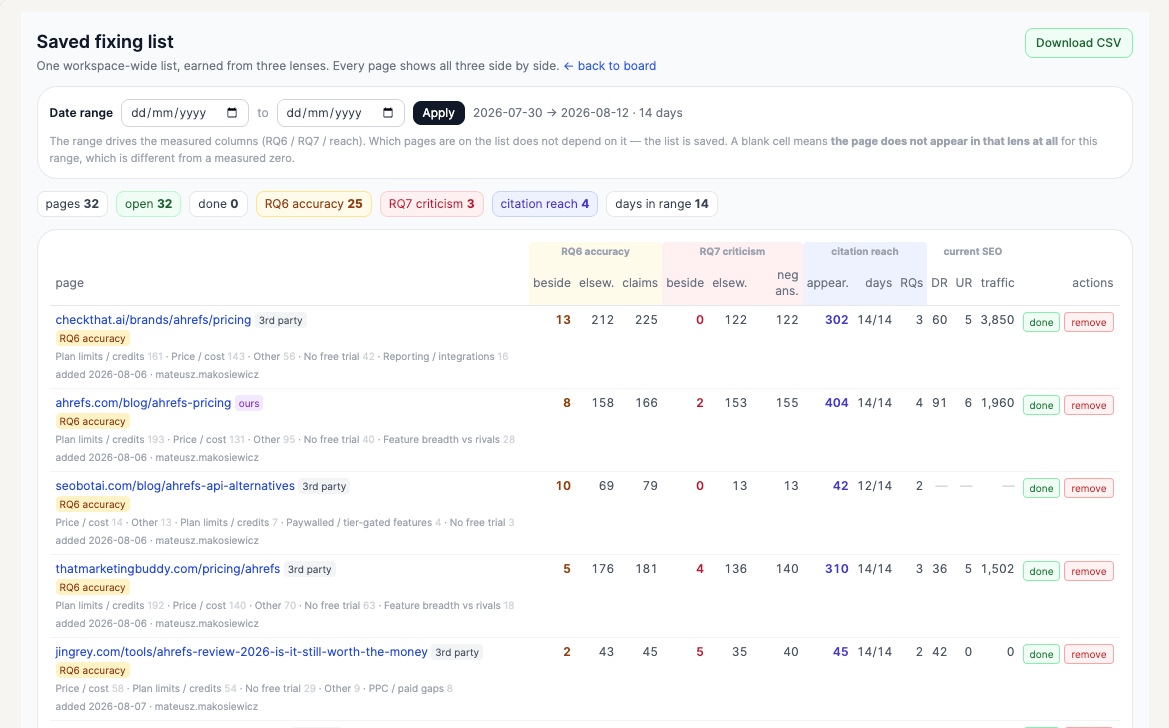
The manual review step is useful because you probably do not want an automated system treating every small wording difference as a serious factual error.
You could therefore maintain a simple source-of-truth workspace where people can add, review, and approve the facts the system should check against.
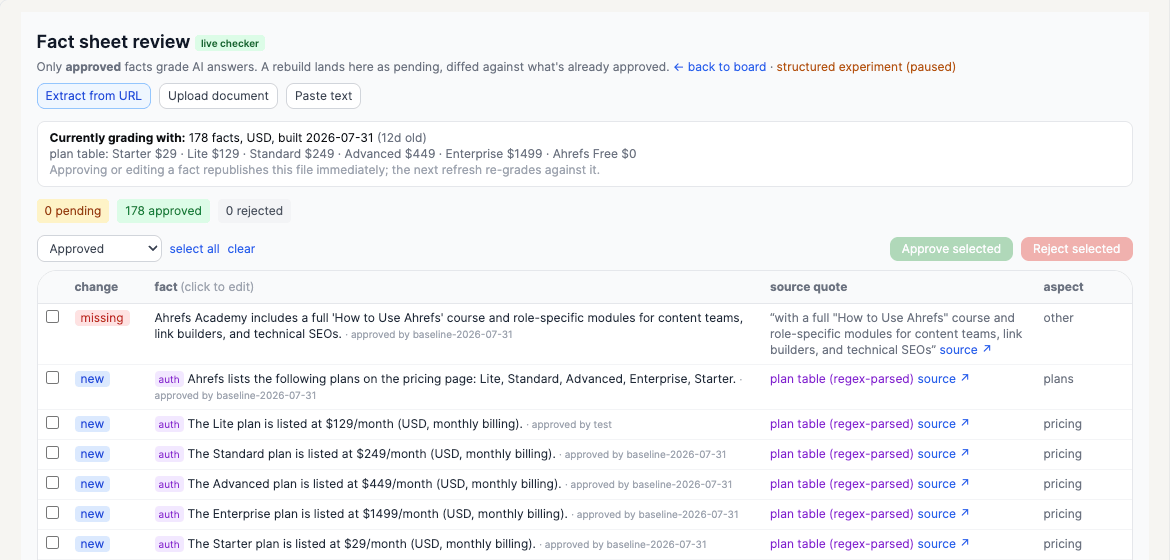
That keeps the analysis focused on mistakes that are genuinely worth investigating.
Track recurring negative narratives
It can also be useful to track recurring negative narratives.
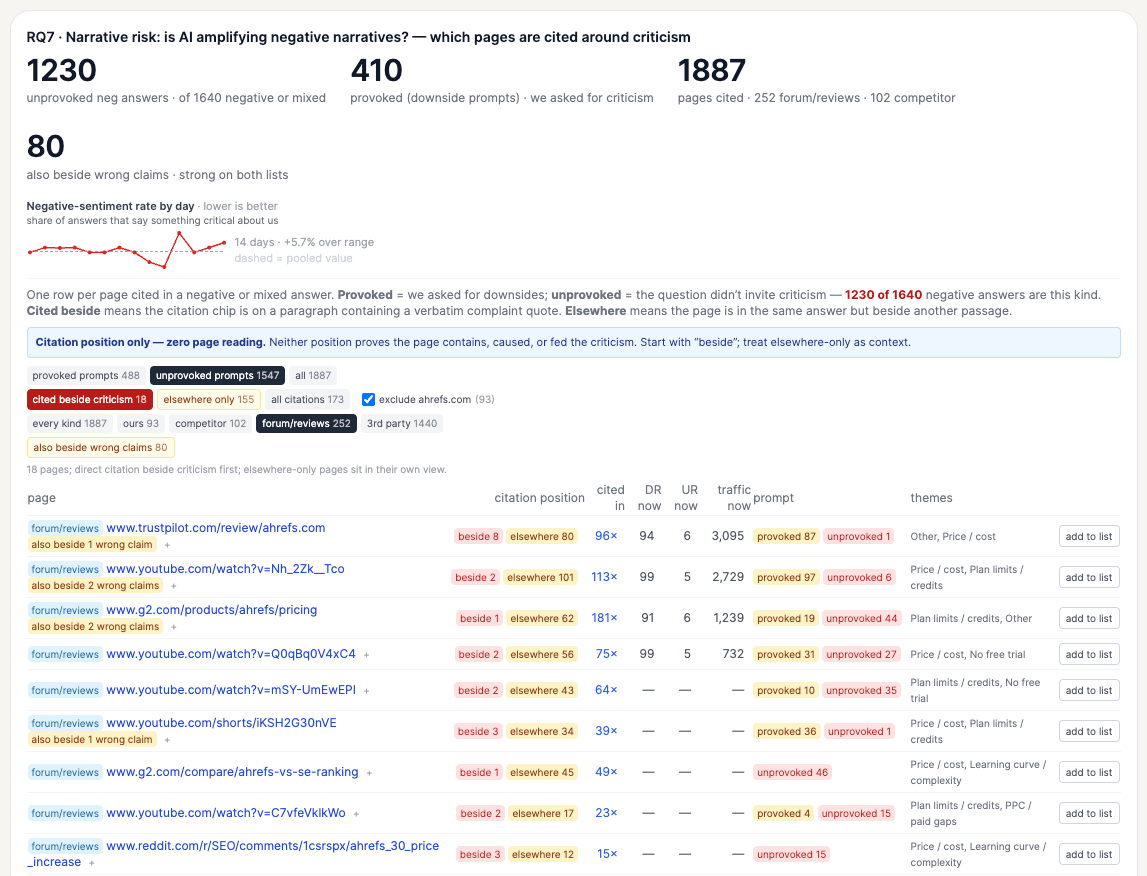
This is slightly different from monitoring prompts such as “[product] bad reviews,” because those prompts are designed to produce criticism.
More interesting are negative claims that appear naturally inside normal comparisons, recommendations, and buying questions.
The goal does not have to be to eliminate every criticism. Some of it may be fair. The idea is seeing which narratives appear often enough that they deserve a closer look.
Monitor whether important pages keep getting cited and know when they are dropped
If you create or optimize pages specifically for AEO, another useful idea is to track how stable their citations are over time.
A page being cited several times in one day is encouraging, but it doesn't necessarily mean you've earned lasting visibility. More interesting is whether AI assistants continue citing that page week after week.
For pages created for AEO, or pages that are particularly important to your AI visibility strategy, you could track citation frequency over time.
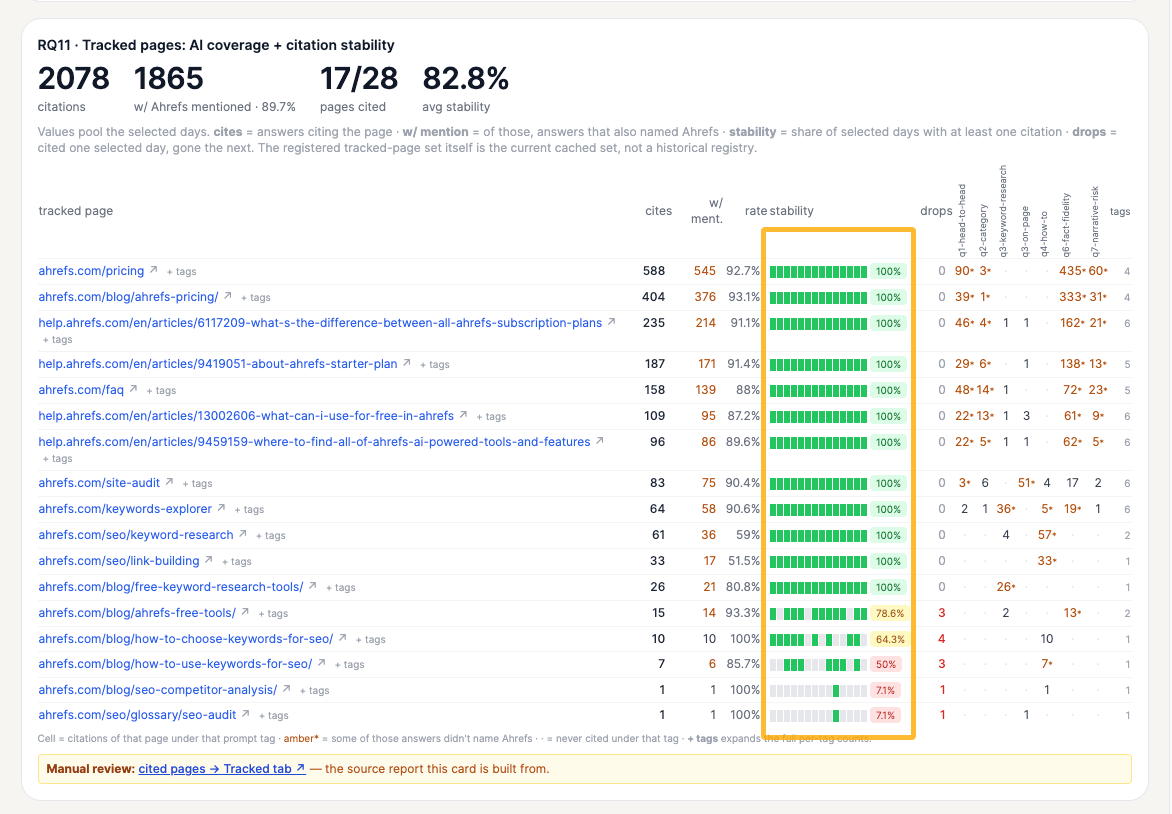
This makes it easier to see whether a page is consistently influencing AI answers, gaining traction, or gradually disappearing from citations.
It can also help you evaluate your AEO work. If a page you optimized starts getting cited and maintains that visibility, that's a much stronger signal than a short-lived spike.
And if an important page starts losing citations, you know it may be worth investigating what changed.
Add SEO, paid search, and traffic data for context
Another useful idea is to look at what is happening around the same topics and competitors outside of AI answers.
You could bring in signals such as organic rankings, search traffic, paid search activity, AI search traffic, and bot activity to get a broader view.
For example, suppose a competitor is gaining visibility in AI answers for a particular topic. If they're also ranking, attracting search traffic, and investing in paid search around the same topic, that gives you much more context about why that topic may matter.
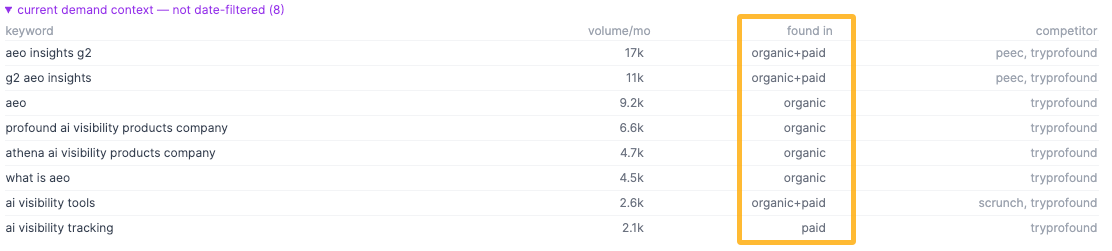
Looking beyond AEO can help you understand whether a change in AI visibility is part of a bigger trend and decide whether it's actually worth your attention.
Take the workflow further with Letaido
Once the data is connected, you can start building workflows around it and use it as a context layer for AI, specialized AI agents, and other tools through API.
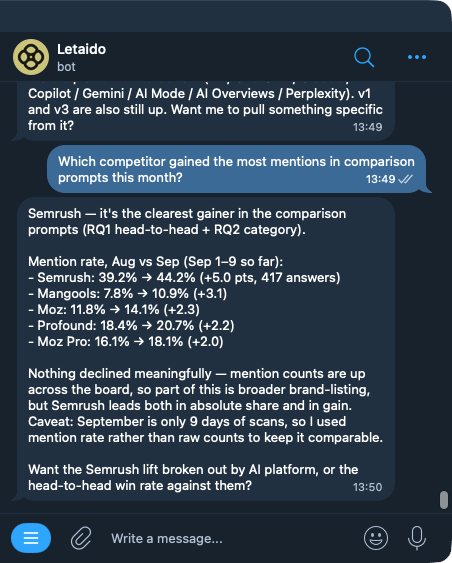
Ask questions directly from your dataset
Instead of opening a report and applying filters manually, you could ask:
“Which competitor gained the most mentions in comparison prompts this month?”
Or:
“Which pages with factual errors were cited most often this week?”
The system can query the underlying data and return the answer with the relevant numbers.
If you’re using Letaido, you could even interact with the data through Slack, WhatsApp, or Telegram—right when and where a question about your AI visibility comes up.
Connect existing AI skills and workflows
If you already have AI skills or workflows you use for AEO, you could connect them directly to the dashboard and use them to generate or enrich the data there.
That way, you can reuse the know-how you’ve already built and keep your most useful AEO workflows in one place, instead of triggering each skill separately.
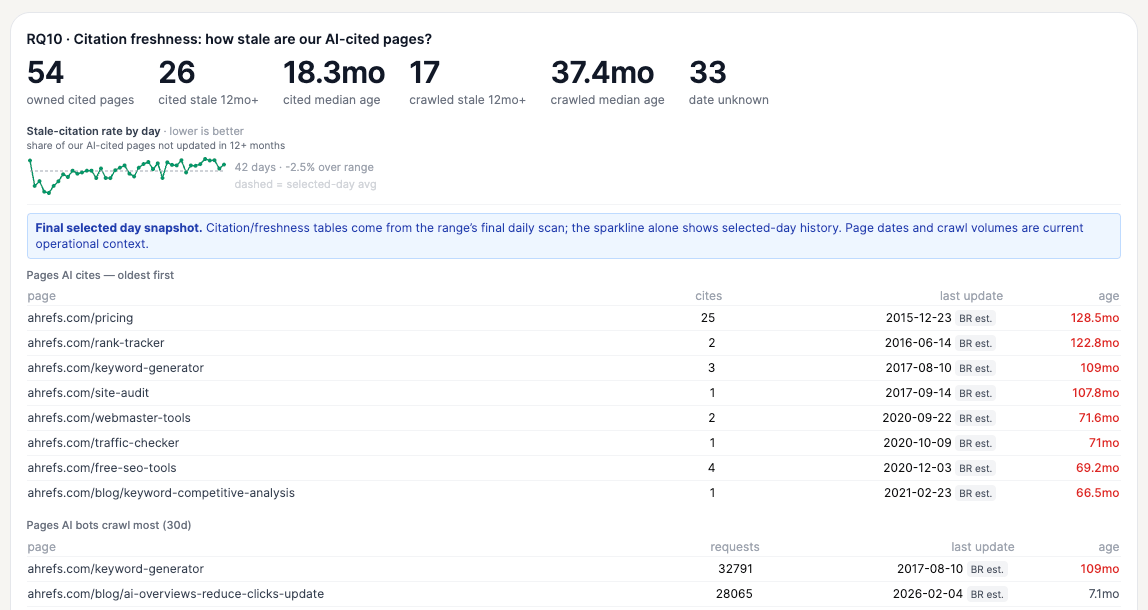
That’s how I added outdated-page detection to my dashboard.
I already had a skill for this—you can also find it in the official Letaido skill collection as AI Citation Freshness Audit—so I simply asked AI to run that process on the pages appearing in our report.
That let me bring the results straight into the dashboard without rebuilding the workflow from scratch.
Automate tracking for active AEO projects
If you’re running several AEO projects at once—say, correcting facts on third-party sites or engaging with Reddit threads that AI frequently cites—you can set up recurring jobs to watch for the changes you expect those projects to produce.
For example, you could ask Letaido to regularly check whether corrected facts start appearing in AI answers, whether your brand gains visibility in targeted Reddit threads, or whether those sources begin showing up more often in citations.
This gives you an ongoing view of whether each project is actually moving the metrics you care about.
Get alerts when important metrics change
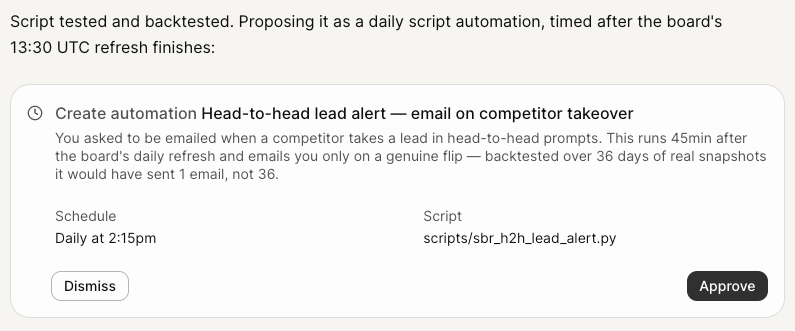
You can define the AEO changes and events that are worth your attention and have the system alert you when they happen.
That could be a sharp drop in topic share of voice in a particular tag, a competitor taking the lead, an important page losing citations, a factual error appearing across multiple AI answers, or a new competitor page mentioning your brand.
The alert could go straight to email, Slack, or another tool your team already uses.
Monitor influential web mentions as they happen
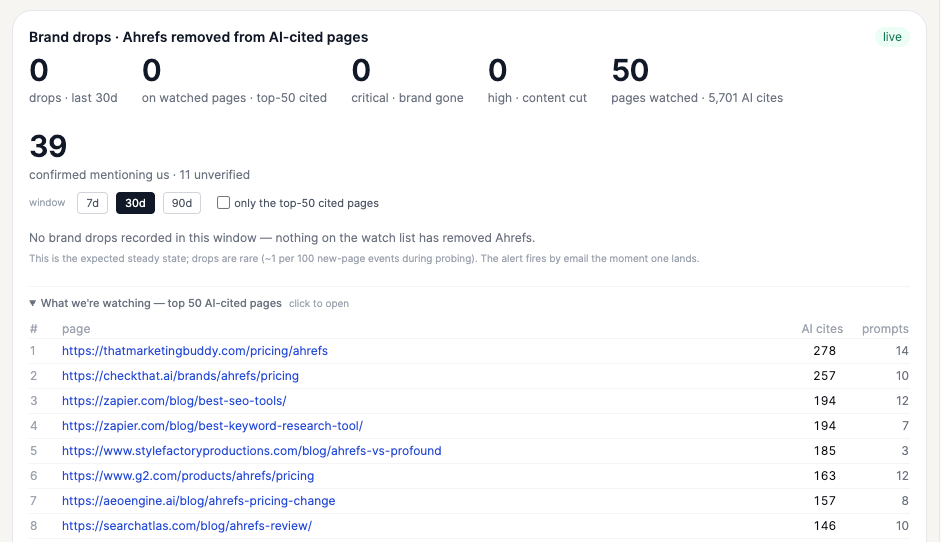
Another idea is to connect a live web mention source, such as Firehose, to monitor important pages as they appear or change.
For example, we could track competitor pages with “Ahrefs” in the URL and get notified when they publish something new or change how they describe us. We could also monitor the top 50 third-party pages that mention Ahrefs and are frequently cited by AI, and flag when our brand is removed or our coverage changes.
This gives you a way to watch the parts of the web that may influence your AI visibility and react while those changes are still fresh. All you have to do is provide a Firehose API to Letaido and ask to build it.
Build an AI visibility monitoring routine
AI visibility is not something you check once and fix once. Brands change. Products change. Competitors launch new features. Publishers update their pages. AI systems change the sources they use and the way they answer questions.
So the goal is to build a routine that helps you catch meaningful changes without checking everything all the time. Here’s a simple way to keep an eye on it:
Final thoughts
The main takeaway is: diagnose the problem before trying to improve your AI visibility.
If your brand is missing from important answers, you may need stronger content or more third-party mentions. If AI keeps repeating inaccurate information, trace it back to the sources behind the claim. If competitors dominate an important topic, find out what’s helping them win. And if AI crawlers can’t access your pages, fix that before investing more in content or PR.
Once you know what the problem is, the next step becomes much clearer.
That’s also why I wouldn’t judge AI visibility by a single score. What matters is understanding where your brand is missing, misunderstood, or losing ground—and deciding which of those gaps are actually worth fixing.
And this isn’t a one-time exercise. Products change. Competitors move. Publishers update their content. AI systems change the sources they use and the answers they give.
So the workflow is ongoing: diagnose, prioritize, act, and check again.

















.jpg&h=630&w=1200&q=100&v=1a56ad72fe&c=1)