The Step-by-Step Guide to Designing Local Landing Pages That Convert
While the growth of artificial intelligence (AI) and global conveniences like Amazon has been a great thing for society, there’s still an undercurrent of people returning to a local, more personal-feeling shopping experience. But this “return to local” doesn’t...
 JaneWalter

While the growth of artificial intelligence (AI) and global conveniences like Amazon has been a great thing for society, there’s still an undercurrent of people returning to a local, more personal-feeling shopping experience.
But this “return to local” doesn’t change the fact that we still live in an internet age. Enter local search engine optimization (SEO) and landing pages.
Local SEO tends to work best for businesses with physical locations that require direct customer contact, but it can also work for virtual online businesses that don’t necessarily meet their customers before a business transaction takes place.
This is why local landing pages are so important. They can give customers the convenience of an online transaction while still providing the trust and personal feel of a local business—if your landing page is done right, of course.
Optimizing your landing page design with the proper elements can help you attract local customers to your business, increase lead generation, and boost conversion rates.
Key Takeaways
Local landing pages only work when they’re built for real locations and real intent. One page per city or service area, with localized keywords, metadata, and copy that matches how people actually search (“service + city” or “near me”). Trust signals drive both rankings and conversions. Consistent NAP data, real reviews from nearby customers, local photos, and clear business details help you show up in map features and convince visitors to take action. Content needs to feel local, not duplicated. Strong local landing pages include tailored copy, location-specific frequently asked questions (FAQs), social proof, and visuals that prove you serve that area, as opposed to generic pages with city names swapped in. Mobile optimization is nonnegotiable for local SEO. Most local searches happen on mobile and convert fast. Pages must load quickly, display contact info above the fold, and make calling or getting directions effortless. Schema markup and clear calls to action (CTAs) turn visibility into results. Structured data helps search engines and AI tools understand your business, while strong, localized CTAs guide users to call, book, or request a quote immediately.Why Are Local Landing Pages Important?
Local landing pages help you show up when people search for services near them, and they’re key to winning conversions in your area.
Think about how people search: “best dentist in Austin,” “roof repair near me,” or “24/7 locksmith in Chicago.”
If you don’t have dedicated pages that target these local queries, you’re invisible in search engine results. In fact, recent stats show 80% of U.S. consumers surveyed search for local businesses online once a week, with about one-third (32%) searching for local businesses multiple times a day. Google’s local algorithm prioritizes relevance and proximity, and a well-optimized local page checks both boxes.
But optimizing your local SEO and landing pages is about more than appeasing Google’s algorithm. These pages can actually convert.
When someone lands on a page with your local address and glowing reviews from nearby customers, trust builds fast. In fact, according to Uberall.com, 85% of customers visit local businesses within a week of discovering them online. 17% of those visit the very next day. That’s why smart local businesses treat these like high-converting landing pages, not just generic content dumps.
With large language models (LLMs) and AI tools pulling content to answer local questions, the need for detailed, well-structured local pages becomes even more critical. These models lean on content that clearly signals relevance and authority, something a basic homepage or generic service page won’t do.
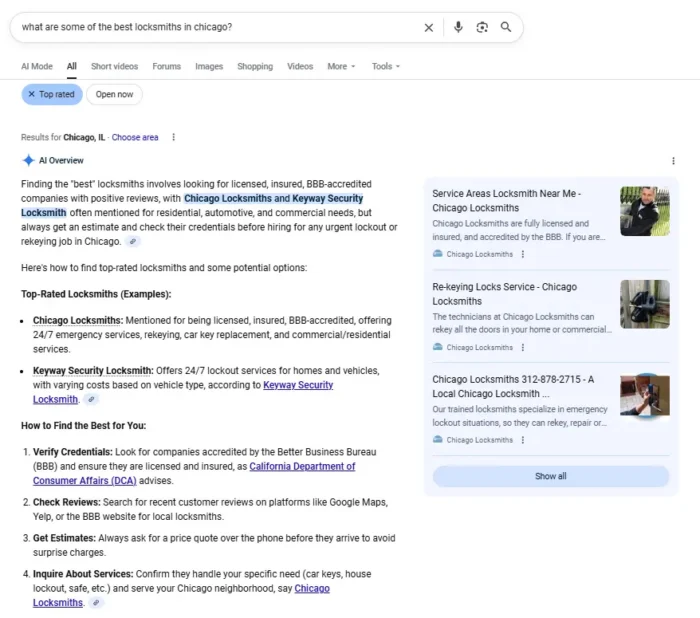
Bottom line: if local traffic matters to you, local landing pages need to be part of your SEO and conversion rate optimization (CRO) strategy.
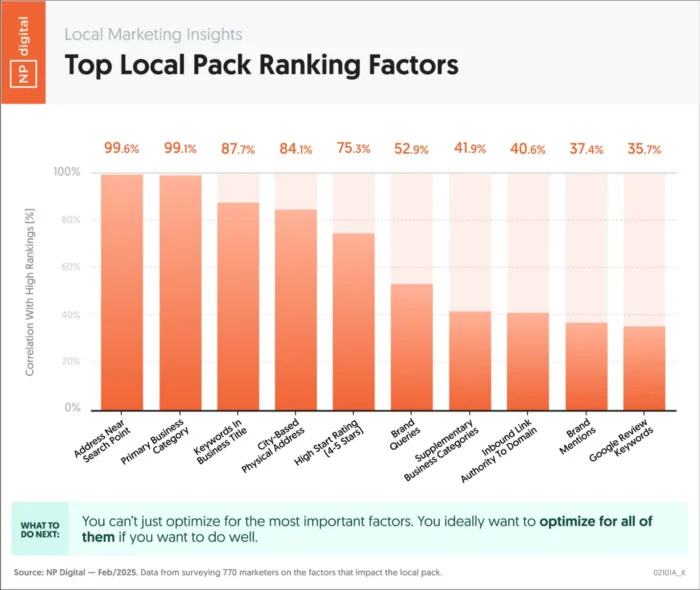
Step 1: Identify where your customers are located.
Local landing pages only work when you know exactly which towns, neighborhoods, or service areas you’re trying to win. Otherwise, you can rack up traffic and still feel stuck because the visits come from places you can’t serve and don’t convert.
Start by answering two questions: Which locations do you want customers to come from? And which locations are they actually coming from today? Once you have both, planning local pages gets a lot easier.
Before you even open your reports, define your real-world service area. If you’re a storefront, your address needs to match how you operate in the real world (and be consistent everywhere it appears). If you’re a service-area business (such as a plumber, cleaner, or mobile vet), set a clear service area in your Google Business Profile so you don’t waste time targeting locations you can’t support.
Then, stop relying on a single data source. Use a few location signals together:
Google Analytics 4 (GA4) to spot city/region trends for session and key events (keep in mind location and demographics reporting is aggregated and can be limited by consent).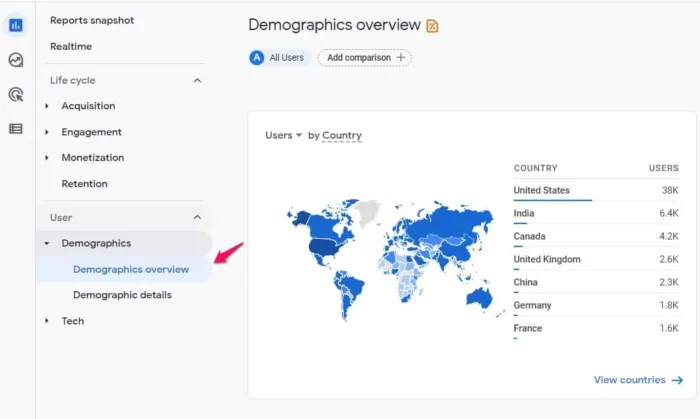 Google Search Console to see the “intent layer”—which local queries are driving clicks and impressions.
 Google Business Profile to see who takes action: calls, direction requests, and website clicks.
Paid geo reporting in Google Ads to confirm what’s real versus inflated by “interest” targeting.
Google Business Profile to see who takes action: calls, direction requests, and website clicks.
Paid geo reporting in Google Ads to confirm what’s real versus inflated by “interest” targeting.
Finally, turn those insights into simple personas with local references, clear benefits, and social proof, so your page reads like it was made for that person in that place.
Step 2: Use localized keywords and metadata to create relevance.
Relevance still matters, but that doesn’t mean you can stuff a city name into every sentence and call it a day. Good local SEO matches what the searcher wants (intent) with what the page promises, starting right in the SERP.
Here’s the key difference: a local landing page usually targets transactional intent (“dentist in Austin,” “emergency plumber near me,” “book HVAC repair”), so your keyword + metadata strategy should read like a clear offer, not a watered-down blog headline.

Start with the basics that actually move the needle:
Title tag: Make a descriptive, concise, and unique title (Google can rewrite titles, but strong input helps). A simple formula works: Primary service + city + differentiator (and brand if it fits). Meta description: Google primarily builds snippets from on-page content, but it may use your meta description when it better matches the query. Write unique descriptions per page, include the “what” + “where,” and add a reason to click (pricing, availability, social proof). Avoid long strings of keywords. Meta keywords: Skip them. Google has said it ignores the keywords meta tag for web ranking.Now, a quick warning: if you’re cranking out dozens of near-identical city pages that funnel to similar destinations, that’s exactly what Google calls doorway abuse. And lists of cities jammed onto a page can fall into keyword stuffing territory.
Step 3: Use consistent NAP data
NAP stands for name, address, and phone number, and it needs to be exactly the same everywhere your business appears online. That includes your local landing pages, your Google Business Profile, directories, and social platforms.
Why does this matter? Because Google (and users) rely on NAP consistency to trust your business is legit. Inconsistent info can hurt your rankings and knock you out of key local SERP features like the map pack.
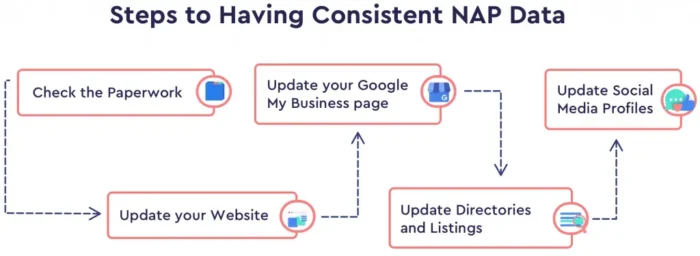
Make sure your NAP is crawlable text, not embedded in an image. Add it in the footer or near your CTA, and match it letter-for-letter with your business listings. Even something small, like “Street” vs. “St.”, can throw off search engines.
If you serve multiple locations, each page should have its own unique NAP. No shortcuts here. Clean data builds trust, and trust drives clicks.
Step 4: Create and publish valuable content
Implementing local landing page design best practices in your content does two things: it helps you rank for location-specific searches and gives visitors a reason to trust you.
Start with copy that speaks directly to your audience in that area. Mention the city or neighborhood naturally, highlight the services you offer there, and include local differentiators like special hours or nearby service coverage. Make it feel personal.
Next, layer in content that builds credibility. Local reviews and case studies show real proof that your business delivers. Include names, star ratings, and even short quotes to make the social proof pop. Photos help, too. Real images of your team or completed projects add authenticity.
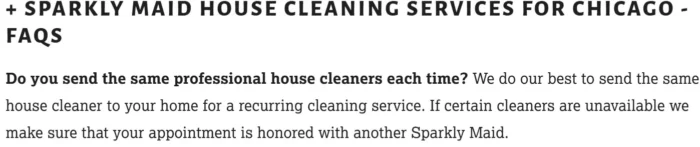
You should also include a brief FAQ section that answers questions specific to that location. Not only does this help your readers, but it also increases your chances of showing up in featured snippets or AI-generated results.
Step 5: Add an effective CTA
Every local landing page needs a clear call to action. Without it, you’re leaving conversions on the table.
The best CTAs guide visitors to take the next logical step, whether that’s calling your business, booking an appointment, or requesting a quote. To be effective, your CTA must feel local and relevant. “Get a Free Quote” is okay. “Get a Free Plumbing Quote in Phoenix” is better. It reinforces the location and makes the offer feel tailored.
Make sure your CTA stands out visually. Use buttons, bold text, and color contrast to grab attention. And don’t just put it at the bottom. Add it near the top of the page and repeat it throughout, especially after sections like testimonials or service descriptions.
If phone calls are your goal, use a click-to-call button—especially for mobile users. For forms, keep them short. Name, email, and one key question is usually enough.
Remember, your local landing page should do more than just inform, it should drive action. The CTA is where that happens.
Step 6: Optimize your local landing pages for mobile users
Mobile search isn’t just dominant, it drives action. In fact, 88% of mobile local business searches result in a call or visit within 24 hours, showing how urgent mobile intent has become.
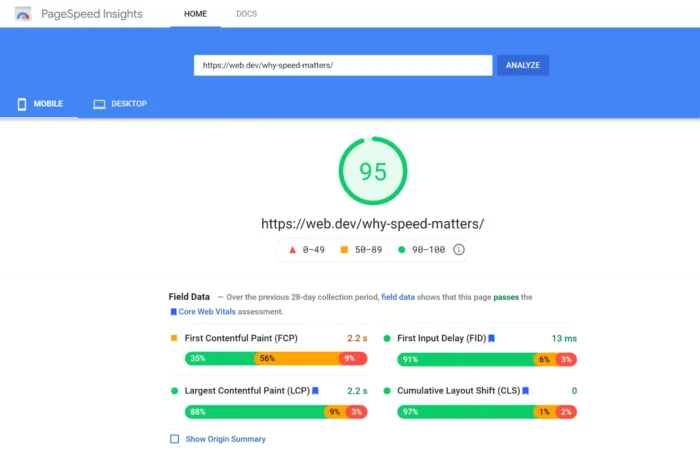
Start with your page performance. Speed is critical. Slow mobile pages frustrate users and push them to competitors. Tools like Google PageSpeed Insights help identify bottlenecks, enabling you to improve load times by compressing images and deferring unused scripts. Fast pages mean better user experience (UX), which, in turn, leads to higher engagement.
Responsive design is nonnegotiable. Your layout must adapt to screens of all sizes with easily readable text and minimal pop-up interference. Prioritize large, clickable CTAs, and ensure your contact info is visible without scrolling.
Mobile users are often on the go. Clearly display your NAP details front and center, ideally above the fold. Clean navigation and quick access to key info make it easier for people to act immediately.
Step 7: Add schema markup
Schema markup helps search engines understand the context of your content, and that’s a big deal for local SEO.
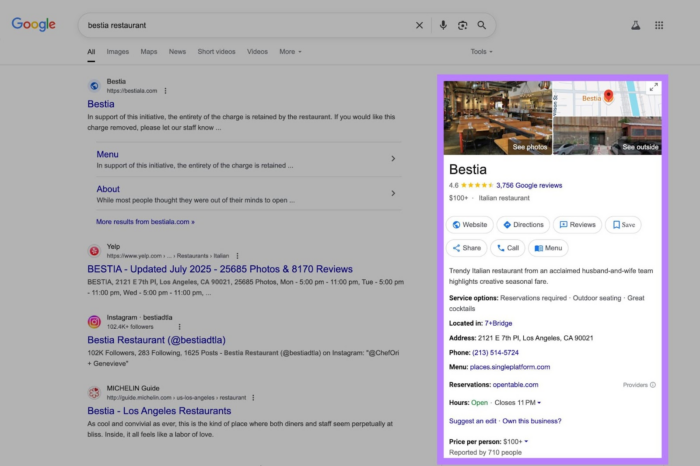
When you add local business schema to your landing pages, you’re giving Google structured data that it can easily read. This increases the chances your business showing up in rich results like the map features or AI-generated summaries. It’s not just about visibility. It’s about making your information easier to find, trust, and act on.
At a minimum, include schema for your business name, address, phone number (NAP), hours of operation, and service area. This aligns perfectly with the on-page content you’ve already built. The more complete your schema, the more signals you’re sending to Google that your business is real, local, and helpful.
You can generate local business schema using tools like Google’s Structured Data Markup Helper or Schema.org. Then either embed it as JSON-LD in the <head> of your page or use a plugin if you’re on a platform like WordPress.
Don’t forget to test it. Use Google’s Rich Results Test to make sure your markup is working as intended.
It takes a few extra steps, but schema markup is one of the easiest technical wins you can add to a local landing page. It won’t guarantee rankings, but it gives your content a better shot at being seen and trusted.
FAQs
How do I create content for local landing pages for SEO?
Start with localized keywords (e.g., “[service] in [city]”) and ensure they appear naturally in your headlines and throughout the copy. Then, write content that actually helps local visitors: include location-specific details, highlight nearby landmarks, and speak directly to the needs of that community. Bonus points if you add customer reviews or links to local pages.
How to make local SEO landing pages
Structure each page around one location or service area with unique URLs (like /plumbing-los-angeles). Don’t forget your Google Business Profile and local schema markup. They help search engines match your page with nearby searchers.
How to optimize landing page for local SEO
Use consistent NAP (name, address, phone) info across the page and the web. Add a local map, embed reviews from customers in that area, and link internally to relevant services. Make sure your page loads fast and works well on mobile because that’s where most local searches happen.
Conclusion
To maximize your search results and lead generation, make sure that you design separate landing pages for each city that you’re targeting.
Above all, create unique, location-specific copy for your landing pages. Building a local landing page requires an investment. It could be the investment of your time, money, or both.
However, it’s become a lot easier these days because of the plethora of landing page creators and landing page templates.