AEO checker tools that measure answer engine visibility [2026]
An AEO checker tells you whether the AI answers your buyers rely on actually mention your brand. People increasingly ask ChatGPT, Perplexity, and Gemini a question and act on the reply without clicking a link, so visibility that once...
 Troov
Troov
![AEO checker tools that measure answer engine visibility [2026]](https://53.fs1.hubspotusercontent-na1.net/hubfs/53/aeo-checker-1-20260903-3858273.webp)
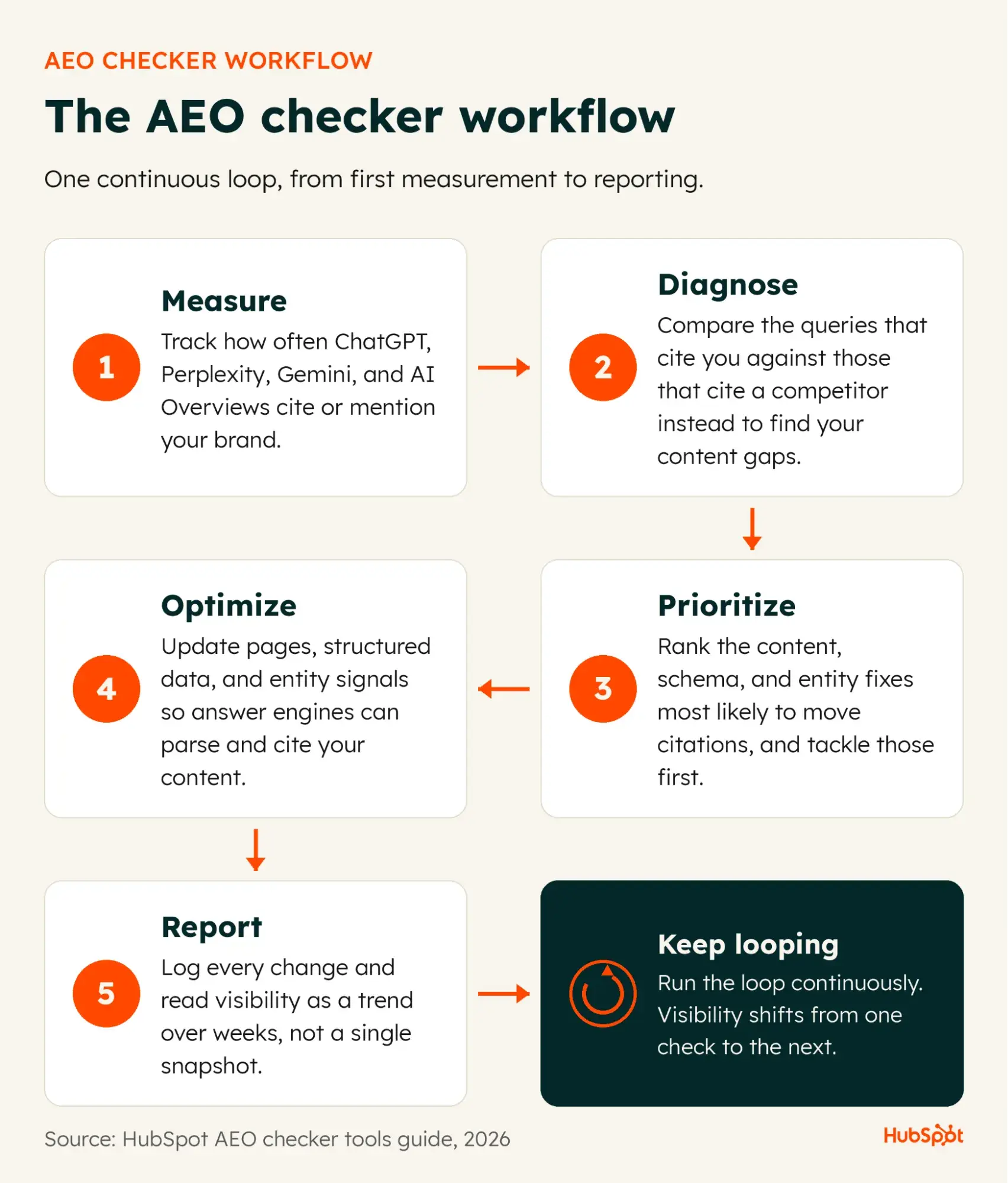
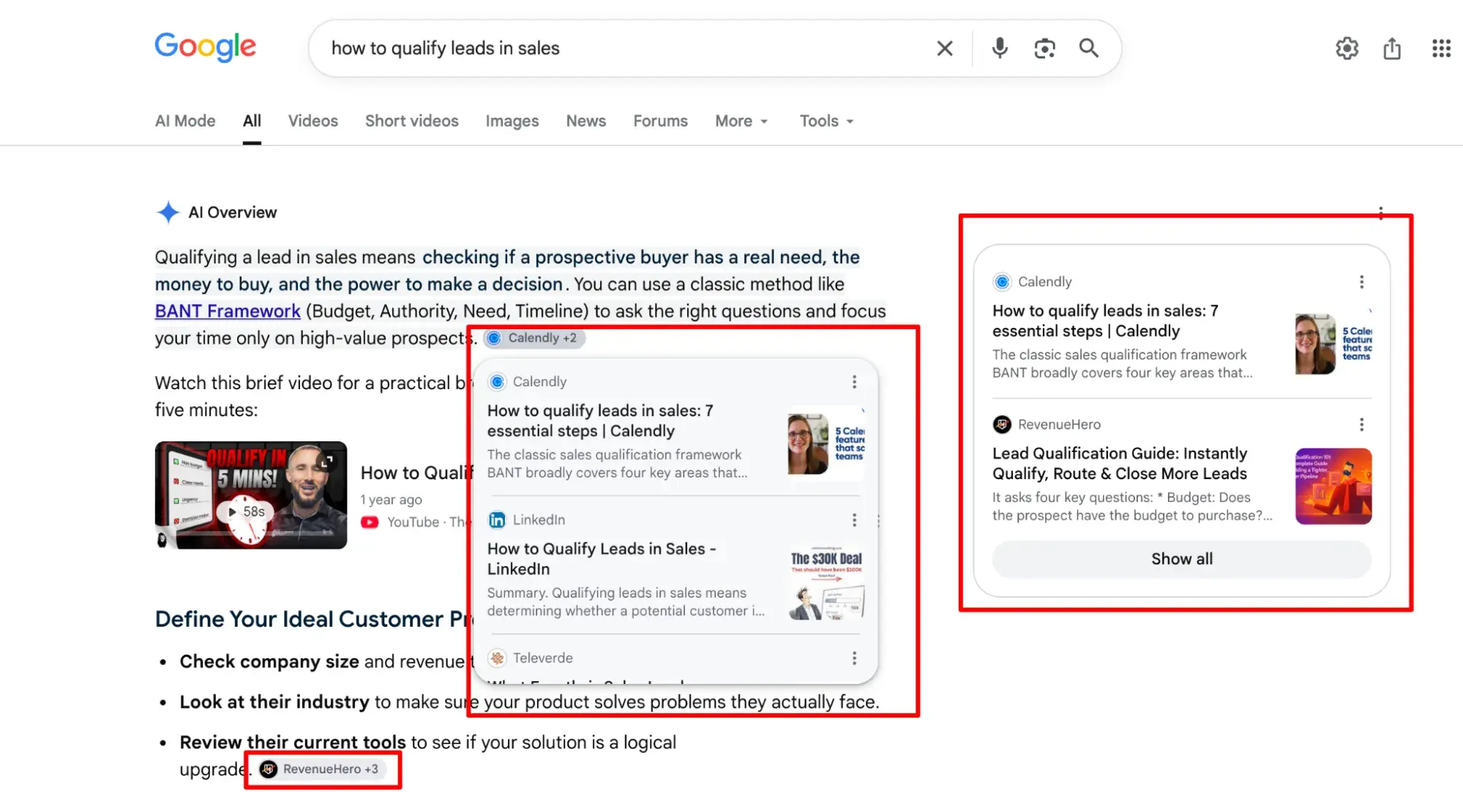
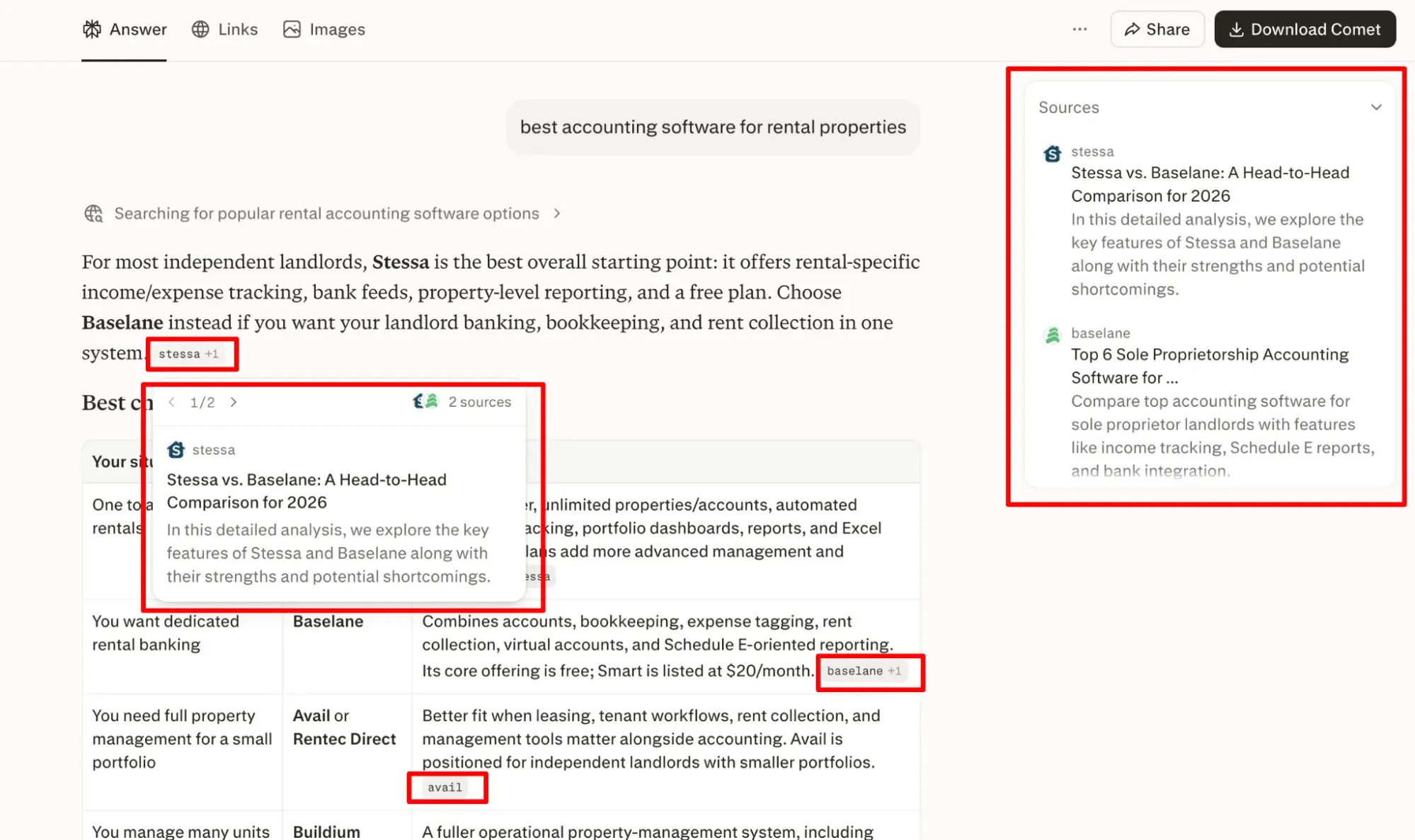
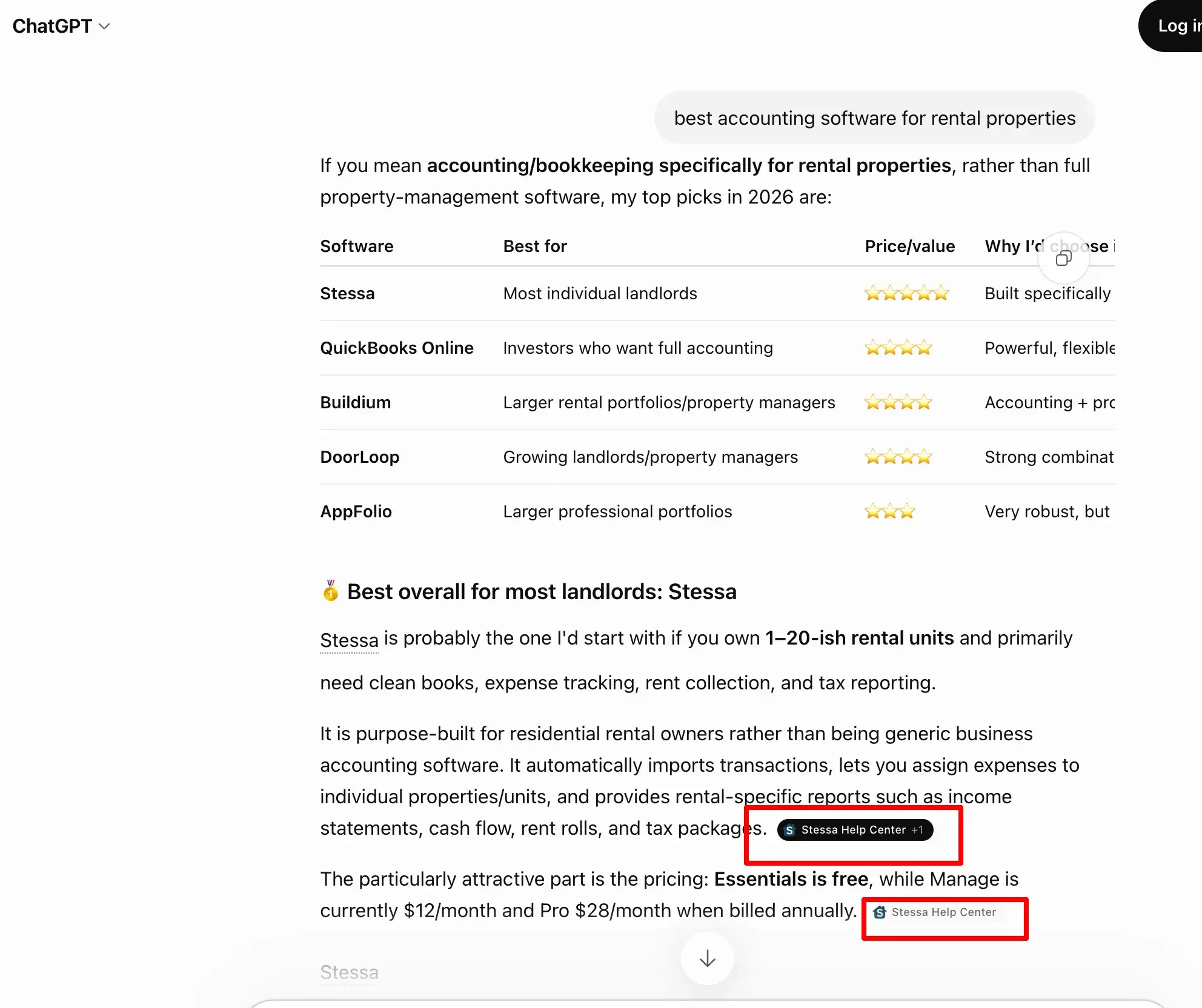
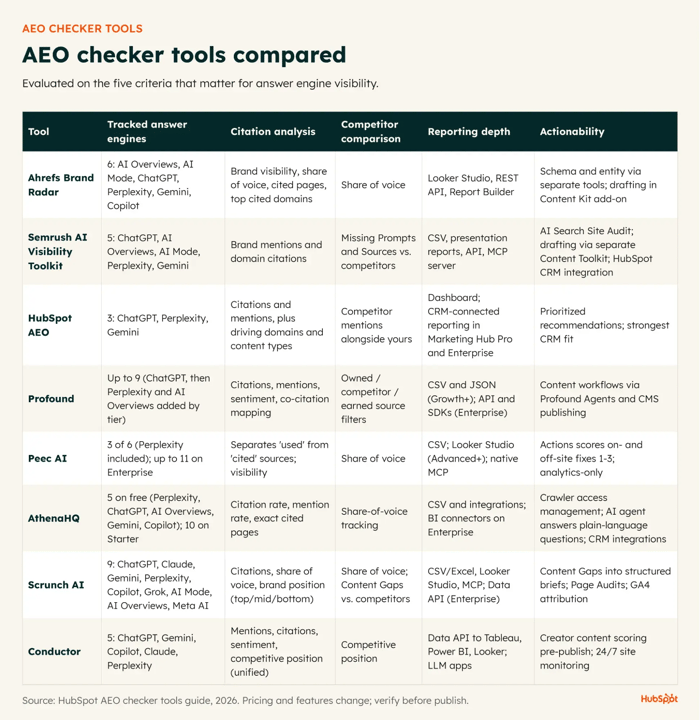
An AEO checker tells you whether the AI answers your buyers rely on actually mention your brand. People increasingly ask ChatGPT, Perplexity, and Gemini a question and act on the reply without clicking a link, so visibility that once showed up in your rankings can vanish into an answer you never see. To manage that, you need to see which questions surface your content, which reward a competitor, and where an engine gets your brand wrong. A good AEO checker measures exactly that, and the tools do it in very different ways. This guide covers what an AEO checker does, how to run manual checks across ChatGPT, Perplexity, and AI Overviews, and how the best AEO checkers compare so you can pick the right fit. Read on to discover the software that’ll help you adapt to this new era of search. Table of Contents Answer engine optimization (AEO) is the practice of improving how often and how accurately your brand appears in the AI-generated answers people get from tools like ChatGPT, Perplexity, and Gemini. Read more about this shift in search behavior in our guide to generative engine optimization. Those tools are answer engines; rather than returning a page of links, they read across many sources and reply with one synthesized answer, often resolving a question before anyone clicks through. Google brought the same summary-first behavior to its own results when it launched AI Overviews in May 2024. AEO and SEO address different halves of the same problem. SEO works to rank your pages in a list of links; AEO works to get your brand mentioned and your content cited inside the answer itself. The two are complementary rather than competing, and strong SEO still supplies the crawlability and authority signals that answer engines rely on when they choose what to cite. That citation goes to the content answer engines can parse and trust: clearly structured pages, direct answers to real questions, and claims backed by verifiable primary sources. An AEO checker measures how visible your brand is across answer engines, then turns that visibility into recommendations on how you can improve. It checks: From there, a checker ranks what to fix first, flagging the content updates, schema corrections, and entity improvements most likely to move citations. Checking your visibility in AI Overviews is a manual process to start: you run your priority queries in a live search session and read what Google returns. Google’s AI Overviews (AIOs) surface only when Google’s systems decide a summary adds something beyond the standard links, so they don’t trigger for every query. An AIO can also vary from one session to the next, so sampling across a few sessions beats a single lookup. When one appears, it cites the pages it drew from. As you can see in the screenshot below, Google places source links inline, next to the text they support, with a desktop hover preview naming the site. List the queries that matter: your brand name, branded product terms, and the informational questions your buyers ask. Run each in a signed-out or incognito session, and record three things: whether an AI Overview appears, whether your domain shows up among its inline source links, and the exact claim it makes. Compare the queries that trigger an AIO and cite you against those where an AIO appears but competitors are cited instead of you. That second group is your content gap list. Because AIOs vary between sessions, treat a single absence as a prompt to re-check, not proof you’ve lost a placement. Screenshot each result with the query, date, and location for a defensible before-and-after record. Don’t count on Search Console to isolate this for you. Its standard Performance report rolls AI Overview activity into the overall “Web” search type rather than breaking it out. Google started rolling out a dedicated generative AI performance report in June 2026, but that view reports impressions only and reached just a subset of sites at launch. Pro tip: These manual checks work for a short query list, but they don’t scale, and AIOs shift often enough that sampling them by hand gets unreliable at volume. Several AEO checkers detect AI Overviews for you and log every result automatically. The Tools With AI Overviews Tracking section below covers the ones that handle it. ChatGPT and Perplexity cite sources inside the response, so a check means reading each answer for your brand and links. Perplexity by default attaches citations to every answer, each linking to the source it drew from. It also shows a panel to the right listing all sources. ChatGPT, on the other hand, shows inline citations when a response uses web search and also shows them in a Sources panel beneath the reply. Using the branded and informational queries you defined earlier, check two things: whether your domain appears among the cited sources, and whether your brand is named in the answer text. A citation and a mention are separate wins. ChatGPT only searches the web when a question benefits from current information, or when you select web search manually. Ask direct, current questions (“best [category] tools for [use case]”), so the engine reaches for live sources you can inspect. Sources vary from one query to the next, so run each prompt several times across fresh sessions. For every run, record the engine, prompt, date, whether you were cited or mentioned, and which competitors appeared. That log surfaces inconsistencies (e.g., cited one run but not the next, or by Perplexity but not ChatGPT). Each absence is a task. Where a competitor is cited and you aren’t, fix that question’s content or structure, then re-run after publishing. Checking AI visibility manually is fine when you’re starting out with a small dataset, but it doesn’t scale. Choose AEO checking software that can monitor answer engine visibility continuously and automatically. Here are the factors I’d look for: HubSpot AEO tracks visibility across ChatGPT, Perplexity, and Gemini and returns prioritized recommendations; in Marketing Hub Professional and Enterprise, AEO adds CRM-connected reporting. For a free snapshot first, AI Search Grader scores how answer engines currently represent your brand. The next section compares specific AEO tools against the above factors. I’ve categorized the best AEO checking tools to make it easy to find the one that best fits your unique needs. Check out the quick comparison table below, then scroll down for details on each tool. Brand Radar draws on real search queries rather than synthetic prompts, and AI Overviews is its largest index. Organic Research flags which of your ranking keywords already trigger AI Overviews, so you can prioritize near-inclusion pages. HubSpot AEO tracks both citations (AI answers that link back to your domain) and mentions (answers that name your brand without a link), plus the domains and content types driving visibility for you and competitors. Profound goes beyond citation detection into citation context: sentiment scoring, uncited-prompt flagging, and a breakdown of citations by source type (owned, competitor, earned). Peec AI is a pure-play analytics tool reporting clean Perplexity data. AthenaHQ tracks Perplexity on every plan, including a free tier, with a conversational assistant. Scrunch AI checks whether AI crawlers can reach and render your pages. Conductor pairs 24/7 technical monitoring with a content scorer. Once a checker is running, a handful of metrics tell you whether your visibility is improving. Track these: Read these as trends. A single reading tells you little; the direction over weeks is what matters. Track citation coverage alongside brand visibility, while engagement and qualified-traffic proxies (AI-referred sessions, branded search lift) help capture the zero-click influence you can’t measure directly. HubSpot AEO tracks your visibility score week over week across ChatGPT, Perplexity, and Gemini, and in Marketing Hub Professional and Enterprise, connects that data to the contacts and deals it touches. An AEO checker’s job usually ends at the diagnosis. It flags the gap, then leaves you to export the data, brief a writer, and rebuild the fix in a separate CMS. HubSpot keeps the diagnosis and the fix in one place when you subscribe to Marketing Hub Professional or Enterprise. HubSpot AEO is available on its own and turns your visibility data into prioritized recommendations, telling you what to create, what to update, or where to reach out, and why. On its own, at $50/month, HubSpot AEO covers tracking, prompt suggestions, citation analysis, and those recommendations, but it stops at implementing the fixes for you. Acting on a recommendation without leaving HubSpot, plus prompt and recommendation suggestions drawn from your CRM data, comes with AEO in Marketing Hub Professional and Enterprise. There, Content Agent turns a blog recommendation into a research-backed first draft in your brand voice with a single click. The draft lands in HubSpot’s content editor, where your team reviews and refines it before publishing through Content Hub and Marketing Hub. That generation is in public beta and runs on HubSpot Credits, at roughly $10 (1,000 credits) per blog post. Because that work sits on Smart CRM, HubSpot records traffic referred from AI tools as its own source and ties it to the contacts and deals it produces, so AEO reporting lives next to the rest of your funnel. One honest limit: Answer engines often resolve a question without sending a click. HubSpot can attribute the AI traffic that does click through, but visibility that never becomes a session won’t register as pipeline, so read visibility scores and referral revenue as two related but separate measures. HubSpot AEO is the practical next step once manual checks stop scaling and you need this loop running continuously. It depends on your method. Answer engines return different sources from one run to the next, so manual spot-checks should sample several sessions per query. Automated checkers handle this better: Daily or weekly refreshes catch that volatility, while a monthly snapshot buries it. People use the two labels interchangeably, but AEO is the more precise one. Answer engine optimization names a specific practice: improving how accurately and how often your brand appears in AI-generated answers from tools like ChatGPT, Perplexity, and Gemini. Treat AEO as the term to standardize on. Yes, within limits. Both can surface the sources behind an answer, so any single response is readable. But results shift from one run to the next, so reliability comes from repetition. Run each prompt several times across fresh sessions and track the pattern, not one snapshot. No. They measure different things. AEO checkers track how answer engines cite and mention you; SEO tools track rankings, keywords, and backlinks. Since strong SEO still feeds the crawlability and authority signals answer engines draw on, run the two side by side rather than swapping one out.
What is answer engine optimization?
What does an AEO checker do?
How to Run an AEO Check in Google AI Overviews
Step 1: Define your important queries.
Step 2: Interpret results.
Step 3: Build reporting.
How to Check ChatGPT and Perplexity Citations
Step 1: Run practical citation checks.
Step 2: Phrase prompts to trigger retrieval.
Step 3: Log results and convert gaps to tasks.
AEO Checker Buyer Criteria
Best AEO Checker Tools
Tools with AI Overviews Tracking
Ahrefs Brand Radar
Semrush AI Visibility Toolkit
Tools with ChatGPT Citation Detection
HubSpot AEO
Profound
Tools with Perplexity Monitoring
Peec AI
AthenaHQ
Tools for Schema and Entity Readiness
Scrunch AI
Conductor
AEO Metrics that Matter
From Measurement to Action in HubSpot
Frequently Asked Questions About AEO Checker
How often should you run an AEO check?
Is AEO the same as AI search optimization?
Can you reliably track citations in ChatGPT and Perplexity?
Do AEO checkers replace traditional SEO tools?










![A Visual Guide to TikTok Ads Manager [Infographic]](https://imgproxy.divecdn.com/9aaKOtRQYId9gEIRIiE2AgLnRsoeG1xVqz6aJuMegTo/g:ce/rs:fit:770:435/Z3M6Ly9kaXZlc2l0ZS1zdG9yYWdlL2RpdmVpbWFnZS90aWt0b2tfYWRfaW5mbzMucG5n.webp)