FAQ Schema: A Beginner’s Guide
New technologies like AI have drastically changed search engine architecture. Gaining visibility online requires more advanced tactics than traditional SEO. One of these secret weapons to give your pages more real estate in search results is called FAQ schema....
 Hollif
New technologies like AI have drastically changed search engine architecture. Gaining visibility online requires more advanced tactics than traditional SEO. One of these secret weapons to give your pages more real estate in search results is called FAQ schema.
It’s simple to implement using basic structured data (if you’re new to that, here’s a primer on schema). But here’s the real kicker: Google’s AI Overviews and other AI-driven platforms are now pulling content directly from FAQ schema.
In the past, marketers have implemented FAQ schema to gain visibility in Google features, such as featured snippets and Answer Cards. Other features are more prevalent now, but FAQ schema is still an important part of modern search.
Today, using FAQ to structure your data can help you appear in AI-driven results. If your content is optimized, that gives your content the best shot of being read and cited by LLMs, not just by the regular search engines.
Most site owners still aren’t taking full advantage of this. So if you jump in now, you’re ahead of the curve.
This guide will walk you through setup, placement, and results.
Key Takeaways
FAQ schema increases your visibility in Google by making your content more visible to Google features like People Also Ask, as well as the LLMs that power AI search results—even if your ranking doesn’t change. Use schema on FAQ hubs, knowledge bases, and any other priority content. Structuring this data can help answer common questions and reduce friction. Google’s AI Overviews and other LLM-driven features are now pulling answers directly from FAQ schema, making it critical for future visibility. JSON-LD is the recommended format, and you can implement it in under 30 minutes using simple tools or plugins. Schema works best when your questions are specific, helpful, and tied to real customer concerns.What is FAQ Schema?
FAQ schema is a type of structured data you add to your page’s html code to help search engines understand your frequently asked questions and display them directly in results.
It’s based on Schema.org markup, which Google and other search engines use to parse and categorize content. When implemented correctly, FAQ schema turns your standard list of questions and answers into rich results.
That added visibility means users can find the info they need faster, making your website stand out from the rest. You might not jump in rankings, but you’ll earn higher visibility just by taking up more space.
Today, that structured content can also be pulled into generative AI responses like Google’s AI Overviews, which are becoming more prominent in search. That gives you another opportunity to show up, even if you’re not ranking #1.
You don’t need to be a developer to use schema, either. Tools and plugins can handle the heavy lifting, and you can gain a solid understanding of how schema works behind the scenes just by reading this breakdown of structured data.
How the SERP Page Has Evolved for FAQs
Before I dive into FAQ schema in more detail, I want to discuss Google’s ever-changing search results.
Not only does Google change its algorithm regularly, but it also often tests new design elements.
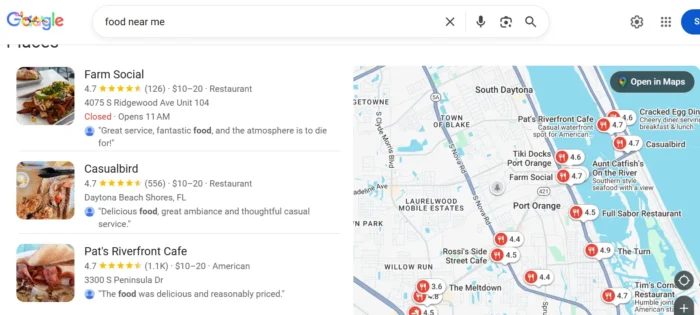
For example, if you search for “food near me”, you see a list of local restaurants along with their ratings.
When you search for a person, Google may display a picture of that person along with a brief overview.
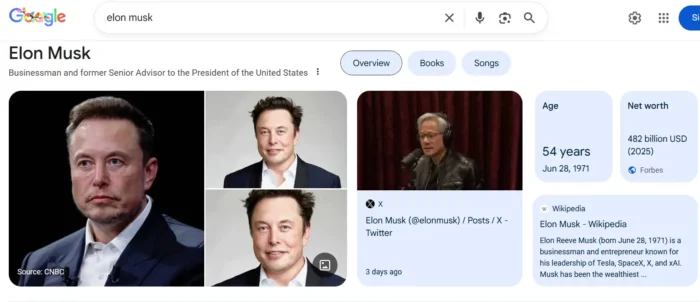
Over the years, Google has refined its search results to provide you with the best experience.
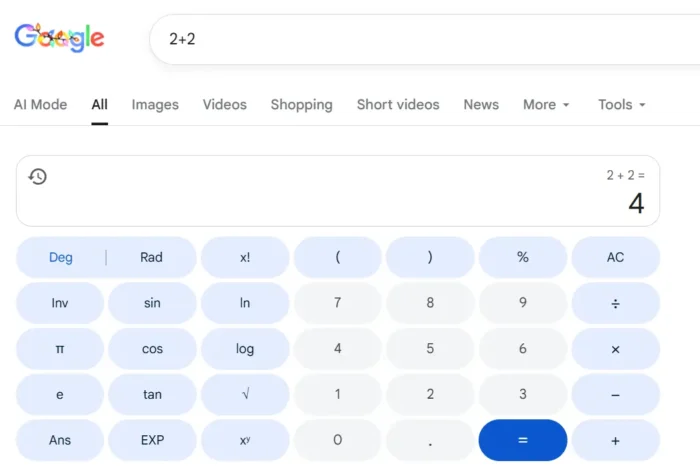
For example, if you search for “2+2,” Google shows you “4,” so you don’t have to click through and visit a webpage.
However, FAQ schema markup may be flying under the radar, by comparison.
Here’s what I mean: if you search “digital marketing,” you see a bank of questions in the People Also Ask section:
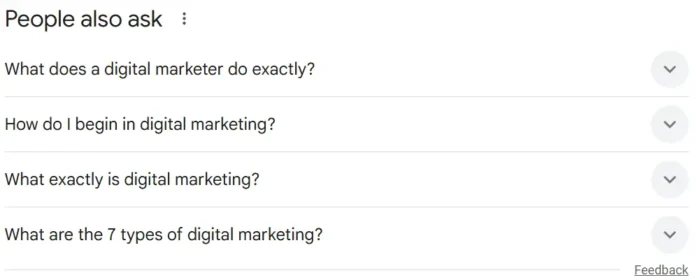
This snippet holds some of the most coveted real estate on Google’s SERPs. It’s the third thing you see below sponsored results and images for our “digital marketing” search.
Getting included in a Google feature like this requires structured data. That’s why FAQ schema is such a powerful optimization.
To take things further, mastering markup and data structuring can also position your pages to appear in Google’s AI Overviews. The large language models (LLMs) that power your favorite AI assistant need a way to process the information on the internet. They rely on schema and data structure to understand what they’re reading. Here’s an example:
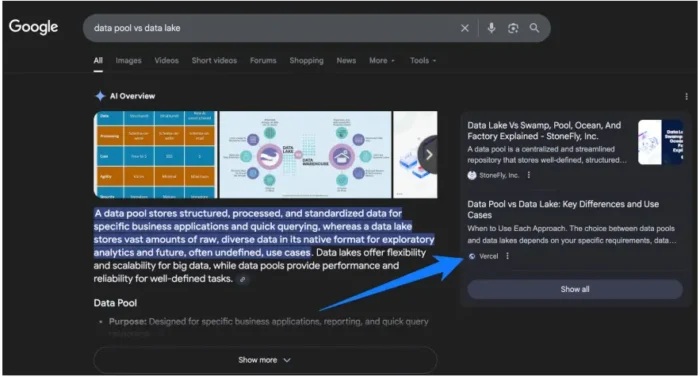
Source: https://searchengineland.com/schema-ai-overviews-structured-data-visibility-462353
So, where should you begin with FAQ schema and data structuring? Keep reading while I talk you through it.
Picking The Right FAQ Schema Markup: QA vs. FAQ Schema
Before you introduce schema to your site, you have a markup decision to make. There are different types of markup, but one of the most popular is FAQ schema.
This kind of FAQ schema markup tells search engines your website is a Frequently Asked Questions (FAQ) page. If you have a FAQ page on your website, using the FAQ schema can help you improve your ranking in the SERPs.
As an example of what FAQs can do, in some cases, you can get a collapsible menu under your SERP results that reveals the answer when a user clicks on it:
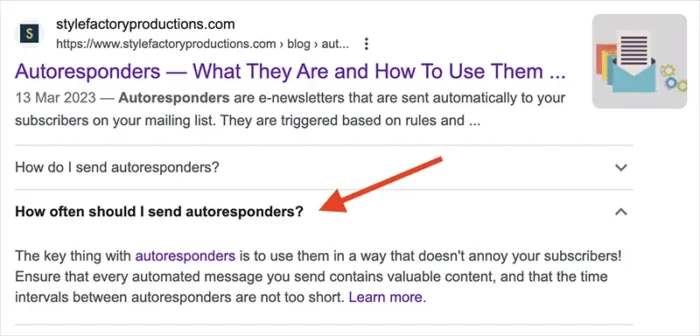
Source: https://www.stylefactoryproductions.com/blog/how-to-add-faq-schema-to-a-website
If you use Google’s voice search, structured data can help you rank here. And, with Google’s current layout, you actually get double the payoff. The AI overview will pull from your structured data, and you’ll also appear as a source tile, directly to the right of it:


In contrast, you use a Q&A schema where users contribute different types of answers and vote for the best one. This provides rich result cards under your SERP, showing all the answers with the top answer highlighted.
After Google’s implementation of its FAQ schema rich results, website owners could have two URLs showing in search. Typically, they look like this:
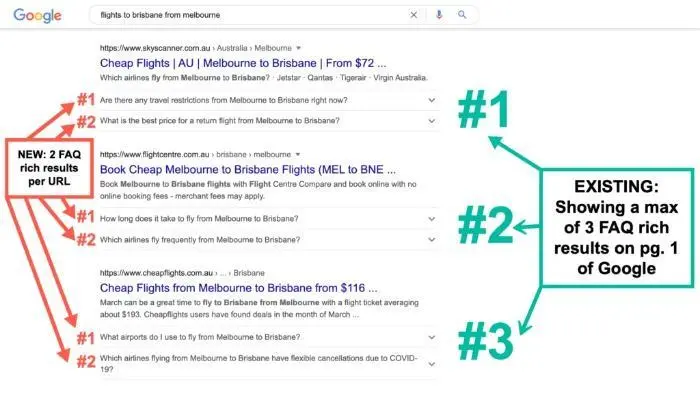
Now you understand the purposes of these different schemas, let’s move on to Google’s guidelines on using FAQ schema.
Google’s FAQ Schema Markup Guidelines
As detailed below, Google has a comprehensive list of FAQ schema guidelines:
Use FAQPage only if your page contains a list of questions and answers. Use QAPage instead if you have a single question, and users can submit alternative answers. Here are some examples:Valid use cases:
The health site created an FAQ page without any option for users to answer alternative questions. A government agency support page that lists FAQs without a way to submit alternative answers.Invalid use cases:
Forum pages reserved for posting a single answer to a particular question. A product support page where users can submit answers to a single question. A product page to which users can submit multiple questions and answers on a single page. Using FAQPage for advertising purposes. The entire question text should be included in each question, and the entire answer text should be included in each answer. The entire question text and answer text may be displayed. Content that includes obscene, profane, sexually explicit, graphically violent, promotion of dangerous or illegal activities, or hateful or harassing language may not appear as a rich result. All FAQ content must be visible to the user on the source page.As set out below, Google also has extensive guidelines for Q&A schema:
Only use the QAPage markup if your page has information in a question-and-answer format, which is one question followed by its answers. Users must be able to submit answers to the question. Don’t use QAPage markup for content that has only one answer for a given question with no way for users to add alternative answers; instead, use FAQPage. Here are some examples:Valid use cases:
Forum pages that allow users to submit answers to individual questions. Product support pages that enable users to submit answers to singular questions.Invalid use cases:
FAQ pages written by the site itself that don’t let users provide alternative answers. Product pages allowing users to give multiple questions/answers on an individual page. How-to guides, blog posts, and essays that answer a specific question. You must not add QAPagemarkup to an entire site or forum if some of the content isn’t eligible, or apply QAPage markup to FAQ pages with numerous questions on a single page. Don’t use QAPagemarkup in your advertising. Each question must include the full text of each question and answer. Only use Answermarkup for answers to the questions. Not for comments on the questions or answers. If your question and content include prohibited content such as hateful language, sexually explicit content, or promote dangerous or illegal activities, Google may not display it as a rich result.If your content meets these guidelines, the next step is to implement the schema on your website and decide which type to use.
How Do I Implement QA and FAQ Schema?
You can implement schema either through JSON-LD or Microdata, but first, let me explain some more about them.
JSON-LD is a schema definition language; it describes the structure and meaning of JSON data. JSON-LD is easy to use, lightweight, and extensible, allowing you to define your own custom schemas or utilize existing schemas from other sources.
In contrast, microdata uses a subset of the JSON format to add extra information to HTML tags. The role of this information is to identify the type of data and how to handle it. For example, you can use microdata to mark up a person’s name and email address:
I recommend choosing one style and sticking to it throughout your webpage; for consistency, I’d suggest not using both types on the same page. Let’s walk through a quick process on how to create and test each type of schema on your site.
Create Your Schema
If you’re unsure which one is best to use, Google recommends JSON-LD, and Google has been in the process of adding support for markup-powered features. You can implement JSON-LD in the header of your content, and it’s quick to add.
JSON-LD
If you’re wondering what this looks like in practice, here are some examples:

For ease of implementation, you can create your own schema by using the Technical SEO FAQ schema markup tool. It gave me the following result:
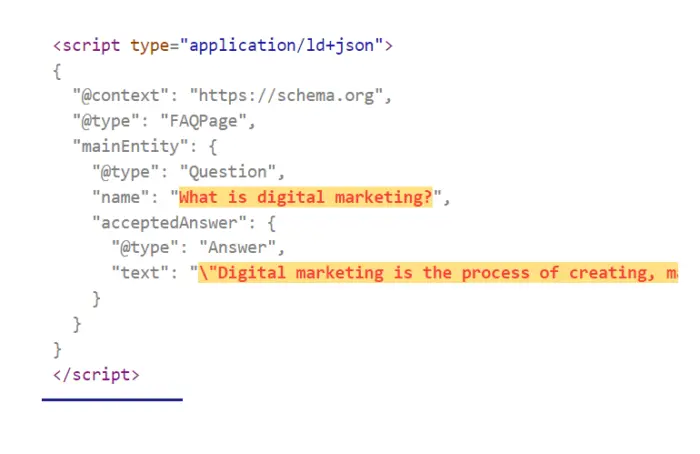
The Technical SEO tool is easy to use. Just select the type of page you want to create, add in your questions and answers, and watch the schema appear!
Microdata
Now on to microdata.
Creating microdata code, like the example below, may appear complicated, but it doesn’t have to be. You can use one of the many free tools to create your own code, like I did here:
<div class=”schema-faq-code” itemscope=”” itemtype=”https://schema.org/FAQPage”>
<div itemscope=”” itemprop=”mainEntity” itemtype=”https://schema.org/Question” class=”faq-question”>
<h3 itemprop=”name” class=”faq-q”>What is digital marketing?</h3>
<div itemscope=”” itemprop=”acceptedAnswer” itemtype=”https://schema.org/Answer”>
<p itemprop=”text” class=”faq-a”>Digital marketing is the process of creating, managing, and executing a marketing plan that uses digital technologies to reach and engage customers. Digital marketing includes email marketing, search engine optimization (SEO), social media marketing, and display advertising.</p>
</div>
</div>
<div itemscope=”” itemprop=”mainEntity” itemtype=”https://schema.org/Question” class=”faq-question”>
<h3 itemprop=”name” class=”faq-q”></h3>
<div itemscope=”” itemprop=”acceptedAnswer” itemtype=”https://schema.org/Answer”>
<p itemprop=”text” class=”faq-a”></p>
</div>
</div>
</div>
When implementing schema on your website, feel free to use the templates above and modify them with your own text, or keep it simple by using the tools I linked to.
Consider questions that prompt your reader to take the next step. That could be clarifying a product feature, explaining your pricing model, addressing objections, or even tackling basic industry terms. If users are asking about it in a search—or in your support inbox—it’s probably a good fit. You don’t need a lot of questions either. Three to five well-structured FAQs can be enough to add value and get picked up by search engines.
Testing Your New Schema
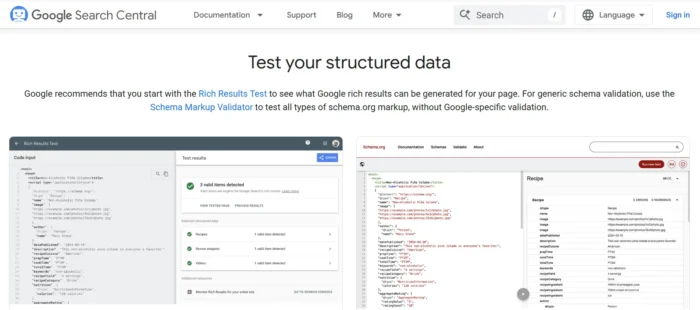
Once you’ve finished, you can use Google’s Structured Data Testing Tool to test your rich results or structured data. The tool tests schema markup and rich results, and gives you feedback on any errors or issues with your code. Google’s Rich Result Tester also gives you an idea of what your structured data looks like in the results.
Getting Results With FAQ Schema
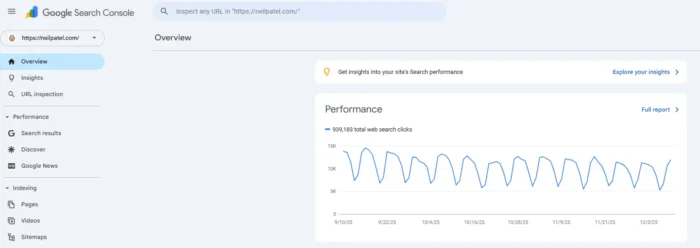
Log in to Google Search Console and enter the URL of any page you’ve modified in the top search bar.
After that, you want Google to crawl the page so it can index the results. The only thing you need to do is click “request indexing”.
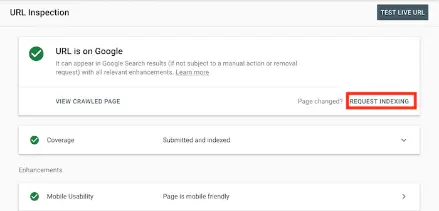
After your URL is reindexed, it’s more likely to show up in relevant search results.
The key to making this work is to do this with pages and terms that already rank on page 1. That’s where I’ve seen the biggest improvement.
Where to Use FAQ Schema
FAQ schema isn’t just for blog posts. You can use it across dedicated FAQ pages, knowledge bases, and any pages that give users helpful answers.
Think of FAQ schema as a way to move users closer to a decision. If a potential customer might hesitate, an FAQ can help them keep going. When those answers show up in search, you’re making it even easier for them to find and trust you.
Wherever you decide to use it, be sure to add FAQs that handle objections, explain your process, or outline what’s included. The goal is to clearly address any concerns your customers may have. This might mean breaking down what makes your product or offering unique or helping customers choose between different options in your industry.
Does FAQ Schema Help Me Rank For People Also Ask and Featured Snippets?
Here’s a question: Does the FAQ schema help with ‘People Also Ask’ and Featured Snippets?
Yes. Properly structuring your data using FAQ schema markup can significantly increase your chances of appearing in People Also Ask or AI-driven searches. Structuring your data shows Google that your FAQs are providing direct answers to users questions, creating a much better chance of increasing your visibility.
Maximizing your efforts here may require some research. Dig into what customers are asking routinely on your own pages, as well as competitors and industry leaders. From there, you can frame those user queries as FAQs on your pages.
With the right questions in hand, your job now becomes answering them as directly as possible. Write a quick, direct answer that takes no more than two to three sentences. Also, don’t “bury the lead.” Make sure you include the important information as close to the beginning of your answer as possible.
Does FAQ Schema Help Me Rank For Voice Search?
Short answer: absolutely!
For a start, FAQ schema can help Alexa users find you. According to recent stats, there are about 77.6 million Alexa users in the U.S. alone, and you want these people to discover your site!
It’s not just Amazon, though.
Apple and Google are also using voice search, and there’s a good reason why: in recent years, voice search use is up among online users. Recent data shows there are over 100 million U.S. consumers using smart speakers.
Additionally, voice search enhances accessibility and enables mobile users to find you when they’re on the go, providing two more reasons to consider using FAQ schema markup.
Questions from voice search get most of their answers from featured snippets, and adding structured data on your website increases the chances of getting you into these high-visibility snippets.
I also suggest checking out these tips on voice search SEO for more strategies for ranking for voice search.
Does FAQ Schema Help Me Rank In LLMs?
Yes, and it’s becoming a bigger deal by the day.
As generative AI continues to shape search, large language models (LLMs) like Google’s Gemini and Bing Copilot are pulling more answers directly from structured content. That includes FAQ schema.
If your content is clearly marked up and answers a question well, it has a higher chance of being pulled into AI Overviews and other rich AI snippets, even if your page isn’t ranking #1 organically.
This is especially true for concise, factual Q&A content. LLMs look for clarity, context, and credibility. Well-written FAQ schema checks all three boxes and gives search engines a clean structure to work with.
While there’s no guaranteed way to rank in AI-generated results, schema gives your content a technical advantage. It tells the model: “Here’s a clear, trustworthy answer.”
And with less real estate available in AI-driven SERPs, every edge counts.
If future visibility is your goal, FAQ schema should be part of your strategy. It’s one of the simplest ways to increase your chances of being surfaced by generative AI.
FAQs
What is FAQ schema?
FAQ schema is a type of structured data that helps search engines understand and display your frequently asked questions in the search results. It can turn your standard FAQs into rich results, giving your listing more space and improving click-through rates.
How do you create FAQ schema?
You can create FAQ schema manually using JSON-LD code or use a tool or plugin that generates it for you. Many platforms like WordPress have SEO plugins that make this simple—just input your questions and answers, and the markup is handled for you.
How do we implement FAQ schema?
Once you’ve created your FAQ schema, you can add it to the HTML of your page—usually in the header or just before the closing body tag. Be sure to test your code using Google’s Rich Results Test to make sure it’s valid and error-free.
Does FAQ schema still work?
Yes, FAQ schema still works—and it’s more relevant than ever. It not only boosts your visibility in the SERPs but also increases your chances of being included in AI Overviews and other generative search features.
Conclusion
The simple hack of adding FAQ schema potentially increases the visibility of your brand and helps improve the authority of your website. It’s a simple solution that can take a single day to implement across your main question, product, or FAQ page.
I’ve used it heavily in the past, and as long as I pick keywords that I already rank on page 1 for, I get great results.
Although FAQ schema markup looks complicated, there are plenty of free tools to help you create it, and taking this extra step may give you an SEO advantage that other sites may lack.








![Run An Ecommerce SEO Audit in 4 Stages [+ Free Workbook]](https://api.backlinko.com/app/uploads/2025/06/ecommerce-seo-audit-featured-image.png)

















.jpg&h=630&w=1200&q=100&v=7abd35f457&c=1)