How to Do an SEO Audit: A Step-by-Step Website Audit Guide
Key Takeaways You’ve set up your website, and it’s looking good at first, but then your engagement and your traffic are falling. Wondering what’s going on? You’re not alone. According to Ahrefs, 96.55 percent of content gets no organic traffic from Google. If you’re panicked, don’t be. An SEO audit can reveal common on-page or technical SEO issues that...
 Astrong
Key Takeaways
An SEO audit is a comprehensive analysis of your site’s technical health, content, backlinks, and AI search visibility. It shows you what’s holding back your rankings and how to fix it. Audit timing depends on scope: Small sites might take a few hours, while larger or more complex sites take a week or more. A complete audit covers technical SEO (e.g., site speed, indexing), on-page elements (e.g., meta titles, content gaps), off-page factors (e.g., backlinks, E-E-A-T), and AI search visibility (e.g., AI Overviews, ChatGPT Search). Tools like Ubersuggest, Ahrefs, Screaming Frog, Google Search Console (GSC), and PageSpeed Insights can make an SEO audit more manageable. Run a full audit at least once a year, with quarterly check-ins for larger or fast-moving sites and mini-audits after site changes or ranking drops.You’ve set up your website, and it’s looking good at first, but then your engagement and your traffic are falling. Wondering what’s going on? You’re not alone.
According to Ahrefs, 96.55 percent of content gets no organic traffic from Google.
If you’re panicked, don’t be. An SEO audit can reveal common on-page or technical SEO issues that might be affecting your online performance.
That’s great news because acting on what you learn from an audit can increase your rankings, along with visitor numbers and conversions.
If you’re not sure where to start, this guide walks you through it step by step.
Before we get into it, let’s explain what an SEO site audit is and why it’s necessary.
What Is an SEO Audit?
An SEO audit is a comprehensive analysis of a website and its search engine ranking that highlights areas for improvement. The process evaluates your on-page and technical SEO metrics, content quality, and backlink profile. These days, a full audit should also include an assessment of your AI visibility.
SEO audits can help spot potential areas of opportunity, like:
Content refresh opportunities Technical SEO issues, such as site speed issues or mistakes in your website’s code Areas where competitors are outranking you Ways to improve UX by improving load times and mobile accessibility for the optimal customer experience Keyword implementation, including titles and meta descriptions Rank performance for your chosen keywords and in the search engine results pages (SERPs) and AI platforms Content updates to align with algorithm and guideline changes Backlink qualityAn SEO audit is expansive, involving all major areas of your website. If that sounds like a lot of work, maybe you need proof that a website SEO audit is worthwhile. I’ve got it.
A detailed SEO audit by NP Digital for the customer experience (CX) automation platform Verint resulted in a significant increase in organic traffic. Specifically, we saw:
A 210% increase in non-branded organic search clicks year-over-year (YoY), 30 days post-migration A 33% increase in the total number of keywords ranked in positions 1-10 YoYTo optimize your online results, you should conduct regular audits. Twice a year or quarterly is a good baseline, but you might also want to do an audit if:
Your website’s organic traffic and conversions are falling. The site has a high bounce rate. Your keyword rankings are falling, and you don’t know why.You’ll also want to perform an SEO audit after a website migration or search engine algorithm update. This will help you spot SEO challenges early and take the appropriate action.
Tools You’ll Need
SEO audits can take anywhere from a few hours to six weeks, but the right tools make them far more manageable.
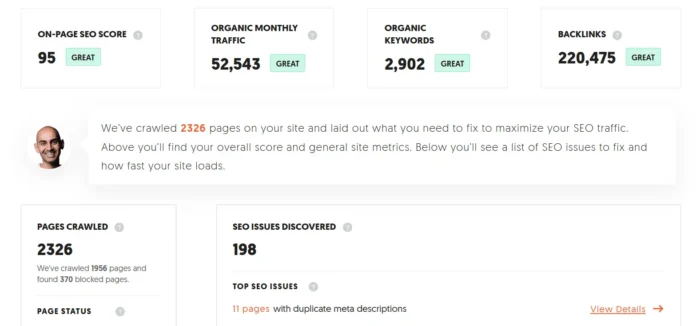
Ubersuggest is my all-in-one SEO platform. It offers backlink audits, keyword research, and content performance analysis in one dashboard. You can also get a clean one-page site audit, do competitive analysis, find content ideas, and get domain overviews in just a few clicks.
Source: https://app.neilpatel.com/en/seo_analyzer/site_audit
Screaming Frog improves your SEO by leveraging its SEO Spider crawler to identify common issues such as broken links, duplicate content, and missing meta tags.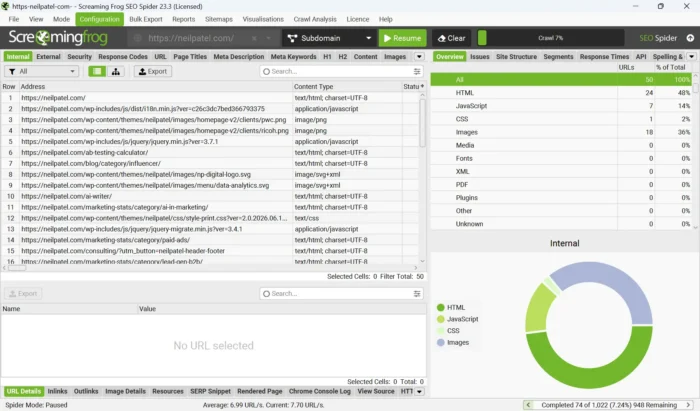 Copyscape finds plagiarized and duplicate content, which can affect your SEO.
Lumar (formerly Deepcrawl) is a website crawling tool that checks your site’s technical performance, like site speed and accessibility issues. It provides more than 250 built-in reports.
Schema Markup Validator ensures the proper implementation of structured data on a website. Just enter your URL to run a test to find and fix errors.
Small SEO Tools Keyword Density Checker enables you to analyze keyword density on your website. You’re aiming for about 1 to 2 percent keyword density.
Google Search Console provides you with key metrics that show you exactly how your page is performing in the Google SERPs. View search traffic data, ensure Google can find and crawl your site, and fix any indexing issues, all within the same platform.
Google PageSpeed Insights helps you evaluate your site’s user experience (UX). It’s a solid starting point for measuring Core Web Vitals, the key metrics Google uses to assess page speed, responsiveness, and visual stability, and shows you how fast your pages load, along with specific actions you can take to improve them.
Copyscape finds plagiarized and duplicate content, which can affect your SEO.
Lumar (formerly Deepcrawl) is a website crawling tool that checks your site’s technical performance, like site speed and accessibility issues. It provides more than 250 built-in reports.
Schema Markup Validator ensures the proper implementation of structured data on a website. Just enter your URL to run a test to find and fix errors.
Small SEO Tools Keyword Density Checker enables you to analyze keyword density on your website. You’re aiming for about 1 to 2 percent keyword density.
Google Search Console provides you with key metrics that show you exactly how your page is performing in the Google SERPs. View search traffic data, ensure Google can find and crawl your site, and fix any indexing issues, all within the same platform.
Google PageSpeed Insights helps you evaluate your site’s user experience (UX). It’s a solid starting point for measuring Core Web Vitals, the key metrics Google uses to assess page speed, responsiveness, and visual stability, and shows you how fast your pages load, along with specific actions you can take to improve them.
How to Perform an SEO Audit
Google has more than 200 different ranking factors, so figuring out where you’re going wrong can be tough. However, a comprehensive SEO site audit can uncover the cause and enable you to create an action plan to fix it.
Here’s how to perform an SEO audit:
1. Run a Website Crawl
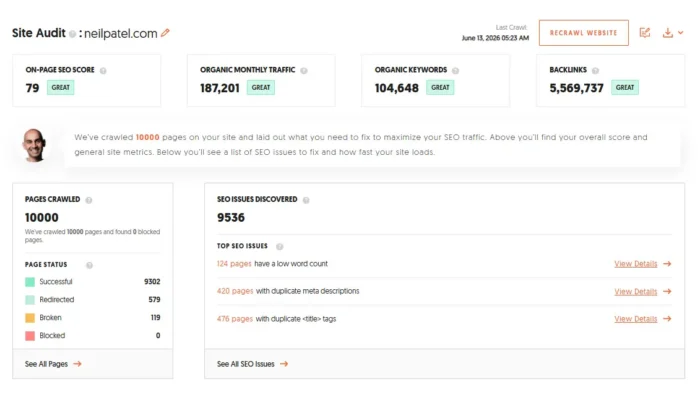
To start, log in to Ubersuggest, click Site Audit in the left-hand menu, enter your URL, and click “Search.”
The crawl returns an on-page SEO score along with site metrics like organic monthly traffic, organic keywords, and backlinks (as seen in the screenshot below). Below that, you get a list of critical errors, warnings, and recommendations to help boost your rankings.
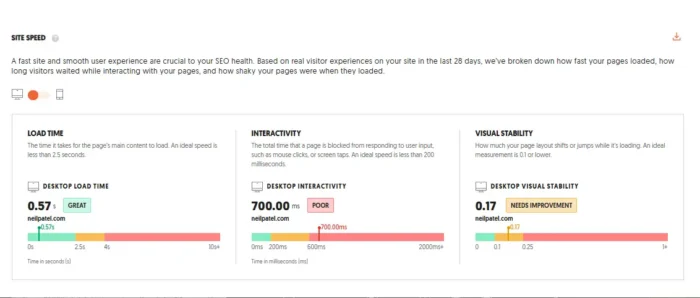
Scroll down more, and you’ll also find a Site Speed report. Drawing on real visitor data from the past 28 days, it breaks performance into load time, interactivity, and visual stability, each rated on a scale from good to poor, so you can see what needs attention.
For larger sites with hundreds or thousands of pages, consider running the crawl on a staging environment first. This lets you catch issues and test fixes before they affect your live site.
2. Analyze Organic Traffic
Organic traffic is the number of visitors who reach your site without paid search ads. You earn it from backlinks, brand mentions, and social media posts. It’s a strong indicator of your site’s popularity, content quality, and SEO effectiveness, and it can deliver real return on investment (ROI). Use this calculator to estimate the value of organic search.
A drop in traffic or falling rankings often signals that your SEO strategy needs adjusting. Google algorithm changes can also cause dips through penalties or manual actions.
Measure organic traffic with Website Traffic Checker, Google Analytics 4 (GA4), Google Search Console, Bing Webmaster Tools, or your web host’s internal analytics. In GA4, segment by landing page and device to spot which pages are losing ground, not just overall traffic.
3. Review Meta Titles and Meta Descriptions
Your meta title and meta description are your pitch in the search results. A clear, keyword-aligned title helps Google understand what your page is about and influences its ranking. A short, specific description gives searchers a reason to click through to your site.
Use Screaming Frog to bulk-review your site for missing, duplicated, and underperforming meta titles and descriptions. From there, you can optimize tags by tightening copy, fixing length issues, and aligning each tag with the page’s target keyword.
It’s worth knowing that Google rewrites about 70 percent of meta descriptions, so a polished description isn’t always what searchers see. Title tags are rewritten less often, giving them greater reliability.
Also see Google’s guidance on title tags and meta descriptions.
4. Check for Keyword Cannibalization
Cannibalization occurs when multiple pages on your site target the same keyword. Essentially, they compete for the same search traffic.
When cannibalization occurs, it damages your visibility by lowering rankings for the competing pages and causes visitor confusion. Fixing it can improve your traffic, as these case studies show.
In the image from Ahrefs below, we can see how three blogs covering different topics could be consolidated into a single, more comprehensive guide to avoid cannibalization.
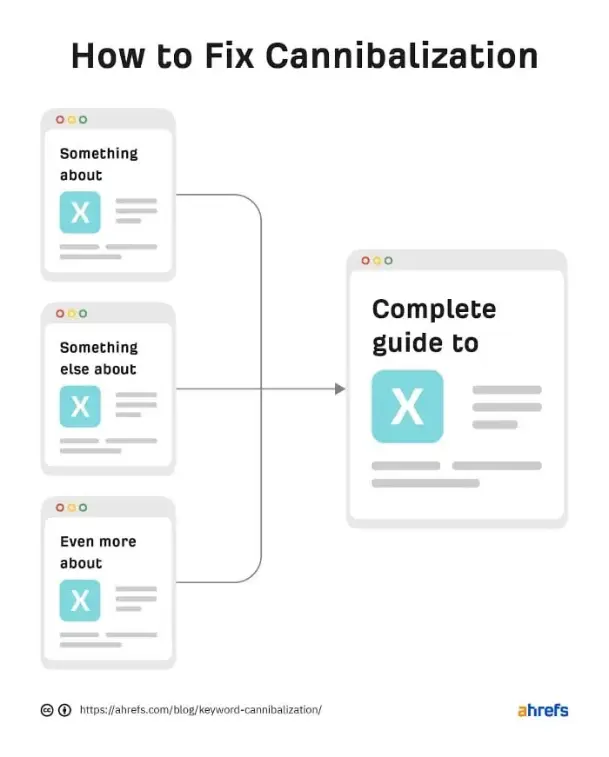
So, if you find pages cannibalizing one another on your own site, consider combining the content into a single page (a pillar post) full of valuable information. You can use URL redirects to help solve this issue, but consolidating your content works much better than redirects alone.
5. Fix Indexing Issues
Common indexation issues include:
404 errors Server errors Broken redirects or redirect loops Duplicate content Thin or empty pages Incorrect use of canonicalsA few things can cause Google to ignore a page: slow load times, low-quality content, or poor mobile performance. Google also doesn’t index every page on the web, which is normal.
Start your fix in Google Search Console. The URL Inspection tool is the most direct way to check whether a specific page is indexed and why it may not be. Drop in any URL to pull live crawl status, canonical signals, and any indexing errors.
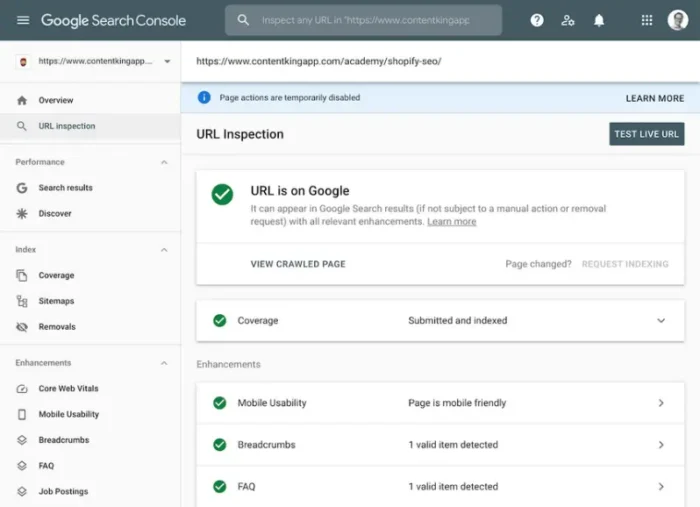
Source: https://www.conductor.com/academy/url-inspection-tool/
If you’re still stuck, see Google’s full list of indexing issues or our guide to technical SEO audits.
6. Check for Duplicate Content
Duplicate content is a common issue online, and it can hurt UX and trigger keyword cannibalization. It happens when you publish across multiple domains, use different content formats, or let content management system (CMS)-generated pages slip through unchecked.
You can run a quick check for duplicate content with tools like Copyscape or the SEO Content Checker Chrome extension.
Once you find duplicates, you have a few good options:
Consolidate similar pages to cut redundancy. Set up 301 redirects to your preferred URL. Add canonical tags to tell Google which version to index.Watch for self-canonicalization gaps, too. Pages should usually point a canonical tag at themselves, but ecommerce product pages and CMS-generated templates sometimes miss this step.
A quick canonical audit catches these issues fast. For a deeper look, run a full content audit.
7. Check Page Speed
The average site takes 2.5 seconds to load on desktop and 8.6 seconds on mobile. If your site is slower, you’re likely falling behind.
Slow load times can drive up bounce rates and hurt conversions. They can also take a toll on your search visibility, since site speed is a Google ranking factor. When pages lag, visitors often head to a competitor instead.
Start by running your site through Google PageSpeed Insights for a speed score, error breakdown, and specific recommendations. Ubersuggest can also identify issues across your site.
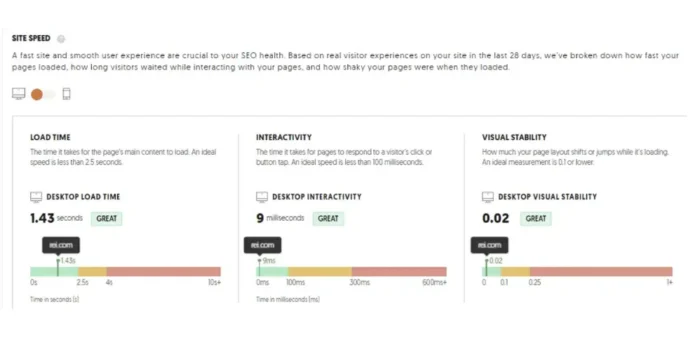
To address slow load times, focus on these fixes:
Improving server response time, or time to first byte (TTFB) Optimizing images Using a content delivery network (CDN) Reducing the number of plugins and scripts Minifying CSS, JavaScript, and HTML Enabling GZIP compression on your serverSmall speed improvements compound across thousands of page views, so prioritize the biggest bottlenecks first.
8. Check Core Web Vitals
During your technical SEO audit, measure your Core Web Vitals. These metrics reflect how real users experience your site, and Google uses them as a ranking factor.
There are three to track, each with its own target threshold:
Largest Contentful Paint (LCP) measures loading performance. Aim for under 2.5 seconds. Interaction to Next Paint (INP) measures responsiveness to user input like clicks and taps. Aim for under 200 milliseconds. Cumulative Layout Shift (CLS) measures visual stability during page load. Aim for a score under 0.1.Google used to focus on First Input Delay (FID) as a Core Web Vital, but INP replaced it in March 2024.
To check your scores on any of these vitals, use Google Search Console and PageSpeed Insights.
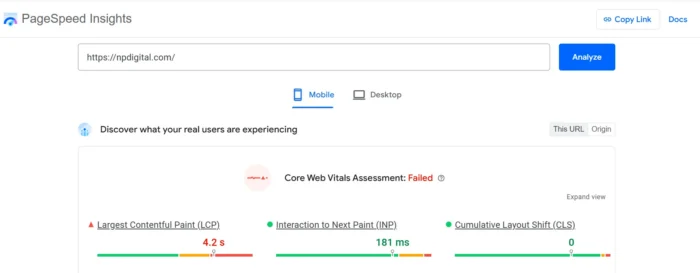
Source: https://pagespeed.web.dev/analysis/https-npdigital-com/r222sosba0?form_factor=mobile
PageSpeed Insights covers individual pages; Search Console covers the whole site. Group your failing URLs by template or page type to fix the biggest issues in one pass.
9. Analyze Mobile Friendliness
Google uses your site’s mobile version for indexing and ranking by default. Plus, with more than half of website traffic coming from mobile, you need to design for these users first. A mobile-friendly site also improves SEO and user experience.
Google retired its Mobile-Friendly Test in December 2023, along with the Mobile Usability report in Search Console. The recommended replacement is Lighthouse, built into Chrome DevTools.
Lighthouse audits mobile usability, performance, accessibility, and SEO in a single report. Open any page in Chrome, right-click, select “Inspect,” and run a Lighthouse mobile report.
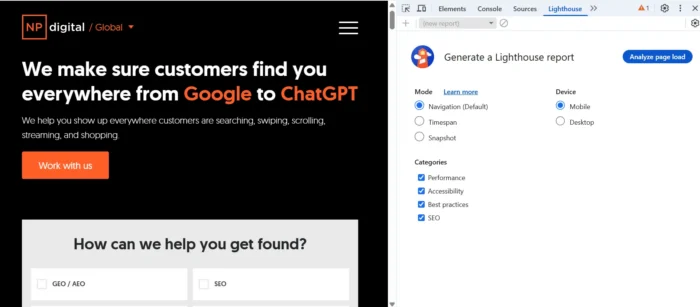
Bing’s Mobile Friendliness Test is still a solid backup option. If your site needs work, consider a full mobile makeover to improve the experience for users on every device.
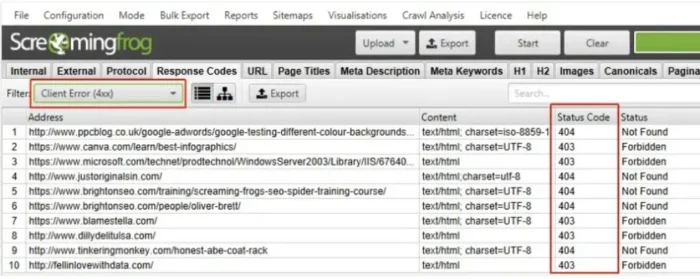
10. Fix Broken Links
Broken links are one of the most common issues you’ll find in an SEO audit, and most sites have a few. A Pew Research study finds that 23 percent of news sites and 21 percent of government sites contain at least one broken link.
That’s a little alarming given the reputation these types of sites have, but broken links happen occasionally through site updates, content changes, and deleted pages.
The problem is that these broken links can frustrate visitors and degrade the user experience. They also affect rankings, since Google relies on working links to pass PageRank and anchor text signals between pages.
Use a tool like Screaming Frog to find broken links, then fix, delete, or redirect each one.
Audit your internal and external broken links separately. Internal broken links have a more direct impact on crawl efficiency and PageRank flow, so fix them before tackling broken outbound links.
11. Complete a Competitive Analysis
Competitive analysis helps you understand your competition and spot opportunities to rank higher than them on Google.
It also lets you see how your competitors are doing, including their strengths and weaknesses, while giving you an idea of how to better position your product or service to gain more traction.
Consider the following factors during competitive analysis:
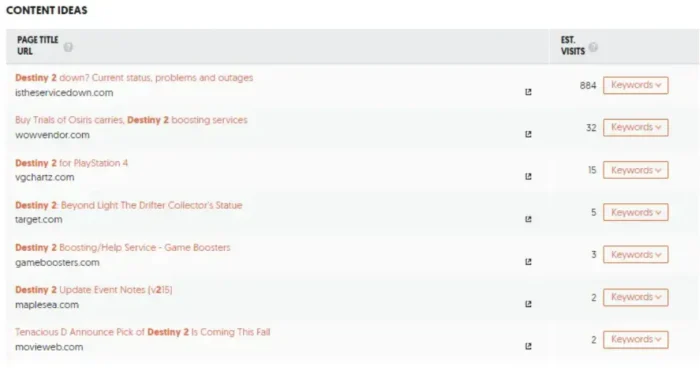
Keywords that your competitor ranks for Keywords your competitors have lost Number of backlinks each website has Quality of backlinks Social media engagement (e.g., Facebook likes, Twitter followers) Website speed Mobile responsivenessMany tools can simplify this task, but I’ll talk you through using Ubersuggest. All you need to do is:
Enter the competitor’s URL and select “Search.” Choose “Keyword Ideas” from the left sidebar. Analyze the keyword and content ideas list.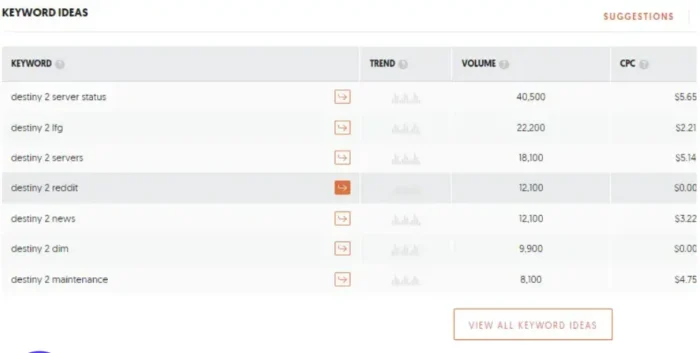
4. Click Backlinks Overview.
5. Scroll down to the “Source Page Title & URL” section.
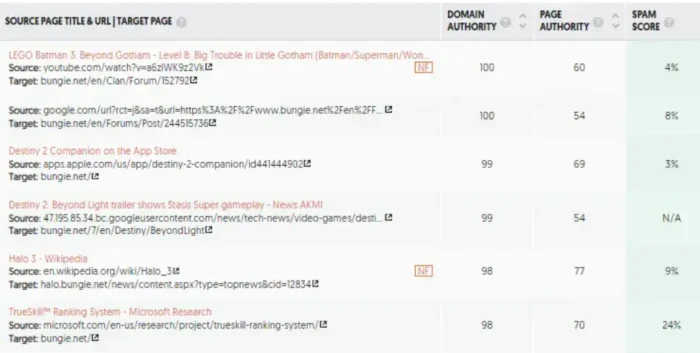
You can also use these Ubersuggest features in the same way for competitor tracking.
You’ll also want to measure how you and your competitors stack up when it comes to Google’s Core Web Vitals, which you can do quickly with PageSpeed Insights and Lighthouse.
12. Analyze Your Sitemap
Take time to analyze your sitemap as part of your SEO site audit.
Why? Because your sitemap ensures that Google and other search engines can properly crawl and index your website. It enhances visibility and improves your SERP rankings.
To audit your sitemap, you can use Google Search Console. Here’s how to do it:
Go to GSC and locate the sitemaps report to see a list of sitemaps and their performance.
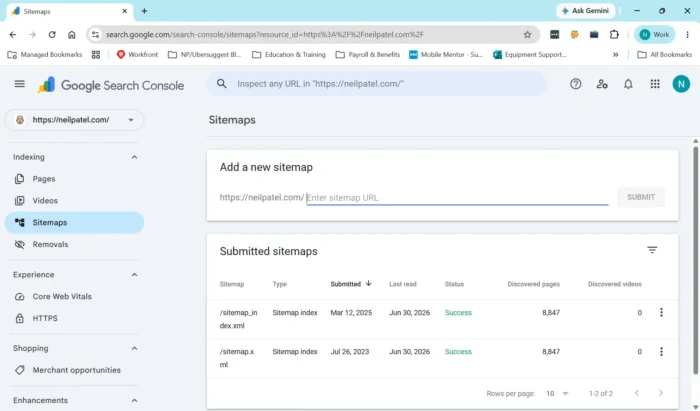 Review the sitemap status to ensure that Google has successfully processed and indexed your sitemap. You’ll also see if there are any warnings or errors listed.
If you need to make changes, click on the sitemap you want to audit and check the list of submitted URLs. Review the list to confirm that it includes all your website’s essential pages.
Take note of the number of URLs submitted in a sitemap and how many are listed in “Discovered URLs.” Ensure that the search engines are indexing a significant portion of your submitted URLs. A large discrepancy might indicate indexing issues.
Look for common errors like “URL blocked by robots.txt.”
Next, validate URLs. Use the “Inspect URL” feature to manually check the indexing status and coverage of specific URLs to find specific page issues.
Then, if you’ve made any fixes during your SEO audit, update your sitemap and resubmit to Google by clicking the submit button.
Review the sitemap status to ensure that Google has successfully processed and indexed your sitemap. You’ll also see if there are any warnings or errors listed.
If you need to make changes, click on the sitemap you want to audit and check the list of submitted URLs. Review the list to confirm that it includes all your website’s essential pages.
Take note of the number of URLs submitted in a sitemap and how many are listed in “Discovered URLs.” Ensure that the search engines are indexing a significant portion of your submitted URLs. A large discrepancy might indicate indexing issues.
Look for common errors like “URL blocked by robots.txt.”
Next, validate URLs. Use the “Inspect URL” feature to manually check the indexing status and coverage of specific URLs to find specific page issues.
Then, if you’ve made any fixes during your SEO audit, update your sitemap and resubmit to Google by clicking the submit button.
You also need to make sure GSC’s sitemap report only includes indexable URLs. Google’s crawl of your sitemap will include noindex pages, unless you tell it otherwise. If you include these pages in your sitemap, as well as canonicals and redirects, you risk confusing Google’s crawlbot and wasting crawl budget on pages that don’t move the needle.
13. Identify Content Gaps
Content gaps refer to topics users seek information about that your site doesn’t cover. A content gap analysis is certainly worth adding to your SEO checklist.
Filling content gaps provides a better user experience and increases your website’s visibility for more keywords.
You can uncover content gaps by:
Looking at rankings: Perhaps your keywords rank, but not as high as you’d like. Begin with the basics by making sure that SEO fundamentals are in place and enhancing content where possible. Using keyword research: Your first step is to see what’s working, so check for high-performing keywords. Pay special attention to long-tail keywords, as these often have lower competition. Look out for related keywords, too. Competitive analysis: Which keywords are your competitors ranking for? Use these as inspiration for new topic ideas.You can use Ubersuggest to identify keyword and content gaps to speed things up.
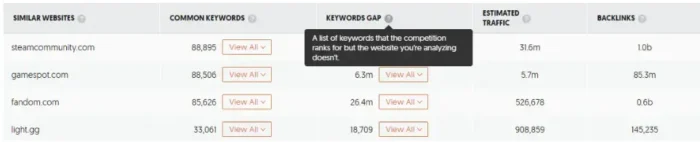
Add your URL and choose “Similar Websites” from the left navigation pane; you’re looking for the “Keywords Gap” heading. Hit the down arrow for a keyword, and you’ll see links to keywords and content your competitors rank for, but you don’t.
Look for keywords where your site is already ranking, but on page two or three. These will be easier gaps to win than those where your site has no presence.
14. Review Structured Data
Structured data is code (typically schema.org markup) added to your pages to help search engines understand what your content is about. It powers rich results such as star ratings, product information, FAQs, and recipe cards in search results.
During an audit, check that your structured data is implemented correctly and that pages displaying rich results are still doing so. Errors or missing markup can cost you visibility.
Two tools handle this well. Google’s Rich Results Test checks individual URLs for valid markup, and Search Console’s Rich Results report shows site-wide performance and errors at a glance.
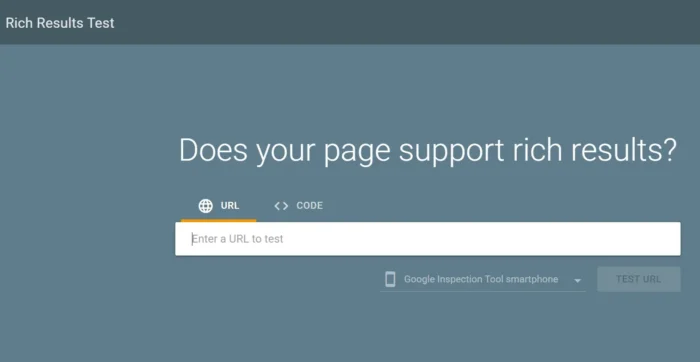
This step has grown more relevant in recent years. AI Overviews increasingly pull from clearly formatted, structured content, so clean schema gives your pages a better shot at being parsed and cited by AI systems.
15. Evaluate E-E-A-T Signals
E-E-A-T stands for experience, expertise, authoritativeness, and trustworthiness. It isn’t a direct ranking signal on its own. Instead, E-E-A-T shapes how Google’s quality raters evaluate content, and those assessments inform how ranking systems get calibrated over time.
Strong E-E-A-T signals help your site weather algorithm updates and build long-term search visibility.
During your audit, look for four things:
Author bios with real credentials and links to professional profiles (e.g., LinkedIn, published work) About pages that clearly establish the site’s purpose, ownership, and editorial standards Original research, data, or first-hand experience woven into the content External citations or links from credible sources to back up claimsYMYL content (Your Money or Your Life topics such as health, finance, and legal advice) is held to the highest E-E-A-T standard, since misinformation in these areas can cause real harm. If you publish in these niches, treat every piece as a trust-building opportunity.

16. Audit Your Backlink Profile
Your backlink profile is the collection of links from other sites pointing back to yours. A clean, diverse profile signals trust to Google. A messy one can drag your rankings down.
When auditing backlinks, focus on three areas:
Toxic or spammy links. Watch for unnatural anchor text patterns, low-authority referring domains, and links from spam-prone neighborhoods (e.g., link farms, irrelevant foreign-language sites). Disavow or remove these. Lost backlinks worth reclaiming. Look for pages that used to have links pointing to them but have since been moved or deleted. You can often recover the link with outreach or a 301 redirect. Overall link profile diversity. A healthy profile draws from a wide range of referring domains across different industries, geographies, and content types. A heavy concentration of links from a small number of sources can look unnatural to Google.Both Ubersuggest and Ahrefs are useful for this. For a deeper walkthrough, see our link audit guide.
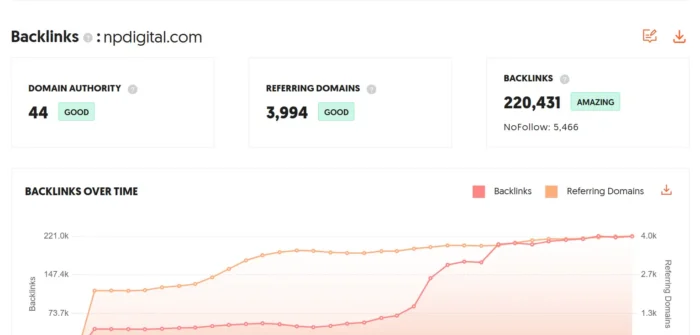
17. Check AI Search Visibility
AI Overviews and AI answer engines have changed how people find information online. Your site’s presence in these results is now a core part of any modern SEO audit.
Check two things during your audit:
Google AI Overviews. Run your target queries in Google and note whether any of your pages get cited in the AI-generated overview at the top of the results. Other AI answer engines. Run the same queries in ChatGPT Search, Perplexity, and similar tools to see if your content shows up in their responses.What tends to drive AI citations? Content that directly answers specific questions, strong E-E-A-T signals, and topical depth across a subject. AI systems prefer clear, well-structured sources they can confidently cite.
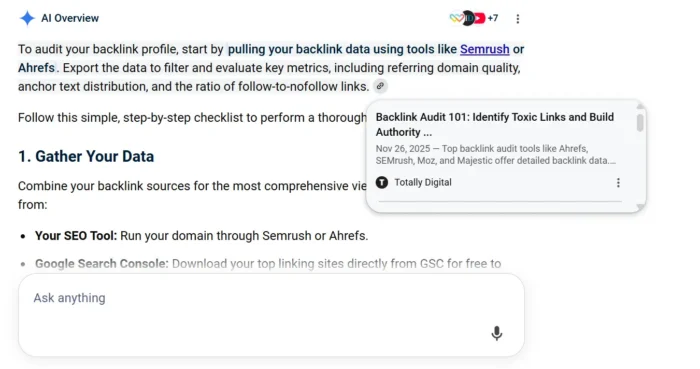
For scaled tracking, tools like BrightEdge and SE Ranking offer AI visibility reports that monitor citations across multiple queries and platforms.
It’s also important to check your robots.txt. If it blocks the AI crawlers used by platforms like ChatGPT and Claude, your content generally won’t appear in their responses, no matter how well-optimized it is.
FAQs
Why is an SEO audit important?
An SEO audit reveals technical issues, content gaps, and missed opportunities holding back your rankings. Without one, you’re guessing at what to fix. Regular audits also help you keep pace with Google’s algorithm updates.
What is included in an SEO audit?
A complete audit covers technical SEO (site speed, mobile-friendliness, indexing), on-page elements (titles, meta descriptions, content), off-page factors (backlinks), and increasingly, AI search visibility. See the steps above for the full breakdown.
How long does an SEO audit take?
A small site can be audited in a few hours. Larger or more complex sites typically take one to several weeks.
How often should you conduct an SEO audit?
Run a full audit at least once a year. For larger sites or fast-moving industries, quarterly audits are a smart choice. Run mini-audits whenever you launch new content, migrate a site, or notice a sudden ranking drop.
Conclusion
A great-looking site that isn’t performing won’t bring in the visitors, leads, or conversions you need to grow. A detailed SEO audit helps you identify what’s holding the site back and fix it.
Fortunately, audits can be painless with the right tools. Ubersuggest, Ahrefs, Screaming Frog, Google Search Console, and PageSpeed Insights cover most of what you’ll need.
Set a cadence and stick to it. A full audit at least once a year is the baseline, with quarterly check-ins for larger or fast-moving sites. Mini-audits make sense whenever you launch new content or notice a ranking drop.
Start with the steps most likely to move the needle fastest. That could be addressing indexing issues, page speed, Core Web Vitals, or broken internal links.
Knock those out, and the rest gets easier.