
Meta Tags for SEO: What They Are, Why They Matter, and How to Use Them
Key Takeaways What does the term “meta tags” cover, and which ones matter for SEO? Some of the advice out there is outdated, and plenty of tags that sound important don’t really affect your rankings. This guide covers the...
 AbJimroe

Key Takeaways
Meta tags are HTML snippets in the <head> section of your page that tell search engines and AI tools what your content is about. Human readers don’t see meta tags directly, but the tags shape how your pages show up in search and social previews. Not all meta tags for SEO move the needle. The title tag, canonical, and robots meta tag directly affect SEO. Meta descriptions, viewport, and Open Graph tags contribute indirectly through click-through rate (CTR), mobile usability, and social sharing. Google rewrites roughly 76 percent of title tags it analyzes, so a well-optimized title still matters even when Google might overwrite it. The same meta tag hygiene that helps you rank in Google can also improve visibility in AI-powered features like Google AI Overviews, since AI parsers rely on structured signals to interpret and cite your pages. Meta tags decay over time. Run a full audit at least quarterly, or after any major site migration or content management system (CMS) update.What does the term “meta tags” cover, and which ones matter for SEO?
Some of the advice out there is outdated, and plenty of tags that sound important don’t really affect your rankings.
This guide covers the meta tags for SEO that influence how search engines and AI tools read your pages. I’ll walk you through what each tag does and how to implement them correctly. I’ll also show you which tags you can safely ignore and how to audit your meta tag setup to strengthen your visibility across traditional and AI search.
What Are Meta Tags?
Meta tags are a type of HTML tag that provides search engines with information about a website page.
Two tags do most of the work: your title tag and meta description.
Your title and meta description tags create the cover for your web page. They’re the first impression most visitors get about your site. That’s where the importance of meta tags in SEO lies. They’re the elements that control how your pages appear in search.
Meta tags shape so much of your site’s visibility, yet they operate entirely behind the scenes. They live in the <head> HTML section of your site’s source code. They’re invisible to visitors but instrumental in explaining the content and structure of your pages to search engines, browsers, and social media platforms.
Humans and machines view the internet in different ways. What machines see when they visit your site looks something like this:
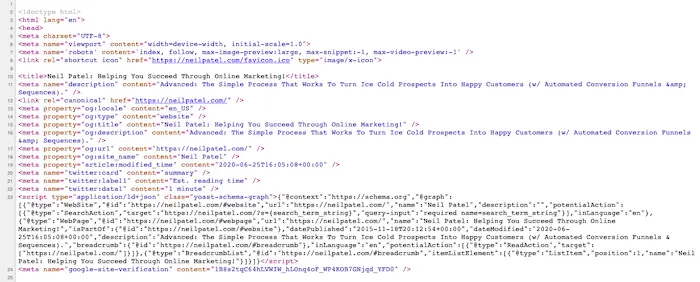
A search engine like Google takes all that machine-readable information and organizes it for people. To do that, it relies on tags that provide context. So meta tags aren’t just about improving rankings. They also help your site deliver a smoother user experience.
The right meta tags can strengthen your email marketing and marketing automation efforts, too, by helping you track performance on emailed links.
On the social front, bloggers, YouTubers, and social media influencers will have an easier time sharing your content if you use the right meta tags. Clean tags make sure your content displays cleanly and let you track which social media platforms your content clicks are coming from.
Think of meta tags for SEO as the packaging for your product. If your packaging is off, even a great product struggles to sell.
Which Meta Tags Are Important for SEO?
Not every meta tag is worth your time. Some directly affect how Google ranks your pages, some help indirectly by shaping user behavior, and some do nothing for SEO in 2026.
Here’s how the HTML meta tags for SEO break down by impact.
High SEO impact:
Title tag: A confirmed ranking factor and the primary clickable element in the search engine results page (SERP), which can drive click-through rate (CTR). Canonical tag: Tells Google which version of a page to rank when duplicate or near-duplicate URLs exist. Robots meta tag: Controls what searchers see in the SERPs by telling Google whether to index a page or follow its links.Moderate SEO impact:
Meta description: Not a ranking factor but drives CTR from the SERP. Viewport tag: Advises your browser on how to render pages on your mobile device. This signifies mobile-friendliness to Google, which is good for its mobile-first indexing model. Open Graph tags: Shape how your pages appear on social platforms and how AI tools describe your content.Meta Tags That Don’t Affect SEO
Here’s a reference table of the HTML meta tag attributes and the values each one accepts.
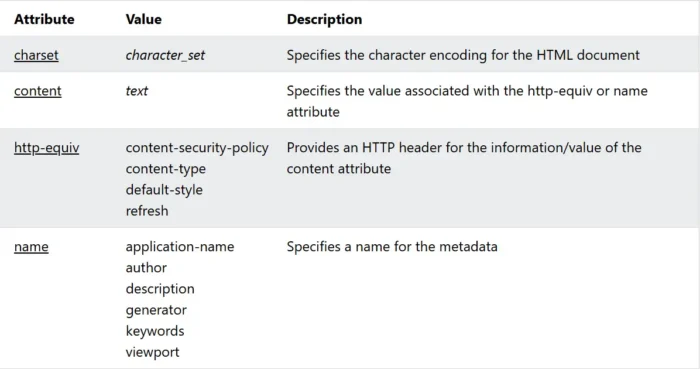
Four tags you’re likely to encounter that have less effect on rankings:
Author tags: An author meta tag identifies who wrote a piece of content. Google once used author information to filter results, but it’s no longer a ranking factor. However, you might use author tags if you run a multi-author blog. Keyword tags: The keywords meta tag was originally used to list terms a page wanted to rank for. Google confirmed in 2009 that it ignores this tag due to widespread abuse, and that position has not changed. Charset tag: The charset meta tag declares the page’s character encoding (usually UTF-8), so browsers render text correctly. It’s a rendering instruction, not a search signal, and a modern content management system (CMS) platform will likely add it automatically. Http-equiv tags: Http-equiv tags emulate HTTP response headers directly within the HTML, controlling things like page refresh and content type. These are server-level concerns, and modern implementations handle them at the server rather than in the markup.The Most Important Meta Tags for SEO
Here’s a closer look at each of the seven meta tags that shape how search engines, social platforms, and AI tools understand your pages.
1. Title Tag
It’s not technically a meta tag, but it appears in the header and is treated as one.
Aim for title tags for SEO that are roughly 50 to 60 characters. Google frequently rewrites page titles in search results. One study finds that it does so for about 76 percent of the pages analyzed. While you can’t prevent rewrites entirely, writing clear, descriptive titles gives Google a stronger starting point.
Also note that just because 60 is the generally recommended limit doesn’t mean you should use all those characters. Google really assesses your title tag by pixels. The limit is 580 to 600 pixels. The character limit is just a good benchmark within that range.
Your title should also match the intent behind the search. That’s where long-tail keywords make a difference, especially with AI answer engine optimization (AEO).
Here are the top meta titles in the SERPs for “How to make content marketing effective.”
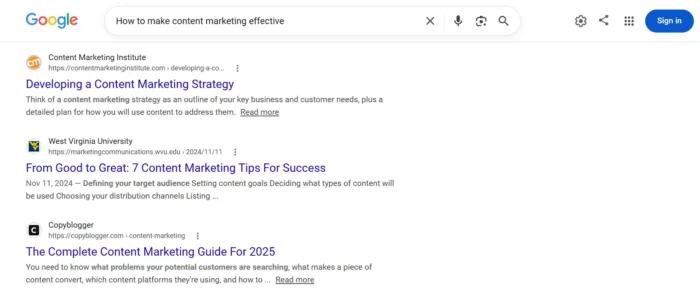
By adding the year, we get an entirely new set of results for “how to make content marketing effective 2026.”
Someone searching without a date may want evergreen advice, while someone including the year is probably looking for the latest strategies.
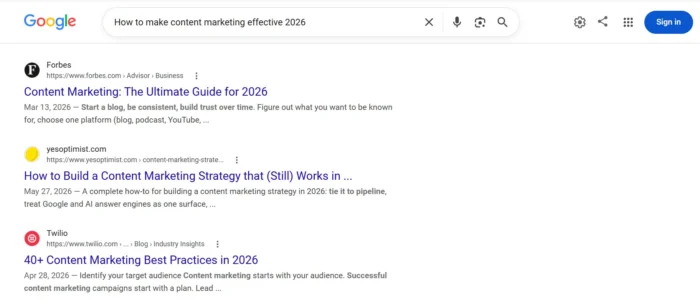
You’ll also see the AI Overview results change for each query if you conduct this experiment yourself.
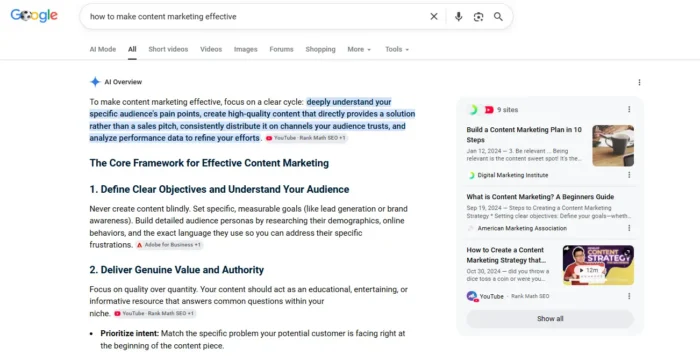
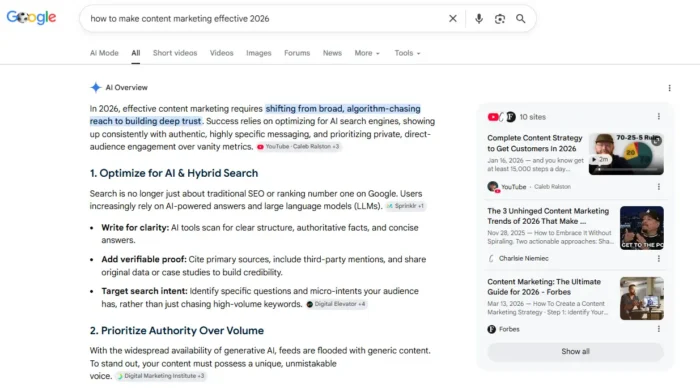
Including modifiers like a year, location, or audience in your title can help reinforce the search intent you’re targeting. Whatever title you choose, place your primary keyword near the beginning whenever it reads naturally. That makes it easier for both users and search engines to understand what your page is about.
Here’s what a title tag looks like in HTML:
<head>
<title>The Best Title Example I Could Come Up With</title>
</head>
In WordPress, your page title often becomes the title tag by default.
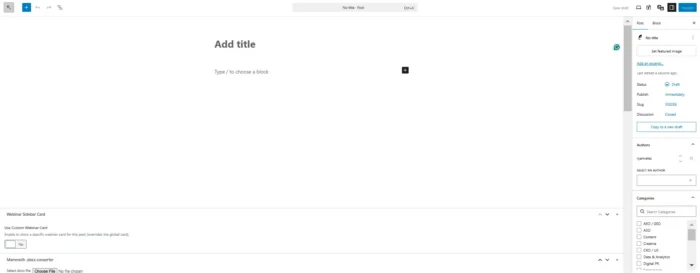
If you want more control, install an SEO plugin like Yoast SEO. It lets you customize your title tag, meta description, and URL slug without touching your site’s code.
That’s all there is to it!
2. Meta Description
A meta description tag provides an overview of the page’s content.
They’re limited to around 160 characters and aren’t directly tied to Google’s search algorithms at all.
Here’s what the HTML looks like:
<head>
<meta name= ”description” content=”This is an example of the text that will show up in search results. Read on to learn more about description tags.”>
</head>
Although they aren’t directly tied to your rankings, it’s worth getting them right. Writing a well-crafted description can boost your CTR and social engagement.
Google frequently rewrites meta descriptions when it believes a snippet of on-page content better meets a user’s search intent, a finding observed in multiple industry studies and reflected in Google’s own documentation.
You can’t prevent rewrites entirely, but writing a clear, accurate meta description gives Google a strong candidate to use. Follow the best practices I’ve laid out in my meta description guide to improve your chances.
3. Canonical Tag
The rel=”canonical” tag tells search engines which version of a page you consider the preferred URL when duplicate or near-duplicate content exists across multiple addresses. Google Search Console can show you which of your pages currently have this tag:
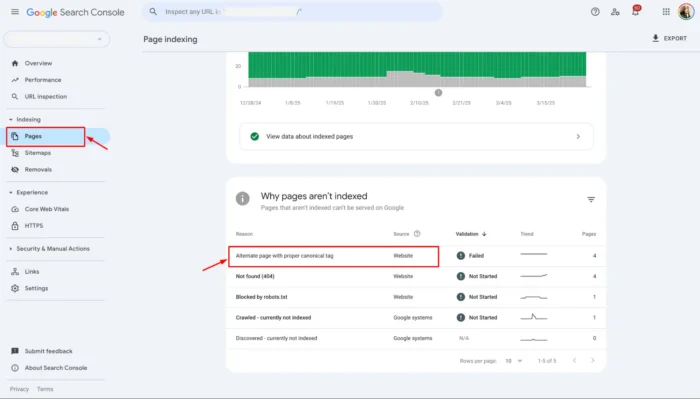
Duplicate content occurs more often than site owners might realize. It shows up in instances such as:
Pagination URL parameters (like tracking codes or filters) HTTP vs. HTTPS versions www vs. non-www variations Syndicated content on other sitesWithout a canonical tag, Google decides which URL to index and consolidate ranking signals around, and it doesn’t always pick the one you want.
Broken canonical tags won’t do you any favors, either. Avoid these common mistakes:
Canonicalizing to a page that returns a non-200 status code (like a 404 or redirect) sends mixed signals and can prevent Google from recognizing your preferred page. Placing multiple conflicting canonical tags can confuse Google.Canonical tags are a fundamental of technical SEO and are worth auditing on any site with more than a few dozen pages. Using self-referencing canonicals (a page pointing to itself) is fine and recommended per Google’s guidance.
Here’s how the HTML should look:
<head>
<link rel=”canonical” href=”https://example.com/your-page/” />
</head>
4. Robots Meta Tag
I need to get something out of the way up front: The robots meta tag is completely different from a robots.txt file. I don’t want you getting the two confused.
The robots meta tag controls indexing, while a robots.txt file controls crawling. A page can be crawled by Google and still noindexed, and a page blocked in robots.txt can still show up in Google’s index if Google finds links pointing to it from elsewhere.
By default, all the pages and links you create on your website are indexed as ‘follow’ by search bots and web crawlers.
Whenever you want to change that, you’ll need a robots meta tag.
It’s useful for syndicated and duplicate content that your customers or readers could use, but you don’t want credit in search indexes. You can also use it for links you don’t necessarily want to endorse.
Here’s the noindex HTML code:
<html><head>
<meta name=”robots” content=”noindex” />
(…)
</head>
Here’s the HTML for a robot nofollow:
<meta name=”robots” content=”nofollow”>
You can also combine directives in a single tag:
<meta name=”robots” content=”noindex, nofollow”>
Other common directives include noarchive (don’t show a cached copy), nosnippet (don’t show a text snippet in the SERP), and noimageindex (don’t index images on the page).
Common use cases for noindex are:
Staging and development environments Thank you pages Admin pages Thin pages Downloadable contentCommon use cases for nofollow are:
User-generated content like blog comments Paid or sponsored links Any outbound link you don’t want to endorseRecently, Google changed how we use the nofollow tag. Each nofollow use case mentioned above needs to be paired with its appropriate related attribute.
Blog comments and other user-generated content should use rel=”ugc.” Paid or sponsored links use the rel=”sponsored” attribute. Everything else stays as rel=”nofollow.”
5. Viewport Meta Tag
You probably don’t spend much time thinking about viewports, but they’re especially important in today’s mobile-first world of search. They should be on every one of your pages, and most CMS platforms add them automatically. You just need to verify by inspecting the page source.
When you browse on a mobile device, webpages are shown in a pop-up window called a viewport that extends past the device’s border.
Here’s an illustration of what I’m talking about.
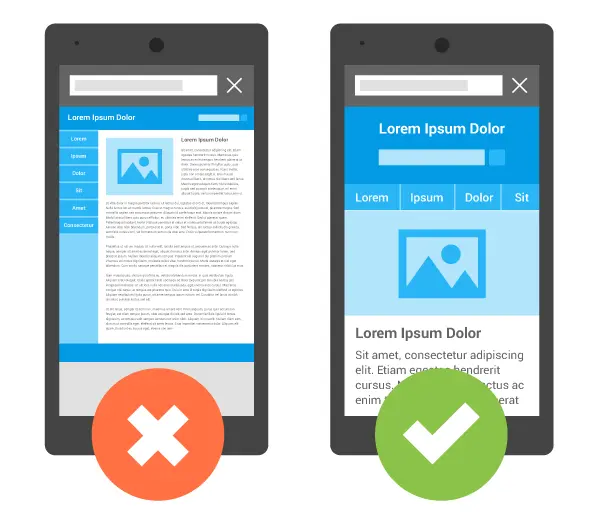
Developers can set the viewport size to increase mobile usability.
WordPress users can check this tag to learn this information for their templates.
You probably didn’t know that unless you’re already a web developer.
Since Google increasingly focuses on mobile-friendly websites, this meta tag could be the difference between success and failure on mobile.
Here’s a look at the HTML:
<head>
<meta name=”viewport” content=”width=device-width, initial-scale=1″>
</head>
6. Open Graph Tags
Open Graph (OG) tags define how a page appears when shared on social platforms. The protocol was developed by Facebook in 2010 and is now used across most major social and messaging platforms.
The four essential tags are og:title, og:description, og:image, and og:url. There are optional tags that go even deeper, but these are four must-haves.
For og:image, Facebook recommends 1200×630 pixels, a default size that translates well to other major platforms, such as LinkedIn and Discord.
OG tags also matter because they influence how appealing the preview is, and that can have an impact on engagement and click-through from social shares.
X (formerly Twitter) uses its own Card tags (twitter:card, twitter:title, twitter:description, twitter:image), but most implementations fall back to OG tags when Twitter-specific tags aren’t present. However, it’s helpful to use X’s card tags because they provide platform-specific data that OG tags don’t.
Most SEO plugins, including Yoast and Rank Math, auto-generate OG tags from your title and meta description. Review and override where needed.
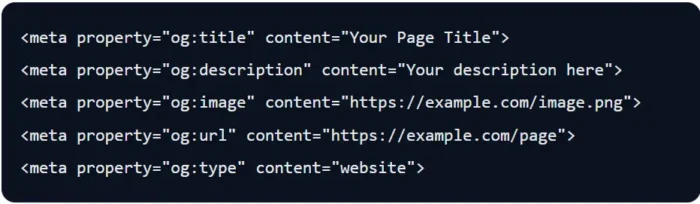
Source: https://ogcheck.com/blog/twitter-cards-vs-open-graph
7. Structured Data Markup (Schema)
Structured data uses JSON-LD to provide explicit information about page content, like the ingredients and cooking time of a recipe. Added as a script block in the <head>, it’s separate from your visible HTML.
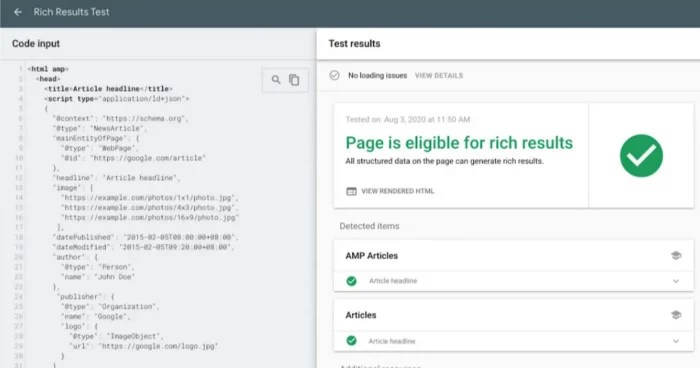
Structured data also helps search engines better understand your content, as clear structured data can make the information on your pages easier for machines to interpret.
The most commonly used schema markup types are:
Article: Provides search engines with critical data like an article’s headline, author, publication date, modification date, and content sections. BlogPosting is a subtype of Article structured data specifically for blogs. Product: Enables rich results in Google that display important information like pricing and reviews. Product schema also helps machines understand details like pricing and availability, which may improve how products are represented across search experiences. HowTo steps: Helps crawlers understand step-by-step instructional content where the order of the steps matters. HowTo schema helps search engines understand instructional content with ordered steps. Organization: Highlights company-specific information like name and logo, and is typically placed on an organization’s homepage or about us page. BreadcrumbList: Explains your site structure to AI and search engine crawlers. Google can use this to display breadcrumb trails in the SERPs rather than solely URLs. This schema also helps show search engines the topical relevance of a particular page, based on its position within your site.Note that Google fully deprecated FAQ rich results in May 2026, so FAQPage schema no longer generates a visible SERP feature, though the markup can still help systems interpret Q&A content.
Implementation is easiest through plugins like Yoast, Rank Math, or a dedicated schema plugin.
How to Audit Your Meta Tags
Auditing meta tags is essential to any on-page SEO cheat sheet. The tags you set up years ago often no longer match the pages they describe now, and a single CMS update or plugin swap can overwrite what you configured without you even realizing it.
A quarterly audit keeps things aligned.
Start with a site crawler. Tools like Screaming Frog, Ahrefs Site Audit, and Semrush identify meta tag issues at scale. A crawl will also identify pages missing canonical tags or carrying robots directives that conflict with what you actually want indexed.
From there, move to Google Search Console for the problems that only come up in production.
The Page indexing report flags pages Google has excluded from the index due to noindex directives.
Over in the Performance report, pages with high impressions but unusually low click-through rates deserve a closer look. Review the title tag and meta description to see whether they match search intent, and check how Google is displaying the page in search results.
Structured data problems surface separately in the Rich Results reports.
Prioritize fixes by traffic, since errors on high-impression pages carry more weight than errors on pages nobody visits. Also, run a fresh crawl after any major site migration or CMS update.
How to Add Meta Tags
Here’s how to use meta tags for SEO on the three most common platforms.
WordPress With an SEO Plugin
The two most popular options are Yoast and Rank Math. Both are free at the entry level and expose the same set of controls, so the choice usually comes down to preference.
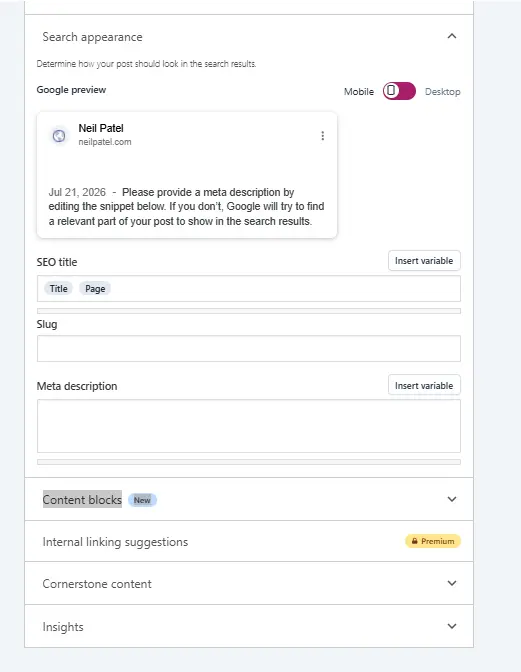
Both plugins add a meta box below the post editor with the tags you’ll edit most often. The SEO tab covers your title tag and meta description with a live snippet preview.
Deeper controls live under Advanced, where you can override the robots meta tag and canonical URL, and under Social, where you can set custom Open Graph and Twitter Card values.
For site-wide defaults, Yoast uses the Search Appearance menu, and Rank Math uses Titles and Meta. Both let you set templates that apply across every post type on your site.
Other CMS Platforms
Most modern CMS platforms include a built-in interface for the basic meta tags.
Shopify’s Edit website SEO section handles title tags and meta descriptions on every page.
Squarespace uses the SEO/AI Visibility panel.
Wix has the most complete built-in interface of the three, with an SEO Panel that handles every major meta tag on every page.
Advanced tags like canonicals and robots vary in support and may require a theme edit or third-party app on Shopify and Squarespace.
Custom HTML
If you have direct HTML access, add meta tags inside the <head> element of each page, or set them once through a <head> template if your framework supports it. Verify what actually renders by viewing the page source or running the URL through Screaming Frog or Ahrefs Site Audit.
Meta Tags and AI Search
Your meta tags shape how features like Google AI Overviews interpret your page. A page with a clear title tag and well-implemented structured data is easier for AI parsers to cite than one that relies on unstructured body text alone.
Open Graph tags matter here, too. AI crawlers like GPTBot read og:title and og:description when generating link previews and citations, so a strong OG image and description also shape how AI systems describe your page.
The important thing to grasp here is that good SEO hasn’t changed. AI SEO still relies on many of the same on-page and technical SEO elements we’ve all been talking about for years.
FAQs
How many types of meta tags are there?
There isn’t an official count, since HTML’s <meta> element accepts many different attribute combinations. For SEO purposes, only a handful materially affect performance, and they’re covered in the sections above.
Do meta tags help SEO?
Yes, though the impact varies by tag. The title tag directly affects rankings. Canonical and robots tags shape how Google indexes your pages. Meta descriptions don’t influence rankings but do drive click-through rate from the SERP.
Which meta tags are important for SEO?
The title tag matters most, since it’s a confirmed ranking factor. The viewport tag would come next, since Google uses mobile-first indexing. Right behind it are the canonical tag (controls duplicate content handling) and the robots meta tag (controls indexing). Beyond those, meta descriptions and Open Graph tags contribute indirectly through CTR and social sharing.
How do you create meta tags for SEO?
It depends on your platform. WordPress users typically add them through an SEO plugin like Yoast or Rank Math. Most other major CMS platforms have built-in interfaces for the basics. For custom HTML, add meta tags directly to the <head> section of each page.
Conclusion
The meta tags for SEO covered in this guide form the foundational layer of on-page communication between your site and the systems that decide who sees it.
Get them right, and you give search engines and AI tools a clearer read on your pages. Get them wrong, and even strong content can struggle to earn visibility.
Meta tags are a must for any site to have a reliable presence in traditional search and AI-powered features. Pair clean fundamentals with an SEO audit workflow that catches drift early, and you’ll compound value across every channel where discovery happens.
If you’re looking for a professional opinion on your on-page setup, the team here at NP Digital can help you with an on-page audit. We’ll make sure your meta tags are doing the most to boost your visibility and help you implement strategies that help you climb up the SERPs.


























.jpg&h=630&w=1200&q=100&v=1a56ad72fe&c=1)