10 Best Email Outreach Tools for Cold Campaigns in 2026
People have been saying cold outreach is dead for years. Yet businesses continue to use it because it still works. Email outreach still drives the pipeline, fills calendars, and closes deals. Done poorly, it fills spam folders and damages...
 Fransebas
People have been saying cold outreach is dead for years. Yet businesses continue to use it because it still works. Email outreach still drives the pipeline, fills calendars, and closes deals. Done poorly, it fills spam folders and damages your sender reputation.
According to Validity’s 2025 Email Deliverability Benchmark Report, the global inbox placement rate fell to 82.3% in Q4 2024, while spam placement nearly doubled from 4.5% to 8.6% over the course of the year. In other words, nearly one in five emails never reaches the primary inbox, making deliverability just as important as the message itself.
That gap between “done right” and “done wrong” is where your choice of email outreach tool matters. A bad sequence in a great tool will still fail. But even a great sequence can struggle if the tool works against you.
This guide reviews the 10 best email outreach tools for cold campaigns in 2026, covering what each one does, where it falls short, and which teams it’s best suited for.
What Is Email Outreach?
Email outreach is the practice of sending targeted, personalized emails to start a business conversation. Unlike email marketing, it focuses on reaching specific people rather than sending messages to a subscriber list.
Cold email outreach takes that a step further. You’re reaching out to people who aren’t familiar with you or your business, so relevance matters even more. Generic emails are easy to ignore. Personalized ones get more replies.
Common use cases include B2B lead generation, link building, recruiter outreach, agency prospecting, SaaS customer acquisition, partnerships, and investor relations.
Success isn’t measured by how many emails you send. According to Hunter’s 2026 State of Email Outreach, the average cold email sequence generated a 4.5% reply rate. The best-performing campaigns focused on targeting, personalization, and follow-ups rather than sending more emails.
Most buying guides compare features. A better approach is to compare what actually affects campaign performance.
Deliverability and domain health
If your emails land in spam, nothing else matters. Look for tools that support inbox warmup, custom tracking domains, and sensible sending limits. If a platform encourages sending unlimited emails from a single inbox, it’s usually a red flag.
Personalization and automation
Basic merge tags are no longer enough. Look for tools that support conditional logic, dynamic variables, and AI-assisted writing without adding unnecessary complexity. According to HubSpot reports, 93.8% of marketers say personalized experiences generate more leads and purchases than non-personalized campaigns.
Lead generation and integrations
Some tools are pure sequencers. You bring your own leads. Others include a lead database. Know which you need before you evaluate. A CRM integration is a minimum if your team is more than two people.
Pricing and scalability
Starting prices rarely tell the full story. As your campaigns grow, check how costs change for additional inboxes, users, and leads. A platform that looks affordable today can become expensive as your email outreach scales.
10 Best Email Outreach Tools for Cold Campaigns in 2026
The software market has matured considerably over the past few years, but success still comes down to a handful of fundamentals. According to Mailgun’s 2025 State of Email Deliverability, 48% of senders say avoiding spam folders is one of their biggest challenges, while only 32% actively monitor spam complaint rates. That gap highlights why choosing the right email outreach software is about visibility into deliverability and sender reputation.
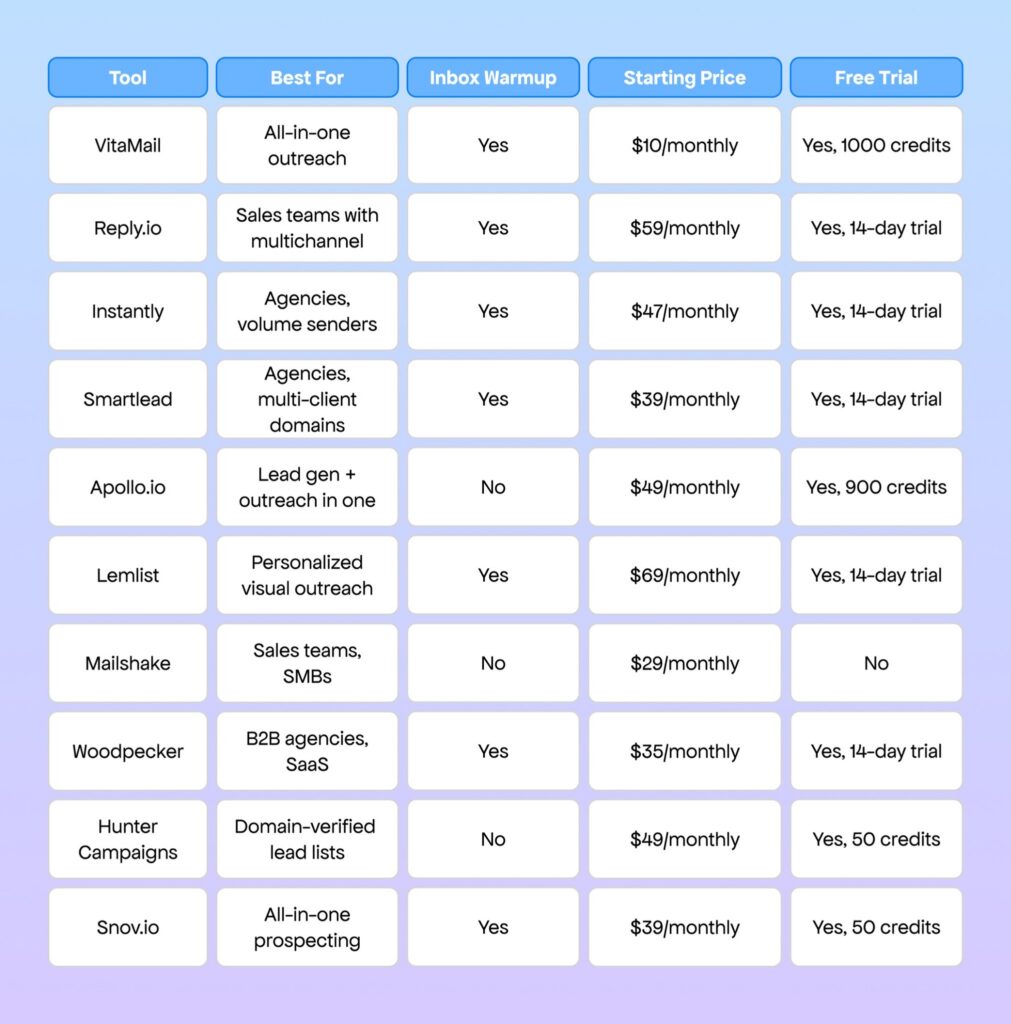
InstantlyBest for: Agencies and high-volume senders who need to run multiple campaigns across many domains simultaneously.
Instantly made a name for itself by solving the one thing that most cold emailers run into at scale: inbox limits. The platform is built around unlimited sending accounts from day one, not a premium add-on. Pair that with built-in warmup, and you get a solid foundation for volume-heavy campaigns.
The analytics dashboard is genuinely useful. You can track performance at the campaign, subsequence, and individual-email levels. A/B testing is easy to set up, and the data surfaces quickly enough that you’re not waiting three weeks to know what’s working.
Strengths:
Unlimited email accounts on all paid plans, which is a big deal for agencies Built-in warmup with a large warmup pool Clean, fast UI that doesn’t slow you down when managing 20+ campaignsLimitations:
No native lead prospecting, so it’s purely a sequencer Personalization options are competent but not the most advanced on the marketPricing: Starting at $47/mo. 14-day free trial is available.
Who it’s for: Agencies running cold outreach for multiple clients and solo operators sending at high volume.
VitaMailBest for: SMBs and growing teams looking to manage email outreach, deliverability, and campaign execution from one platform.
VitaMail combines campaign creation, inbox management, email verification, and deliverability tools in a single workflow. With VitaMail V5, the platform also includes automated inbox warmup, flexible sending controls, and domain health monitoring to help teams prepare campaigns before they go live. Rather than relying on multiple tools, users can manage outreach from one place.
The campaign builder keeps the setup straightforward. Users can create multi-step email sequences, define audience targeting, connect inboxes, and manage sending without a complicated workflow.
Strengths:
Combines campaign creation, email verification, and deliverability tools in one platform Built-in inbox warmup and flexible sending controls Domain Health monitoring helps identify issues before campaigns are launchedLimitations:
Some advanced features are available only on higher-tier plans Free credits may not be enough to explore every capabilityPricing: Starts at $10 with Pay-Per-Use pricing. Subscription plans are also available, and new users receive 1000 free credits.
Who it’s for: Businesses that want a simpler way to create campaigns, maintain healthy sender reputation, and manage outreach from one platform.
3. Reply.io
Best for: Small and mid-sized sales teams that want lead generation and multichannel outreach in one platform.
Reply.io combines prospecting and outreach in a single platform. Along with multichannel sequences, it includes a large B2B database, lead enrichment, buyer intent signals, and email deliverability tools. If your team wants to find prospects and reach them without switching between multiple tools, Reply.io covers the entire workflow.
The platform supports outreach across email, LinkedIn, calls, SMS, and WhatsApp. It also includes Jason AI to help generate and optimize outreach messages, along with campaign analytics to track team performance.
Strengths:
Combines prospecting, lead enrichment, multichannel outreach, and deliverability tools in one platform Large B2B database with buyer intent data Supports outreach across email, LinkedIn, SMS, calls, and WhatsAppLimitations:
More feature-rich than teams looking for a simple outreach tool may need Initial setup and onboarding can take timePricing: Starting at $59/user/monthly, 14-day free trial available.
Who it’s for: Small and mid-sized sales teams that want to manage lead generation and multichannel outreach from one platform.
4. Smartlead
Best for: Agencies managing outreach across multiple client domains who need centralized control.
Smartlead sits in a similar lane to Instantly but leans harder into the agency use case. The master inbox view, which aggregates replies across all client campaigns, is the standout feature. Instead of logging in and out of client accounts, you manage everything from one place.
The warmup network is solid, and the platform gives you fine-grained control over warmup parameters. If you’re paranoid about domain health (and you should be), the level of control here is reassuring.
Strengths:
Unified inbox across unlimited client accounts, a significant agency time-saver Advanced warmup controls with detailed health metrics Strong Webhook and API support for teams with custom workflowsLimitations:
The UI can feel overwhelming when you’re managing a lot of campaigns at once Onboarding is not as smooth as some competitors, so plan for a setup dayPricing: Starting at $39/monthly. A free trial is available.
Who it’s for: Outreach agencies managing cold email for multiple clients who need one dashboard to rule them all.
5. Apollo.io
Best for: Sales teams that want lead sourcing and cold email outreach in a single platform.
Apollo.io is less of a cold email tool and more of a complete sales intelligence platform that includes email outreach. The lead database is the main draw: over 275 million contacts with filtering by job title, company size, tech stack, and funding stage. For teams that spend a lot of time prospecting before they even get to outreach, having both in one place changes the workflow considerably.
The sequencer is capable but not the most sophisticated. Where Apollo shines is the speed from “identified prospect” to “first email sent.” That step, which normally involves exporting CSVs between tools, just doesn’t exist here.
Strengths:
Massive contact database with solid filters that reduces time spent on list building Intent data signals help prioritize who’s worth reaching out to first Free tier is genuinely useful for solo operators and early-stage teamsLimitations:
No native inbox warmup, so you need a separate tool or to manage it manually Data quality varies; always validate before large sendsPricing: Starting at $49/monthly. A free plan with 900 credits is also available
Who it’s for: SDRs and AEs who want prospecting and sequencing in one tab, without exporting CSVs between platforms.
6. Lemlist
Best for: Teams that want to personalize outreach at scale with images, videos, and dynamic content.
Lemlist built its reputation on visual personalization, specifically adding the recipient’s name or company logo to custom images in emails. It sounds gimmicky until you see the reply rates on a campaign that uses it well. For certain markets and outreach styles, it genuinely works.
Beyond the visuals, Lemlist has grown into a solid multichannel platform with LinkedIn and voice note steps, a lead database, and built-in warmup via Lemwarm. It’s a more complete package than it was two years ago.
Strengths:
Dynamic image and video personalization that’s actually easy to set up Lemwarm integration keeps domain health in check without a separate tool Active community and template library with proven sequence frameworksLimitations:
Higher starting price compared to similar tools in this list The personalization features add value only if your audience responds to that style, so test before you commit.Pricing: Starting at $69/monthly. 14-day free trial available.
Who it’s for: B2B teams in markets where standing out visually drives replies, typically agency services, creative, and consulting.
7. Mailshake
Best for: Sales teams at SMBs that want straightforward email sequencing without the complexity of enterprise platforms.
Mailshake is the oldest tool on this list, and that’s not a criticism. The platform is stable, well-documented, and genuinely easy to get running in an afternoon. If your team is new to cold outreach and you want to start sending within 24 hours, Mailshake removes almost all the friction.
The phone dialer and LinkedIn touchpoints are available on higher tiers, which gives it some multichannel capability. The core, though, is email. And that core is solid.
Strengths:
Fast setup, one of the quickest tools to get live from a standing start Clean, minimal interface that doesn’t overwhelm new teams Strong native integrations with Salesforce, HubSpot, and PipedriveLimitations:
No built-in inbox warmup, so you’ll need a separate warmup tool or handle it manually Reporting is basic compared to Instantly or SmartleadPricing: Starting at $29/monthly. No free trial.
Who it’s for: Small sales teams that want simple, reliable cold email sequencing without a steep learning curve.
8. Woodpecker
Best for: B2B SaaS companies and agencies that want compliance-conscious outreach with team collaboration features.
Woodpecker has always been strong on the fundamentals. Deliverability features are thoughtful. It detects whether a contact has already replied to a different campaign from a different team member, which prevents the embarrassing double-contact situation that burns relationships.
The agency panel is a practical addition for teams managing client accounts, and the bounce shield (which detects and removes risky emails before sending) adds a layer of protection that not every tool bothers with.
Strengths:
Duplicate and overlap detection across team campaigns, an underrated feature Bounce Shield actively reduces the risk of hitting spam traps Agency panel simplifies multi-client managementLimitations:
UI feels dated compared to newer tools in this space The pricing model gets complicated, and per-contact billing can surprise you at scalePricing: Starting at $35/monthly. 14-day free trial available.
Who it’s for: B2B teams that take compliance seriously and need protection against the domain-reputation risks of overlapping outreach.
9. Hunter Campaigns
Best for: Content marketers and link builders who are already using Hunter.io to find verified emails.
Hunter Campaigns isn’t a standalone product. It’s the sequencing layer built into Hunter.io. If you’re already using Hunter to find and verify email addresses, adding Campaigns to your workflow is a natural extension. You go from finding a contact to sending them a sequence without leaving the tab.
The feature set is deliberately simple. Basic sequences, send scheduling, and open and reply tracking. No frills. For link building campaigns, guest post pitches, and lightweight B2B prospecting, that’s often enough.
Strengths:
Tight integration with Hunter’s email finder and verifier, with zero friction from prospect to sequence Simple, non-intimidating interface that non-sales users can pick up quickly Generous free tier for low-volume use casesLimitations:
Limited sequencing logic compared to dedicated outreach tools No inbox warmup, no multichannel, no advanced personalizationPricing: Starting at $49/monthly. Free plan available with 50 credits.
Who it’s for: SEO teams, content marketers, and link builders who live in Hunter and want sequencing built into their existing workflow.
10. Snov.io
Best for: Teams that want an all-in-one prospecting and outreach platform without paying enterprise prices.
Snov.io tries to do it all: email finder, verifier, CRM, drip campaigns, and inbox warmup, under one roof. The value proposition is consolidation: instead of five tools with five subscriptions, you pay one.
The trade-off is depth. None of the individual features match the best-in-class tools in their respective categories, but for early-stage teams and solo operators who don’t want to manage a stack, that trade-off is worth it.
Strengths:
Covers the full outreach stack in one platform: prospecting, verification, sequencing, CRM Inbox warmup is included and works reasonably well Pricing is competitive relative to what you get across all featuresLimitations:
Depth of each feature doesn’t match specialized tools. The email finder lags Hunter, the sequencer lags Instantly Data quality in the prospecting database can be inconsistentPricing: Starting at $39/monthly. Free trial available with 50 credits.
Who it’s for: Founders and early-stage sales teams who want everything in one place and are willing to trade depth for simplicity.
A good outreach email has four parts: a subject line that earns the open, an opening line that’s specific to the recipient, a short pitch that focuses on them rather than you, and a clear, single ask. Keep it under 150 words.
Research backs that approach. Instantly’s 2026 Cold Email Benchmark Report found that the best-performing subject line typically stayed under 80 words. The takeaway is simple: keep your message short, relevant, and easy to read.
Here’s how to think through each one:
Subject line. Be specific rather than clever. “Quick question about [Company]’s onboarding flow” gives the recipient a reason to open the email. Generic subject lines like “Let’s connect” rarely stand out.
Opening. Reference something real, such as a recent product launch, blog post, or funding announcement. Generic openers like “I hope this email finds you well” immediately make the email feel mass-produced.
The pitch. Explain what you do in one sentence and why it’s relevant in the next. Skip long introductions. If your value isn’t clear within two sentences, it probably won’t be clear later.
The ask. End with one clear call to action. “Are you available for a 15-minute call next week?” is much stronger than “Let me know your thoughts.”
Skip the templates. Recipients can usually recognize them immediately.
How Many Outreach Emails Can You Send Per Day?
For a new or recently warmed domain, it’s generally best to send no more than 50–100 cold emails per day from a single inbox. Sending more too soon increases the risk of landing in spam and damaging your sender reputation.
Spam filters look for unusual sending patterns. A brand-new inbox that suddenly sends 500 emails in a day can appear suspicious. Gradually increasing volume over several weeks helps build trust with mailbox providers and improves long-term deliverability.
High-volume teams solve this by using inbox rotation, spreading sends across multiple inboxes instead of relying on just one. Sending 500 emails from ten inboxes is far safer than sending the same volume from a single account. Most email outreach tools support inbox rotation. If yours doesn’t, it’s worth considering an alternative.
A strong email outreach strategy depends on more than choosing the right software. These common mistakes can hurt deliverability, even when you’re using a great tool.
Using one inbox for everythingSending too many emails from a single inbox is one of the fastest ways to trigger spam filters. If you’re running high-volume campaigns, use inbox rotation instead of relying on one account.
Skipping domain warmupSending hundreds of emails from a new domain on day one can damage your sender reputation. Gradually increasing volume gives mailbox providers time to recognize your domain as a legitimate sender.
Choosing features over workflowThe tool with the longest feature list isn’t always the best choice. Pick one that fits how your team actually works.
Skipping a custom tracking domainShared tracking domains also share reputation. Setting up a custom tracking domain helps protect your deliverability and gives you more control over your sending reputation.
Conclusion
The best email outreach tool is the one that matches your workflow, sending volume, team size, and domain setup. Start with deliverability, then compare automation, integrations, and pricing.
If you’re unsure where to begin, choose a tool with a free trial and run a small campaign. Pay attention to reply rates, bounce rates, and inbox placement rather than open rates alone.
Finally, don’t rush your first campaign. Warming up your domain and building a healthy sender reputation will have a bigger impact on long-term results than any single feature an email outreach platform offers.
FAQs
What Is an Outreach Template?
An outreach template is a pre-written email structure with variable placeholders, {{first_name}}, {{company}}, {{recent_post}}, that get swapped out at send time. Templates work best as a starting point, not a finished product. If yours can go out without any editing, it’s too generic to get replies.
What Is an Example of an Outreach Message?
Subject: Quick question about [Company]’s onboarding flow
Hi [Name], I noticed [Company] recently launched [specific feature]. We help SaaS teams at a similar stage cut onboarding drop-off by around 30%. Worth a 15-minute call this week?
Under 50 words. One specific observation. One clear ask. That’s the format that works.
How Do You Outreach Someone?
Research who you’re emailing and why it’s relevant to them right now. Write one email, not a pitch deck. Lead with something specific to them, explain your relevance in a sentence, and make one ask. If you’re sending at volume, outreach software handles sequencing and follow-ups so nothing slips.
Which Is an Example of an Outreach Activity?
Cold email is the most common, but it goes beyond that, a LinkedIn message with a personalized note, a guest post pitch, a podcast interview request, a link-building email. What makes something outreach is the absence of a prior relationship and the intent to start one.
How Can You Tell if Someone Opened Your Email Outreach?
Most cold outreach email services track opens using an invisible pixel. When the recipient loads the email, the pixel fires and logs the open. It’s not perfectly accurate, Apple’s Mail Privacy Protection and image-blocking create false positives. But it’s a useful directional signal. Low opens means fix the subject line. Good opens but no replies means fix the email.
What Are the Benefits of Using Outreach?
It gives you a direct line to people who’d never find you through search or social, no algorithm, no ad spend. A few basic outreach tips make a measurable difference: keep your list targeted, personalize beyond the first name, and always follow up at least twice. Most replies don’t come from the first email.