7 Ways to Automate Content Marketing with Agent A
Writing formulaic SEO content, updating old articles, reporting on blog performance, even running complicated performance analyses… these are all things Agent A does for me. Here are some of our favorite Agent A use cases for content marketers. Agent...
 ValVades
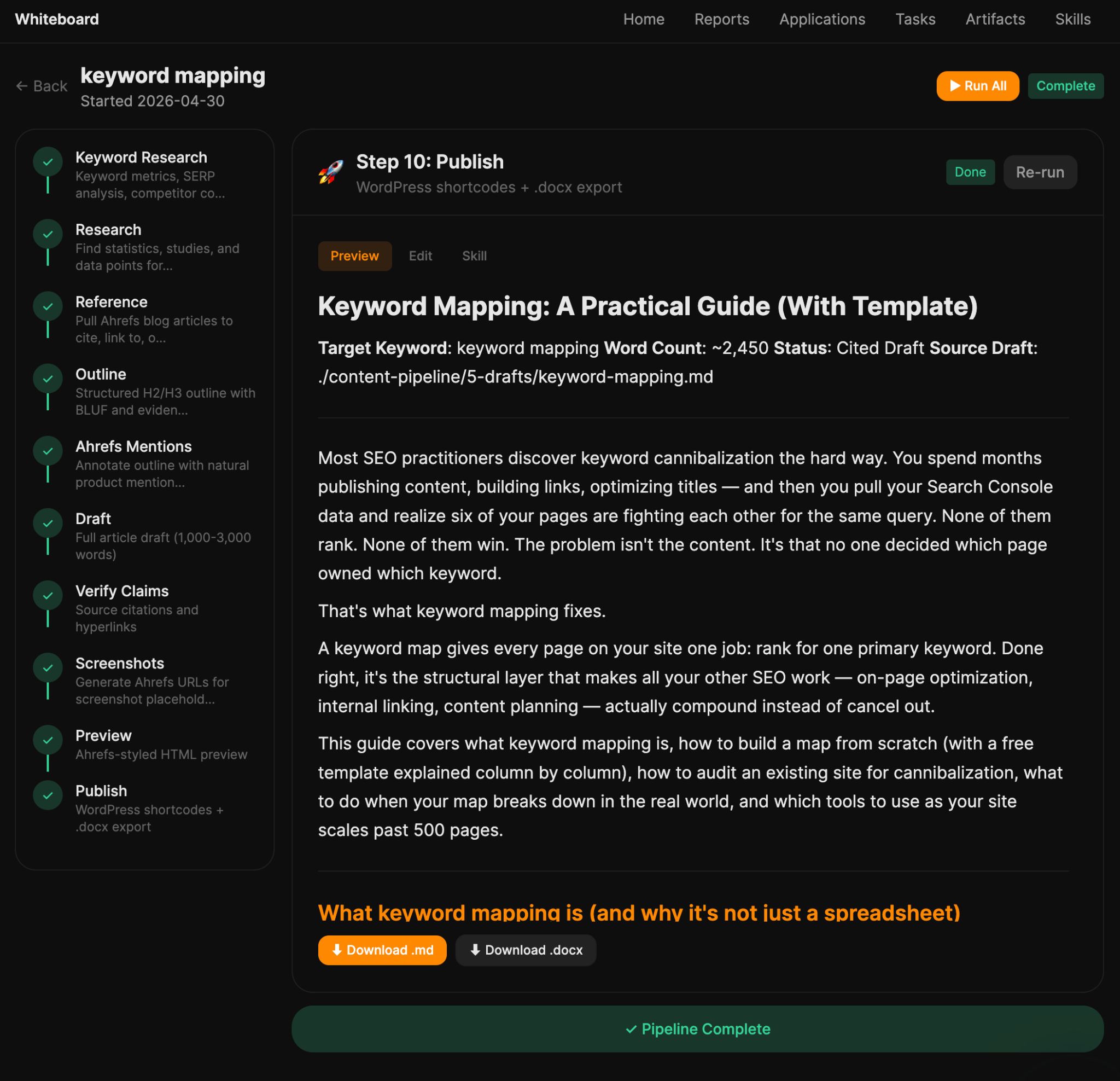
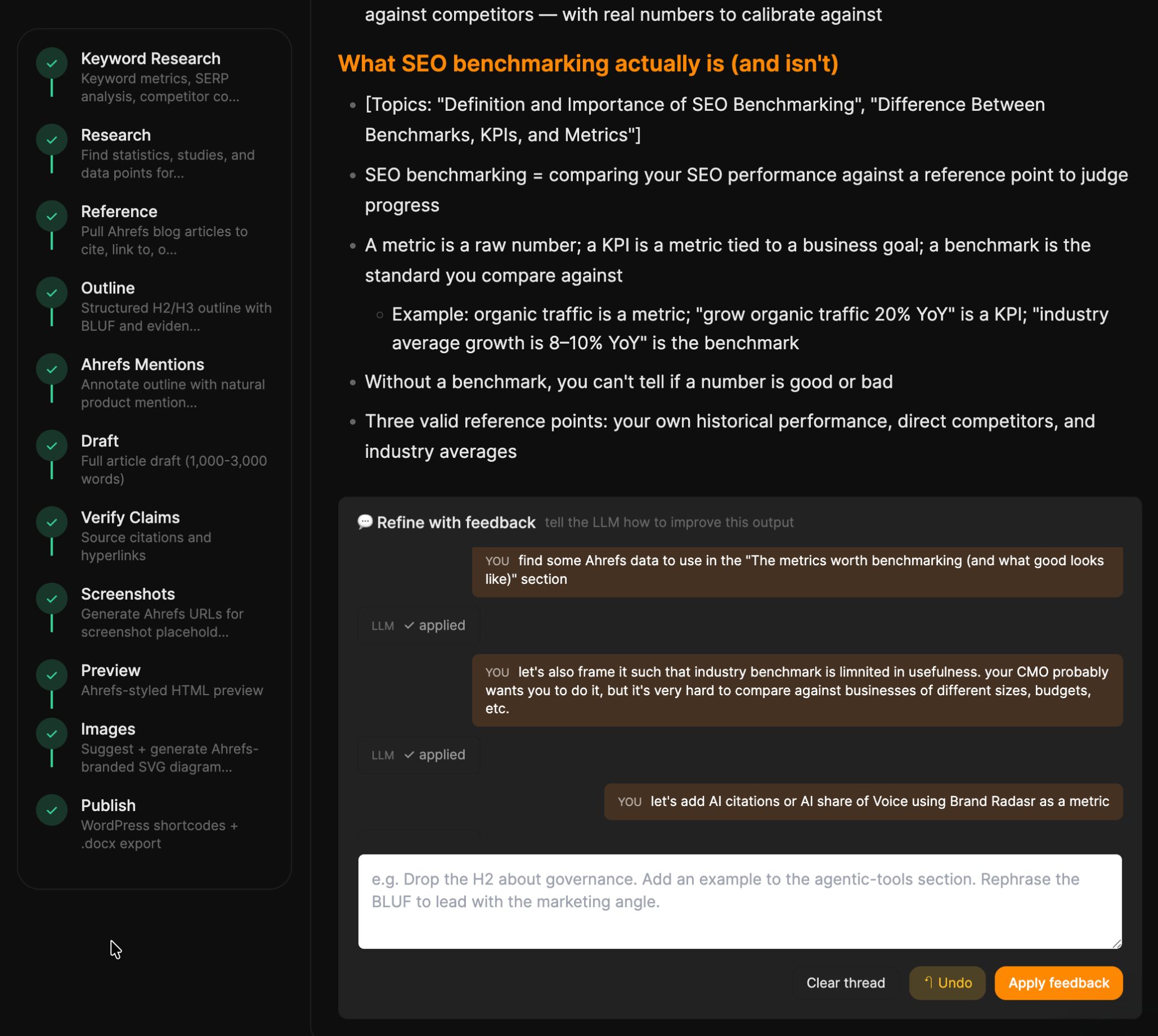
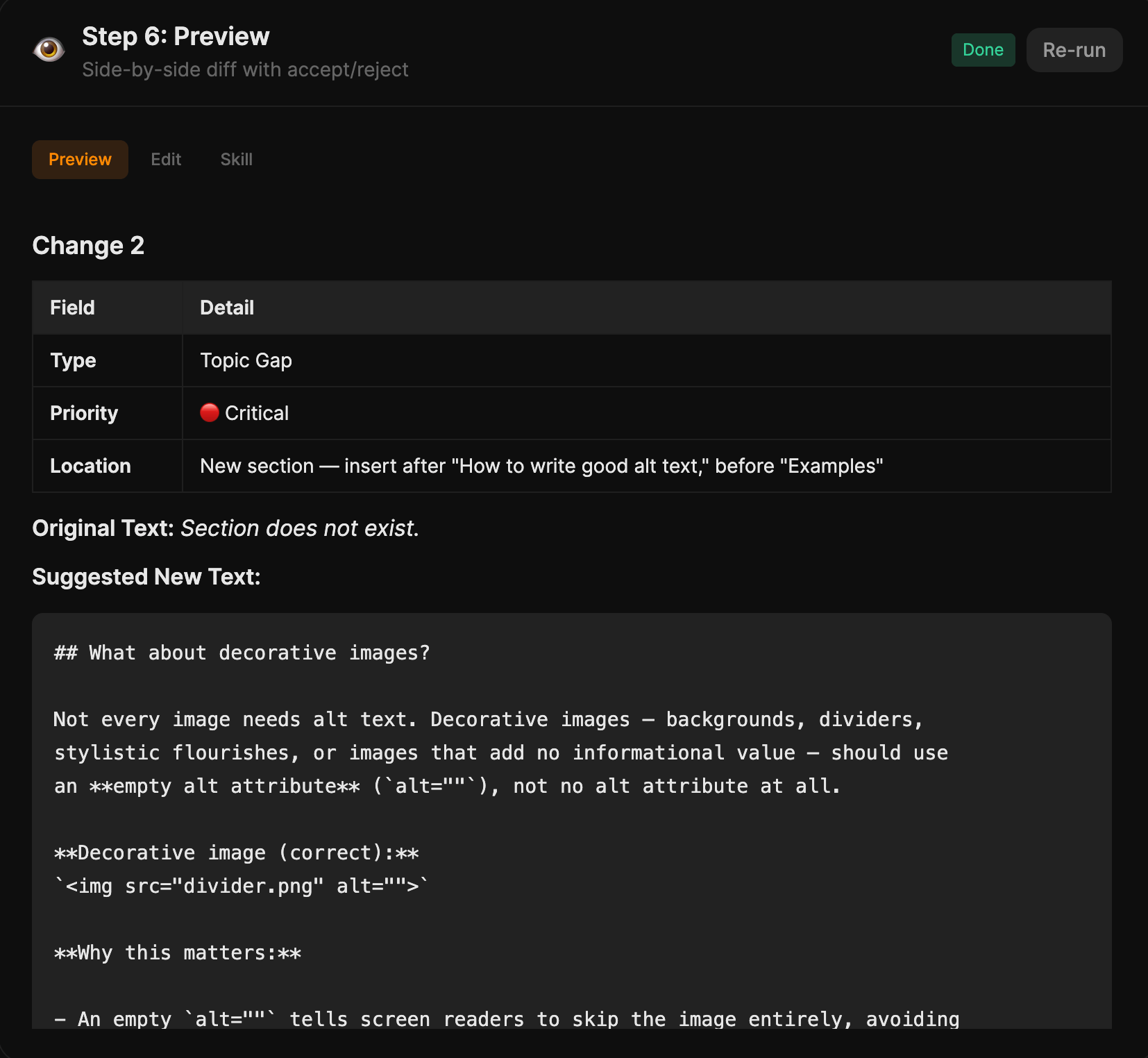
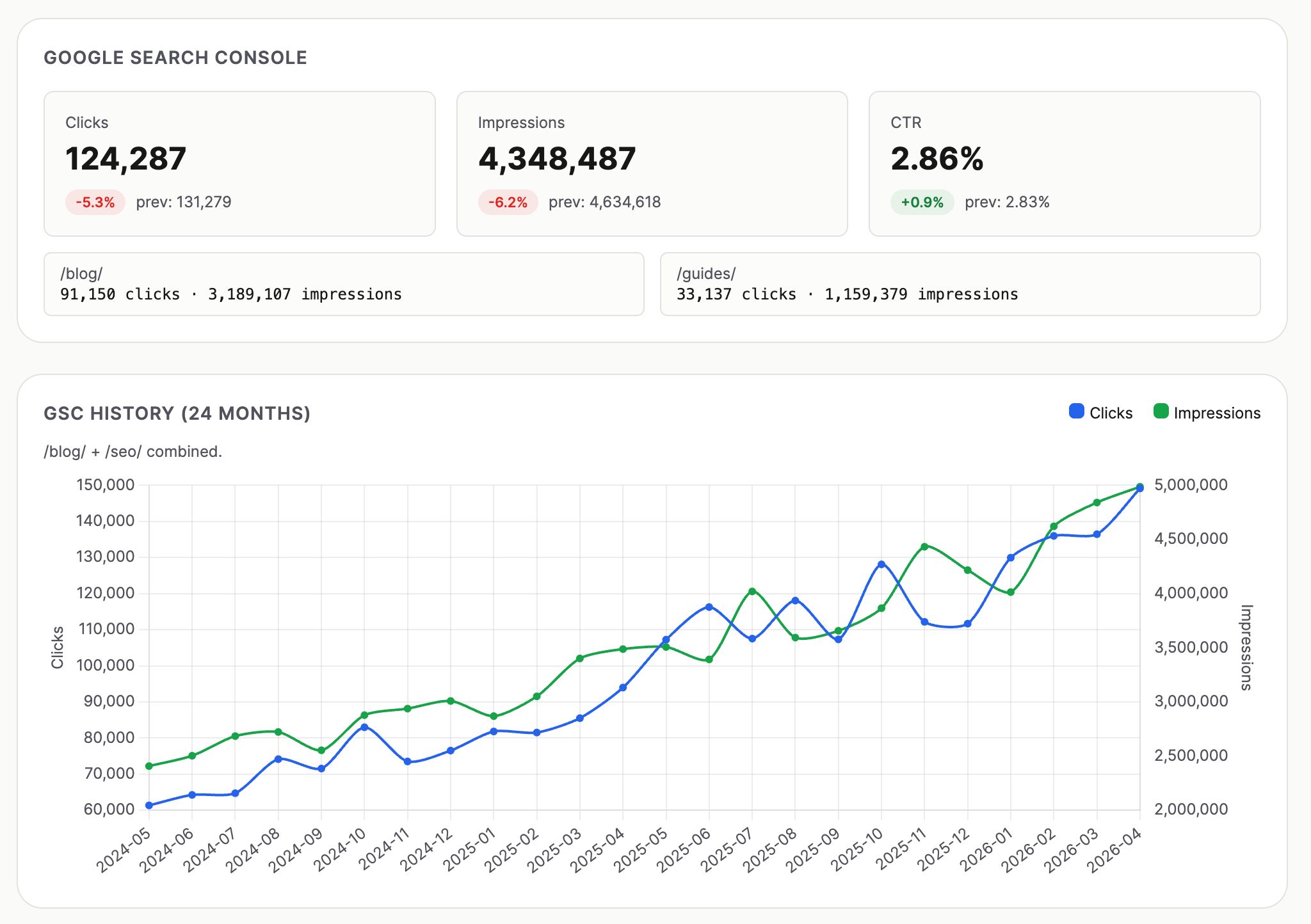
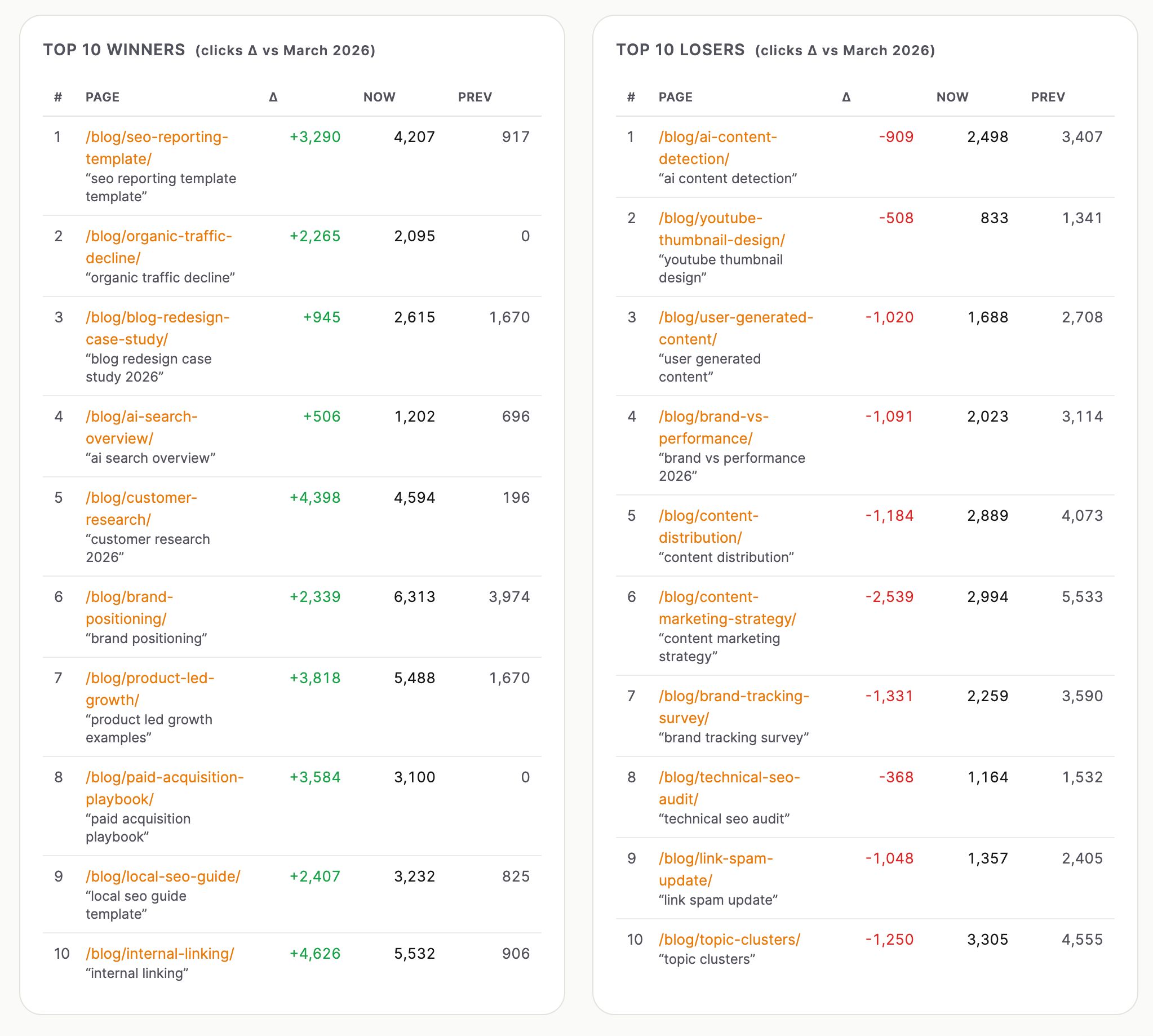
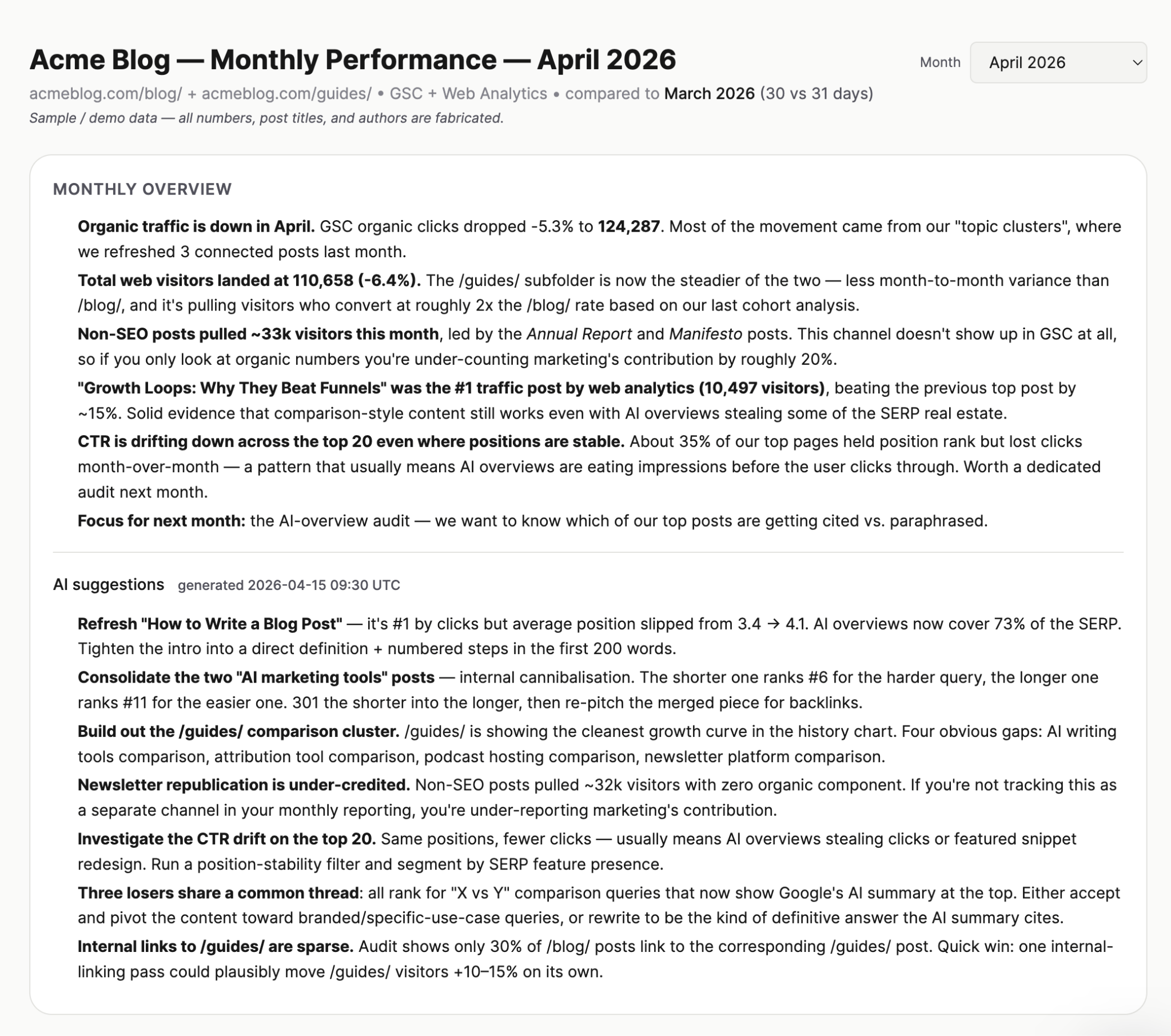
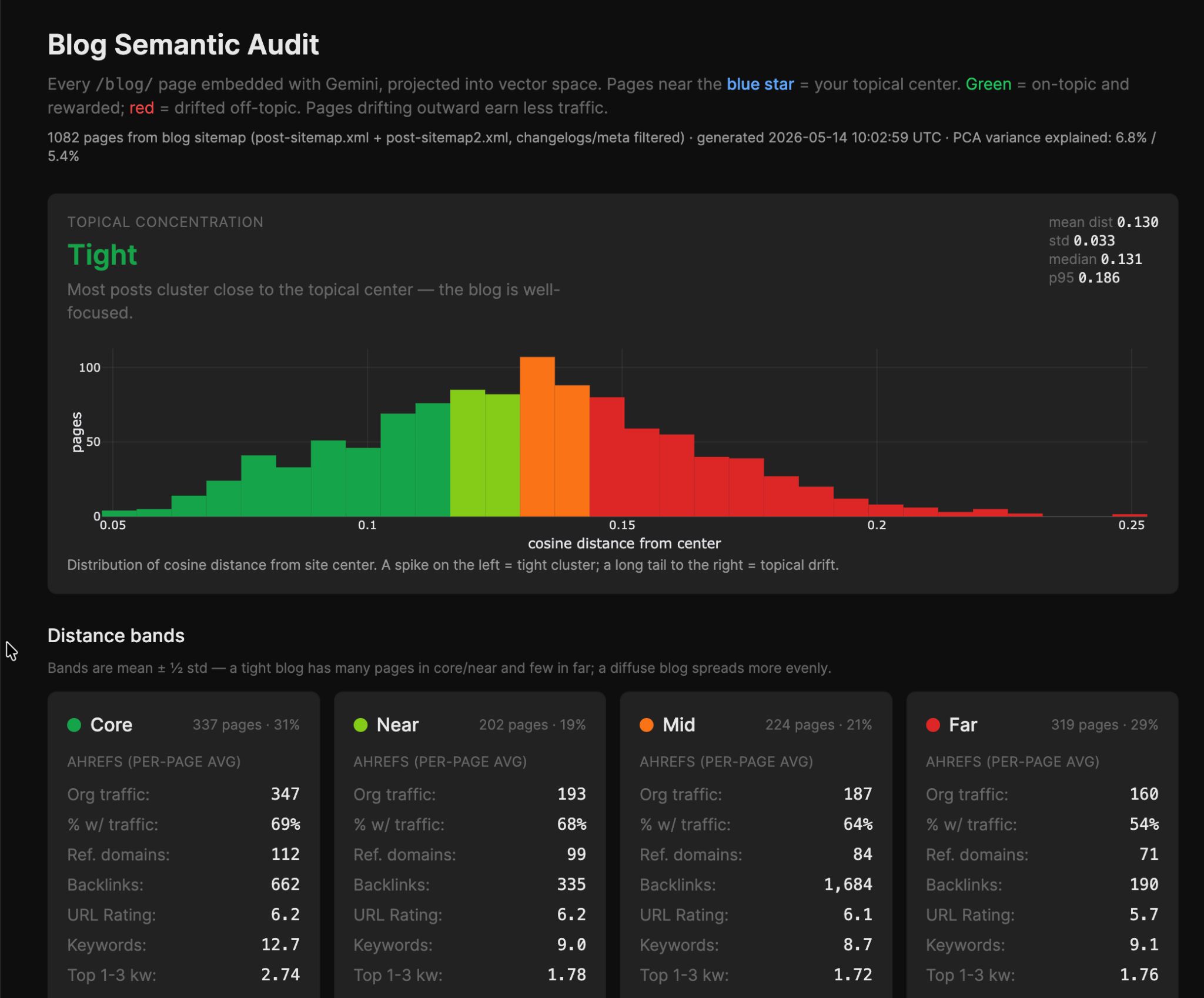
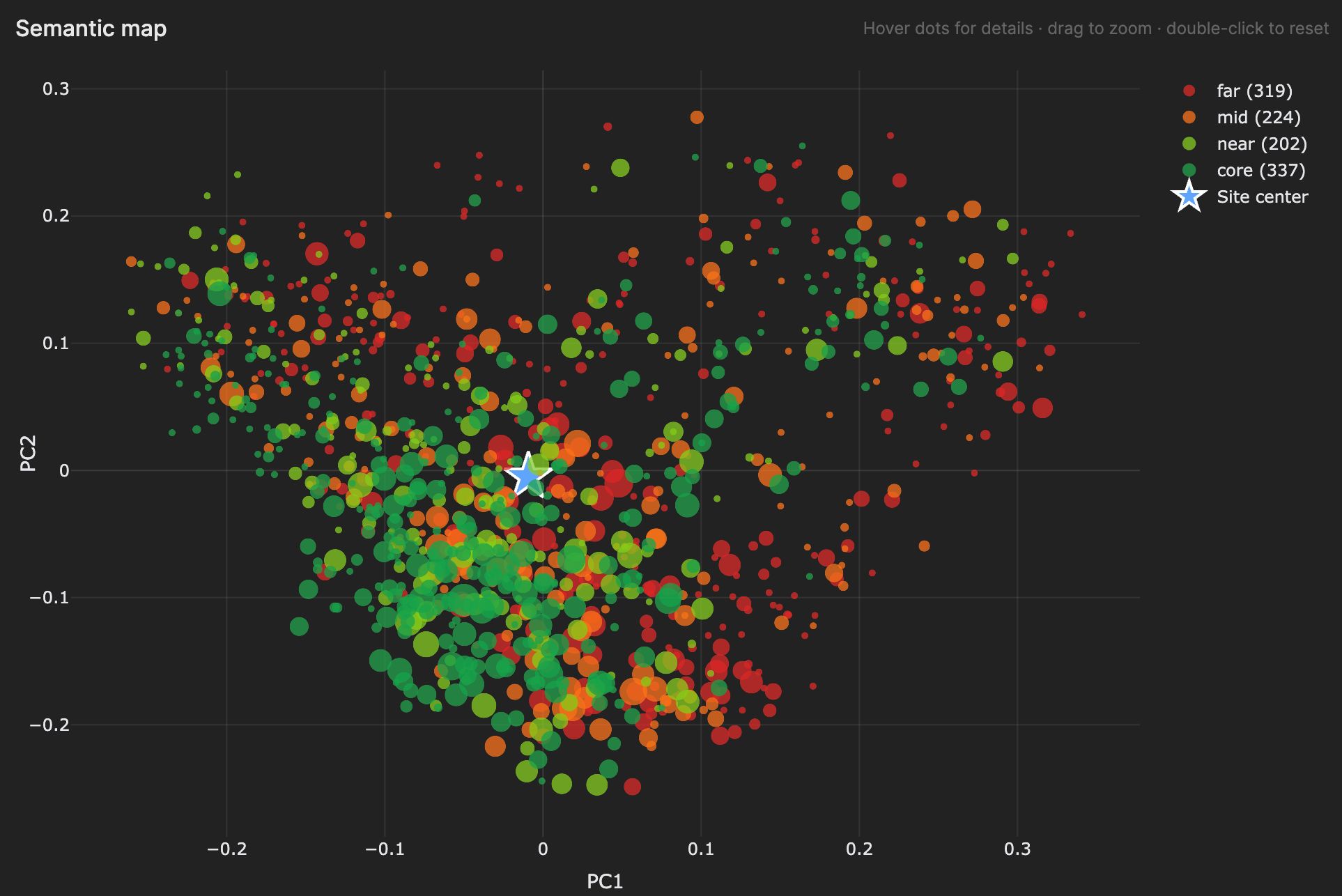
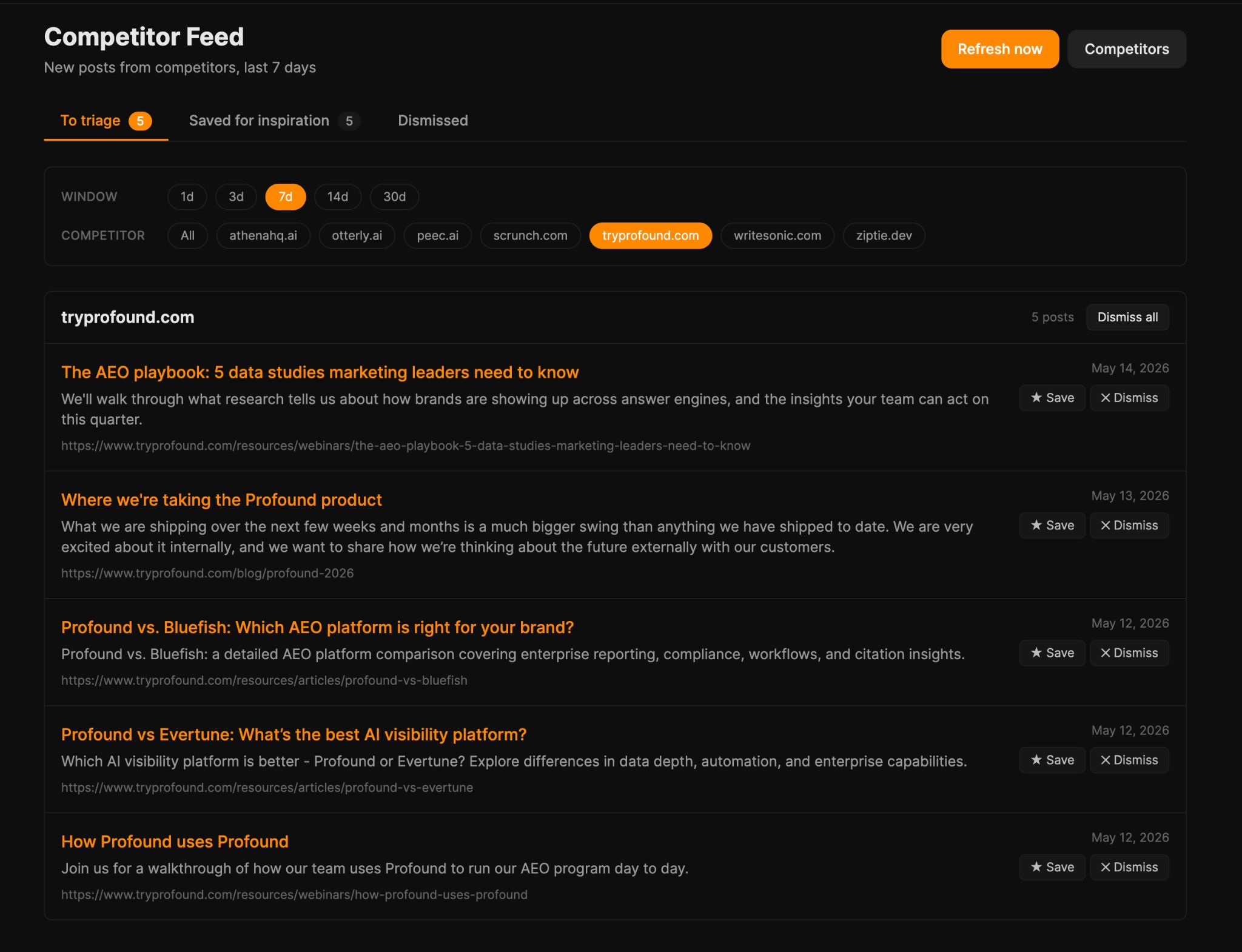
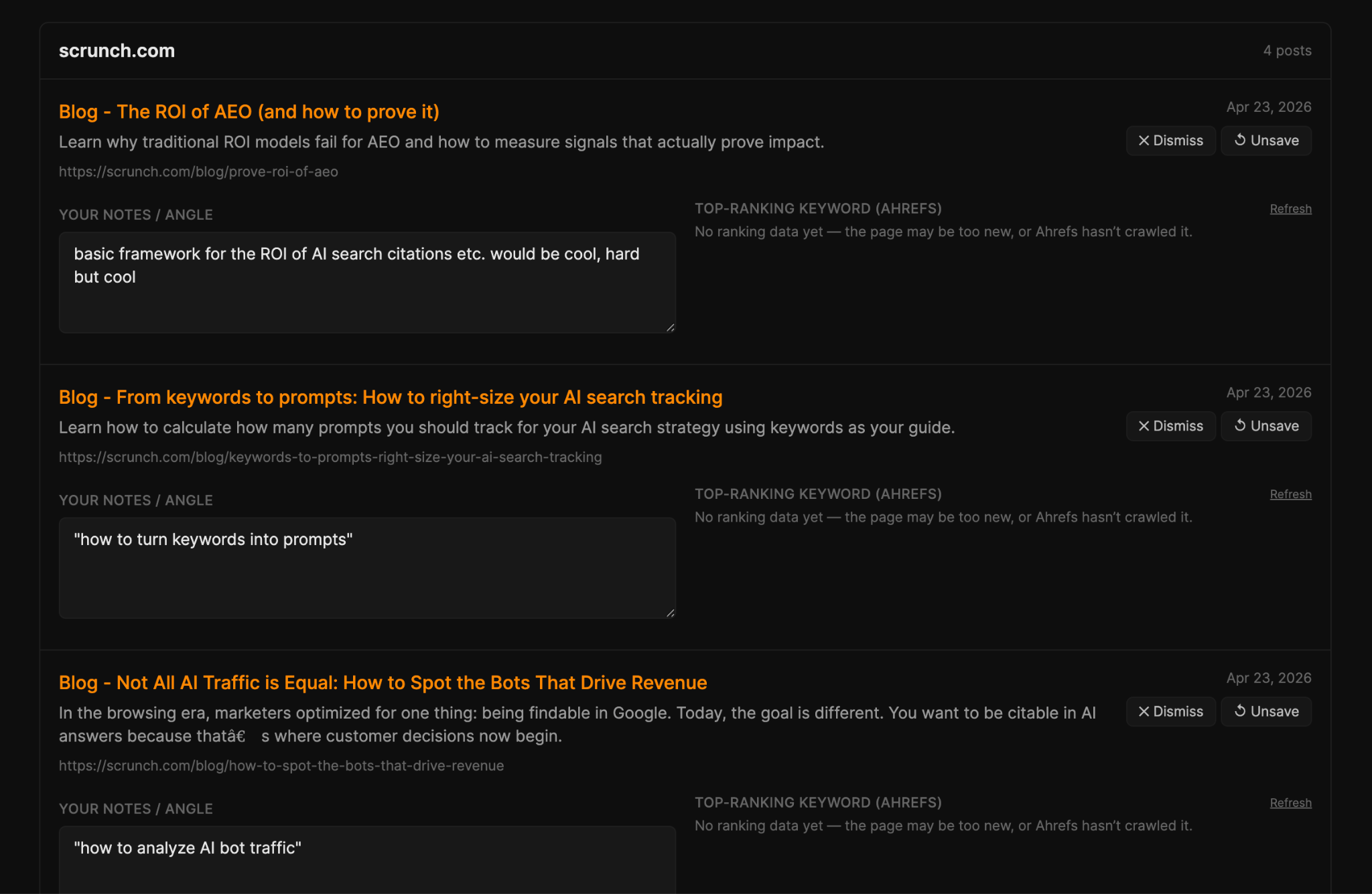
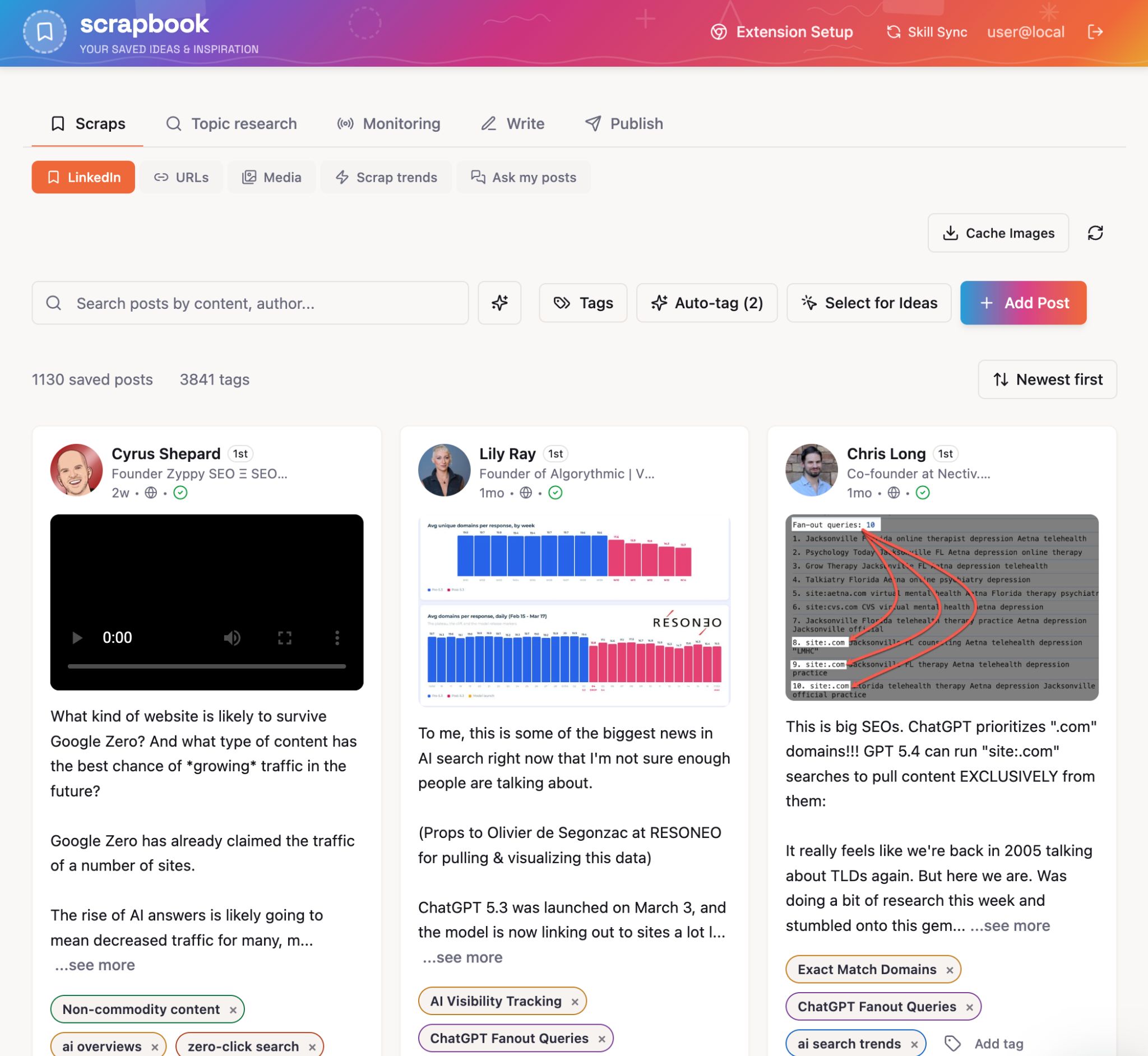
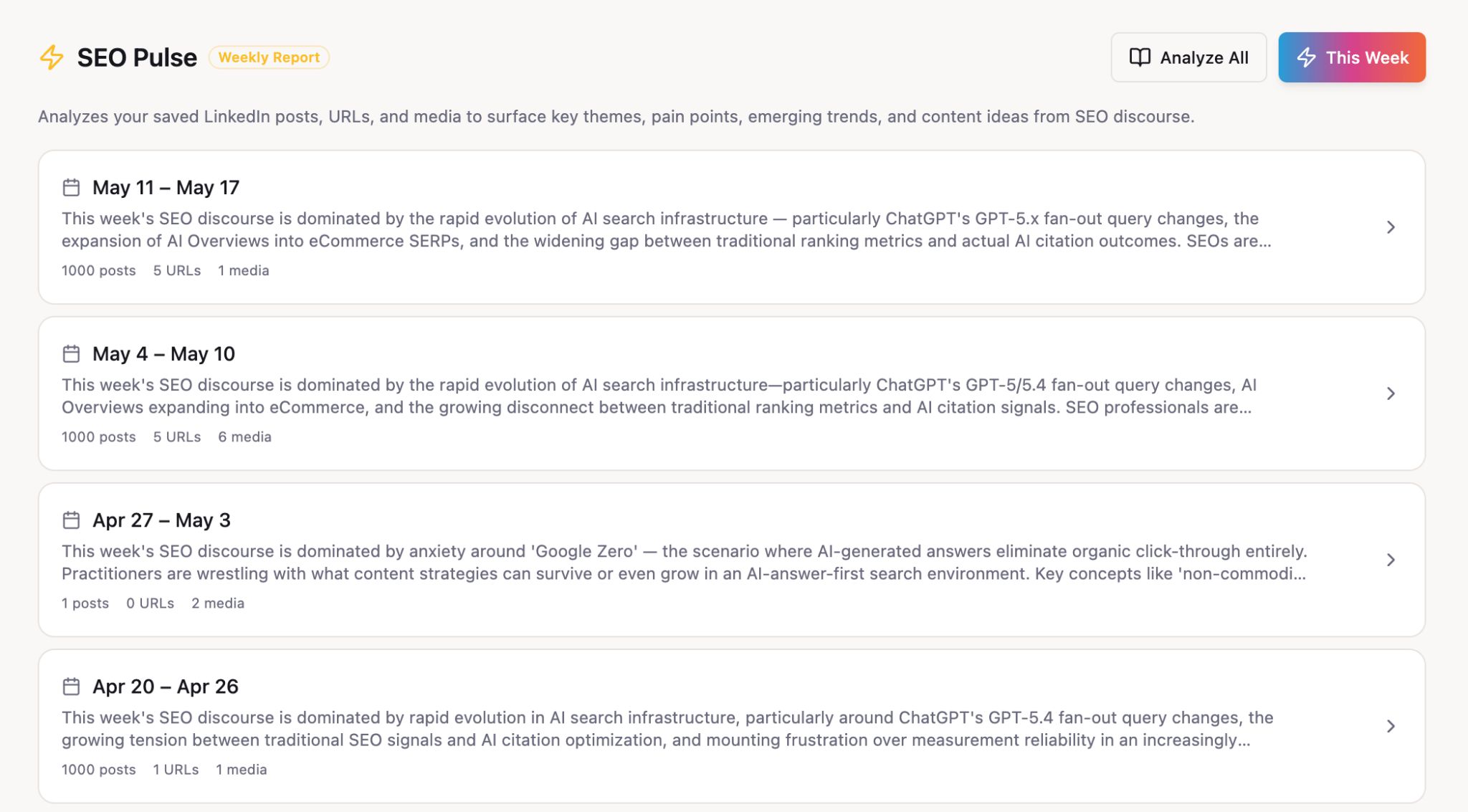
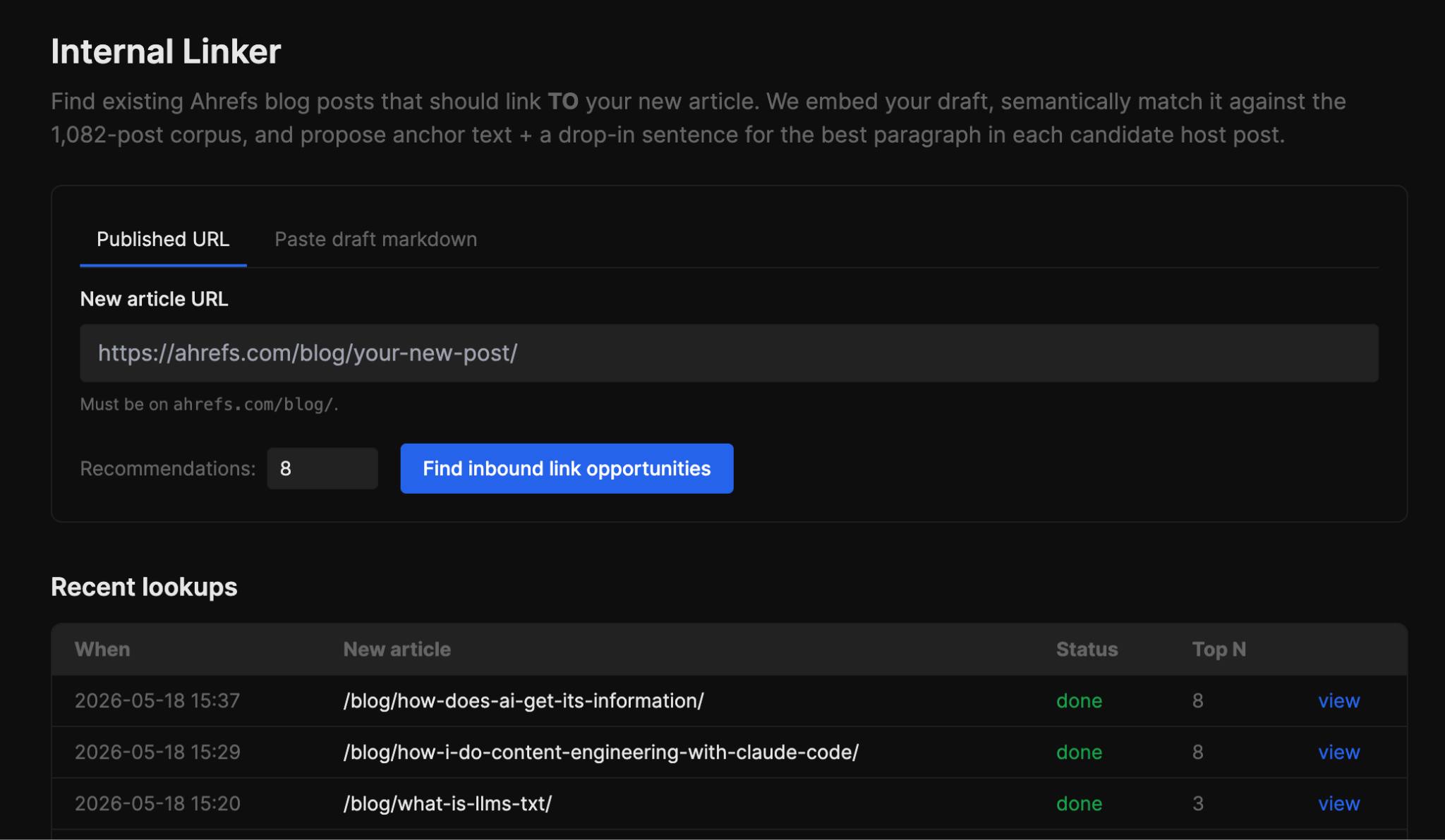
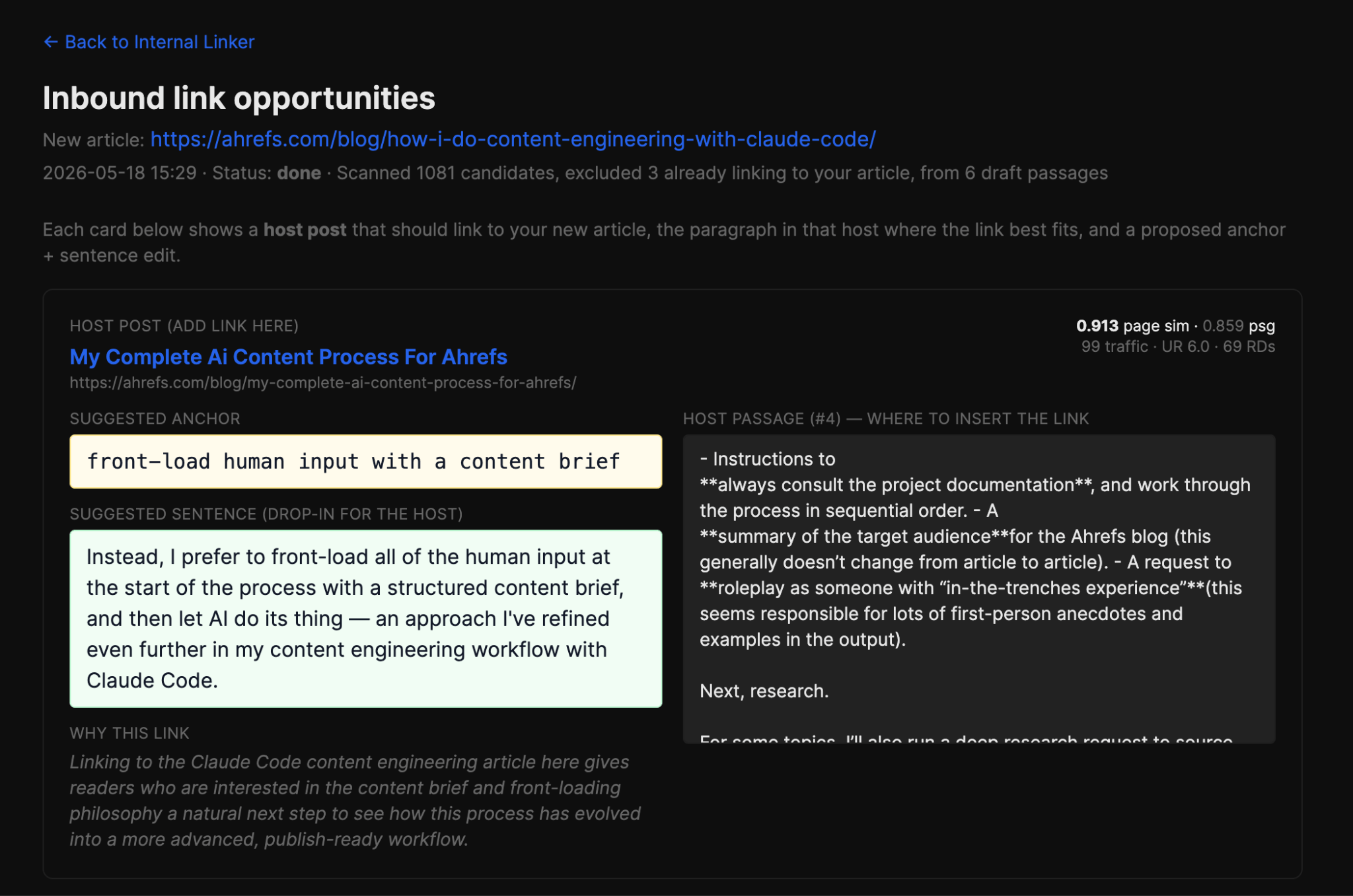
I run the Ahrefs blog team, and each week we use Agent A to automate more and more of the tedious parts of our work. Writing formulaic SEO content, updating old articles, reporting on blog performance, even running complicated performance analyses… these are all things Agent A does for me. Here are some of our favorite Agent A use cases for content marketers. Agent A is a marketing agent from Ahrefs—essentially an AI assistant with direct, unrestricted access to the full Ahrefs dataset that can carry out marketing and SEO tasks autonomously, rather than just answer questions. It’s a workspace where a long-running AI agent builds, runs, and maintains tools for you, on infrastructure it controls. It is not just a chatbot you ask questions to. It is closer to a junior engineer who happens to have a deep SEO background, a Postgres database, a Flask server, and access to all the frontier LLMs. Here’s how Agent A is different from ChatGPT, Claude Code, or even using the Ahrefs API or MCP: Here’s how we’re using Agent A to automate content marketing: I used Agent A to build the Blog Pipeline, an 11-stage assisted-writing workflow that automates SEO content creation. You enter a target keyword (or better yet, ask Agent A to find one with the built-in ‘Content Gap Analysis‘ skill), and Agent A works sequentially through 11 separate stages to deliver a publish-ready article draft. Agent A works in series through keyword research, SERP analysis, AI Content Helper topic snapshot, bulleted outline, product mentions, drafting, internal linking and citation sourcing, image generation, and formatting for publication. You can see the output at every stage and edit it in-line. I keep tinkering with the Blog Pipeline. My latest additions include: Starter prompt: Build me an assisted long-form article pipeline. Atomic input is a target keyword. Stages run sequentially as background jobs the UI polls: (1) keyword research via Ahrefs, (2) competitor SERP fetch, (3) AI Content Helper topic snapshot, (4) bulleted outline with mandated topic coverage, (5) data-mention placement, (6) full draft, (7) polish, (8) WordPress shortcode formatting + .docx export. Each stage shows its output, has an "edit" textarea, and a "refine with feedback" chat that re-runs the stage with my notes. Style guide comes from a per-author voice profile. We have over 1,000 articles on the Ahrefs blog (including localized versions), and keeping them all up to date is more than a full-time job. I used Agent A to build an automated updating process: Share a published URL, and the pipeline fetches the article, extracts the page content, then runs four diagnostic stages in parallel: My favorite feature is the Preview stage: a side-by-side diff between your current article and the proposed updates, with the option to accept/reject per change. You’re never staring at an AI-rewritten draft and trying to spot what changed. You see the original on the left, the proposed edit on the right, and you click through them. The Update Pipeline is what makes a monthly “refresh 20 old posts” sprint actually manageable. Starter prompt: Build me a blog-post update pipeline. Input: a published URL. Fetch the article. Run five diagnostic stages: (1) Guidance — I set scope (light refresh vs. full rewrite); (2) Claims Audit — LLM extracts every stat, study reference, and dated assertion and grades each for staleness with a suggested replacement; (3) Ahrefs Mentions — cross-check against Ahrefs features released since publication and suggest where to drop new ones; (4) Topic Gaps — re-run the SERP, surface topics current top-ranking pages cover that mine doesn't; (5) Authoritative Pages — find linkable sources published since my article. Final stage: side-by-side diff between current article and proposed updates, with accept/reject per change. Export the accepted version as markdown and WordPress shortcodes. Every month I share a pretty detailed performance report for the Ahrefs blog. It combines tons of data sources, includes loads of visualisations, and offers a layer of my (theoretically) expert analysis. The report used to take a full day to create. Now, Agent A generates it for me, automatically, on the 2nd day of each month (to allow time for GSC data to finish collecting). (This is just dummy data—you can tell by the fact that it’s increasing month-over-month…) It pulls Google Search Console, Ahrefs Web Analytics, and the GSC dashboard chart together into one view with KPI tiles, 12-month trend chart, subfolder splits, winners-and-losers tables, daily anomaly callouts, and full paginated lists of every SEO and non-SEO post. I’ve also included an editable “monthly overview” field. The AI doesn’t write the analysis: that’s my job. Instead, it analyses the month’s performance and suggests 6-10 candidate bullet points I can review and cherry-pick into the overview, if they support my analysis. Starter prompt: Build me a monthly blog performance report. Pull GSC + Ahrefs Web Analytics for the current month. Show KPI tiles, a 12-month trend chart with a migration marker, subfolder split, winners/losers tables (paginated, 25/page), daily anomaly callouts, and full paginated tables of every post. At the top, an editable markdown "monthly overview" with auto-save. Beside it, an AI panel that takes my cached KPIs + an "industry context" textarea I fill with algo-update news and produces 6-10 candidate bullets I can copy. Add a "publish to public site" button that snapshots a read-only view. I’ve always been interested in topical authority: the idea that Google rewards websites that cover their area of expertise in comprehensive detail. We have a huge, sprawling blog, and I wanted to see how our “off-topic” articles performed relative to our core articles. So Agent A ran the analysis for me. To get a little technical, the Blog Semantic Audit mapped every URL on our blog into vector space, computed a site centroid, and bucketed pages by their cosine distance into core/near/mid/far. Then it enriched every page with Ahrefs traffic data, so each bucket shows you average organic traffic, referring domains, UR, and keyword coverage. It even grouped related articles together to highlight natural topic clusters. The result answers a question I always wanted to answer: “Do my off-topic posts underperform my core posts, and by how much?” On our blog, the answer is yes: core pages get roughly 2× the traffic of far pages. Starter prompt: Run a semantic audit of my blog. Pull every URL from the sitemap, fetch the content, embed each page (mean of passage embeddings) using a 3072-d embedding model. Compute the site centroid and bucket pages by cosine distance to it (core/near/mid/far using mean ± 1/2σ — not quartiles). Enrich each URL with Ahrefs batch analysis (org_traffic, refdomains, UR, keywords). Run k-means with silhouette scan (k=2..12) to find natural topic clusters. Output: bucket histogram, per-bucket Ahrefs averages, cluster summaries with sample URLs, and a verdict on whether the blog is tight or diffuse. I spend a lot of time reviewing competitor blogs and looking for article inspiration. When I asked Agent A to help, it built a tool called Competitor Feed. Competitor Feed watches a list of competitor blog sitemaps and surfaces new posts each day. Each post is saved with a title, publish date, first-paragraph excerpt, and a one-line LLM summary. I then triage each item as save/dismiss/ignore: good ideas get saved into my backlog of content ideas. When you save a post, the app fires an Ahrefs Keywords Explorer pipeline against the title: it extracts a 2-3 word seed topic, fetches keyword suggestions, ranks them by volume and intent, and attaches the results to the saved row. So “competitor watching” stops being a passive feed and turns into an active keyword pipeline: every interesting competitor post produces a list of keywords we could go after on the same topic. Starter prompt: Build me a competitor blog watcher. I configure a list of competitor blog sitemap URLs. A daily job diffs each sitemap, fetches new URLs, and for each new post shows title, publish date, first-paragraph excerpt, and a one-line LLM summary of the angle. Triage states: new / saved / dismissed. When I save a post, run an Ahrefs Keywords Explorer pipeline against the title: extract a 2-3 word seed topic, fetch keyword suggestions, rank by volume and intent, attach results to the saved row. The output is competitor-inspired keyword lists, not a passive reading queue. Louise built the LinkedIn Scrapbook, her own personal swipe file for content inspiration. You install a Chrome extension; while you browse LinkedIn, one click on any post saves it, with full text, author, engagement metrics, and media, into your scrapbook. Scrapbook becomes very interesting when you’ve saved some content, care of all the extra tools Louise added, like: Starter prompt: Build me a LinkedIn swipe-file app with a Chrome extension. The extension adds a "Save to Scrapbook" button to every LinkedIn post; one click captures post text, author, engagement metrics, and media URLs and POSTs to my Console app. The Console app stores posts in Postgres with full-text search. Build three tools on top of the corpus: (1) Trending Keywords — extract topic seeds from saved posts, surface rising topics over a rolling window; (2) Content Gap — diff topics in saved posts against topics in my published blog posts, output what I'm consuming but haven't written about; (3) Example Finder — semantic search over the scrapbook with deep links back to LinkedIn. Add a generic web-clipper extension too for non-LinkedIn URLs. Internal linking is one of those SEO chores that “should” get done every time we publish and almost never does. So I got Agent A to build the Internal Linker. Feed it a new article (either a published link, or pasted draft markdown for unpublished pieces) and it finds the most relevant existing posts that should link to it. Under the hood, it embeds the input article with Gemini and cosine-compares against all other articles from our sitemap. The top candidates then get rescored with a special traffic weighting to prioritize links from articles with lots of existing organic traffic. It also auto-excludes any post already linking to you, parsed from each candidate’s markdown body, so you’re not staring at recommendations you’ve already used. For each recommended article, the tool also identifies the single paragraph most semantically aligned with your new article. Then Claude Sonnet 4.6 drafts a natural 2-6 word anchor and rewrites that paragraph’s sentence to include it, ready to paste straight into the existing article. Starter prompt Build me an internal-linking tool. Input: either a published blog URL or pasted draft markdown for unpublished pieces. Embed the input article with Gemini and cosine-compare against my pre-cached blog post vectors. Rescore top candidates with authority weighting: 0.7 × similarity + 0.3 × log(org_traffic) — favours high-traffic hosts where a link actually moves rankings. Auto-exclude any host already linking to me (parse each candidate's markdown body). For each top host, identify the single paragraph most semantically aligned with the input article — that's where the link goes. Have Claude draft a natural 2-6 word anchor and rewrite a sentence in the host paragraph to include it. Per-recommendation context: page sim, passage sim, host's org_traffic / UR / refdomains, the host paragraph, and a one-line rationale. Cache passage vectors per host so repeat lookups are instant. Run lookups async with live step status; persist every lookup to history. If you’re an Ahrefs customer, you can try Agent A for free for one month. Test out some of these prompts for inspiration, build some applications and generate some reports, and see just how much of the tedious parts of your job Agent A can tackle for you.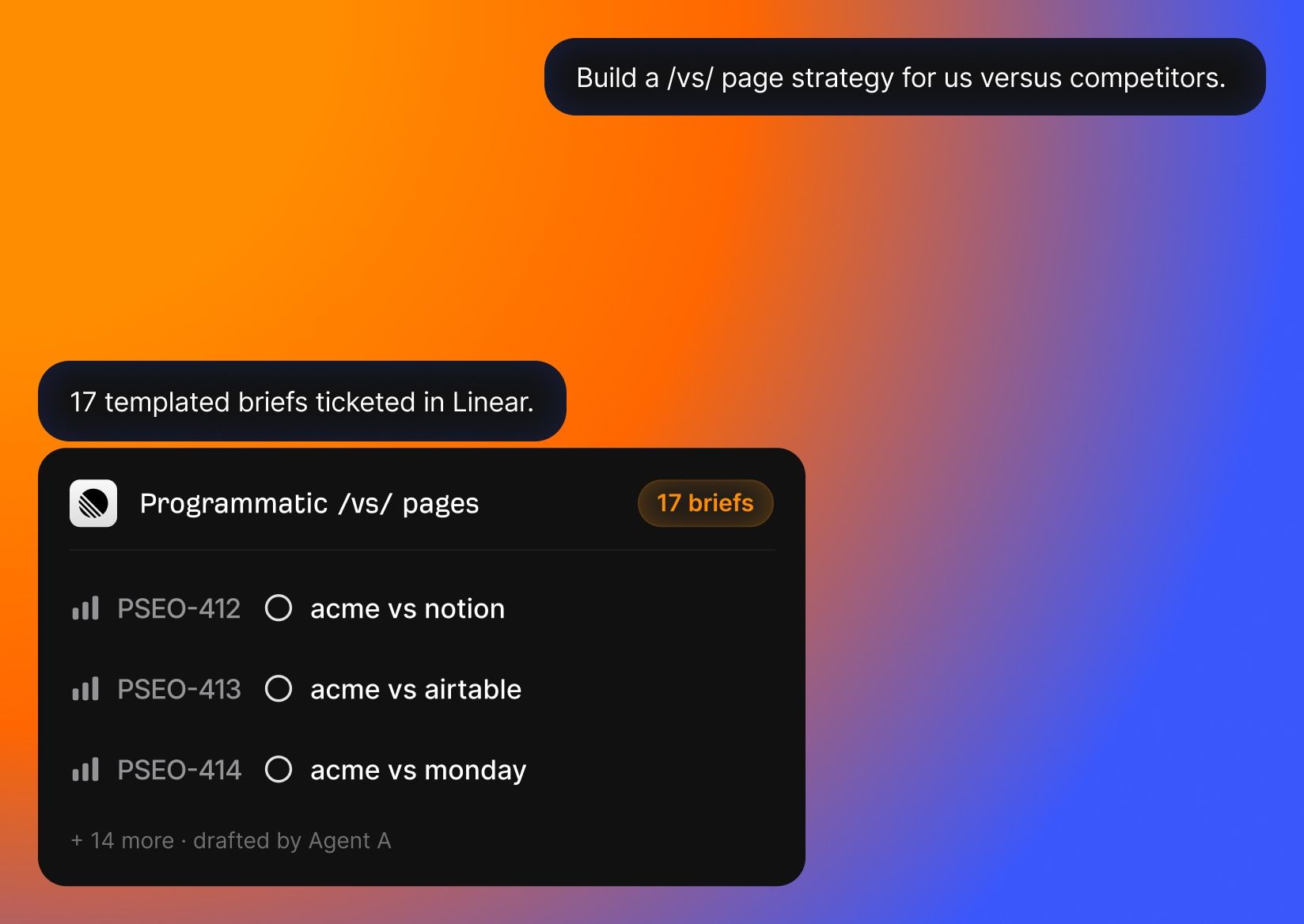

7. Get scientific internal linking recommendations
Final thoughts