
Best Practices for Writing SEO Title Tags
Key Takeaways Google rewrites 76% of title tags as of 2025, and AI Overviews are changing how title tags function even beyond click-through. They may not be the most exciting part of the SEO jigsaw puzzle, but if you...
 FrankLin
Key Takeaways
Google rewrites 76 percent of title tags as of Q1 2025, often when titles are too long, keyword-stuffed, or misaligned with the page’s H1. Title tags remain the second most important ranking factor in Google’s algorithm, and the HTML version still influences ranking even when Google rewrites the displayed title. The sweet spot for title tag length is 51 to 60 characters, which carries the lowest rewrite rate across large-scale analyses. In 2026, your title tag works in two places: driving clicks in traditional SERPs and acting as a citable label inside AI Overviews. Audit your existing titles by impressions and CTR. High-impression, low-CTR pages are your fastest wins.Google rewrites 76% of title tags as of 2025, and AI Overviews are changing how title tags function even beyond click-through. They may not be the most exciting part of the SEO jigsaw puzzle, but if you want to drive organic traffic to your website, getting them right is vital.
Even Moz says, “Title tags are the second most important on-page factor for SEO, after content.” They’re a quick win if you want to supercharge your SEO strategy.
If you’re looking for a boost in the search engine results pages (SERPs), keep reading. I’ll share my title tag best practices to help improve your visibility across traditional Google rankings and AI Overviews.
What Is a Title Tag?
A page title tag is the headline that represents your web page in the SERPs.
Your meta tags are important because they work with your meta description (the text below the title tag) to tell potential customers about your page content.
Let’s say you’re searching for “kitchen installation services.” One of the top results is IKEA, with the title tag “Kitchen installation services.”

This is an excellent title tag, as it clearly explains the page’s purpose and aligns with IKEA’s brand.
There are two reasons why page title tags are so important:
First, if you have a clear title that’s relevant to your page, both humans and search engines will see that as a sign of a good page.
If your title tag SEO isn’t on point, people could skip over your content, and search engines may determine that your page isn’t as good as it could be.
A second reason why title tags are important is that they appear in browser tabs and are used when people share your pages on social media. Get your title tag right, and it can help your content stand out.

Now that you have the definition down, the next question is how to write meta title tags for SEO that actually earn the click.
How to Write an Effective Title Tag
If you want to increase your chances of ranking on the first page of Google, a well-crafted, unique SEO title tag can help boost your odds. Recent data shows that an SEO-optimized title tag is the second most important ranking factor in Google’s algorithm.
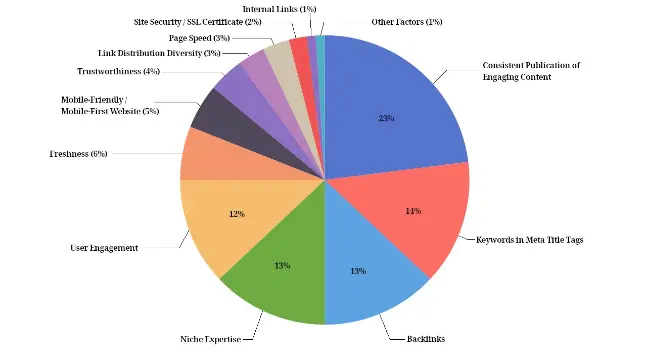
Source: https://firstpagesage.com/seo-blog/the-google-algorithm-ranking-factors/
Here are some SEO title tag best practices to help you nail the elements that’ll drive traffic.
1. Get the Length Right
Data shows that your title tag needs to be between 50 and 60 characters. This is the sweet spot that had the lowest amount of rewrites from Google (39 to 42 percent), because it coincides with the way Google truly measures your title tag: pixels. The sweet spot is 580 pixels, which aligns with the 50-60-character limit.
You also won’t be able to tell the search engines and potential customers what your page is about if it’s too short. Too long, and the search engines will cut off your title tag with an ellipsis (…).
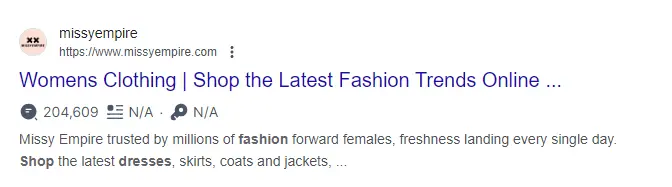
Some tools can help you see how your meta title tag will look in the search engine results and check your word count. One of my favorites is the Mangools SERP simulator.
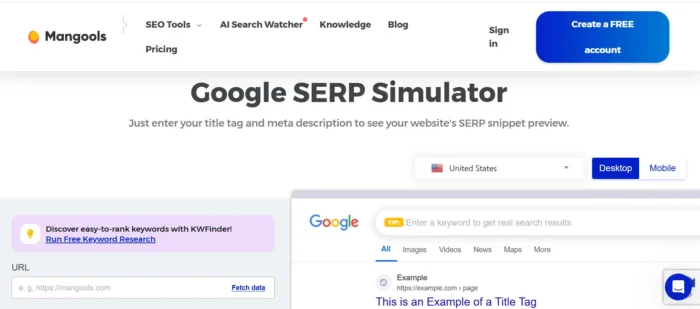
The HTML version of your title tag is also still important. You’ll want to abide by the pixel or character limit for display, but your HTML version still matters for ranking and relevance signals, even if your display version gets rewritten.
2. Front-Load Your Target Keyword
For best results, try to put your focus keyword as close to the beginning of your title as possible.
This means search engines (and search engine users) will quickly see that your page is relevant.
Let’s look at “buy red shirt” as our focus keyword. These title tag examples use that keyword right at the start, increasing the chances of that all-important click.
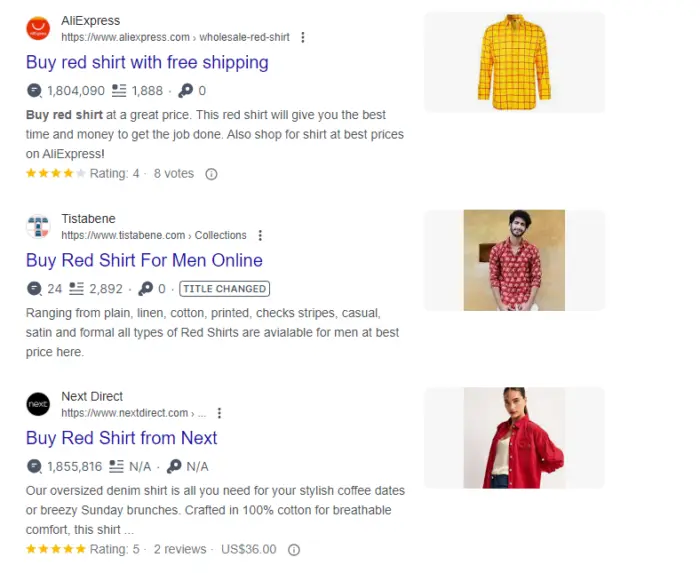
You’ll also want to make sure you’re using the right version. Check the Parent Topic in a keyword tool to ensure you’re using the highest-traffic version of the keyword, not just the most obvious one. You can also optimize for more than one keyword by incorporating the right keyword variants and synonyms into your title tag.
You could change your title tag from only including “cheap hotels” to including “affordable, cheap hotels and rooms,” for example, to catch more than one variant.
Keyword research tools are a great resource for finding and analyzing different versions of a single focus keyword.
Google Search Console, Moz’s Keyword Explorer, and SEMrush are just a few useful, easy options to choose from.
With SEMrush, for example, all you have to do is search your keyword and navigate over to the “Related Keywords” tab.
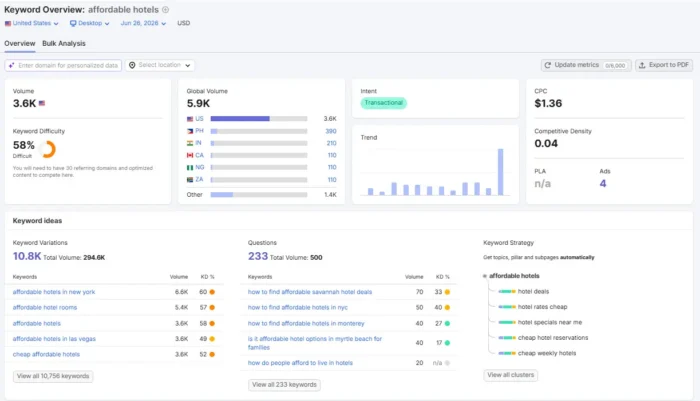
From there, you can see information for the keyword(s), like organic search volume, the cost-per-click (CPC), statistics on competition and trends, and more.
Scroll down to find a list of related words.
The tool will analyze how closely “related” a keyword really is based on a 0-100 percent scale, the ranking difficulty, the total number of results for those words, and trends.

Of course, it’s vital to ensure that keyword placement is organic, no matter which variant you use. While using them is great, don’t shoehorn them in just to get a placement. It’s against title tag best practices to stuff keywords into your title. Yes, you can optimize for multiple variants, but only if it sounds natural.
3. Show the Benefit or Value
You need to use your title tag to show how you provide value. What do customers get when they click on your page?
This benefit can depend on what you sell and what stage of the sales funnel customers are at (search intent). If you’re targeting people who are looking for information, you need to show what they can learn from your content.
I like this title tag – “12 Ways to get Heatless Curls Fast.” It’s enticing and shows that you can get results quickly.

Targeting people who are ready to buy? It pays to be concise. What are you selling, and what does the product offer?
While this title is a bit long, I like it because it says the product is customized for short, fine hair. None of the other results say this, which makes this title tag stand out.
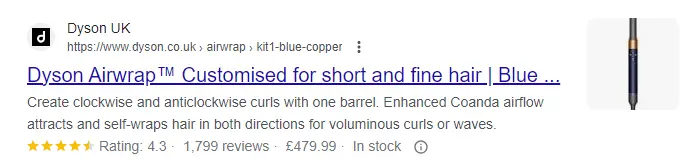
If your page doesn’t provide what you promise in your meta page title, customers will get frustrated, and Google could rewrite your title tag, so don’t be deceptive.
4. Use Power Words, Modifiers, and CTAs
A power word is highly persuasive and can trigger an emotional response in your customers. When used in your title tag SEO, they can encourage people to check out your pages!
Using a power word in your meta title tags is a fantastic way to get attention and boost your click-through rates.
Here’s a brilliant example. This title tag could have easily been “50 top tips for changing how you cook,” but Taste of Home has gone with “50 secrets chefs won’t tell you.”
That sounds a lot more intriguing!
Here are some power words to get you started:
Free New Easy Imagine InstantAnother one of the popular SEO title tag best practices is to use numbers, because numbers attract our attention. They’re specific, they stand out, our brains can easily recognize them, and they’re great for growing search traffic.
Marketers have also been saying for years that pages with odd numbers in their titles will gain the most shares because odd numbers stick in your mind much better than even numbers.

So it might be better to conclude all of your lists once you reach an odd number, like 9, instead of one that “looks better,” like 10 or 20. Including the year can also boost your post’s performance. It can signal recency around topics where freshness matters, and increase click-through rates (CTRs).
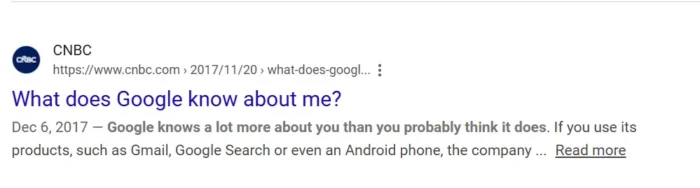
Just like numbers or the year, questions can be powerful for grabbing your audience’s attention. They pique our curiosity.
I’ve talked about the importance of using open-ended questions in your blog posts before. The same applies to title tags.
News sites like CNBC practice this tactic all of the time:
You can even take a more creative approach and answer part of the question in your title as a teaser, like copyguide.co does:

AYou might even increase your chances of being cited in Google’s AI Overviews if you ask a question in your title and provide a clear, comprehensive answer on your web page.
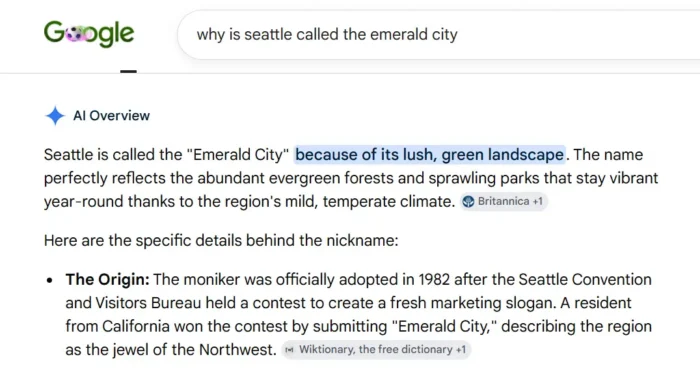
AI Overviews pull from multiple sources to generate a summary answer at the top of the SERP, and they’re most often triggered by question-based, informational queries. That makes question-format titles a natural fit for capturing this kind of visibility.
For example, a search like “Why is Seattle called the Emerald City?” often surfaces an AI Overview that synthesizes explanations from several websites before the traditional organic results appear below.
Of course, the goal of title tag best practices and other SEO elements is to get readers to click. This is the very reason calls to action (CTAs) are just as important as, if not more important than, questions in your SEO title tags.
CTAs make people click because they do exactly what their name says. They “call people to act” on whatever you’re asking of them.
You’re probably already including them in ads, blog posts, and web pages. Why not include them in title tags, too?
Action words (or trigger words) provide users with something extra by giving them an incentive to do something.
Examples of action words include buy, download, watch, learn, find, listen, and view.
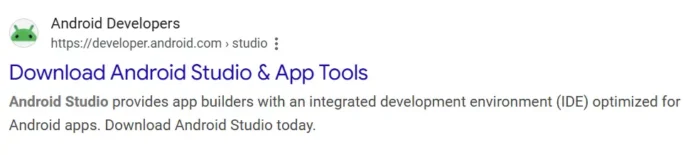
Combine those words with terms like free, easy, or new, and people will be clicking on your content like never before.
Additionally, you may want to consider adding some top keywords to your title.
You can have too much of a good thing, though. Overusing or cramming all of these elements into your title tag may make it feel spammy and undermine the very SEO boost we’re trying to achieve.
As I mentioned earlier, Google rewrites over 76 percent of title tags according to SearchEngineLand!
But why?
It turns out Google does this when its search algorithms think your title doesn’t represent the page’s content. It may see a mismatch between the user’s specific query and your title, or a mismatch between your title and your blog’s H1.
Title formatting can also trigger a rewrite. Google often rewrites titles that are too long, too short, or that overuse pipe characters.
Your title could also be rewritten to remove keyword stuffing and boilerplate language, and to add context. For commercial queries, Google frequently emphasizes commercial elements and removes what it considers unnecessary fluff.
So if your title tags don’t look good to Google, they’ll consider other factors, including:
On-page text Anchor text Structured data markupTake a look at this title tag: “Utilities and Electrical Services.”

If you go to the homepage and view the source code (right-click and select “View Source” or “View Page Source”), you’ll see the actual title is “Utilities and Electrical Services – Murphy.”
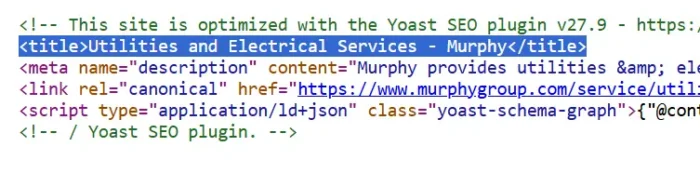
Google rewrote it because it felt the revised title tag would help people more than the original.
A well-optimized title tag is still worth writing because it gives Google a starting point. Without one, Google starts from scratch, and the result is often worse.
The good news: If you follow the title tag SEO steps outlined in this article, Google should keep your title tags as they are. Keep titles under 55 characters, match the title closely to the H1, ensure the title accurately describes the page content, and avoid exact-match keyword stuffing, and you should be fine.
It’s also important to remember that a rewrite is more of a display issue and not a ranking signal issue. Google will continue to use your HTML title tag for ranking signals, even if it rewrites what’s displayed in the SERPs.
Title Tags in the Age of AI Overviews
In 2026, your title tag is doing two jobs.
In traditional search results, it still drives clicks. In zero-click SERPs, where a user finds their answer in an AI Overview without leaving the page, a citation builds brand trust and mindshare even when no click follows. Both functions matter to your AI SEO strategy.
Google’s recent moves make this dual function even more important. In March 2026, Google confirmed it is testing AI-generated titles in traditional search results, not just Discover. The test is described as small for now, but Discover’s “small” headline experiment became a permanent feature within a month. Accurate, intent-matched titles are the most likely to survive both human and AI editorial review.
For AI Overview eligibility, your title tag should reflect a direct, citable answer to a common query, not just a click hook. Think of it as a label for a useful resource. That mindset aligns naturally with answer engine optimization, where clarity and accuracy outweigh clever phrasing.
We’re already seeing data to back this point. A recent study shows that title tags written to describe the general topic clearly get about two times the citations of titles strictly optimized for a keyword.
How to Implement a Title Tag
Once you know how to create an SEO title tag that works, it’s time to add it to your web page.
Here are two different ways you might go about it.
Case 1: You Use WordPress
If you use WordPress, it’s super easy to add a title tag. There are extensions you can download to implement your SEO title tags. The benefit of using these is that you don’t have to edit your HTML.
My extension of choice is Yoast, although other options work just as well, such as Rank Math and Slim SEO.
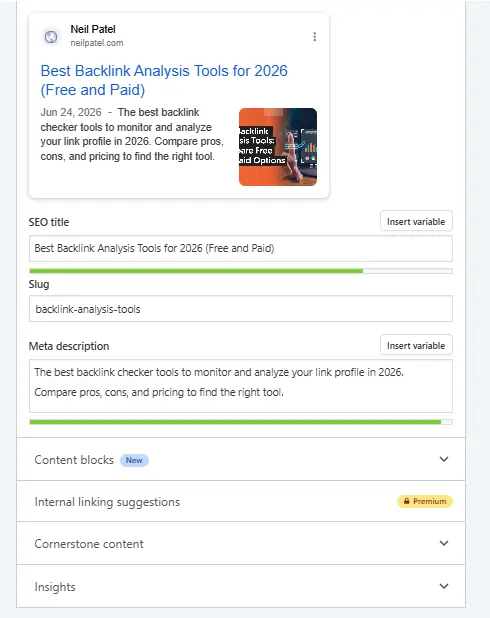
Here’s how Yoast works once you’ve installed it. To edit the title tag for a page or post, navigate to that content and open the editor.
If you’re using the traditional WordPress editor, scroll down to the bottom of your post or page, and you’ll see the Yoast box, where you can edit the title tag and meta description. If you’re in Elementor, you can access Yoast by clicking the settings cog in the Elementor menu.
You can edit your title tag and meta description directly in Yoast. It’ll also give you a nice preview of your title and meta description so you can see how they’ll look in the search engine results.
Case 2: You Use A Custom Site Not Hosted On A CMS
If your site isn’t hosted on a content management system (CMS), you can edit your HTML directly to add a title tag.
First, access the HTML for your page. I recommend checking with your hosting service on how to do this.
Once you’ve found the editable HTML, make sure you’re between the <head> tags.

To create the title, use <title> tags. For example:

Save your code, and your title will show up correctly.
If you don’t have a bespoke website or use a CMS other than WordPress, I recommend contacting your CMS provider or web host.
They’ll be able to advise you on how to access your HTML to edit your page title tags, and you can move on to the next element of my on-page SEO cheat sheet to get the most out of your optimization efforts.
Your title’s formatting elements create a solid SEO foundation, but there are several tweaks worth layering on. Here are a few SEO title tags best practices that can make a real difference.
Use Your Brand Wisely
The title tag can be a great place to include your brand name, but don’t go over the top. You only have limited space, and it’s more important to use your title tag to show how you can solve your customers’ problems.
Google recommends using your homepage title tag to include additional information about who you are and what you do. That’s what I’ve done with the Neil Patel homepage, as you can see here:

For the rest of your pages, adding your brand name to the end of the title tag will suffice (if there’s room).

Consider Making Your H1 Different From The Title Tag
Sometimes, your headline and title tag will be the same. But there are some cases where they won’t be.
For example, if your page headline is long and detailed, you might want a shorter, snappier title tag. This can look better in the search engine results and gives customers more context.
Here’s an example from Copyblogger. The title tag is “Content marketing tools and training.”

However, the headline on the website is “The most important skill in business is the ability to move people with words.”

Avoid Duplicate Tags
When creating lots of content, it can be tempting to use the same title tag for each page to save time.
However, this can cause issues with search engines.
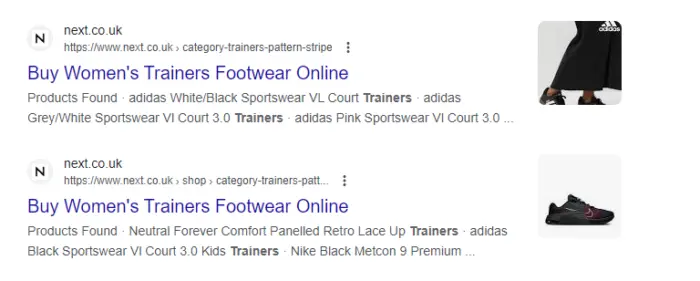
Note this example of identical tags from next.co.uk. Listing multiple pages with identical title tags may confuse customers, leaving them unsure which page to click on. It can also confuse the search engines, as they won’t know which pages to prioritize for which search query.
The good news is that there are plenty of tools that will help you find duplicate title tags. My favorite is Screaming Frog, which quickly identifies duplicate title tags and meta descriptions.
Add emojis
At one time, Google had removed emoji characters from results pages.
Eventually, Google would reverse that decision, meaning that we can still leverage the power of emojis in the SERPs and on mobile.
That’s good news since emojis can add a sense of emotion to regular text or even replace text altogether.
But you can use emojis for more than just fun and games. They can also boost engagement.
You can add emojis to your title tags by copying and pasting them, using a WordPress plugin, or typing the code yourself.
If you’re using Yoast, you already have access to codes for each emoji that you can copy and paste.
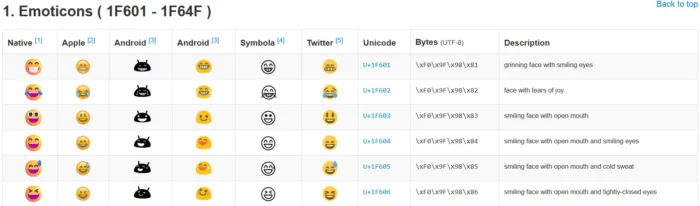
Once you’ve selected an emoji, added it in, and published your page, it should look something like this on SERPs.

When you view the source code for your web pages, your code may look different depending on how you’ve built your page.
Some pages will show the emojis in your source code, but source code for other web pages that include emojis, like this one from Search Engine Journal, might cause emoticons to appear as code instead of displaying them. Either way, viewing the source code is a good way to confirm your chosen emojis made it into your title tag.

Here’s a quick tip: to view the source code for any web page, press Ctrl + U on a PC or ⌥ Option + ⌘ Command + U on a Mac.
Emojis will take up character space within your title tag, so keep that in mind when considering length, which we discussed earlier.
A/B test your title tags
A/B testing is a great way to experiment and see what SEO title tags drive the most clicks.
Start with Google Search Console’s Performance report, which surfaces click-through rate by URL and gives you a reliable baseline. Document the page’s average CTR for the 28 days before deploying the new title. Then, push the change live and compare CTR over the next 28-day window. That length helps smooth out daily fluctuations and seasonality.
For an extra layer of validation, third-party tools like TitleTester collect feedback from real users on which title variations they find most compelling. That kind of pre-deployment input can help you narrow your options before committing a page to a live test.
How to Audit Your Existing Title Tags
A title tag audit is a foundational technical SEO task, and you can run one in an afternoon. Start with a site crawler like Screaming Frog or Ubersuggest to flag titles that are missing, duplicated, longer than 60 characters, or lacking the target keyword.
Next, use Google Search Console’s Performance report to identify pages where the displayed title in search results differs from your HTML title. This surfaces pages Google has already rewritten, which are strong candidates for revision.
Once you have your list, prioritize fixes by traffic and impressions. Pages that already attract impressions but underperform on clicks should be natural candidates for title optimization, since the title is one of the few elements that influences clicks without requiring content changes.
Finally, check for significant misalignment between your title tag and your H1. As Zyppy’s title tag rewrite study showed, mismatched titles and H1s are a common rewrite trigger that’s easy to fix.
FAQs
Are title tags still relevant for SEO?
Yes. In 2026, title tags shape your page’s presentation in traditional search results, AI Overviews, and AI-generated rewrites. Skip them, and Google will create one for you, often with worse results.
Do title tags help SEO?
Yes. According to John Mueller, the HTML title tag still works for ranking purposes, even when Google rewrites the displayed version in the SERP.
How important is the length of a title tag for SEO?
Length influences whether Google keeps your title or rewrites it. Titles in the 51 to 60 character range have the lowest rewrite rate, per Zyppy’s analysis of 80,000+ title tags.
Does a duplicate H1 and title tag hurt SEO?
No. Closely matching your title tag and H1 reduces the chance of a Google rewrite. Significant misalignment is a known rewrite trigger, but there are instances where your H1 can be slightly different. You can use a longer, more descriptive H1 on your homepage than your title tag in Google as long as they both cover the same general topic.
Conclusion
Title tags carry more weight than they used to, and they’re harder to get right. Google rewrites more titles than ever and AI Overviews read your title as a citable answer rather than a click hook, raising the bar for a “good” title.
Ensuring you write accurate and intent-matched titles will serve you across traditional SERPs and AI Overviews. It can even help you avoid any AI-generated rewrites Google might roll out.
If your existing titles haven’t been audited in a year or two, they’re due for a refresh. NP Digital can help you audit your on-page SEO and surface the title tag opportunities most likely to move the needle.
Unlock Thousands of Keywords with Ubersuggest
Ready to Outrank Your Competitors?
Find long-tail keywords with High ROI Find 1000s of keywords instantly Turn searches into visits and conversionsFree keyword research tool










![Unlock Local SEO: Online Review Trends Broken Down by Industry [Webinar] via @sejournal, @lorenbaker](https://www.searchenginejournal.com/wp-content/uploads/2025/02/featured-949.png)














.jpg&h=630&w=1200&q=100&v=7abd35f457&c=1)