Are AI Meeting Assistants Safe? What Happens to Your Meeting Data
AI meeting assistants can transcribe, summarize and automate follow-up, but what happens to your meeting data? Learn the privacy risks, retention issues and settings to check before using one.
 Netzender Editorial Team
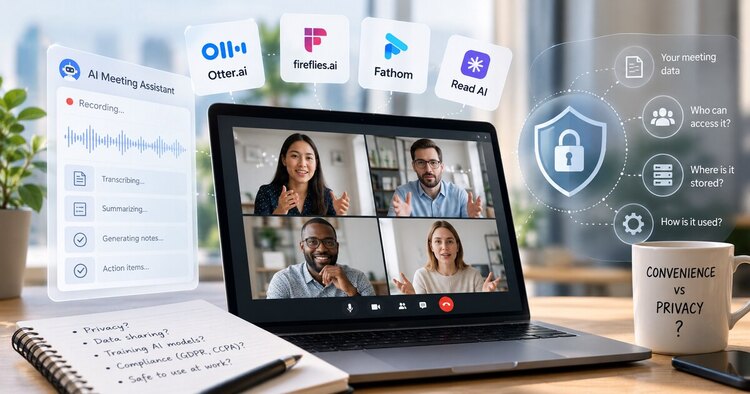
AI meeting assistants can remove one of the most repetitive parts of knowledge work: taking notes while trying to stay present in a conversation. They can record or process meeting audio, generate transcripts, summarize decisions, identify action items and make past conversations searchable.
That convenience comes with a privacy trade-off. A normal video call may already involve audio and participant metadata. Adding an AI meeting assistant can create several additional layers of data: transcripts, summaries, speaker labels, action items, AI prompts, meeting metadata and sometimes stored audio or video.
So are AI meeting assistants safe?
They can be safe enough for many ordinary workplace meetings when they are configured carefully, but they should not be treated as automatically private simply because the provider advertises encryption or AI security. The practical question is not only whether the service is secure. You also need to know what it captures, where the data goes, who can access it, how long it remains available and whether your organization should have recorded the conversation in the first place.
This guide explains what happens to meeting data, the privacy risks that matter most and a practical checklist for deciding when an AI meeting assistant is appropriate.
Last checked: October 6, 2026. Product policies and administrative controls can change. For sensitive organizational use, verify the provider's current privacy, security and retention documentation before deployment.
What Does an AI Meeting Assistant Actually Capture?
The phrase “AI meeting assistant” can make the process sound simpler than it really is. Depending on the product and configuration, the system may process or store several different types of information.
| Data Type | What It May Contain | Why It Matters |
|---|---|---|
| Audio or video | The original conversation and visual meeting content | This can contain the richest and most sensitive version of the meeting |
| Transcript | Speaker-attributed text of what participants said | Easy to search, copy, share and retain for long periods |
| AI summary | Decisions, themes, risks and key discussion points | Can expose important information even without the full transcript |
| Action items | Tasks, owners, deadlines and commitments | May reveal internal plans or individual responsibilities |
| Meeting metadata | Participant names, email addresses, meeting title and time | Can reveal business relationships and organizational activity |
| AI prompts and responses | Questions users ask the assistant and generated answers | May be retained separately from the meeting transcript |
This distinction matters because deleting one layer does not always mean every related layer disappears. A company may, for example, allow separate retention policies for original audio and transcripts, while summaries or compliance records can follow different rules.
The Main Privacy Question: What Happens After the Meeting?
During a meeting, participants usually know that they are speaking to other people. The less visible privacy issue begins after the call ends.
A traditional conversation disappears unless someone records it or writes detailed notes. An AI-assisted meeting can instead become a durable digital record that may be searchable months later.
That record can be useful. A team can revisit why a decision was made, find commitments or bring an absent colleague up to speed. But persistence also changes the risk profile of the conversation.
You should ask four basic questions:
- What is retained? Audio, video, transcript, summary, prompts or all of them?
- Who can access it? Only the owner, everyone invited, an entire workspace or anyone with a shared link?
- How long is it retained? Indefinitely, until manual deletion or according to an administrator-defined policy?
- What happens when it is deleted? Does deletion cover only the visible meeting report or the underlying data as well?
Those questions are often more useful than asking whether a product is simply “secure.”
Do AI Meeting Assistants Use Your Conversations to Train AI?
This concern deserves a precise answer because different products have different policies.
Zoom states that customer audio, video, chat, screen sharing, attachments and other communications-like content are not used to train Zoom's or third-party AI models.
Fireflies.ai states that meeting audio, video, transcripts and summaries are not used to train AI models, internally or externally. Its current documentation also describes zero-data-retention requirements for third-party processing vendors.
Read AI states that contributing data to model improvement is opt-in and turned off by default.
Those policies are meaningful, but “not used for training” does not mean “the service processes no data.” The provider still needs to process enough information to create the transcript, summary or other features you requested.
Training policy and operational data processing are therefore two different questions.
What About Microsoft Teams Copilot?
Microsoft illustrates why the details matter.
Teams can allow Copilot during a meeting without enabling persistent recording or transcription. In that mode, Copilot can use live meeting audio and contextual signals to generate notes, tasks and answers during the meeting.
However, Microsoft also explains that Copilot prompts and responses may still be retained according to an organization's Microsoft Purview retention policies, even when recording and transcription are turned off.
Meeting organizers can also control who is allowed to access recordings, transcripts and AI recaps. Options can include everyone, organizers and co-organizers, or specific people.
The lesson is important: “no recording” does not necessarily mean “no retained AI-related information.”
Retention Is One of the Most Important Settings
AI meeting tools become riskier when organizations collect every meeting forever simply because storage is inexpensive.
Otter provides a useful example of more granular retention. Its administrative controls can apply retention periods to a full conversation or specifically to audio/video and transcripts. If a full conversation retention period expires, related data such as transcripts, media, summaries, action items and other conversation information can be deleted.
This suggests a good organizational principle even if you use another product:
Do not retain meeting data longer than it has a legitimate business purpose.
A weekly project status meeting may only need a relatively short retention period. A formal decision record may need longer retention. A sensitive personnel discussion may be inappropriate for automated recording in the first place.
The Six Privacy Risks That Matter Most
1. Recording a Meeting That Should Not Be Recorded
The first risk occurs before encryption, AI processing or cloud storage even becomes relevant.
Some discussions involve employee performance, legal strategy, confidential customer information, security incidents, unreleased financial information or sensitive negotiations. Automatically inviting a meeting bot to every calendar event can capture conversations that were never suitable for AI processing.
The safest setting for sensitive workflows is often not a stronger AI model. It is no automated recording at all.
2. Participants May Not Understand What Is Being Captured
A visible bot joining a call is better than invisible processing, but participants still may not understand whether the tool stores audio, creates a transcript, produces a summary or makes the result available to other workspace members.
Read AI, for example, says it announces itself and uses meeting notices and controls intended to inform participants when data collection is occurring.
Organizations should still create their own clear policy rather than assuming a vendor notification satisfies every internal, contractual or legal requirement.
3. Sharing Settings Can Expose More Than Expected
A transcript can be protected from the public internet while still being shared too broadly inside an organization.
Potential mistakes include:
- automatically sharing reports with all invitees;
- allowing anyone with a link to access a report;
- giving an entire workspace access to meetings that only a project team needs;
- leaving access unchanged when employees move roles;
- exporting transcripts into another service with weaker permissions.
The meeting assistant is only one part of the privacy chain. The destination where summaries and transcripts are exported matters too.
4. Integrations Expand the Data Surface
Meeting assistants increasingly connect to CRMs, task managers, document systems and automation platforms.
This is productive because an action item can automatically become a task or a sales conversation can update a CRM record.
It also means the data may travel beyond the original meeting platform.
Before enabling an integration, ask what permissions it receives and what information it copies into the connected service. An integration that only creates action items carries a different risk from one that exports complete transcripts.
5. AI Summaries Can Be Wrong
Privacy is not the only risk. AI-generated summaries can misinterpret a speaker, omit context or turn a tentative suggestion into something that sounds like a decision.
A generated action item can also assign the wrong owner or deadline.
For consequential meetings, the summary should be reviewed by a person before it becomes an official record or triggers an automated workflow.
6. Old Meeting Data Becomes a Security Liability
Every additional stored transcript increases the amount of information that could potentially be exposed through a compromised account, misconfigured sharing link, excessive administrator privilege or connected application.
The risk accumulates over time.
A company that records three years of meetings may possess a searchable archive containing product plans, customer names, internal disagreements, passwords accidentally spoken aloud, commercial strategy and personnel information.
Data you no longer need still creates exposure.
AI Meeting Assistant Privacy Comparison
| Product / Platform | Current Privacy-Relevant Feature | What Users Should Check |
|---|---|---|
| Microsoft Teams Copilot | Can operate during a meeting without persistent transcription; access to recordings/transcripts can be restricted | Purview retention, organizer settings and who can access AI-related content |
| Zoom AI Companion | Zoom says customer communications content is not used to train its or third-party AI models | Account-level AI controls, retention and which AI Companion features are enabled |
| Fireflies.ai | States meeting content is not used for AI training and describes zero-data-retention for third-party processing | Workspace sharing, bot auto-join settings, integrations and retention configuration |
| Read AI | Model-improvement training is opt-in and reports have sharing controls | Who owns the report, automatic sharing behavior and workspace retention |
| Otter | Supports configurable retention for complete conversations, audio/video and transcripts | Which data category the retention rule applies to and what remains after deletion |
This is not a ranking. Privacy depends heavily on plan level, administrator configuration, integrations and how an organization actually uses the product.
When Should You Avoid an AI Meeting Assistant?
Some meetings deserve a higher threshold than routine project discussions.
Consider disabling automated meeting capture when a conversation involves:
- employee disciplinary or performance matters;
- legal advice or privileged discussions;
- highly confidential M&A or financing information;
- security credentials, incident-response details or vulnerability disclosures;
- sensitive health or personal information;
- customer information subject to contractual restrictions;
- participants who have not agreed to the recording or processing;
- information your organization's policy explicitly prohibits from being recorded.
This is a risk-management principle, not legal advice. Recording and consent requirements vary by jurisdiction and circumstances, so organizations should establish rules appropriate to where they operate.
A Practical Privacy Checklist Before Your Next Meeting
You do not need to perform a full security audit before every call. A short checklist catches many of the common mistakes.
- Decide whether this meeting actually needs AI notes. Do not enable automated capture just because the feature exists.
- Inform participants. Make it clear that AI transcription, recording or summarization is active.
- Check the sharing default. Know whether reports go to the owner, attendees, workspace members or anyone with a link.
- Review retention. Set a reasonable expiration period rather than keeping all meeting data indefinitely.
- Review integrations. Understand where transcripts, summaries and action items are exported.
- Use strong account security. MFA or passkeys and careful administrator permissions matter because a meeting archive can contain highly valuable information.
- Review consequential summaries. Do not allow an AI-generated recap to become the official record without human verification when accuracy matters.
What Should Small Teams Configure First?
For a small company without a dedicated security team, the most useful controls are usually straightforward.
Start by disabling automatic bot attendance for every calendar event. Let users deliberately choose which meetings need AI support.
Next, use the narrowest practical sharing permissions. A summary should not become company-wide simply because everyone belongs to the same workspace.
Then establish a default retention period. You can create exceptions for meetings that genuinely need to become long-term records.
Finally, review connected applications. Meeting data exported into a CRM, automation platform or document store should receive equivalent access controls.
Is a Built-In Meeting AI Safer Than a Third-Party Bot?
Not automatically, but a built-in assistant can reduce the number of systems involved.
If your organization already uses Microsoft Teams or Zoom, enabling native AI functionality may keep more of the workflow inside an existing administrative and compliance environment.
A specialized third-party assistant may offer better meeting notes, search, automation or cross-platform support, but it introduces another vendor, another account system and potentially another set of integrations.
The decision should therefore consider architecture rather than brand recognition:
- How many services receive the meeting data?
- Where is the canonical transcript stored?
- Which system controls deletion?
- Who administers access?
- Can the tool operate without retaining original media?
How AI Meeting Assistants Fit Into a Broader AI Workflow
Meeting assistants are increasingly becoming the entry point for automation rather than the end of the workflow.
A transcript can become a summary. The summary can create tasks. Tasks can be sent to a project-management system. Sales discussions can update a CRM. Technical meetings can generate documentation.
That can save substantial manual work, but every automated step should be treated as an additional data boundary.
If you are comparing the general AI platforms behind modern knowledge work, see our guide to ChatGPT vs Claude vs Gemini for work.
And if you are moving from AI assistance toward building your own workflows, see how to build an AI app without starting from code.
So, Are AI Meeting Assistants Safe?
For ordinary workplace meetings, a well-configured AI meeting assistant can be a reasonable productivity tool.
But safety depends less on whether the product has an AI label and more on how the organization handles four things: consent, access, retention and integrations.
The safest deployment is not the one that records the most meetings. It is the one that captures only useful meetings, tells participants what is happening, limits access, deletes data when it is no longer needed and treats sensitive conversations differently from routine collaboration.
AI meeting assistants can reduce note-taking. They should not reduce judgment.