One Tab at a Time: A 20-Minute Focus Ritual for Distracted Digital Workdays
A practical 20-minute focus ritual for distracted digital workdays. Learn how to reduce browser tab overload, define one task, capture distractions, protect attention, and build a calmer single-tasking workflow.
 Netzender Editorial Team
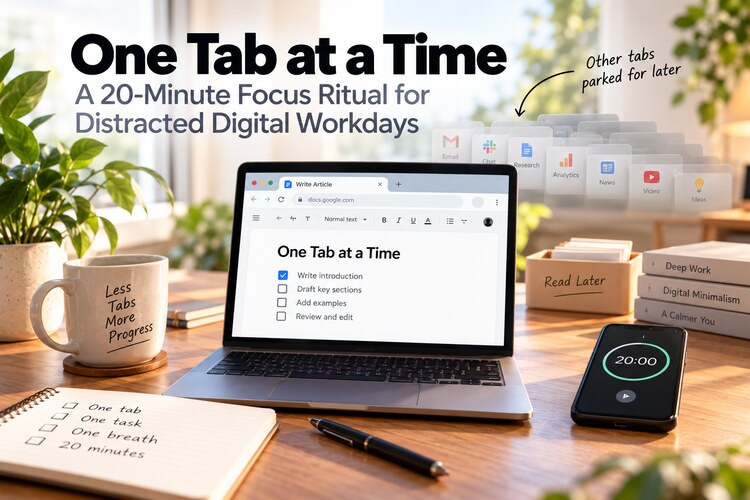
Look at your browser right now. If you work online, there is a good chance several tabs are open for things you are not currently doing: email, chat, research, analytics, a document you plan to read later, perhaps a video, and a handful of pages you no longer remember opening.
None of those tabs looks particularly dangerous. Together, however, they create a working environment in which your attention is constantly being offered another place to go.
The solution does not have to be an elaborate productivity system. A surprisingly useful practice is to reduce the next block of work to three things:
one tab, one task, and one deliberate breath before you begin.
Netzender's version adds one more constraint: do it for just 20 minutes. Long enough to create depth, short enough that almost anyone can start.
Last reviewed: October 2026.
The Real Problem Is Fragmented Attention
Digital work makes it extremely easy to switch context.
A difficult sentence in a document can become a reason to check email. A slow-loading dashboard can become a reason to open a news site. A notification can turn into ten minutes inside another application.
The problem is not simply that these activities consume time. Every switch changes what your mind is holding.
You stop thinking about the paragraph, query, spreadsheet, design, or problem in front of you and load another context instead. When you return, part of the original mental state has to be reconstructed.
Do that dozens of times and a full day can feel busy while producing surprisingly little work that required sustained thought.
This is why attention should be treated as part of your work environment, not merely as a matter of self-discipline.
If your whole day already feels reactive, start with our broader guide to building a focus system that protects attention.
Rule 1: Keep One Working Tab in the Foreground
“One tab” does not have to mean literally deleting every tab in your browser.
It means that during the current focus block, only the material required for the current task gets to occupy the foreground.
Suppose you are writing a proposal. Your working environment might contain:
- the document;
- one reference page;
- perhaps one data source.
What you do not need in the same active workspace:
- email;
- social media;
- analytics you are not currently analyzing;
- news;
- shopping;
- a dozen articles you intend to read later;
- tabs belonging to unrelated projects.
You are not declaring those things unimportant. You are declaring them irrelevant to the next twenty minutes.
Create a Tab Parking Lot Instead of Keeping Everything Open
People often keep browser tabs open because closing them feels like losing something.
That is an information-management problem, not an attention problem.
Create a simple parking place:
- a bookmarks folder called “Read Later”;
- a note containing URLs;
- a browser reading list;
- a project document with reference links;
- a task manager entry for something that genuinely requires action.
If a page matters, save it somewhere trustworthy. Then close it.
An open browser tab should not be your long-term memory system.
Rule 2: Define One Observable Task
“Work on the website” is not one task.
Neither is “do marketing,” “write content,” or “work on the report.”
A useful focus task has a visible finish line.
For example:
- write the introduction and first two sections;
- review ten candidate keywords;
- debug the login error;
- compare three providers and record the results;
- edit the first five minutes of the video;
- reply to the seven messages that require decisions.
The goal is not necessarily to finish an entire project in twenty minutes. The goal is to know exactly what deserves your attention during that block.
Why Start With 20 Minutes?
Long focus sessions can become another form of productivity pressure.
If you tell yourself that deep work requires two uninterrupted hours, a busy day may never seem like the right moment to start.
Twenty minutes changes the negotiation.
You can usually postpone email for twenty minutes. You can usually leave your phone alone for twenty minutes. You can usually tolerate an unfinished unrelated task for twenty minutes.
And once you begin, you may continue beyond the timer naturally.
The timer is therefore not a deadline. It is a commitment boundary:
For the next twenty minutes, this is the only work I need to be doing.
Rule 3: Use One Breath as a Transition
Before starting, stop for one slow breath.
This is not meant to turn ordinary computer work into a complicated meditation exercise.
The breath has a practical function: it creates a tiny boundary between choosing the task and beginning it.
Try this:
- Put your hands down for a moment.
- Take one slow breath.
- Look at the task you wrote down.
- Start the timer.
- Begin.
This small pause becomes especially useful after a meeting, message, call, or interruption when your mind is still carrying the previous context.
The 60-Second Setup Before Every Focus Block
A focus ritual should be easier to perform than to avoid.
Use this quick setup:
| Step | Action |
|---|---|
| 1 | Write down the one task. |
| 2 | Save or close unrelated tabs. |
| 3 | Open only the tools needed for the task. |
| 4 | Silence unnecessary notifications. |
| 5 | Put the phone out of immediate reach. |
| 6 | Take one deliberate breath. |
| 7 | Start a 20-minute timer. |
The setup should take about a minute. If preparing to focus becomes a ten-minute ritual, the system itself has become a distraction.
What to Do When You Want to Switch Tabs
The interesting part of this practice begins when another task suddenly feels urgent.
You remember an email you need to send.
You want to look up one fact.
You wonder whether someone answered your message.
You remember another project.
Instead of switching immediately, capture the thought in a temporary list.
Call it the not-now list.
Examples:
- send invoice;
- check analytics;
- research that new tool;
- reply to Alex;
- look up hotel options;
- fix image on homepage.
Then return to the current task.
This works because you are not asking your brain to forget the thought. You are giving it a trusted place to wait.
Protect the Block From Notifications
Single-tasking becomes much harder if applications are still permitted to interrupt the block.
During the twenty minutes, consider pausing:
- email notifications;
- Slack or Teams alerts;
- social notifications;
- phone banners and vibration;
- desktop news alerts;
- nonessential calendar popups.
You do not need to remain unreachable all day. You only need a small protected window.
For a systematic cleanup of interruptions, see our notification detox guide.
Separate Focus Time From Communication Time
A common reason people keep email and messaging open all day is fear of missing something important.
The alternative is not to ignore communication. It is to give communication its own time.
For example:
- focus block;
- five-minute message check;
- another focus block;
- email processing;
- meeting;
- focus block.
This creates a rhythm between focused production and responsiveness.
During communication windows, communicate fully. During focus windows, focus fully.
What If Your Task Requires Many Tabs?
Some work genuinely requires multiple sources.
Research, competitive analysis, travel planning, development, troubleshooting, and data comparison are obvious examples.
In that case, interpret “one tab” as one working context.
You might have five research tabs open, but they all belong to the same question.
The problem is not the numerical tab count. The problem is mixing unrelated intentions in the same attention space.
A developer may need documentation, logs, code, and a local application at the same time. That is still one task if all four are being used to solve the same problem.
Use Browser Profiles to Separate Contexts
Browser profiles can make this system much easier.
You might maintain:
- a work profile;
- a personal profile;
- a research profile;
- a client-specific profile.
Each profile can have its own bookmarks, history, logins, extensions, and open sessions.
This reduces the temptation to mix YouTube, personal email, client dashboards, social media, and project research into one enormous browser window.
Use Full Screen When the Task Deserves Depth
For writing, coding, reading, analysis, and design, full-screen mode can remove several visual invitations to switch context.
You do not need full screen for every task. But when the work becomes difficult, simplifying what is visible can make staying with the problem easier.
Consider hiding:
- the bookmarks bar;
- unused sidebars;
- chat windows;
- dock or taskbar distractions;
- desktop widgets;
- unrelated application windows.
When the Task Feels Difficult, Do Not Automatically Escape
One of the most revealing moments in focused work is the moment you get stuck.
That is often when another tab becomes irresistible.
Instead of immediately switching, try a ten-second reset:
- Notice that you want to escape.
- Take one breath.
- Ask: “What is the smallest next action?”
- Do that action.
The next action might be:
- write one ugly sentence;
- run one diagnostic command;
- read one paragraph of documentation;
- calculate one number;
- make one decision;
- write down exactly what you do not understand.
Focus is not the absence of difficulty. Often it is simply the ability to stay with difficulty slightly longer.
Use a Two-Minute Closing Ritual
When the timer ends, do not immediately disappear into another application.
Spend two minutes closing the loop.
- Record what you completed.
- Write down the next step.
- Save your work.
- Process the not-now list.
- Choose whether to continue or take a break.
This makes restarting easier later because you no longer have to reconstruct where you stopped.
A Practical Daily Pattern
You do not need eight hours of perfect concentration.
Try three protected blocks first.
| Block | Possible use |
|---|---|
| Morning | Important creative or analytical work |
| Late morning | Second priority project |
| Afternoon | A smaller task requiring uninterrupted attention |
Three twenty-minute blocks equal only one hour of protected work.
That sounds modest, but one focused hour can be surprisingly valuable when compared with several hours of fragmented activity.
Do Not Turn Focus Into Another Optimization Project
There is an irony in spending hours searching for the perfect productivity system instead of doing the work.
You do not need:
- a complicated workspace;
- twelve focus applications;
- a perfect timer;
- a new keyboard;
- a complete life dashboard;
- an elaborate scoring system.
Use the tools you already have.
The ritual should reduce cognitive overhead, not add another layer of management.
Where This Fits Into Digital Minimalism
This practice is a small form of digital minimalism.
You are not necessarily reducing the total number of tools in your life. Instead, you are reducing the number of tools competing for attention at one particular moment.
If you want to examine your overall relationship with technology rather than only your work environment, continue with our 30-day digital minimalism reset.
Try the Ritual for Seven Days
For one week, do at least one twenty-minute block each day.
Before each block:
- choose one task;
- clear unrelated digital clutter;
- take one breath;
- start twenty minutes;
- capture distractions instead of following them.
At the end of the week, ask:
- Did I finish important work faster?
- Did I switch applications less often?
- Which distractions kept returning?
- Which notifications should be removed permanently?
- What time of day made focusing easiest?
- Did twenty minutes feel too short, too long, or about right?
Then adjust the practice to your own work rather than trying to follow somebody else's productivity routine perfectly.
Frequently Asked Questions
Do I really need to use only one browser tab?
No. The principle is one working context. If several tabs are required for the same task, keep them. Close or save tabs belonging to unrelated intentions.
Is 20 minutes long enough for deep work?
Twenty minutes is a starting point, not a maximum. The purpose is to lower the barrier to beginning. Once the habit becomes easier, you can extend blocks to thirty, forty-five, or sixty minutes when the work benefits from it.
What should I do if someone needs to reach me?
Keep an emergency path available through priority contacts or selected communication tools. A focus system should reduce unnecessary interruptions without making you unavailable when availability genuinely matters.
Should I use a website blocker?
A blocker can help when certain sites repeatedly pull you away from work. Start with environmental simplification first, then add blocking if the same distraction continues to defeat your intention.
What if my job requires constant messaging?
Even highly collaborative jobs often contain small periods when immediate response is unnecessary. Start with ten or twenty minutes and communicate your availability expectations where appropriate.
Final Thought: Make Attention Smaller Before You Make It Stronger
Trying harder to concentrate inside a chaotic digital environment is exhausting.
A better first move is to make the environment smaller.
One working context.
One visible task.
One deliberate breath.
Twenty protected minutes.
Then do the thing you chose to do.
Focus often becomes easier not because you developed extraordinary discipline, but because fewer things are being allowed to compete with the work in front of you.