AI Browser Agents in 2026: What They Can Do, Where They Fail & 5 Tools to Know
AI browser agents can navigate websites, compare options, fill forms and complete multi-step web tasks. See how ChatGPT, Gemini in Chrome, Copilot, Perplexity Comet and Opera Neon compare in 2026—and where human control still matters.
 Netzender Editorial Team
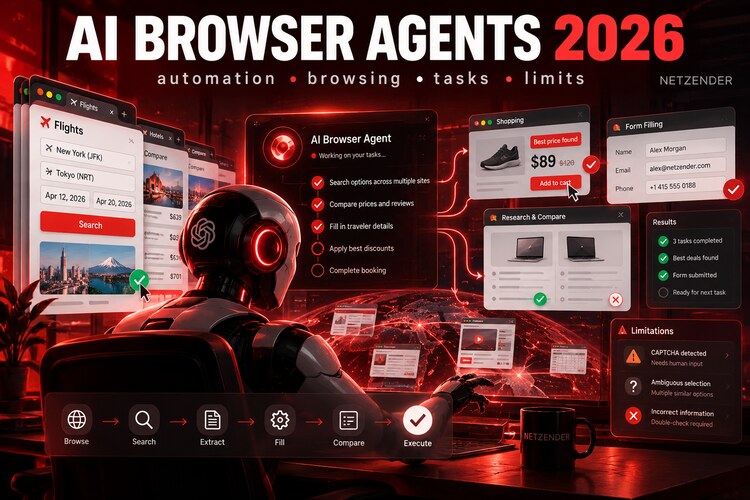
AI assistants used to tell you what to click. AI browser agents can increasingly click for you.
In 2026, products from OpenAI, Google, Microsoft, Perplexity, Opera, and other AI companies are moving beyond page summaries and chatbot sidebars toward something more consequential: software that can navigate websites, switch between pages, enter information into forms, compare options, and carry out multi-step tasks inside a browser.
That sounds like a small interface change. It is actually a major shift in how people may use the web.
Instead of opening ten tabs to research a trip, compare products, or complete an administrative task, you can increasingly describe the outcome you want and let an agent handle much of the browser work.
But browser agents are not reliable enough to receive unlimited trust. They can misunderstand pages, choose the wrong option, encounter CAPTCHAs, follow malicious instructions embedded in websites, or make a technically valid choice that is not the choice you intended.
This guide explains what AI browser agents can realistically do in 2026, five important products to know, where they still fail, and how to use them without giving away more control than necessary.
Last reviewed: October 2026.
AI Browser Agents in 2026: The Quick Answer
| Tool | Best for | How it works | Human control |
|---|---|---|---|
| ChatGPT Work / Cloud Browser | Complex web tasks and research-to-action workflows | Operates a separate cloud browser and can use connected tools | Pauses when sign-in, input, or confirmation is required |
| Gemini in Chrome | Users already working inside Chrome and Google services | Auto browse acts across web pages and integrates with Google context | Confirmation for sensitive actions |
| Browse with Copilot in Edge | Microsoft and enterprise workflows | Clicks, types and navigates directly in Edge | User can watch, stop, or take over |
| Perplexity Comet | Research-heavy browsing and everyday web errands | AI-native browser with an assistant that can browse and act | Shows actions and requests permission for important steps |
| Opera Neon | Agentic browsing and AI experimentation | Built-in agents plus connections to external AI through MCP | Task-dependent user supervision |
What Is an AI Browser Agent?
An AI browser agent is software that can perceive what is happening inside a browser, reason about a goal, and take actions on web pages instead of merely describing what you should do.
A conventional AI assistant might say:
“Go to the airline website, enter your dates, sort by price, and compare the top three flights.”
A browser agent may be able to:
- open the airline or travel site;
- enter the origin and destination;
- select travel dates;
- run the search;
- inspect the results;
- open several options;
- compare price, schedule, and restrictions;
- present the strongest choices;
- continue toward booking after you approve.
The important difference is the shift from answering to acting.
That puts browser agents in the same broader movement as AI workflow automation. Our guide to the best AI workflow automation tools in 2026 explains how deterministic workflows and autonomous agents can work together.
AI Browser vs. Browser Agent: They Are Not Exactly the Same
The terminology is messy because products are evolving faster than the category names.
An AI browser usually means a web browser with AI deeply integrated into the browsing experience.
A browser agent refers more specifically to the capability that takes actions.
For example, an AI browser may:
- summarize a page;
- answer questions about open tabs;
- translate text;
- compare information;
- generate content alongside the page.
An agentic browser can go further and:
- click buttons;
- navigate between websites;
- type into fields;
- complete forms;
- add items to a cart;
- change settings;
- perform repetitive browser steps;
- continue a task across multiple pages.
That distinction matters because summarizing a website is relatively low-risk. Acting inside an authenticated account is not.
1. ChatGPT Work and Cloud Browser — Best for Complex Research-to-Action Tasks
OpenAI's browser-agent approach combines web interaction with the broader capabilities of ChatGPT.
ChatGPT can use a cloud browser running on its own computer to visit supported websites, read pages, click controls, enter information, and carry out multi-step browser tasks.
The advantage is that browser interaction does not have to exist in isolation. A task can combine web research with analysis, files, connected apps, code, and document creation.
Useful examples
- Research several products and create a comparison.
- Investigate competitors and summarize the findings.
- Plan travel across several websites.
- Collect public information and turn it into a report.
- Work through repetitive administrative web processes.
- Use signed-in websites when the user provides access during the task.
For important actions, the system can pause for user input, sign-in, or confirmation rather than proceeding silently.
Best for: users who want the browser to be one component of a larger knowledge-work workflow.
Watch-out: do not interpret agent autonomy as permission to stop checking the output. Verify consequential changes and transactions.
2. Gemini in Chrome — Best for Chrome and Google Ecosystem Users
Google has been turning Gemini in Chrome from an assistant that understands pages into an agent that can act on them.
Its auto browse capability can perform multi-step web errands such as researching options, scheduling tasks, updating recurring orders, or starting parts of a travel-booking process.
One of Gemini's biggest advantages is context.
Chrome is already where many people browse, and Gemini can also work with Google services such as Calendar, Maps, Gmail, YouTube, and other connected context where supported.
Good use cases
- Compare information across multiple tabs.
- Research products while browsing.
- Organize travel planning.
- Schedule appointments.
- Work with Gmail or Calendar context.
- Handle repetitive web errands.
Google says auto browse asks for confirmation around certain sensitive actions rather than blindly completing them.
Best for: Chrome users who want agentic capabilities without moving to a completely different browser.
Watch-out: access and capabilities can still vary by country, device, and subscription.
3. Browse with Copilot in Edge — Best for Microsoft-Centered Work
Microsoft's Browse with Copilot brings agentic actions directly into Edge.
When instructed, Copilot can navigate pages, select interface elements, type information, and work across browser tabs while the user watches.
The visibility is important: the browser shows where Copilot is operating, and users can interrupt or take over the task.
Microsoft is also positioning browser agents differently for consumer and enterprise environments. In business settings, administrators can control which sites the browser agent is allowed to interact with.
Good use cases
- Research across websites.
- Compare information.
- Complete supported forms.
- Navigate repetitive web processes.
- Work inside Microsoft-centric business environments.
Best for: Microsoft 365 organizations and Edge users where governance matters.
Watch-out: Microsoft explicitly recommends avoiding highly sensitive tasks such as banking, trading, medical records, or government identifiers during early agentic browsing use.
4. Perplexity Comet — Best for Research-Centered Agentic Browsing
Perplexity took a more browser-native approach with Comet.
Rather than adding a chatbot to an existing browser, Comet was designed around an AI assistant that lives alongside the user's browsing activity.
The assistant can understand open pages, research across the web, move through websites, and perform actions when the user delegates a task.
Perplexity emphasizes three ideas in Comet's agent design:
- show the user what the assistant is doing;
- allow the user to control how much autonomy it receives;
- pause before sensitive or important actions.
Good use cases
- Research topics across several sources.
- Compare products and prices.
- Summarize information from multiple tabs.
- Handle routine browser errands.
- Assist with email and web-based administrative work.
- Plan purchases or travel while keeping research context visible.
Best for: people whose browser work begins with search, research, and information comparison.
Watch-out: giving an agent access to an already authenticated browser session is powerful. Treat account access as a permission decision, not merely a convenience feature.
5. Opera Neon — Best for Experimenting With an Agentic Browser
Opera Neon is another example of the browser becoming an execution environment rather than simply a window onto websites.
Neon includes several AI modes for different tasks and can choose an appropriate agent based on what the user is trying to accomplish.
Opera has also added MCP connectivity, allowing external AI systems to work with the browser session. That creates an interesting model: the browser can become an action layer for AI agents built elsewhere.
Good use cases
- Agent-driven browser tasks.
- Research.
- Content and web workflows.
- Connecting external AI agents to browser context.
- Experimenting with browser automation without building everything from scratch.
Best for: early adopters who want to explore what an agent-native browser can become.
Watch-out: rapidly evolving products change features quickly. Evaluate the workflow you need rather than choosing based on the word “agentic.”
What AI Browser Agents Are Already Good At
1. Repetitive navigation
When a task involves opening pages, changing filters, copying information, and repeating the same sequence, an agent can remove a surprising amount of mechanical work.
2. Research and comparison
Browser agents are particularly useful when information is distributed across several pages.
They can often:
- search several sites;
- extract relevant facts;
- normalize information;
- compare options;
- produce a shortlist.
3. Form filling
Simple forms are a natural agent task because the work involves translating known information into web fields.
4. Shopping research
An agent can compare specifications, reviews, availability, and prices across several stores faster than manually opening dozens of tabs.
5. Travel research
Flights, hotels, schedules, policies, and destination research involve exactly the kind of multi-page comparison browser agents are designed to reduce.
6. Routine administrative tasks
Agents can save time when the same browser-based workflow needs to be completed repeatedly.
Where Browser Agents Still Fail
The most important thing to understand about browser agents is that they do not fail like traditional software.
A conventional program usually either follows its instructions or throws an error.
An AI agent can appear to be progressing normally while misunderstanding what is happening.
1. Ambiguous interfaces
If two buttons, products, dates, or options look similar, the agent can choose the wrong one.
2. Dynamic websites
Modern pages constantly change. Elements load late, popups appear, layouts move, sessions expire, and websites behave differently depending on device or location.
3. CAPTCHAs and anti-bot systems
Some websites deliberately make automated interaction difficult.
4. Incorrect assumptions
An agent may have enough information to continue but not enough information to choose correctly.
Imagine a travel agent finding two nearly identical fares but overlooking that one includes baggage and the other does not.
5. Authentication problems
Sign-ins, two-factor authentication, payment verification, and security challenges frequently require human involvement.
6. High-consequence actions
A browser agent selecting the wrong color of a T-shirt is annoying.
An agent choosing the wrong flight date, submitting a legal form incorrectly, transferring money, or changing an account setting can have much larger consequences.
The Security Problem: Websites Can Try to Manipulate the Agent
One of the most important risks in agentic browsing is prompt injection.
A webpage contains information intended for humans. But an AI agent is also reading that information as input.
A malicious page can contain text designed to influence the agent's behavior.
That creates a new security problem: the agent has to distinguish between information it should understand and instructions it should obey.
Browser vendors are developing protections, but users should still assume that web content is untrusted.
This becomes especially important when the browser is logged into:
- email;
- cloud storage;
- company systems;
- shopping accounts;
- social networks;
- administrative dashboards.
7 Rules for Using Browser Agents Safely
1. Give the agent the smallest useful task
“Research these five hotels and compare them” is safer than “plan and book my entire vacation without asking me.”
2. Keep confirmation before purchases
Let the agent research, filter, and prepare. Confirm the actual transaction yourself.
3. Avoid banking and highly sensitive accounts
Do not make your first browser-agent experiment your financial life.
4. Review forms before submission
Check names, addresses, dates, numbers, and selected options.
5. Watch permissions
Do not connect every account merely because the product supports it.
6. Separate research from execution
A particularly useful pattern is:
- agent researches;
- agent proposes;
- human reviews;
- agent executes the approved action.
7. Keep a human in the loop when mistakes are expensive
The amount of oversight should increase with the cost of a wrong action.
A Better Browser-Agent Workflow
Suppose you want to buy a laptop.
Instead of saying:
“Buy me the best laptop under $1,500.”
use the agent in stages.
- Find laptops under $1,500 matching my specifications.
- Compare CPU, RAM, battery life, display, weight, warranty, and reviews.
- Exclude sellers with unclear return policies.
- Show me the best three options.
- Explain the tradeoffs.
- After I choose, open the retailer and prepare the cart.
- Stop before payment.
This approach still saves most of the work while keeping the consequential choice with the user.
Browser Agent or Workflow Automation?
Browser agents and workflow automation overlap, but they are not interchangeable.
| Use browser agent when... | Use workflow automation when... |
|---|---|
| The website has no useful API | A reliable API or integration exists |
| The task requires visual navigation | The steps are structured and predictable |
| The process changes depending on page content | The same rules should run every time |
| You need ad-hoc human-style browsing | You need repeatable production automation |
| The workflow is temporary or exploratory | The workflow should run hundreds or thousands of times |
In many real systems, the best solution combines both.
A deterministic workflow might trigger the task, an agent might handle the messy website interaction, and the workflow might then validate and store the result.
Where Browser Agents Could Matter Most for Businesses
For companies, browser agents can potentially automate the long tail of work that has historically been too small or inconsistent to justify custom integrations.
Examples include:
- competitor monitoring;
- supplier research;
- lead enrichment;
- public-data collection;
- quality assurance;
- content operations;
- travel administration;
- procurement research;
- support workflows;
- internal web tools with no API.
The business opportunity is not simply replacing people who browse websites.
It is reducing the amount of human attention spent on mechanical web interaction.
For marketing-specific agents, see our comparison of the best AI agents for marketing in 2026.
How to Evaluate an AI Browser Agent
Do not evaluate these products only by asking whether they completed one impressive demo.
Test them on the workflows you actually perform.
Evaluate:
- Task success: Does it finish correctly?
- Recovery: What happens when the page changes?
- Transparency: Can you see what it is doing?
- Permissions: Can you limit access?
- Confirmation: Does it pause before consequential actions?
- Speed: Is delegation actually faster than doing it yourself?
- Cost: Does the time saved justify the subscription or compute cost?
- Privacy: What browser and account data can the system access?
Where AI Browser Agents Are Going
The bigger change is not that AI can click websites.
It is that the web may increasingly become an environment used by both humans and software agents.
That could change:
- how websites expose actions;
- how ecommerce sites design checkout;
- how businesses authenticate automated users;
- how websites protect against malicious agents;
- how advertisers reach users whose agents filter options for them;
- how search traffic works when an agent visits pages on a user's behalf;
- how software companies build agent-friendly interfaces and APIs.
The browser may gradually become less of a place where users manually operate every interface and more of an execution layer where humans specify intent and agents perform the mechanical steps.
Frequently Asked Questions
What is an AI browser agent?
An AI browser agent is software that can understand a web task and interact with websites by navigating, clicking, typing, filling forms, and carrying out multiple steps toward a goal.
Are AI browser agents the same as AI browsers?
Not necessarily. An AI browser may offer summaries and page-aware chat without taking actions. A browser agent specifically has the ability to operate the interface.
Can an AI browser agent buy things for me?
Some systems can research products, prepare purchases, add items to carts, and navigate checkout. Sensitive or consequential steps such as payments commonly require confirmation, and users should review the order before completion.
Are AI browser agents safe?
They can be useful, but they introduce new risks because they interact with untrusted web content and may have access to authenticated accounts. Use limited permissions and human confirmation for consequential tasks.
Can browser agents fill out forms?
Yes, supported agents can often enter information into web forms. Important submissions should still be reviewed for accuracy before they are sent.
Will browser agents replace APIs?
No. APIs remain more reliable for structured, high-volume automation. Browser agents are particularly useful when an API does not exist or when the workflow depends on a human-oriented web interface.
Can browser agents handle CAPTCHAs?
CAPTCHAs and other anti-automation systems can interrupt agent workflows and often require human involvement.
Final Verdict
AI browser agents are becoming genuinely useful in 2026, but their strongest role is not fully autonomous web surfing.
They are most valuable as delegated operators:
- research the options;
- navigate the repetitive steps;
- collect the information;
- prepare the action;
- ask the human when the decision matters.
ChatGPT, Gemini in Chrome, Microsoft Copilot, Perplexity Comet, and Opera Neon demonstrate different versions of the same direction: AI moving from a sidebar that explains the web to an agent that can operate parts of it.
The technology will become more capable. That makes permission design and human judgment more important, not less.
Use browser agents for the tedious work. Keep control of the decisions that are expensive, sensitive, irreversible, or simply too important to delegate blindly.