Best AI Workflow Automation Tools in 2026: 6 Platforms Compared
Compare the best AI workflow automation tools for 2026, including Zapier, Make, n8n, Gumloop, HubSpot, and Workato. See which platform fits small teams, developers, CRM-centered businesses, and enterprises.

AI workflow automation has changed quickly in 2026. The useful question is no longer whether a platform can add an AI step to an automation. Almost every serious automation product can do that now.
The better question is: which platform gives your business the right balance of reliable workflows, AI decision-making, integrations, human approvals, governance, and technical control?
That distinction matters because a small marketing team connecting forms, email, and a CRM has very different needs from a technical team building multi-agent systems or an enterprise orchestrating AI across finance, sales, support, and internal operations.
This guide compares six of the strongest AI workflow automation platforms in 2026 based on the type of business they fit best — not simply on who has the longest feature list.
Last reviewed: October 2026.
Best AI Workflow Automation Tools in 2026: Quick Comparison
| Platform | Best for | Technical level | Key strength |
|---|---|---|---|
| Zapier | Small and mid-size businesses | Beginner to intermediate | Broad app connectivity and AI orchestration |
| Make | Visual automation builders | Beginner to intermediate | Transparent visual workflows plus AI agents |
| n8n | Technical teams and developers | Intermediate to advanced | Flexible workflows, code, AI and self-hosting |
| Gumloop | AI-native teams | Beginner to intermediate | Agent-first business automation |
| HubSpot | CRM-centered revenue teams | Beginner to intermediate | Agents working with customer context |
| Workato | Large enterprises | Intermediate to advanced | Enterprise orchestration, governance and control |
AI Workflow Automation vs. AI Agents: What Is the Difference?
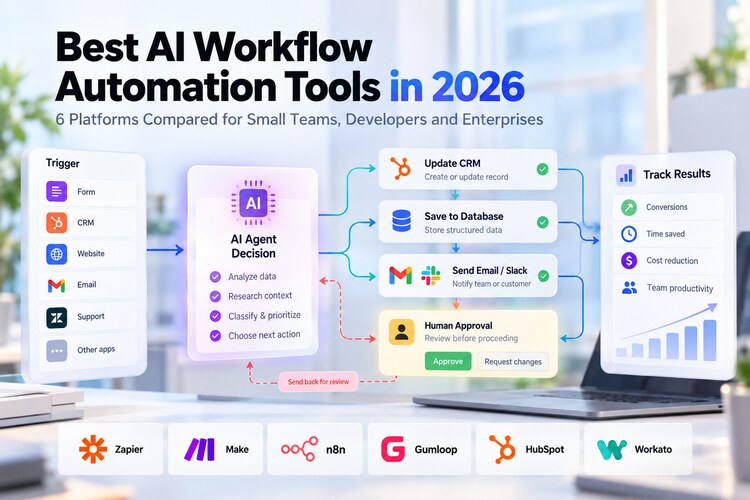
An automated workflow usually starts with a known trigger and follows a defined path. A new lead arrives, the workflow checks a field, updates the CRM, sends a notification, and schedules a follow-up.
An AI agent handles the uncertain parts. It may inspect the lead, research the company, decide how important the opportunity is, summarize its reasoning, and choose which action should happen next.
The most reliable systems in 2026 increasingly use both.
- Deterministic automation handles predictable steps.
- AI handles classification, extraction, summarization, generation, and interpretation.
- Agents handle tasks where several possible actions may be required.
- Human approvals protect high-impact decisions.
That is also why businesses should not replace every workflow with an agent. If a fixed rule can solve the problem reliably, a normal automation is usually easier to test and cheaper to run.
For a deeper look at autonomous systems specifically for marketing, see our guide to the best AI agents for marketing in 2026.
1. Zapier — Best Overall for Connecting Business Apps
Zapier remains one of the easiest starting points for a company that wants automation without building an internal integration platform.
Its strength is connectivity. Zapier combines traditional trigger-and-action workflows with AI steps, agentic actions, MCP connections, data tables, webhooks, branching, filters, and access to thousands of business applications.
That makes it particularly useful when the real challenge is not generating an AI response, but moving data and actions between the systems a business already uses.
Where Zapier fits best
- Lead qualification and routing.
- CRM enrichment.
- Email and Slack workflows.
- Content repurposing.
- Customer-support routing.
- Internal notifications and reporting.
- Connecting ChatGPT, Claude, or other AI systems to business apps.
Best for: small businesses and growing teams that want to automate quickly across many SaaS tools.
Watch-out: large workflows can become expensive or difficult to reason about if every step is handled independently. Design the process first, then automate it.
2. Make — Best Visual Platform for Complex Automation
Make is a strong choice for people who want to understand exactly how data moves through a workflow.
Its visual Scenario Builder makes branches, transformations, API calls, application modules, and error paths visible on one canvas. That has become even more relevant as Make has integrated its newer AI Agents directly into the same environment.
Instead of separating an AI agent from conventional automation, Make lets teams place agentic decision-making inside a visible workflow.
Where Make fits best
- Multi-step marketing operations.
- Content production pipelines.
- Lead processing across several systems.
- Document extraction and classification.
- Agent workflows that still need clear deterministic boundaries.
- Processes that benefit from visual debugging.
Best for: teams that want more control than a simple automation builder without moving entirely into code.
Watch-out: visually complex scenarios can still become difficult to maintain. Reusable modules and clear naming matter as the system grows.
3. n8n — Best for Technical Teams and Self-Hosted AI Automation
n8n occupies a useful position between no-code automation and custom software development.
Technical teams can combine visual workflows with code, APIs, AI models, agents, MCP tools, business rules, human approvals, logging, and custom infrastructure. It can also be self-hosted, which matters for organizations that need greater control over execution or data.
The platform's approach to production AI is especially practical: AI does not need to control every step. Teams can combine probabilistic AI decisions with explicit logic before and after them.
Where n8n fits best
- Custom internal AI tools.
- Multi-agent workflows.
- Research and enrichment pipelines.
- RAG and internal knowledge workflows.
- AI combined with custom APIs or databases.
- Processes requiring human-in-the-loop approvals.
- Businesses that prefer self-hosted infrastructure.
Best for: developers, technical marketers, automation consultants, and companies that want more control over how their AI workflows run.
Watch-out: flexibility creates responsibility. Someone still needs to understand authentication, APIs, error handling, infrastructure, and security.
4. Gumloop — Best for AI-Native Business Automation
Gumloop has evolved from an AI workflow builder toward a broader platform for building, sharing, operating, and controlling agents.
Its emphasis is less on adding AI to legacy automation and more on letting business teams turn repeatable knowledge work into agent-driven processes.
Examples include agents that research accounts, manage CRM activity, analyze calls, work with internal knowledge, create artifacts, and execute recurring tasks across connected systems.
Where Gumloop fits best
- AI-assisted sales operations.
- CRM research and maintenance.
- Knowledge-heavy repetitive work.
- Data extraction and analysis.
- Agentic workflows built by domain experts.
- Teams experimenting with AI-native operating models.
Best for: organizations that want employees closest to a business problem to build AI automation around it.
Watch-out: agent-first platforms evolve quickly. Evaluate the exact connectors, permissions, monitoring, and pricing required for your production use case rather than buying based on demos alone.
5. HubSpot — Best for CRM-Centered AI Workflows
HubSpot is different from the general automation platforms above because its biggest advantage is not the number of external systems it connects. Its advantage is customer context.
Marketing, sales, service, content, and customer information can live around the same CRM records. HubSpot's current Breeze capabilities also allow teams to build custom agents and agentic automations using goals, tools, and knowledge sources.
That can make HubSpot a strong automation layer when the workflow begins or ends with customer data.
Where HubSpot fits best
- Lead qualification.
- Sales prospecting.
- Customer follow-up.
- CRM research and enrichment.
- Marketing and sales handoffs.
- Customer-service workflows.
- Agent workflows that need CRM context.
Best for: companies already using HubSpot as their primary customer platform.
Watch-out: HubSpot should not automatically become the center of every operational workflow. If most of the process happens outside the CRM, a dedicated orchestration platform may be a better fit.
6. Workato — Best for Enterprise AI Orchestration
Workato belongs at the enterprise end of this comparison.
Large organizations rarely struggle because they cannot create one automation. They struggle because they need hundreds of workflows and agents to operate across departments while respecting identity, permissions, compliance requirements, auditability, and existing systems.
Workato combines integrations and traditional automation with enterprise agent orchestration. Its agents can work inside larger business processes while actions remain traceable and governed.
Where Workato fits best
- Enterprise integration and orchestration.
- Cross-department business processes.
- Finance and operations automation.
- IT and employee workflows.
- Governed AI-agent execution.
- Large environments with strict access controls.
Best for: enterprises where security, governance, scale, and integration architecture matter more than having the simplest builder.
Watch-out: Workato is usually more platform than a small company needs. Evaluate it when integration has become an organizational problem, not merely when you want to automate a few tasks.
Which AI Workflow Automation Tool Should You Choose?
The easiest way to narrow the market is to choose according to the stage and technical maturity of your organization.
| Business situation | Start with | Why |
|---|---|---|
| Small team automating common SaaS apps | Zapier | Fast setup and broad connectivity |
| Visual builder needing more workflow control | Make | Transparent scenarios and agentic steps |
| Technical team building custom AI systems | n8n | Code, self-hosting and flexible AI architecture |
| AI-native team automating knowledge work | Gumloop | Agent-first approach |
| Revenue team centered on CRM data | HubSpot | Customer context already lives in the platform |
| Enterprise managing automation at scale | Workato | Governance and orchestration |
7 Things to Evaluate Before Choosing a Platform
1. Integrations
Start with the applications you actually use. A platform with thousands of connectors is valuable only if it connects reliably to your CRM, database, support system, finance stack, content tools, and internal systems.
2. Deterministic workflow control
AI should not be responsible for every decision. Make sure the platform supports conditions, branches, retries, validation, and predictable non-AI steps.
3. Human approval
Look for ways to pause the workflow before sending customer communications, spending money, changing records, deleting data, publishing content, or triggering other consequential actions.
4. Agent capabilities
Ask what the agent can actually do. Can it select tools? Perform multiple steps? Use business knowledge? Maintain context? Recover from errors? Or does the platform simply call an LLM once?
5. Debugging and observability
Production automation eventually fails. You need execution history, useful error messages, input and output inspection, retry controls, and enough visibility to understand why an AI decision occurred.
6. Data and security
Check authentication, permissions, data retention, model providers, regional requirements, logs, secrets management, and whether the product gives agents more access than they need.
7. Cost at scale
Do not compare only monthly subscription prices. AI workflows may involve workflow runs, individual tasks, model tokens, API fees, premium connectors, storage, and infrastructure.
A Better Way to Build AI Automation
One of the biggest mistakes in 2026 is starting with an AI agent when the business process itself has not been defined.
A more reliable sequence is:
- Choose one repetitive business process.
- Write down the inputs and desired outcome.
- Identify the predictable steps.
- Automate those steps deterministically.
- Add AI only where interpretation or judgment helps.
- Add an agent only where the next action genuinely needs to be selected dynamically.
- Put human approval before high-impact actions.
- Measure business outcomes.
This architecture also makes AI easier to replace. Models change quickly; business processes should not need to be rebuilt every time a new model becomes popular.
If you want to design a worker-like system around a specific business role, read our guide to building an AI employee for a business workflow.
Three Practical AI Workflow Examples
Inbound lead qualification
- A lead submits a form.
- The automation normalizes the data.
- AI classifies the company and use case.
- An agent researches missing account context.
- A deterministic rule checks qualification criteria.
- High-value leads require approval or route directly to sales.
- The CRM and follow-up tasks are updated automatically.
Content repurposing
- A new long-form article is published.
- The workflow extracts the main arguments.
- AI drafts social posts, email copy, and short-form concepts.
- Brand rules validate tone and prohibited claims.
- A human approves public content.
- Approved assets are scheduled across channels.
Customer-support triage
- A support request arrives.
- AI identifies intent and urgency.
- The workflow retrieves relevant account data.
- Routine requests receive an approved automated response.
- Complex or sensitive cases route to a specialist.
- The system records the resolution for future analysis.
Frequently Asked Questions
What is the best AI workflow automation tool for a small business?
Zapier is often the easiest general starting point because it connects a large number of common business applications and supports both traditional automation and AI-powered steps. Make can be better when the workflow requires more visual control.
What is the best AI workflow platform for developers?
n8n is a strong option for technical teams because it combines a visual workflow builder with code, APIs, AI agents, human approvals, MCP support, and self-hosting.
Can AI agents replace traditional workflow automation?
Usually they should not. Deterministic workflows are better for predictable tasks. AI agents add the most value where context, interpretation, or dynamic decisions are required.
Should every business use AI agents?
No. Many valuable automations need little or no generative AI. A well-designed conventional workflow is better than an unnecessary agent because it is usually easier to test, cheaper to run, and more predictable.
Which platform is best for enterprise automation?
Workato is particularly relevant to large enterprises that need agent orchestration, integration, governance, permissions, and auditability across many systems. The best choice still depends on the existing enterprise architecture.
Final Verdict
There is no universal winner in AI workflow automation because the platforms solve different levels of the problem.
Zapier is a practical default for connecting business apps. Make is excellent when visual control matters. n8n gives technical teams deeper flexibility and infrastructure control. Gumloop is worth evaluating for agent-first knowledge work. HubSpot becomes compelling when customer context and CRM workflows are central. Workato addresses enterprise orchestration and governance.
The best platform is not the one with the most AI features. It is the one that lets you automate a valuable business process reliably, keep control over consequential actions, and measure whether the workflow actually improves cost, speed, conversion, or customer experience.
And if the workflow eventually becomes a standalone product, our guide to building an AI app covers the next step from automation to application.
Netzender Editorial Team