TSA PreCheck Touchless ID in 2026: How It Works, Airports, Airlines & What to Know
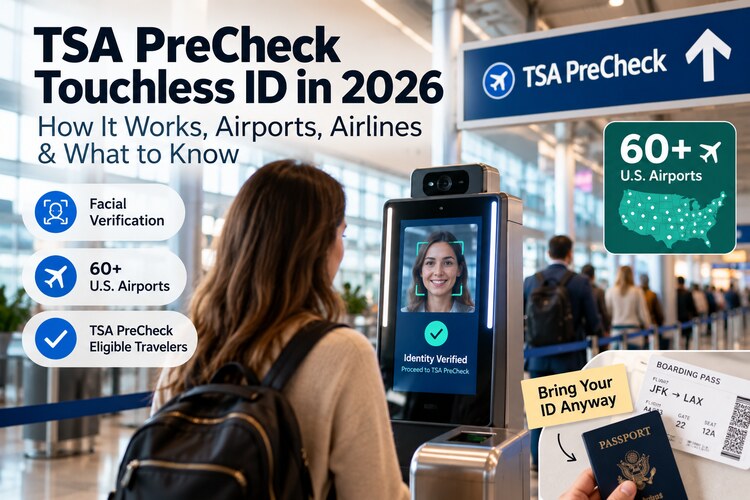
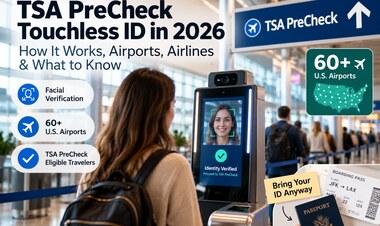
TSA PreCheck Touchless ID is now available at more than 60 U.S. airports. Learn how facial identity verification works, who is eligible, participating airlines, privacy considerations, and why you should still carry physical ID.

Airport security in the United States is becoming increasingly digital. One of the biggest changes for frequent flyers in 2026 is TSA PreCheck Touchless ID, a system that can let eligible travelers verify their identity at participating checkpoints with a quick facial scan instead of repeatedly presenting a physical ID and boarding pass.
The program has expanded rapidly and is now available at more than 60 U.S. airports. But there is an important catch: availability can depend on your airport, terminal, airline, TSA PreCheck status, and whether you opted in correctly before the trip.
This guide explains how TSA PreCheck Touchless ID works, who can use it, what you still need to carry, how facial verification is used, and what to check before heading to the airport.
Last reviewed: October 2026.
TSA PreCheck Touchless ID: The Quick Answer
| Question | Answer |
|---|---|
| What is it? | An optional identity-verification system for eligible TSA PreCheck travelers using facial comparison. |
| Where is it available? | More than 60 U.S. airports as of 2026, but support varies by airline and terminal. |
| Do I still need TSA PreCheck? | Yes. Touchless ID is an enhancement to the PreCheck experience, not a replacement for enrollment. |
| Do I need to opt in? | Yes. Eligible travelers generally need to enable the feature through a participating airline or supported digital identity workflow. |
| Should I still carry physical ID? | Yes. Technology may be unavailable and TSA officers can still require traditional identification. |
| Is participation mandatory? | No. Facial comparison participation is voluntary. |
What Is TSA PreCheck Touchless ID?
TSA PreCheck Touchless ID is a biometric identity-verification option designed to make part of the airport checkpoint process faster for eligible travelers.
Instead of handing a TSA officer your physical ID and boarding pass for identity verification, a camera captures a live image of your face. The system compares that image with an identity image already associated with your travel credentials.
When the comparison succeeds, your identity and travel eligibility can be confirmed electronically.
This does not eliminate security screening itself. You still proceed through the TSA PreCheck screening process after identity verification.
How TSA Touchless ID Works at the Airport
The experience can vary slightly by airline and airport, but the general process looks like this:
- You are enrolled in TSA PreCheck or have eligible PreCheck access through a trusted traveler program such as Global Entry.
- You opt in to Touchless ID through a participating airline or supported enrollment method.
- Your reservation is linked to the required traveler information.
- Your boarding pass shows that you are eligible for the Touchless ID process.
- You go to a participating TSA PreCheck Touchless ID checkpoint.
- A camera captures a live facial image.
- The system verifies your identity.
- You continue through the TSA PreCheck security lane.
For the traveler, the biggest visible difference is that you may not need to pull out an ID card or boarding pass during that identity-verification step.
Who Can Use TSA PreCheck Touchless ID?
Touchless ID is not simply a walk-up facial-recognition lane that every passenger can use.
You generally need:
- eligible TSA PreCheck access;
- a reservation with a participating airline;
- required identity information linked to your airline profile;
- Touchless ID opt-in or consent;
- a participating airport and checkpoint.
Travelers accessing TSA PreCheck through Global Entry may also be eligible when the other requirements are met.
Because the rollout depends on airline technology as well as TSA infrastructure, two passengers departing from the same airport may not necessarily have the same Touchless ID option.
Which Airlines Support TSA Touchless ID?
Major U.S. carriers participating in the Touchless ID ecosystem include:
- American Airlines;
- Delta Air Lines;
- United Airlines;
- Southwest Airlines;
- Alaska Airlines;
- Hawaiian Airlines.
Participation can change and does not necessarily mean every flight from every participating airport will offer the same experience.
Before a trip, check your airline's current Touchless ID instructions and your boarding pass rather than assuming availability based only on the airport.
Which Airports Have TSA PreCheck Touchless ID?
The program expanded dramatically in 2026 and now reaches more than 60 U.S. airports.
Major airports with Touchless ID availability include locations such as:
- Atlanta (ATL);
- Los Angeles (LAX);
- Chicago O'Hare (ORD);
- Denver (DEN);
- Dallas/Fort Worth (DFW);
- Miami (MIA);
- Orlando (MCO);
- Seattle (SEA);
- San Francisco (SFO);
- Boston (BOS);
- New York LaGuardia (LGA);
- New York JFK (JFK);
- Washington Dulles (IAD);
- Washington National (DCA);
- Las Vegas (LAS);
- Phoenix (PHX);
- San Diego (SAN);
- Tampa (TPA).
This is not intended to be a permanent master list. Airports, terminals, airlines, and lanes can change as the system expands.
Practical rule: verify support with your airline shortly before departure.
The Airport May Support It—but Your Terminal Might Not
This is one of the easiest details to miss.
An airport appearing on a Touchless ID list does not necessarily mean the technology is available:
- at every terminal;
- at every checkpoint;
- for every participating airline;
- during every operating period.
Equipment can also be temporarily unavailable.
That is why Touchless ID should be treated as a faster option rather than a reason to leave your normal travel documents at home.
Yes, You Should Still Bring Physical ID
Even if your boarding pass says Touchless ID and you have used the system successfully before, carry an acceptable physical ID.
A TSA officer may need to use the conventional identification process if:
- the facial comparison does not succeed;
- the Touchless ID system is unavailable;
- your airline data is incomplete;
- your checkpoint does not support the service;
- you are directed to another screening location;
- additional verification is required.
For U.S. domestic travelers using a state driver's license or identification card, REAL ID requirements also remain relevant.
Does Touchless ID Replace REAL ID?
No.
TSA PreCheck Touchless ID and REAL ID solve different parts of the travel process.
REAL ID refers to federal security standards for state-issued driver's licenses and identification cards used for purposes such as domestic air travel.
Touchless ID is an optional digital identity-verification experience available to eligible travelers at participating checkpoints.
You should therefore continue carrying a TSA-accepted ID even when planning to use Touchless ID.
What About Facial Recognition and Privacy?
Privacy is an understandable concern whenever facial-comparison technology is introduced into travel.
TSA says participation in facial comparison is voluntary. Travelers who do not want to participate can request the regular identity-verification process.
TSA also says digital identification does not create a national database of passengers' digital ID information. According to the agency, digital identification information is received with the passenger's consent and is generally not copied or stored, except in limited testing environments where travelers are informed.
For travelers who are uncomfortable with the biometric process, the most important point is simple:
You can still use the normal identification process.
Touchless ID vs. Regular TSA PreCheck
| Feature | Regular TSA PreCheck | PreCheck Touchless ID |
|---|---|---|
| Expedited security screening | Yes | Yes |
| PreCheck eligibility required | Yes | Yes |
| Identity verified electronically with facial comparison | Not necessarily | Yes |
| Physical ID normally presented at identity check | Usually | Often not required during the Touchless verification step |
| Available everywhere PreCheck exists | Broader availability | No |
| Opt-in required | No special Touchless opt-in | Yes |
TSA Touchless ID vs. CLEAR
The airport experience may look similar because both can use biometric identity verification, but they are different programs.
TSA PreCheck Touchless ID is part of the government security-screening ecosystem and is available to eligible PreCheck travelers without a separate Touchless ID membership fee.
CLEAR is a private membership service operating identity-verification lanes at participating airports and venues.
Travelers should compare them based on:
- airports they use most often;
- airlines they fly;
- existing TSA PreCheck or Global Entry membership;
- CLEAR membership cost;
- which lanes are actually faster at their home airport.
There is no universal answer because airport layouts and peak-hour queues differ.
What If You Have Global Entry?
Global Entry includes TSA PreCheck eligibility for qualifying members, so many Global Entry travelers can also use Touchless ID when their airline and airport support it and the required opt-in has been completed.
Global Entry itself serves a different purpose: it is primarily designed to speed up U.S. immigration processing when returning from international trips.
Touchless ID affects the departure-side identity verification experience at participating TSA checkpoints.
What to Do Before Going to the Airport
A few minutes of preparation can prevent most Touchless ID confusion.
1. Confirm TSA PreCheck eligibility
Check that your Known Traveler Number is correctly attached to the reservation and that TSA PreCheck appears on your boarding pass.
2. Complete the airline's Touchless ID opt-in
Do this before arriving at the checkpoint. Depending on your airline, enrollment or consent may be handled through your loyalty profile, app, website, or check-in flow.
3. Check airport and terminal support
Do not rely only on the airport name. Look for airline-specific information.
4. Confirm your boarding pass
Look for the Touchless ID indicator or other eligibility signal provided by your airline.
5. Bring physical identification anyway
This remains one of the most important practical steps.
What to Expect on Travel Day
At a supported airport, look for signage directing eligible passengers to the TSA PreCheck Touchless ID lane.
The identity step can be very quick:
- approach the verification position;
- look toward the camera;
- wait for facial verification;
- follow TSA officer instructions;
- continue to the PreCheck screening area.
You should still keep your ID accessible in case the system asks for fallback verification.
Is Touchless ID Actually Faster?
It can reduce one small but repetitive part of airport security: taking out documents, scanning or presenting them, and having identity information checked manually.
The actual time saved depends on:
- airport congestion;
- how many Touchless lanes are operating;
- equipment reliability;
- passenger familiarity;
- the size of the standard PreCheck queue.
Touchless ID does not guarantee an empty security lane, but reducing friction at the identity checkpoint can improve passenger flow.
Touchless ID Is Part of a Bigger Travel-Tech Shift
Airports are moving toward a travel experience where identity can increasingly be verified digitally across multiple touchpoints.
That may eventually affect:
- bag drop;
- airport security;
- boarding;
- immigration processing;
- digital travel credentials.
TSA has described a longer-term direction toward a more streamlined identity experience with fewer documents and fewer physical interactions.
For travelers, this means the smartphone, passport data, biometric identity and airline profile are becoming more connected parts of the airport journey.
Build a Smarter International Travel Setup
Touchless ID solves only the airport identity step. A modern travel setup often includes several other digital layers.
Before an international trip, it is worth checking:
- passport validity;
- visa or travel-authorization requirements;
- mobile connectivity;
- airline apps and digital boarding passes;
- offline maps;
- travel insurance documents;
- emergency payment methods.
If you are planning international connectivity, our 2026 travel eSIM guide explains what to check before buying an eSIM.
You can also compare two popular providers in our Airalo vs. Holafly comparison.
5 Touchless ID Mistakes to Avoid
1. Assuming TSA PreCheck automatically enables Touchless ID
PreCheck eligibility is required, but Touchless ID generally requires an additional opt-in.
2. Leaving physical ID at home
Always carry an acceptable ID.
3. Assuming every terminal participates
Availability can vary inside the same airport.
4. Waiting until the checkpoint to investigate enrollment
Complete the setup through your airline before travel whenever possible.
5. Confusing Touchless ID with skipping security screening
The technology simplifies identity verification. You still go through airport security screening.
Frequently Asked Questions
Is TSA PreCheck Touchless ID free?
There is no separate Touchless ID membership fee for eligible TSA PreCheck travelers. You still need the underlying PreCheck eligibility or qualifying trusted traveler membership.
Do I need a passport to use Touchless ID?
Enrollment requirements can depend on the participating airline and identity workflow. Some implementations use passport information or a passport image associated with your identity profile. Follow the instructions provided by your airline.
Can I refuse facial recognition?
Yes. TSA states that facial-comparison participation is voluntary and travelers can use an alternative identity-verification process.
Should I still bring my driver's license or passport?
Yes. Always travel with an acceptable physical ID even when planning to use Touchless ID.
Does every TSA PreCheck airport have Touchless ID?
No. The Touchless ID network is expanding, but it remains a subset of airports, airlines, terminals and checkpoints where TSA PreCheck is available.
Can children use Touchless ID?
Eligibility depends on TSA PreCheck rules, traveler identity requirements and the participating airline's implementation. Families should confirm current requirements before travel rather than assuming every traveler on the reservation can use the same lane.
Final Verdict
TSA PreCheck Touchless ID is one of the more practical airport-technology upgrades arriving at scale in 2026.
It does not eliminate security screening, replace TSA PreCheck, or make physical identification obsolete. What it does is remove some of the friction from identity verification for eligible travelers at participating airports.
The best approach is simple:
- enroll in or confirm TSA PreCheck;
- opt in with a participating airline;
- check whether your airport and terminal support Touchless ID;
- look for the correct indicator on your boarding pass;
- bring physical ID anyway.
Used that way, Touchless ID becomes another useful layer in a smarter travel setup—not something you have to depend on for the entire trip.
Netzender Editorial Team