Build a Focus System: How to Protect Attention in a Distracting Digital Day
A practical focus system for protecting attention with fewer interruptions, clearer priorities, protected work blocks, communication windows and deliberate recovery.
 Netzender Editorial Team

Focus is easier to protect with a system than with motivation.
If email, chat, notifications, browser tabs and unfinished tasks are all competing for attention, telling yourself to “concentrate harder” does not change the environment.
A focus system does.
Focus Is an Environment Problem as Much as a Willpower Problem
Digital work creates two kinds of interruption:
- external interruptions such as messages and notifications;
- self-interruptions such as checking email, news or a feed without being prompted.
A strong focus system needs to reduce both.
Research Shows That Blocking Distractions Can Help
Microsoft Research studied information workers using software that blocked online distractions.
Participants reported higher productivity and were able to focus for longer during the blocking condition.
The study also found an important caveat: some participants worked longer without breaks and experienced greater stress.
The lesson is not “block everything and work forever.”
It is that focus needs both protection and recovery.
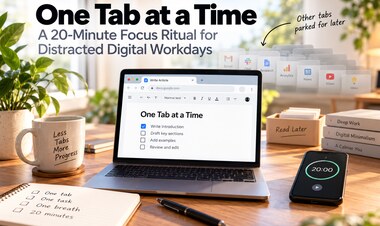
Step 1: Define One Outcome for the Focus Block
Do not start a focus session with a vague task such as:
“Work on the project.”
Define a visible outcome:
- finish the first draft;
- debug the payment callback;
- review 20 candidate pages;
- complete slides 1–8;
- write the database migration.
A clear finish condition reduces the temptation to switch tasks whenever the work becomes difficult.
Step 2: Capture Everything Else Before You Begin
Unfinished reminders compete for working memory.
Before starting, write down:
- messages you need to send later;
- small tasks you remembered;
- ideas unrelated to the current work;
- appointments;
- research questions.
Once captured, they no longer need to be rehearsed mentally.
Step 3: Create a Protected Time Box
Choose a block that is realistic for the task and your current ability to concentrate.
Possible starting lengths:
- 25 minutes for difficult initiation;
- 45 minutes for normal focused work;
- 60–90 minutes for deeper project work.
There is no universally correct focus-block length.
The useful length is one you can repeat without turning every session into an endurance test.
Step 4: Remove Notification-Based Switching
Notifications are requests for attention made on someone else's schedule.
During protected work:
- enable Focus or Do Not Disturb;
- close chat windows;
- disable email alerts;
- silence nonessential phone notifications;
- keep emergency contacts exempt if needed.
Research on workplace email has found associations between notification-driven checking, difficulty focusing and lower perceived productivity.
Step 5: Remove Self-Interruption Shortcuts
Even with notifications disabled, you can still interrupt yourself.
Make distracting behavior slightly harder:
- close social tabs;
- log out of entertainment sites;
- remove distracting icons;
- use a website blocker during focus blocks;
- keep the phone out of reach.
Friction does not need to be dramatic. A few extra steps can be enough to interrupt autopilot.
Step 6: Keep a Distraction Capture List
During focused work, unrelated thoughts will appear:
Check that invoice.
Search for that tool.
Reply to that message.
Do not immediately act on them.
Write them on a temporary list and return to the task.
At the end of the block, decide which still matter.
Step 7: Batch Communication
Communication does not need to be ignored all day.
Instead, create predictable windows.
For example:
- 09:30 email and chat;
- 12:00 communication check;
- 15:30 response window;
- end-of-day review.
The exact times matter less than separating communication mode from concentration mode.
Step 8: Use Different Modes for Different Work
Not all work deserves deep focus.
Divide work into modes:
Focus Mode
Writing, coding, design, analysis, problem solving.
Communication Mode
Email, chat, calls, approvals, coordination.
Administrative Mode
Invoices, forms, file organization, scheduling.
Switching intentionally between modes is different from switching accidentally every few minutes.
Step 9: Protect the First High-Energy Block
If possible, avoid spending your best concentration period entirely on inbox maintenance.
Choose one meaningful task before entering reactive communication mode.
This does not have to happen at 5 a.m. or follow someone else's morning routine.
Find the period when your attention is usually strongest and protect part of it.
Step 10: Stop Before Focus Turns Into Exhaustion
Long concentration sessions need recovery.
After a demanding block:
- stand up;
- walk;
- drink water;
- look away from the screen;
- do a low-demand task;
- take a real break.
Do not automatically replace focused work with ten minutes of highly stimulating feeds.
A Focus System Needs an Emergency Path
Some people genuinely need to remain reachable.
Create exceptions for:
- family;
- important clients;
- production incidents;
- medical needs;
- time-sensitive operational alerts.
This lets you reduce interruption without becoming irresponsibly unavailable.
Use Technology to Protect Attention
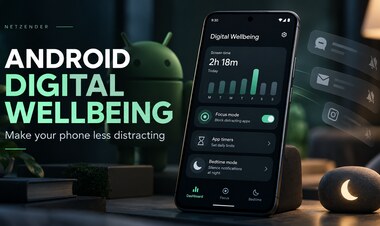
Android Digital Wellbeing, Focus mode, Do Not Disturb and similar tools can automate boundaries.
Our Android Digital Wellbeing guide shows how to configure some of these controls.
The point is not to add another productivity app. Use the simplest tool that reliably creates the boundary you need.
A Practical Two-Block Focus Day
A simple structure might be:
- Review priorities.
- Choose one outcome.
- Run a 60-minute protected focus block.
- Take a short break.
- Check communication.
- Handle meetings and administrative work.
- Run a second protected block later.
- Process the distraction list.
- Close the day with a short review.
Measure Output, Not Heroic Hours
A focus system is working if important work moves forward more reliably.
Track:
- focus blocks completed;
- important outcomes finished;
- interruptions;
- how often you abandoned the intended task;
- whether the system leaves enough energy for tomorrow.
Four hours of genuine progress can be more valuable than ten hours of fragmented activity.
What About Pomodoro?
Pomodoro can be useful because it creates a clear work/break rhythm.
But the specific 25-minute interval is not mandatory.
If 25 minutes helps you begin, use it.
If your work benefits from 60-minute blocks, use those.
The underlying principle is protected attention plus deliberate recovery.
Connect Focus With a Broader Productivity System
Focus solves only one part of productivity.
You still need to decide what deserves attention.
Our practical study system uses a similar principle: clear work units are easier to execute than vague goals.
You can also follow the broader Focus section as we build more attention-management guides.
Final Takeaway
Focus improves when important work has protected space and distractions have somewhere else to go.
Define one outcome, protect a realistic block, reduce external and self-interruptions, batch communication and include recovery.
The goal is not to maintain perfect concentration all day. It is to create enough uninterrupted time for meaningful work to happen consistently.