Digital Detox for Better Sleep: 7 Practical Ways to Reduce Screen Time at Night
Build a realistic nighttime digital detox with seven evidence-informed ways to reduce scrolling, quiet notifications and create a better bedtime routine.
 Netzender Editorial Team
That “one last scroll” before bed can quietly stretch into half an hour. A digital detox for better sleep does not mean giving up your phone or buying expensive gadgets. It means designing a calmer final part of the day so your devices stop competing with rest.
This guide offers seven realistic changes you can try tonight. The goal is not a perfect screen-time score: it is a repeatable routine that supports sleep while leaving room for work, family, and accessibility needs.
Why nighttime screen habits can interfere with sleep
Phones affect sleep in more than one way. Bright light near bedtime may affect circadian timing, while emotionally engaging videos, games, news, and messages can keep the brain alert. Notifications can also interrupt sleep after you put the device down. The effect varies by person, content, brightness, and timing; a blue-light filter alone does not solve every problem.
The CDC recommends consistent sleep and wake times and turning off electronic devices at least 30 minutes before bedtime. The National Heart, Lung, and Blood Institute (NHLBI) also advises using the hour before bed for quiet time and avoiding bright artificial light. Treat these as practical starting points, not a rigid rule that works identically for everyone.
1. Choose a realistic screen-off window
Start with 30 minutes before your intended bedtime. If that feels easy, experiment with 45–60 minutes. Set a reminder named “wind down” rather than relying on willpower when you are already tired. If you need your phone for an important call, keep calls available while reducing optional apps.
2. Give your phone a parking place outside arm’s reach
Charge your phone across the room, on a hallway shelf, or outside the bedroom if practical. This removes the automatic reach-and-scroll habit. Use an inexpensive alarm clock if your phone is your main reason for keeping it beside the pillow. If you must keep the phone close for caregiving or safety, turn the screen face down and silence nonessential alerts.
3. Silence notifications without missing emergencies
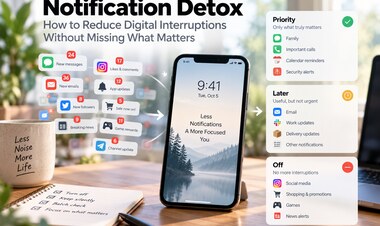
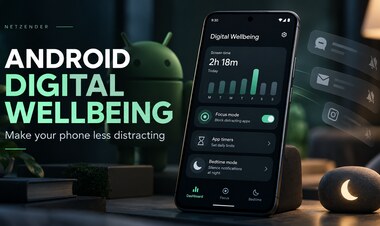
Set up Do Not Disturb or a bedtime focus mode. Allow calls from trusted contacts if necessary and mute social media, shopping, and news alerts. Review notification permissions during the day, not when you are trying to sleep. Fewer interruptions matter more than chasing a particular daily screen-time number.
4. Replace scrolling with a low-effort ritual
Decide in advance what you will do instead: read a paper book, stretch gently, write tomorrow’s top three tasks, listen to calm audio with the screen off, or prepare clothes for the morning. Choose an activity that feels easy enough to repeat on a busy night. Avoid turning the ritual into another productivity challenge.
5. Lower stimulation before you lower brightness
Night mode and dimming can make screens more comfortable, but the content still matters. Avoid late-night arguments, urgent work chats, and endless short-form video feeds when possible. If you need a screen, prefer a short, intentional task with a clear stopping point over an open-ended feed.
6. Keep a consistent wake-up time
A bedtime routine works best alongside a regular sleep schedule. Try waking at roughly the same time each day, including weekends. Most adults need at least seven hours of sleep, though individual needs differ. Avoid sacrificing sleep to achieve a flawless evening routine.
7. Run a seven-night experiment, not a lifelong ban
For one week, record three simple things each morning: when you put the phone away, approximately when you fell asleep, and how rested you feel. Do not obsess over wearable sleep scores. At the end of seven nights, keep the one or two changes that helped and adjust the rest.
A practical 30-minute bedtime routine
- 30 minutes before bed: Finish messages, set your alarm, and activate bedtime focus.
- 20 minutes: Put the phone in its charging spot and dim the room lights.
- 15 minutes: Read, journal, or do a gentle calming activity.
- Bedtime: Keep the room quiet, cool, and dark enough for comfort.
Travel, shift work, parenting, and emergencies can disrupt this schedule. Adapt it to your circumstances rather than abandoning the entire habit after one imperfect night.
What about blue-light glasses and night mode?
Blue-light exposure is only part of the picture. Evidence that blue-light-blocking glasses improve sleep is uncertain, and using a warmer screen does not eliminate stimulating content or notifications. You can dim your display and use night mode for comfort, but prioritize a predictable bedtime and fewer late-night interruptions.
When screen changes are not enough
If you regularly struggle to fall asleep, wake frequently, experience loud snoring or breathing pauses, or feel excessively sleepy during the day, consider speaking with a healthcare professional. Persistent insomnia may benefit from cognitive behavioral therapy for insomnia (CBT-I), a recommended first-line treatment. This article is general information, not medical advice.
Frequently asked questions
How long before bed should I stop using my phone?
Try 30 minutes as a manageable starting point, consistent with CDC sleep-habit guidance. Some people prefer a longer wind-down period.
Does using dark mode make bedtime scrolling harmless?
No. It can reduce visual discomfort, but engaging content and notifications may still keep you alert.
Do I need to quit social media completely?
No. Start by changing when and how you use it. A consistent boundary before bed is more sustainable than an all-or-nothing rule for many people.
Further reading and sources
- CDC: About Sleep
- NHLBI: Healthy Sleep Habits
- NHLBI: Insomnia Treatment
- Cochrane: Blue-light filtering lenses review
Bottom line: Put your phone away a little earlier, quiet the alerts, and make the alternative easy. A small routine you can repeat is more useful than a dramatic detox that lasts one night.