GitHub Copilot in Microsoft Teams: Fix Issues and Create Pull Requests
Learn how GitHub Copilot cloud agent works inside Microsoft Teams: setup, paid-plan requirements, issue-to-PR workflow, security, and the November 2026 app migration.
 Netzender Editorial Team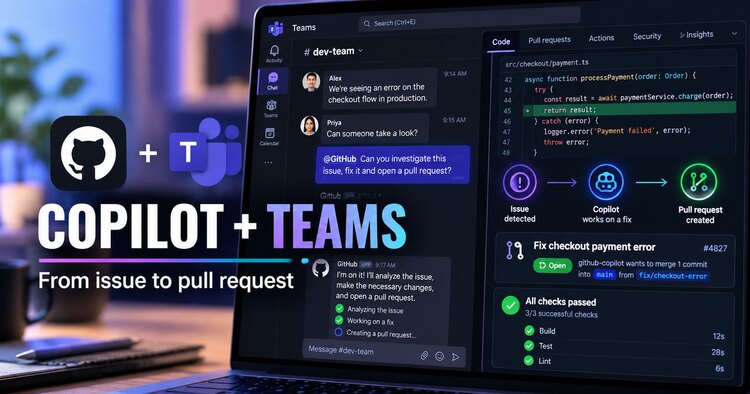
Updated October 25, 2026. GitHub’s new Microsoft Teams integration lets developers move from a repository notification to an AI-assisted fix and pull request by mentioning @GitHub. Here is how the workflow works, who can use it, what it costs, and what to review before merging AI-generated code.
What changed on October 23, 2026
GitHub’s consolidated app for Microsoft Teams now connects repository notifications with GitHub Copilot cloud agent. A team can see an issue notification in a channel, mention @GitHub, ask the agent to investigate or fix the problem, and follow the resulting pull request without switching collaboration tools. GitHub announced this workflow on October 23, 2026; the AI agent experience is in public preview, so availability and behavior may change.
The practical benefit is continuity: the discussion that identified a bug can become useful context for the agent assigned to work on it. But this is not an automatic production deployment system. A human still needs to inspect the proposed changes, review tests, and decide whether to merge.
GitHub notifications versus Copilot cloud agent
The integration combines two related capabilities. Repository notifications and GitHub commands help teams track issues and pull requests inside Teams. Copilot cloud agent is a separate AI-powered capability that can investigate a task, plan changes, work in a cloud sandbox, and create issues or pull requests. GitHub says the cloud agent feature is available to paid Copilot plans and remains in public preview.
Do not assume that installing the Teams app automatically grants an organization paid Copilot access. Organization policies, repository permissions, cloud sandbox settings, and Teams preview requirements may still block an agent session.
Requirements before you start
- A GitHub account and a Microsoft Teams workspace with permission to install the GitHub app.
- A paid GitHub Copilot plan for Copilot cloud agent actions.
- Cloud sandbox and Copilot cloud agent access enabled where required by organization or enterprise policy.
- Write access to the repository for the person who starts an agent task.
- The Microsoft Teams public developer preview setting where required by the GitHub integration documentation.
Administrators should confirm permissions before rolling this out to a full team. A teammate who can read an issue is not necessarily authorized to have the agent change repository code.
How to set up GitHub in Microsoft Teams
- Open the GitHub integration listing in the Microsoft Teams app store and select Add. An administrator may need to approve installation.
- In the relevant channel or chat, mention
@GitHuband follow the sign-in prompts to link your GitHub account. - If prompted, choose a default repository. For multi-repository teams, specify the repository in individual tasks rather than relying on a default.
- Try
@GitHub helpto view supported actions. - Check that the Copilot cloud agent policy and cloud sandboxes are enabled before delegating a coding task.
Teams app installation is generally a one-time workspace or team step, but individual members still need to connect their GitHub accounts to use personalized functionality.
Example workflow: from a reported bug to a pull request
Imagine a checkout team sees a new issue about an incorrect error message. The issue notification appears in a Teams thread. A developer with write access can reply with a focused instruction:
@GitHub Investigate the checkout error described in this thread. Identify the root cause, add a regression test, and create a pull request for review. repo=OWNER/REPO_NAME branch=mainReplace the placeholder repository and base branch with real values. The agent can use the conversation and linked issue as context, work asynchronously in a cloud sandbox, and return status plus links to the resulting artifacts. Ask it to explain assumptions or add tests in the same thread when necessary.
GitHub documents the repo and branch parameters for directing work to a particular repository and base branch. Teams is the coordination surface; GitHub remains the source of truth for the code, diff, checks, approvals, and merge.
What to check before merging an AI-generated pull request
- Scope: Did the agent change only the files necessary for the issue?
- Correctness: Do the changes actually fix the bug rather than mask a symptom?
- Tests: Were regression tests added and did relevant CI checks pass?
- Security: Are secrets, credentials, access controls, and user data handled correctly?
- Maintainability: Are names, error handling, dependencies, and comments consistent with the codebase?
- Ownership: Does a qualified reviewer understand and approve the change?
GitHub specifically warns users to check AI output for mistakes. Even a green test suite is not a substitute for reviewing behavior and business requirements.
Important security and privacy considerations
Teams thread context matters. GitHub says Copilot cloud agent captures the entire thread when it is mentioned and uses that conversation as task context. That context can be stored in artifacts generated by the agent. Avoid placing customer secrets, credentials, or sensitive business discussions in threads you intend to hand to the agent. A direct message to the GitHub app can provide a more focused context.
Identity and permissions differ by setting. In a direct message, the agent may act using the linked user account’s permissions. In a shared thread or channel, artifacts such as pull requests can be created under the app identity. GitHub also documents additional approval behavior for shared-context pull requests when repository rulesets require reviews.
Access is not universal. Only users with write access can trigger code-changing sessions; guests and outside collaborators cannot initiate or steer the agent in Teams. Administrators should review repository rulesets and enterprise Copilot policies.
What happens to the old GitHub Teams app?
GitHub says the legacy app will be renamed GitHub (deprecated) and retired on November 16, 2026. Teams using the older integration should install or move to the consolidated GitHub app. If the team already uses the GitHub notifications app, GitHub advises updating it to the latest version; existing notification capabilities continue.
Before migration, document current channel subscriptions and verify notifications and authentication after the change. The exact UI can differ across Teams clients and organization settings.
Who benefits most from this workflow?
This workflow is especially relevant to software teams that already triage issues in Teams: SaaS developers, internal engineering groups, support engineers, and teams managing many repositories. It can reduce handoffs between a bug discussion and the initial coding task.
Smaller teams should begin with low-risk tasks such as documentation corrections, reproducible test failures, and isolated bug fixes. Highly sensitive changes—payments, authentication, production infrastructure, and customer data access—deserve tighter permissions and human review.
For a broader comparison of assistants in daily work, read ChatGPT vs Claude vs Gemini for Work. If your team is choosing automation platforms beyond software development, see Best AI Workflow Automation Tools in 2026.
Frequently asked questions
Is GitHub Copilot in Teams free?
The Teams GitHub integration supports notification and collaboration features, but GitHub states that Copilot cloud agent actions require a paid Copilot plan. Organization settings and preview requirements also apply.
Can Copilot merge a pull request automatically?
The documented workflow centers on creating proposed changes and pull requests for human review. Teams should preserve their normal branch protection, approval, and merge policies rather than assume the agent is a trusted automatic merger.
Does Copilot read the whole Teams conversation?
GitHub says it uses the entire thread as context when invoked in that thread. Use a separate, focused conversation when the existing discussion contains unrelated or sensitive information.
Can someone without write access ask the agent to fix code?
GitHub says only users with repository write access can trigger changes. Other participants may contribute context, subject to the integration’s collaboration and access rules.
Bottom line
GitHub Copilot in Microsoft Teams is most useful when an issue already has context in a team conversation. It helps turn that context into an investigation, a proposed fix, and a pull request—but it does not remove the need for permissions, careful prompts, testing, and code review. Because the cloud agent integration is in public preview, verify current GitHub documentation before enabling it across a large organization.