Digital Overload in 2026: How to Reduce Screen Fatigue Without Quitting Technology
Feeling overwhelmed by notifications and screens? Try a realistic seven-day reset for focus, eye comfort, sleep routines and mindful technology use.
 Netzender Editorial Team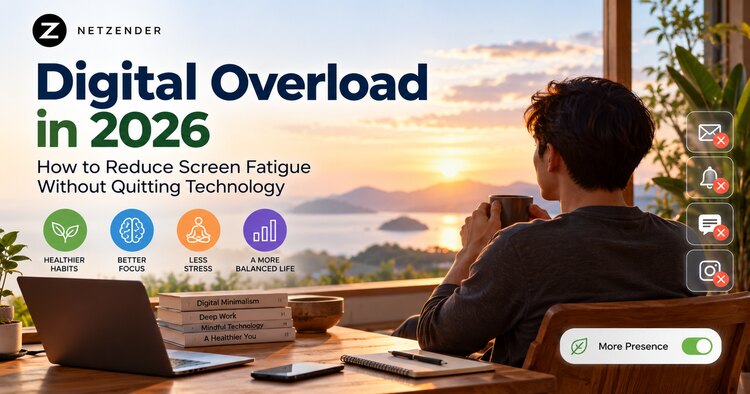
Technology is useful, but constant notifications, back-to-back calls and endless feeds can leave people feeling exhausted. This practical 2026 guide explains how to reduce screen fatigue without deleting every app or abandoning connected life.
Why digital overload feels different from ordinary busyness
Digital overload is not a diagnosis. It describes the experience of having more digital demands than your attention can comfortably handle: alerts, meetings, feeds, messages, and the expectation of immediate replies. Screen fatigue can include tired eyes, fragmented focus, irritability, or the sense that work never really ends. These experiences have different causes, so a useful response begins by noticing which situations trigger them rather than treating every minute on a screen as harmful.
Start with a seven-day attention audit
For one week, record three simple observations: which apps you open without intending to, which notifications interrupt important work, and when your eyes or mind feel most tired. Your phone's built-in screen-time dashboard can provide a rough baseline, but total hours alone are not the goal. A video call with family and an endless social feed are not interchangeable experiences. Look for patterns: repeated checking during focused work, late-night scrolling, or long stretches without changing posture.
Reduce interruptions before reducing screen time
Begin by turning off nonessential push notifications. Keep alerts for people and services that truly require timely action, such as family, work emergencies, or security notices. Batch low-priority messages into two or three planned windows. Put distracting apps on a second home screen or remove their badges. On Android, Digital Wellbeing offers Focus mode and app timers; on iPhone, Focus and Screen Time provide related controls. These tools are optional guardrails, not proof that a particular number of minutes is healthy.
Give your eyes a better working environment
Extended close-up work may contribute to eye discomfort. The widely used 20-20-20 habit suggests looking at something about 20 feet away for about 20 seconds every 20 minutes; treat it as a practical reminder rather than a guaranteed treatment. Blink normally, adjust screen brightness to the room, reduce glare, and keep text comfortably readable. Regular breaks and an ergonomic setup can help. Persistent pain, worsening vision, or significant dryness warrants assessment by an eye-care professional rather than another productivity app.
Create two kinds of breaks
A microbreak is a short pause between tasks: stand, stretch, look away from the display, or get water. A longer break is a genuine change of activity, such as a walk, lunch away from the desk, or an in-person conversation. Neither requires banning technology. The aim is to interrupt continuous demands on attention and give your body a chance to move. If your work requires long sessions, schedule breaks around natural milestones rather than relying on willpower after fatigue appears.
Protect the transition into sleep
Try setting a predictable stopping point for work messages and stimulating feeds. Charge the phone away from the bed when practical, or use a quiet mode with emergency contacts allowed. Dim the display and avoid letting a late-night notification become a new task. Sleep quality is influenced by many factors, so changing a screen setting alone may not solve insomnia. A consistent routine, sufficient sleep opportunity, and professional guidance for ongoing sleep problems matter more than a rigid digital-detox challenge.
Replace passive scrolling with intentional use
Before opening an app, ask what you want to accomplish: send a message, read one article, check directions, or relax for ten minutes. When you finish, close it. If you enjoy social media, keep it; choose a time and duration that fits your priorities. Curate feeds toward people and subjects you value, and mute sources that repeatedly leave you tense or distracted. Digital minimalism is about deciding what deserves your attention, not competing to have the lowest screen-time number.
A realistic seven-day reset plan
Day 1: observe your most distracting digital moments. Day 2: silence three low-value notifications. Day 3: create one 25- to 50-minute focus block. Day 4: add brief visual and movement breaks. Day 5: move one recurring conversation or leisure activity offline. Day 6: set a reasonable evening quiet window. Day 7: review what improved and what felt unrealistic. Keep only the changes that fit your responsibilities, accessibility needs, and relationships. Small repeatable improvements usually outlast dramatic short-term bans.
Measure what matters, not just minutes
After two weeks, ask whether you can finish important tasks with fewer interruptions, whether your eyes feel more comfortable, and whether evenings feel less fragmented. Track one or two indicators, such as uninterrupted work blocks or the number of unnecessary notification checks. If a strategy makes you miss urgent messages or creates stress, adjust it. The purpose is a better relationship with useful technology, not perfect compliance with a digital-wellbeing dashboard.
When self-help is not enough
Digital overload can overlap with burnout, anxiety, sleep problems, and vision conditions, but it does not establish any of those diagnoses. If symptoms persist, interfere with daily life, or become severe, consult a qualified health professional. Employers can also reduce overload by clarifying response expectations, limiting unnecessary meetings, and protecting focus time. Individuals should not have to solve an always-on workplace culture solely through personal discipline.
Related reading on Netzender
- Digital Wellbeing on Android: Make Your Phone Less Distracting
- Agentic AI Projects: An Engineering Roadmap