Black Friday 2026 Shopping Scams: How to Spot Fake Stores and Search Ads
A practical FTC-backed guide to spotting fake Black Friday stores in search ads, checking sellers in 60 seconds, choosing safer payments and responding to fraud.
 Netzender Editorial Team
Quick answer: Fake Black Friday stores can appear in paid search results as well as elsewhere online. Before buying, verify the seller's real website address, research independent complaints, compare the full price and choose a payment method with appropriate dispute protections. The FTC warned about search-result shopping scams on November 19, 2026.
Black Friday 2026 is November 27. This guide focuses on practical shopping safety rather than claiming that any particular retailer or search platform is fraudulent.
Why Black Friday 2026 shoppers should check search results carefully
Black Friday falls on November 27 in 2026, and the rush to compare prices can make a convincing-looking offer feel urgent. A warning published by the US Federal Trade Commission (FTC) on November 19 highlights a specific route to fraud: a shopper searches for a retailer or a hard-to-find gift, clicks what appears to be a useful result, and reaches a fraudulent website. The site may take payment without shipping the promised product, or collect sensitive information.
This is not a claim that paid search ads are inherently unsafe. Legitimate merchants advertise on Google, Bing and other platforms every day. The important distinction is that buying an ad placement does not independently prove that a seller is authentic. Scammers can buy placements too. Treat search results as a way to discover sellers, not as a guarantee of their identity.
The FTC recommends visiting a known retailer's address directly, researching unfamiliar sellers and being cautious about the top results. This guide turns those principles into a practical checklist for US shoppers, with advice that is also useful elsewhere. Payment protections and reporting routes vary by country.
How fake shopping stores appear in search results
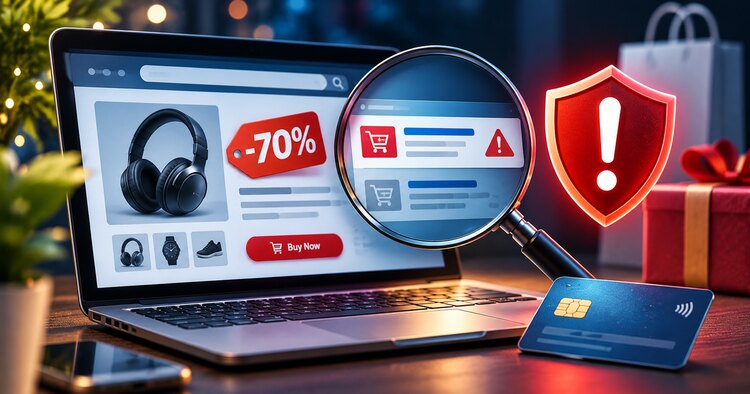
Imagine searching for a popular pair of headphones at a discount. One result shows the product image, an impressive price and a store name that resembles a familiar brand. The page looks polished, with a countdown timer, product reviews and a checkout form. Nothing about its appearance alone proves that it is genuine.
Some fraudsters impersonate an existing retailer using a lookalike domain. Others invent a store and populate it with copied images or exaggerated testimonials. A paid placement can put either type of site where hurried shoppers are likely to click. A search ad is simply an advertisement; an organic result is not automatically safe either.
Before interacting with a result, look closely at the destination website rather than relying on the headline. A familiar logo in the page, a padlock icon or an HTTPS connection does not verify the seller's legitimacy. HTTPS helps protect data in transit; scammers can also obtain certificates. The real question is whether you are dealing with the merchant you intended to reach.
Seven warning signs of a potentially fake online store
- An implausibly low price. A steep discount on a scarce, in-demand product deserves extra scrutiny. Compare the price with established retailers rather than assuming the offer is exclusive.
- A misleading web address. Watch for extra words, unusual spelling, substituted characters or a different domain from the retailer's known website.
- Pressure to buy immediately. Countdown clocks and limited-stock messages can be legitimate marketing tools, but they are not evidence that an offer is real.
- Hard-to-verify contact information. A store with no meaningful address, customer-service channel or independent business history may be difficult to reach if something goes wrong.
- Unclear returns and shipping terms. Read the delivery timeline, refund policy, return costs and restocking conditions before paying.
- Payment methods with weak recovery options. Be wary when an unfamiliar seller insists on gift cards, cryptocurrency, wire transfers or payment apps instead of ordinary checkout options.
- Reviews that cannot be checked independently. Five-star testimonials on a seller's own page may be curated or fabricated. Look for outside reporting and a credible pattern of customer experiences.
The 60-second Black Friday shopping safety check
You can perform a useful first check before entering any payment information. It is a screening routine, not a guarantee of safety.
First 15 seconds: Inspect the complete domain name in the browser address bar. If you meant to shop with a known brand, open a new tab and type its official address yourself. Avoid trusting a lookalike spelling in a search ad.
Next 15 seconds: Search the seller's name together with terms such as “complaint,” “scam” or “reviews.” Check whether the business has a history beyond its own website. The FTC specifically recommends this type of independent search.
Next 15 seconds: Compare the price and the full checkout total, including shipping and taxes, with reputable alternatives. Read return terms and the estimated delivery date. A deal is not useful if the seller cannot reliably deliver.
Final 15 seconds: Check the payment method. Where possible, use a credit card with applicable dispute protections, keep your order confirmation and avoid a seller demanding irreversible payment. If you still feel uncertain, close the page. Missing a discount is less costly than exposing your card details.
How to check a seller before you pay
Start with the retailer's own known website or app when possible. If a search result advertises a particular brand, compare the domain with the one linked from the brand's official communications. A copied logo, social account or review badge is not sufficient proof.
For a marketplace listing, check who actually sells and ships the item. A recognized marketplace name does not mean every third-party seller has the same policies. Read seller feedback in context, including dates, product categories and how disputes were handled.
Search beyond the seller's own testimonials. Consumer complaints, independent reviews and public business information can help, although reviews themselves may be manipulated. Be especially careful if a store has no credible history and claims to have an unlimited supply of products that are sold out elsewhere.
Finally, read the checkout page carefully. Verify the currency, shipping destination, total amount, recurring charges if any, and refund conditions. Save screenshots of the product description, final price and policies for your records.
Safer ways to pay and mistakes to avoid
For US consumers, the FTC generally recommends paying by credit card when possible because credit cards provide dispute protections if merchandise never arrives or is not as described. Those protections have rules and deadlines, so contact your issuer promptly when a problem appears.
Do not send gift-card codes or cryptocurrency to an unknown online seller who demands them as the only way to complete a purchase. Be wary of a request to wire money or move a transaction away from the original marketplace. A payment request that bypasses normal buyer protections is a strong reason to stop.
A secure-looking checkout is not enough. A browser padlock means the connection is encrypted, not that the business is legitimate. Also avoid storing card information on a seller you have not verified, and never send a password or one-time verification code to someone claiming to be “customer support.”
For shoppers outside the United States, consult your card issuer or local consumer protection agency for the protections that apply to your payment method.
What to do if you already paid a suspicious store
Act quickly, and keep a record of what happened. Save the product page, order number, receipt, emails, messages, screenshots and the website address. Do not delete evidence even if the site disappears.
If you used a credit card, contact the card issuer through its official app or the number printed on the card. Explain that you suspect a fraudulent merchant or that the goods were not delivered, and ask about a dispute. If you used a debit card or payment app, contact the relevant provider immediately and ask what recovery options are available. Recovery is not guaranteed.
If you entered a password that you use elsewhere, change it on the legitimate service and enable multifactor authentication. If you disclosed sensitive identity information, follow the FTC's identity-theft guidance. Monitor financial accounts for unfamiliar activity.
In the United States, report suspected fraud to ReportFraud.ftc.gov. Reporting may help investigators identify patterns, but filing a report does not itself guarantee a refund. Be cautious of anyone who contacts you later and promises to recover your money for an upfront fee.
Search ads versus organic results: what matters?
Search advertising and organic ranking work differently. An advertiser pays for eligible ad placement; organic results are ranked by a search engine's systems. The FTC's November 19 alert advises shoppers to look beyond the top sponsored results and research unfamiliar sellers.
Neither placement type is a substitute for verifying a business. An organic result can also point to a compromised, misleading or low-quality site. Conversely, many sponsored results are legitimate. The useful habit is to verify the domain, seller and payment terms before treating any result as trustworthy.
For a related but distinct topic, Netzender's Google Ads invalid traffic overview explains advertising-quality issues from the advertiser's perspective. Invalid traffic and shopping-site impersonation are not the same thing, so this article focuses on consumer safety rather than ad billing.
Black Friday scam FAQ
Are all Google or Bing shopping ads scams?
No. Many are placed by legitimate businesses. An ad's position, however, is not independent verification of the merchant.
Does HTTPS mean a shopping site is safe?
No. HTTPS encrypts the connection, but a fraudulent website can also use it. Verify the seller and domain separately.
Is a 70% Black Friday discount proof of fraud?
No. Deep discounts happen, but an unusually low price is a reason to compare offers and investigate an unfamiliar merchant.
Can I get my money back after a fake-store purchase?
It depends on how you paid, the circumstances and applicable protections. Contact your bank or payment provider immediately; a refund is not guaranteed.
Where can US shoppers report a suspected fake store?
Use the FTC's ReportFraud.ftc.gov portal. If you shared identity information, consult the FTC's identity-theft resources as well.
Sources and further reading
- FTC: How to avoid holiday shopping scams in your search results (November 19, 2026)
- FTC: Don't let scammers get in the way of your holiday shopping
- FTC: Shopping advice and consumer protections
- FTC: ReportFraud.gov
Editorial note: Updated November 20, 2026. This is general consumer information, not individualized legal or financial advice. The hypothetical shopping examples are illustrative, not reports of particular merchants.