Google Gemini Agent for Work: What Can It Automate in 2026?

Explore how Google Gemini agents can support business workflows, from research and documents to automation, with practical examples, privacy considerations and limitations.

Google Gemini Agent for Work: What Can It Automate in 2026?
Google Gemini Agent for Work 2026: business automation, productivity and Google Workspace workflows

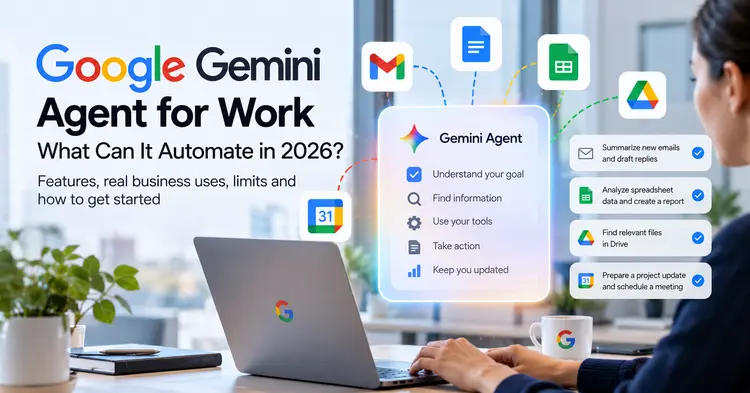
Google Gemini agents promise a different way to work with artificial intelligence. Instead of asking a chatbot to generate one answer at a time, businesses increasingly want AI systems that can understand a goal, gather information, use authorized tools, and help complete a sequence of tasks. That shift is important for teams dealing with overflowing inboxes, repetitive reporting, fragmented documents, and complicated internal processes.

But what can a Gemini agent actually automate in 2026? Where does it offer meaningful value, and where should people remain firmly in control? This guide examines the practical opportunities, the limitations, the security questions, and a realistic approach to adopting AI agents at work.

Editorial note: AI agent capabilities, availability, pricing, supported integrations, and administrative controls can vary by Google product, subscription, organization, region, and rollout stage. Examples in this article describe potential workflows rather than guarantees that every Gemini account can perform every action.

What Is a Google Gemini Agent?

A Gemini agent is an AI-powered system built around Google's Gemini models that can potentially work toward a defined objective using information, instructions, and authorized tools. The key difference from a traditional question-and-answer chatbot is the workflow. An agent may need to plan several steps, retrieve relevant context, process information, and propose or execute an action.

Consider a sales manager preparing for a weekly pipeline meeting. A chatbot might draft an agenda after receiving a manually prepared summary. An appropriately configured agent could potentially retrieve authorized sales information, identify changes, prepare a draft briefing, and ask the manager to review it. The second workflow reduces the amount of manual coordination required, although it introduces new requirements for permissions and verification.

Not every Gemini experience is an autonomous agent. Some features simply generate or summarize content inside an application. Others may support tool use, structured workflows, or multi-step execution. Businesses should evaluate the exact product capability rather than treating the word "agent" as a universal feature description.

Gemini Chatbot vs AI Assistant vs AI Agent

These terms overlap in marketing, but they represent useful distinctions when evaluating software.

Gemini as a Chatbot

A chatbot responds to prompts. It can explain a topic, brainstorm ideas, rewrite text, and help solve problems. A person generally decides what to ask next and manually transfers the result into another application.

Gemini as an AI Assistant

An assistant can provide contextual help within a productivity environment. Examples include suggesting email responses, summarizing documents, or helping create spreadsheet formulas. The person remains the primary operator of the workflow.

Gemini as an AI Agent

An agent aims to coordinate multiple steps toward an outcome. Depending on its configuration and permissions, it may retrieve information, interact with tools, create draft artifacts, and request approval before a consequential action. The central value is not simply better text generation; it is reducing the effort needed to move between tasks.

For a broader comparison of conversational AI systems used by professionals, see our ChatGPT vs Claude vs Gemini for Work guide.

Seven Business Workflows Worth Testing

The most promising use cases usually have three characteristics: they happen frequently, follow a recognizable process, and produce an output that a human can verify. The following examples illustrate where agent-style automation may create value.

1. Preparing Email Briefings and Draft Replies

Professionals often spend valuable time sorting messages, identifying priorities, and composing routine replies. With appropriate access and a supported integration, an AI agent could help categorize incoming requests, summarize relevant threads, and draft responses for review.

A useful workflow might begin with a request such as: "Prepare a summary of customer questions received this week, group recurring issues, and draft responses for the three most common topics." The agent would need permission to access the relevant information and a clear instruction not to send anything without approval.

The benefit is preparation time saved, not unattended communication. Sensitive customer messages, contractual commitments, refunds, and other consequential decisions should remain subject to human review.

2. Finding Information Across Documents

Many organizations already have the information they need, but it is scattered across files, folders, and shared workspaces. An agent that can search authorized documents may help employees find policies, compare versions, identify project decisions, or assemble background material.

For example, a project manager might request a summary of changes to a launch plan and the outstanding issues mentioned in recent documents. The system could potentially locate relevant material and prepare a cited draft, depending on available search capabilities.

The critical requirement is traceability. Employees should be able to open the underlying documents and confirm that the agent interpreted them correctly. A confident answer without a verifiable source is not sufficient for important business decisions.

3. Turning Meeting Notes Into Action Items

Meetings frequently generate decisions that are not consistently documented or assigned. AI can help transform approved notes or transcripts into action items, owners, deadlines, and follow-up summaries.

A well-designed workflow might identify unresolved questions, draft a recap, and prepare tasks for confirmation. It should not invent commitments or assign responsibilities that participants never agreed to.

Meeting content may contain sensitive commercial or personal information. Before enabling automated processing, teams should understand recording consent, data retention, access controls, and applicable organizational policies. Our article Are AI Meeting Assistants Safe? explores these considerations in more detail.

4. Drafting Reports From Spreadsheet Data

Weekly reporting often involves exporting data, checking trends, writing commentary, and formatting a document. An agent-assisted process could potentially analyze an authorized dataset, highlight unusual changes, and prepare a draft narrative.

For example, a marketing team might ask for a comparison of campaign results against the previous week. The AI could help identify changes in spending, conversions, and acquisition costs. A human analyst should still verify the formulas, data freshness, attribution assumptions, and business interpretation.

Numerical accuracy deserves special attention. Language models can produce persuasive explanations even when a calculation is wrong or a dataset is incomplete. Reliable reporting requires validation rules and access to the original figures.

5. Organizing Internal Knowledge

Growing teams accumulate onboarding materials, frequently asked questions, product documentation, and support procedures. AI agents may help identify duplicated guidance, propose document updates, and organize knowledge into more useful categories.

This is particularly attractive for small businesses without a dedicated knowledge-management team. However, the agent should suggest edits rather than silently replacing official procedures. An outdated policy can be inconvenient; an incorrect policy automatically distributed to employees can be costly.

6. Supporting Customer Service Operations

Customer support teams may use agent-style systems to retrieve approved help content, classify incoming requests, and prepare suggested resolutions. A carefully scoped workflow can improve consistency while allowing people to handle unusual cases.

The strongest starting point is a narrow category of repetitive questions with clear, documented answers. More sensitive matters, such as account access, payments, legal disputes, or personal information, require stronger controls.

Businesses should measure resolution quality, customer satisfaction, escalation frequency, and error rates—not just the number of responses produced.

7. Coordinating Repetitive Project Updates

Project teams repeatedly collect status reports, check deadlines, and summarize blockers. An agent could help prepare a draft weekly update from authorized sources and flag missing information.

For example, a team lead might ask for a status report organized into completed work, upcoming milestones, risks, and decisions needed. The agent should distinguish confirmed facts from inferred risks and clearly identify any missing source data.

Readers considering more extensive automation can explore our guide to building an AI employee for a business, which examines the broader workflow-design challenge.

What Makes Agent Automation Different From Simple Prompts?

Traditional prompt-based work usually involves a person copying information into an AI tool, requesting an output, checking it, and manually transferring the result elsewhere. Agent-style workflows attempt to connect some of these steps.

A typical process includes defining the objective, identifying the necessary data, retrieving information through authorized connections, choosing the next action, producing an output, and reporting what happened. More advanced systems may repeat parts of this cycle when a task requires several decisions.

That flexibility is useful, but it also creates uncertainty. If a tool returns unexpected data, a file is missing, or a website changes, an agent may need to recover gracefully. Businesses should ask how the system handles errors, incomplete permissions, conflicting instructions, and tasks it cannot finish.

What Gemini Agents Cannot Reliably Replace

AI agents should not be treated as universally reliable digital employees. They may misunderstand ambiguous requests, use outdated information, misinterpret documents, or select an inappropriate action. Their behavior also depends on the quality of available tools and the restrictions imposed by the organization.

High-Stakes Judgment

Legal advice, financial commitments, hiring decisions, security incidents, and medical matters require qualified human oversight. An agent can help organize information or draft materials, but the responsible professional must verify the result.

Incomplete or Poor-Quality Data

An AI system cannot consistently produce accurate operational insights from inaccurate records. Duplicate customer entries, inconsistent definitions, missing files, and outdated policies can undermine an otherwise sophisticated workflow.

Unsupported Integrations

A Gemini model's general capabilities do not mean it can automatically access every application. Each integration may require a supported connector, configuration, administrative approval, or additional development.

Unrestricted Autonomous Action

Organizations should not assume that allowing an agent to draft a message is equivalent to allowing it to send messages, change permissions, approve spending, or delete records. These actions have different risk levels and should be governed separately.

Google Workspace: Where Could Agents Fit?

Google Workspace is a natural environment for AI-assisted business tasks because employees already use applications for email, documents, spreadsheets, storage, and scheduling. However, the exact features available to a particular organization depend on its subscriptions, administrative settings, and product rollout.

Gmail

Potential use cases include drafting responses, summarizing long conversations, and preparing follow-up lists. Teams should verify whether the specific workflow is supported and whether sending messages requires explicit approval.

Google Docs

AI assistance can help structure reports, rewrite drafts, and organize source material. Agent-style coordination may extend this by gathering authorized context before preparing a document, where supported.

Google Sheets

Spreadsheets are valuable for calculations and business reporting. AI can help explain formulas and summarize patterns, but organizations should verify all material calculations and avoid using unvalidated model output as the sole basis for decisions.

Google Drive

Document discovery is a strong candidate for AI assistance. The main challenge is permission-aware retrieval: an agent should only access information that the requesting user or configured service is authorized to see.

Google Calendar

Scheduling-related workflows may help prepare agendas, identify upcoming commitments, or draft meeting follow-ups. Any capability that changes calendar events should be evaluated for confirmation requirements and unintended consequences.

Privacy, Permissions and Security: The Essential Checklist

Business automation becomes more powerful when an AI agent can access internal information. That same access makes security design essential. A useful pilot should begin with a clear data-access policy rather than a broad instruction to connect everything.

Apply Least-Privilege Access

Give the agent only the permissions required for its assigned workflow. A reporting assistant may need read access to a dataset but not permission to modify it. A document assistant may need access to a particular folder rather than the organization's entire Drive.

Separate Reading From Writing

Read-only workflows are generally easier to evaluate. Writing to business systems introduces additional risks, particularly when the action affects customers, payments, employee records, or security settings.

Require Approval for Consequential Actions

Use human confirmation for sending external communications, publishing content, changing records, granting access, or making financial commitments. A workflow that prepares a draft for approval can still save substantial time.

Review Data Handling

Administrators should review the applicable service terms, retention settings, data-processing documentation, and organizational controls. Do not assume that every consumer and enterprise Gemini product follows identical data-handling rules.

Defend Against Prompt Injection

Documents, websites, emails, and tool responses can contain instructions that attempt to redirect an AI agent. Systems should treat untrusted content as data, not as a higher-priority instruction. Sensitive actions should remain protected by permissions and approval gates.

Maintain Logs and Recovery Options

For business-critical processes, teams need to know what an agent accessed, what it proposed, what actions were approved, and how to reverse mistakes. Logging, version history, and rollback procedures make automation easier to trust.

How Much Could Gemini Agent Automation Save?

The economic case for AI agents depends on the work being automated, the time saved, and the cost of operating and supervising the system. There is no universal return on investment.

Consider a hypothetical team of ten employees. If each employee saves fifteen minutes per working day on routine preparation tasks, the team recovers 150 minutes daily. Across twenty working days, that represents fifty hours of gross time savings. This is an illustrative calculation, not a verified performance claim for Gemini.

Those hours are not automatically converted into cash savings. Employees may spend some of the recovered time reviewing AI output, correcting errors, or completing higher-value work. Organizations should measure the net result rather than multiplying an optimistic time estimate by an hourly wage.

A realistic cost model includes subscription fees, possible usage-based charges, integration work, employee training, governance, quality assurance, and maintenance. Pricing can change, and not every agent capability is necessarily included in a standard Workspace subscription.

How to Pilot Gemini Agents in a Small Business

A controlled pilot is more informative than a company-wide rollout based on a product demonstration. Start with a repetitive task, define success criteria, and measure outcomes over a short period.

Step 1: Select One Narrow Workflow

Choose a process with a clear beginning and end. Preparing a weekly internal briefing is usually easier to assess than asking an agent to "manage marketing." Narrow workflows make errors easier to identify and results easier to compare.

Step 2: Document the Existing Process

Record where information comes from, which decisions require judgment, how long the work currently takes, and what a successful output looks like. Without a baseline, a team cannot reliably estimate improvement.

Step 3: Verify Product Availability

Confirm the exact Gemini product, Workspace edition, supported connectors, region, permissions, and administrative requirements. Avoid designing a workflow around a capability that is not yet enabled for your organization.

Step 4: Start With Read-Only Access

Where possible, let the system retrieve information and create drafts without changing production records. This allows employees to evaluate output quality while limiting the consequences of mistakes.

Step 5: Define Human Approval Points

Specify which actions require a person to review and approve the result. For example, an agent may prepare a customer reply, but an employee must approve it before sending.

Step 6: Measure Quality and Time

Track preparation time, review time, correction rate, task completion rate, and user satisfaction. Compare the results against the original process. A faster workflow is not an improvement if it creates more expensive downstream errors.

Step 7: Expand Gradually

After a successful pilot, consider additional workflows with similar characteristics. Maintain a record of approved use cases, permissions, limitations, and escalation procedures.

Gemini Agents vs Browser Agents and Custom AI Automation

Businesses have several paths to automation. Workspace-oriented assistance may be attractive when most relevant information already lives in Google's ecosystem. Browser agents can interact with websites, while custom integrations may connect internal applications and specialized business systems.

These approaches are not interchangeable. A browser agent may be flexible but sensitive to changes in website layouts. A custom integration may require more engineering but provide stronger control over data formats and allowed actions. Workspace features may be convenient but constrained by supported products and account permissions.

Our guide to AI browser agents in 2026 examines another important category of agent-based automation.

Common Mistakes Businesses Should Avoid

Automating an unclear process: If employees cannot explain the workflow, an agent will struggle to execute it consistently. Simplify the process before introducing AI.

Giving excessive permissions: Broad access can turn a small mistake into a serious incident. Begin with narrowly scoped permissions.

Ignoring source quality: An agent's answer may sound polished while relying on outdated or incomplete information. Require traceable sources for important claims.

Skipping employee training: People need to understand what the system can do, how to review its output, and when to escalate problems.

Measuring only activity: The number of generated summaries or completed tool calls is not a business outcome. Measure accuracy, usefulness, time saved, and risk.

Assuming every feature is generally available: Announcements, demonstrations, previews, and production deployments are different stages. Confirm availability before committing resources.

Frequently Asked Questions

Is Gemini Agent the Same as the Gemini Chatbot?

Not necessarily. Gemini models can power conversational assistants and more complex agent-style systems. An agent generally involves additional workflow coordination, tool access, and permission controls. The precise capabilities depend on the product and configuration.

Can Gemini Agents Send Emails Automatically?

That depends on the supported product, available integrations, granted permissions, and configured approval requirements. Businesses should distinguish drafting an email from actually sending one and require human approval for sensitive communications.

Can a Gemini Agent Access Google Drive?

Some Gemini experiences support interaction with authorized Workspace content, but access is not universal. Administrators should verify the specific integration, permissions, subscription, and applicable organizational settings.

Are Gemini Agents Safe for Confidential Business Data?

Safety depends on the deployment, service terms, access controls, data-handling practices, and workflow design. Businesses should review official documentation and avoid granting unnecessary access. Human oversight remains important.

Will Gemini Agents Replace Employees?

AI agents can reduce repetitive preparation and coordination work, but they do not eliminate the need for judgment, accountability, customer relationships, and domain expertise. The more realistic near-term goal is improving how employees work.

Should Small Businesses Use AI Agents Now?

Small businesses can benefit from carefully chosen pilots, especially for repetitive internal tasks. Start with a measurable, low-risk workflow and verify that the necessary product features are available before investing in broader automation.

Final Verdict: Start With Outcomes, Not the Agent Hype

Google Gemini agents illustrate an important direction for workplace AI: moving from isolated answers toward connected, multi-step assistance. For businesses, the opportunity is not simply producing more text. It is reducing repetitive coordination, improving access to information, and helping teams prepare better work with less manual effort.

The most successful deployments will likely be the least dramatic. A reliable weekly briefing, a well-organized knowledge base, or a carefully reviewed customer-support draft can provide more practical value than an ambitious autonomous workflow that employees cannot verify.

Choose one task, protect your data, verify the available features, measure the results, and expand only when the evidence supports it.

Sources and Further Reading

For current product capabilities and enterprise controls, consult Google's official documentation and announcements. Availability and terms may change after publication.